
大家好,又见面了,我是全栈君。
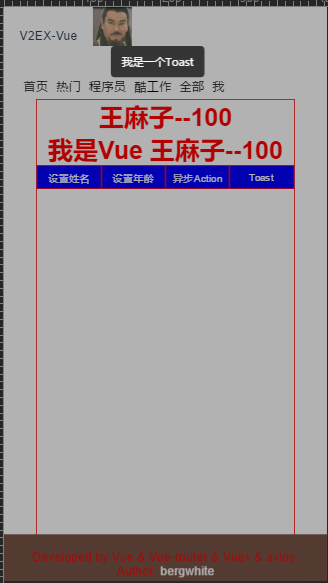

		<style>
			.vue-toast {
				width: 100%;
				height: 100%;
				position: fixed;
				top: 0px;
				left: 0px;
				background: rgba(0, 0, 0, 0.3);
			}

			.vue-tip {
				position: fixed;
				left: 50%;
				width: 100px;
				line-height: 40px;
				padding: 0 10px;
				margin-left: -60px;
				text-align: center;
				z-index: 9999;
				font-size: 14px;
				color: #fff;
				border-radius: 5px;
				background-color: rgba(0, 0, 0, .7);

			}

			.vue-tip.tip-center {
				top: 50%;
			}

			.vue-tip.tip-bottom {
				bottom: 50px;
			}

			.vue-tip.tip-top {
				top: 50px;
			}

			.fadeIn {
				animation-name: fadeIn;
				-webkit-animation-name: fadeIn;
				animation-duration: .5s;
				-webkit-animation-duration: .5s;
				animation-timing-function: ease-in-out;
				-webkit-animation-timing-function: ease-in-out;
				visibility: visible !important;
			}

			@keyframes fadeIn {
				0% {
					transform: scale(0);
					opacity: 0.0;
				}
				60% {
					transform: scale(1.1);
				}
				80% {
					transform: scale(0.9);
					opacity: 1;
				}
				100% {
					transform: scale(1);
					opacity: 1;
				}
			}

			@-webkit-keyframes fadeIn {
				0% {
					-webkit-transform: scale(0);
					opacity: 0.0;
				}
				60% {
					-webkit-transform: scale(1.1);
				}
				80% {
					-webkit-transform: scale(0.9);
					opacity: 1;
				}
				100% {
					-webkit-transform: scale(1);
					opacity: 1;
				}
			}
		</style>
var Toast = {};
//避免重复install,设立flag
Toast.installed = false;
Toast.install = function(Vue, options) {
	if(Toast.installed) return;
	let opt = {
		// 默认显示位置
		defaultType: "center",
		// 默认持续时间
		duration: "3000"
	}
	// 使用options的配置
	for(let i in options) {
		opt[i] = options[i]
	}
	Vue.prototype.$toast = (toast, type) => {
		// 如果有传type,位置则设为该type
		var chooseType = type ? type : opt.defaultType;
		// 如果页面有toast则不继续执行
		if(document.querySelector('.vue-toast')) return;
		// 1、创建构造器,定义好提示信息的模板
		let toastTip = Vue.extend({
			template: `
						           <div class="vue-toast">
						              <div class="vue-tip tip-${chooseType} fadeIn">${toast}</div>
						           </div>
						          `
		});
		// 2、创建实例,挂载到文档以后的地方
		console.log(new toastTip().$mount())
		let tpl = new toastTip().$mount().$el;
		// 3、把创建的实例添加到body中
		document.body.appendChild(tpl);
		// 4.三秒后移除
		setTimeout(() => {
			document.body.removeChild(tpl);
		}, opt.duration);
		//阻止遮罩滑动
		document.querySelector("div.vue-toast").addEventListener("touchmove", function(e) {
			e.stopPropagation();
			e.preventDefault();
		});

		Toast.installed = true;

	};
	// 显示不同的位置
	['bottom', 'top', 'center'].forEach(type => {
		Vue.prototype.$toast[type] = (tips) => {
			return Vue.prototype.$toast(tips, type)
		}
	})
};
// 自动安装  ,有了ES6就不要写AMD,CMD了

if(typeof window !== 'undefined' && window.Vue) {
	window.Vue.use(Toast)
};

export default Toast;
<template>
  <div id="me">
  	<h1>{

    {getMy&&getMy.name}}--{

    {getMy&&getMy.age}}</h1>
	  <h1>我是Vue {

    {this.$store.state.my.name}}--{

    {this.$store.state.my.age}}</h1>
	  <div class="btn">
	  	<button @click='setName'>设置姓名</button>
	    <button @click='setAge'>设置年龄</button>
	    <button @click='setAction'>异步Action</button>
	    <button @click='alertToast'>Toast</button>
	  </div>
  </div>
</template>

<script>
	import Vue from 'vue'
	import { mapGetters,mapMutations,mapActions  } from 'vuex'
	import Toast from '../js/Toast'
	Vue.use(Toast,{    //支持全局配置
		defaultType: "top",
		duration: "10000"
	})
	export default {
		name: 'Me',
		methods: {
			 ...mapMutations([
	      'setMe' // 映射 this.setMe() 为 this.$store.commit('setMe')
	    ]),
	     ...mapActions([
	      'getTopic' // 映射 this.getTopic() 为 this.$store.dispatch('getTopic')
	    ]),
			setName(){
				this.setMe({
					type:'name',
					num:'王麻子'
				})
			},
			setAge(){
				this.$store.commit('setMe',{
					type:'age',
					num:'100'
				})
			},
			setAction(){
				this.getTopic();
			},
			alertToast(){
				console.log(this);
				console.log(this.$toast("我是一个Toast"));
				//console.log(this.$toast.bottom("我是一个Toast"));
			}
		},
		computed: {
	    ...mapGetters([
	       'getApiVal','getApiValComm','getMy'
    ])
  }
	}
</script>

<style scoped>
	#me {
 	width: 80%;
 	height: 1000px;
 	margin: 0 auto;
 	border: 1px solid red;
 	background: white;
 }

 h1 {
 	color: red;
 	text-align: center;
 }
 .btn{
 	display: flex;
 	justify-content: space-around;
 	align-items: center;
 }
 button{
 	border: 1px solid red;
 	width: 100px;
 	height: 30px;
 	background: blue;
 	color: white;
 	cursor: pointer;
 }
</style>
版权声明:本文内容由互联网用户自发贡献,该文观点仅代表作者本人。本站仅提供信息存储空间服务,不拥有所有权,不承担相关法律责任。如发现本站有涉嫌侵权/违法违规的内容, 请联系我们举报,一经查实,本站将立刻删除。
发布者:全栈程序员-站长,转载请注明出处:https://javaforall.net/108442.html原文链接:https://javaforall.net



