
在数据库设计中,常常会有如下这种关联模型,分类表中一条分类对应多个商品表中的商品


如果要获得分类表中每条分类 以及 对应的商品的信息,则需要先查询分类表中的数据,然后根据结果遍历查询商品表,最后把数据拼接在一起
TP5中关联模型可以解决这一问题
普通关联
先创建分类表模型 /application/common/model/Category.php 以及商品表模型 /application/common/model/Goods.php
在分类表中创建关联
namespace app\common\model; class Category extends Base { public function goods(){ return $this->hasMany('Goods','category_id','id'); } }
接着就可以使用关联模型查询数据
public function list(){ return CategoryModel::with('goods')->where(true)->select(); }
嵌套关联
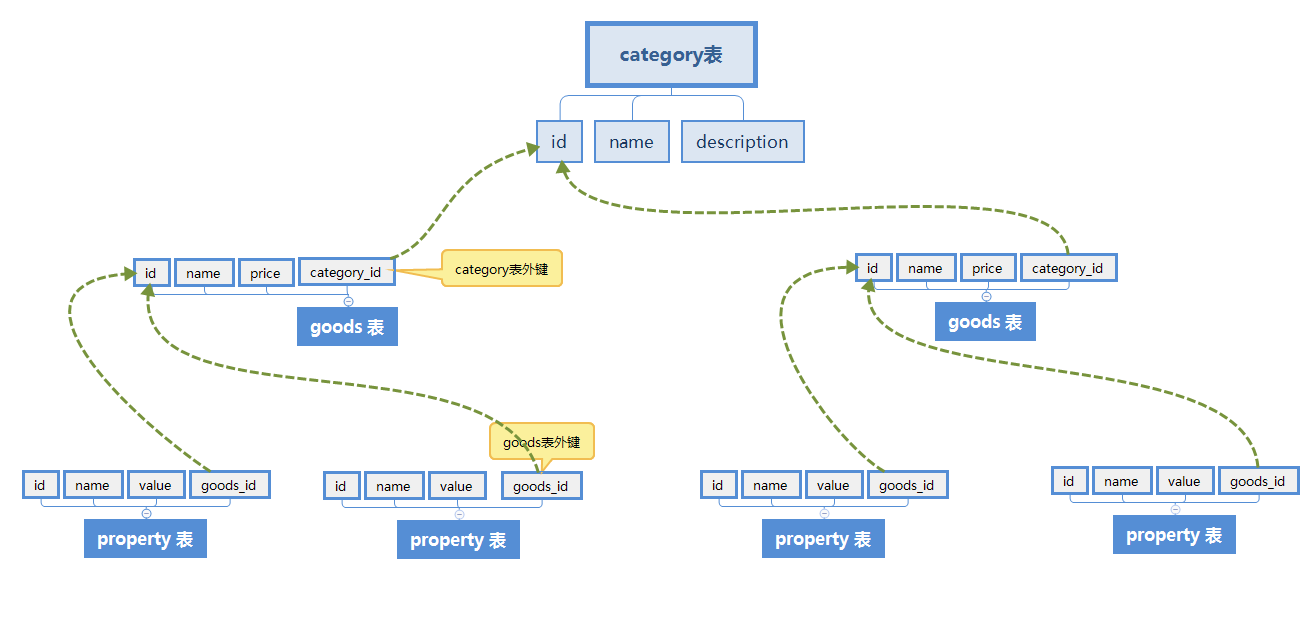
/application/common/model/Category.php
class Category extends Model { public function product(){ return $this->hasMany('product','category_id','id'); } }
/application/common/model/Goods.php
class Product extends Model { public function property(){ return $this->hasMany('property','goods_id','id'); } }
在控制器中调用:
public function index() { return Category::with('product,product.property')->where('id',1)->find(); }
在调用关联模型查询数据时,如果我们需要动态隐藏字段,或者给记录排序时可以这么做
class Category extends Model { public function product(){ return $this->hasMany('product','category_id','id'); } public function list(){ //在with中可以传递一个闭包函数,函数的参数为当前key锁对应模型的查询器 $this //在闭包函数中无需使用select或者find等返回数据 //如下操作返回 category中所有值,以及对应 product ,并且product按照price排序 return self::with([ 'product'=>function($query){ $query->with('property')->field('name')->order('price'); } ])->select(); } }
建立原则
1. 哪张表中建立外键那么那张表就是从表
2. 理论上可以在关联的两张表中建立关联关系,例如用户表User 和用户信息表 Profile 是一对一的关系,假设在Profile表中user_id字段指向User表的id字段,那么在User表中可以建立外键
public function profile(){ return $this->hasOne('profile','user_id','id'); }
也可以在Profile表中建立
public function user(){ return $this->belongsTo('user','user_id','id'); }
建立原则:在哪张表中调用就在哪张表中建立,例如,通常情况下我们是希望通过查找用户user的同时也输出用户信息,所以我们查找的是user表,所有就在user表中建立关联
版权声明:本文内容由互联网用户自发贡献,该文观点仅代表作者本人。本站仅提供信息存储空间服务,不拥有所有权,不承担相关法律责任。如发现本站有涉嫌侵权/违法违规的内容, 请联系我们举报,一经查实,本站将立刻删除。
发布者:全栈程序员-站长,转载请注明出处:https://javaforall.net/112470.html原文链接:https://javaforall.net



