
转载:https://blog.csdn.net/libin_1/article/details/52424340
废话不多说,传送门:http://download.csdn.net/detail/cometwo/9620943
支持https:https://www.aishandian.com/news-631.html
参考文章:http://www.cnblogs.com/hooray/archive/2011/09/10/2172946.html

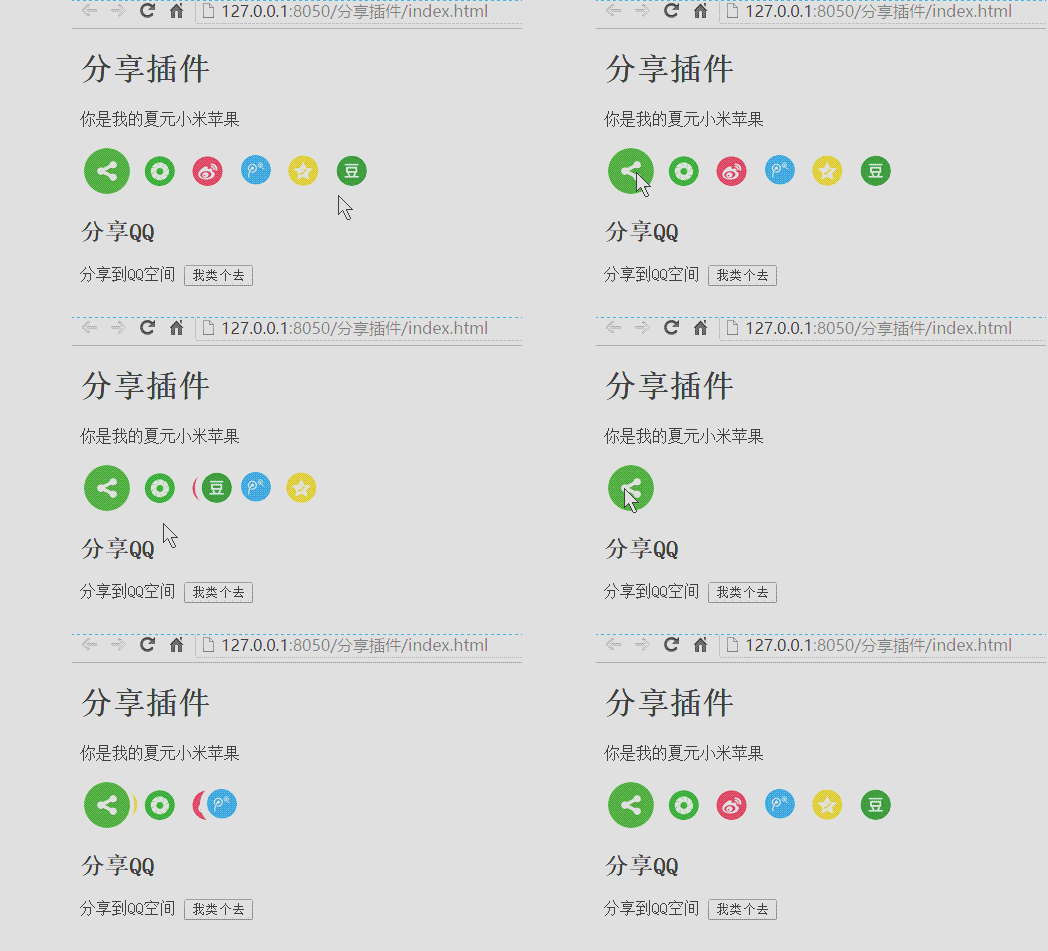
动画效果
$(document).on("click", ".msb_main", function() {
            if($(this).hasClass("disabled")) return;
            var e = 500; //动画时间
            var t = 250; //延迟时间
            var r = $(this).parent().find(".msb_network_button").length; //分享组件的个数
            var i = 60;
            var s = e + (r - 1) * t;
            var o = 1;
            var a = $(this).outerWidth();
            var f = $(this).outerHeight();
            var c = $(this).parent().find(".msb_network_button:eq(0)").outerWidth();
            var h = $(this).parent().find(".msb_network_button:eq(0)").outerHeight();
            var p = (a - c) / 2; //起始位置
            var d = (f - h) / 2; //起始位置
            var v = 0 / 180 * Math.PI;
            if(!$(this).hasClass("active")) {
                $(this).addClass("disabled").delay(s).queue(function(e) {
                    $(this).removeClass("disabled").addClass("active");
                    e()
                });
                $(this).parent().find(".msb_network_button").each(function() {
                    var n = p + (p + i * o) * Math.cos(v)*0.8; //结束位置
                    var r = d + (d + i * o) * Math.sin(v); //结束位置
                    $(this).css({
                        display: "block",
                        left: p + "px",
                        top: d + "px"
                    }).stop().delay(t * o).animate({
                        left: n + "px",
                        top: r + "px"
                    }, e);
                    o++
                })
            } else {
                o = r;
                $(this).addClass("disabled").delay(s).queue(function(e) {
                    $(this).removeClass("disabled").removeClass("active");
                    e()
                });
                $(this).parent().find(".msb_network_button").each(function() {
                    $(this).stop().delay(t * o).animate({
                        left: p,
                        top: d
                    }, e);
                    o--
                })
            }
        });

    }
微信分享效果:

微信分享效果:
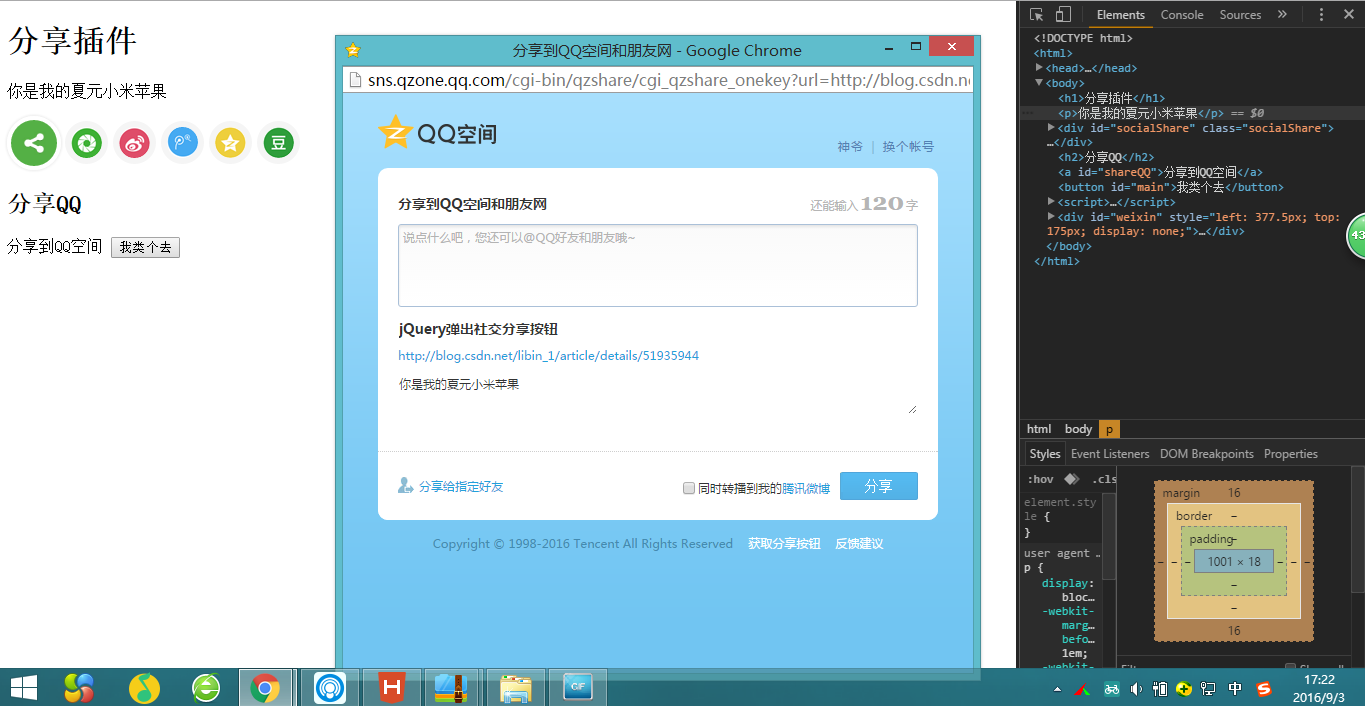
QQ空间分享效果:
这里写代码片- 1
HTML
<!DOCTYPE html>
<html>

    <head>
        <meta http-equiv="Content-Type" content="text/html; charset=utf-8" />
        <title>jQuery弹出社交分享按钮</title>
        <link rel="stylesheet" href="css/share.css" type="text/css" />
        <script src="js/jquery-2.1.4.js" type="text/javascript"></script>
        <script src="js/share.js" type="text/javascript"></script>
    </head>

    <body>
        <h1>分享插件</h1>
        <p>你是我的夏元小米苹果</p>
        <div id="socialShare"></div>
        <h2>分享QQ</h2>
        <a id="shareQQ">分享到QQ空间</a>
        <button id="main">我类个去</button>
        <script>
            $(function() {
                $("#socialShare").socialShare({
                    content: $("p").text().trim(),
                    url: "http://blog.csdn.net/libin_1/article/details/51935944",
                    titile: $("h1").text().trim()
                });
                $(".msb_main").trigger('click');
            });

            $("#shareQQ").on("click", function() {
                $(this).socialShare("tQQ");
            })

            $("#main").click(function() {
                var openUrl = "https://www.baidu.com"; //弹出窗口的url
                var iWidth = 630; //弹出窗口的宽度;
                var iHeight = 580; //弹出窗口的高度;
                var iTop = (window.screen.availHeight - 30 - iHeight) / 2; //获得窗口的垂直位置;
                var iLeft = (window.screen.availWidth - 10 - iWidth) / 2; //获得窗口的水平位置;
                window.open(openUrl, "", "height=" + iHeight + ", width=" + iWidth + ", top=" + iTop + ", left=" + iLeft + "" + ",toolbar=no, menubar=no, scrollbars=no, resizable=no, location=no, status=no");
                //window.open('page.html', 'newwindow', 'height=580, width=650, top=0, left=0, toolbar=no, menubar=no, scrollbars=no, resizable=no, location=no, status=no');
            });
            $(function() {
                function autocenter() {
                    var bodyW = parseInt(document.documentElement.clientWidth);
                    var bodyH = parseInt(document.documentElement.clientHeight);
                    var elW = $("#weixin").width();
                    var elH = $("#weixin").height();
                    console.log((bodyW - elW) / 2);
                    $("#weixin").css("left", (bodyW - elW) / 2);
                    $("#weixin").css("top", (bodyH - elH) / 2);
                }
                window.onresize = function() {
                    autocenter();
                };
            });
        </script>

    </body>

</html>
JS
/*
 * @Description: 分享插件
 */
;
(function($, window, document, undefined) {
    //插件初始化
    function init(target, options) {
        var settings = $.extend({}, $.fn.socialShare.defaults, options);
        //初始化各个组件
        console.log(settings);
        var $msb_main = "<a class='msb_main'><img title='分享' src='images/share_core_square.jpg'></a>";
        var $social_group = "<div class='social_group'>" +
            "<a class='msb_network_button weixin'>weixin</a>" +
            "<a class='msb_network_button sina'>sina</a>" +
            "<a class='msb_network_button tQQ'>tQQ</a>" +
            "<a class='msb_network_button qZone'>qZone</a>" +
            "<a class='msb_network_button douban'>douban</a>" +
            "</div>";
        $(target).append($msb_main);
        $(target).append($social_group);
        $(target).addClass("socialShare");

        //添加腾讯微博分享事件
        $(document).on("click", ".msb_network_button.tQQ", function() {
            tQQ(this, settings);
        });
        //添加QQ空间分享事件
        $(document).on("click", ".msb_network_button.qZone", function() {
            qZone(this, settings);
        });
        //添加新浪微博分享事件
        $(document).on("click", ".msb_network_button.sina", function() {
            sinaWeibo(this, settings);
        });
        //添加豆瓣分享事件
        $(document).on("click", ".msb_network_button.douban", function() {
            doubanShare(this, settings);
        });
        //添加微信分享事件
        $(document).on("click", ".msb_network_button.weixin", function() {
            weixinShare(this, settings);
        });
        $(document).on("click", ".msb_main", function() {
            if($(this).hasClass("disabled")) return;
            var e = 500; //动画时间
            var t = 250; //延迟时间
            var r = $(this).parent().find(".msb_network_button").length; //分享组件的个数
            var i = 60;
            var s = e + (r - 1) * t;
            var o = 1;
            var a = $(this).outerWidth();
            var f = $(this).outerHeight();
            var c = $(this).parent().find(".msb_network_button:eq(0)").outerWidth();
            var h = $(this).parent().find(".msb_network_button:eq(0)").outerHeight();
            var p = (a - c) / 2; //起始位置
            var d = (f - h) / 2; //起始位置
            var v = 0 / 180 * Math.PI;
            if(!$(this).hasClass("active")) {
                $(this).addClass("disabled").delay(s).queue(function(e) {
                    $(this).removeClass("disabled").addClass("active");
                    e()
                });
                $(this).parent().find(".msb_network_button").each(function() {
                    var n = p + (p + i * o) * Math.cos(v)*0.8; //结束位置
                    var r = d + (d + i * o) * Math.sin(v); //结束位置
                    $(this).css({
                        display: "block",
                        left: p + "px",
                        top: d + "px"
                    }).stop().delay(t * o).animate({
                        left: n + "px",
                        top: r + "px"
                    }, e);
                    o++
                })
            } else {
                o = r;
                $(this).addClass("disabled").delay(s).queue(function(e) {
                    $(this).removeClass("disabled").removeClass("active");
                    e()
                });
                $(this).parent().find(".msb_network_button").each(function() {
                    $(this).stop().delay(t * o).animate({
                        left: p,
                        top: d
                    }, e);
                    o--
                })
            }
        });

    }

    function replaceAPI(api, options) {
        api = api.replace('{url}', options.url);
        api = api.replace('{title}', options.title);
        api = api.replace('{content}', options.content);
        api = api.replace('{pic}', options.pic);
        return api;
    }

    function OPenWindow(URL) {
        var openUrl = URL; //弹出窗口的url
        var iWidth = 630; //弹出窗口的宽度;
        var iHeight = 580; //弹出窗口的高度;
        var iTop = (window.screen.availHeight - 30 - iHeight) / 2; //获得窗口的垂直位置;
        var iLeft = (window.screen.availWidth - 10 - iWidth) / 2; //获得窗口的水平位置;
        window.open(openUrl, "", "height=" + iHeight + ", width=" + iWidth + ", top=" + iTop + ", left=" + iLeft + "" + ",toolbar=no, menubar=no, scrollbars=no, resizable=no, location=no, status=no");
        //window.open('page.html', 'newwindow', 'height=580, width=650, top=0, left=0, toolbar=no, menubar=no, scrollbars=no, resizable=no, location=no, status=no');
    }

    function tQQ(target, options) {
        var options = $.extend({}, $.fn.socialShare.defaults, options);
        OPenWindow(replaceAPI(tqq, options));
        //      window.open(replaceAPI(tqq, options));
    }

    function qZone(target, options) {
        var options = $.extend({}, $.fn.socialShare.defaults, options);
        OPenWindow(replaceAPI(qzone, options));
        //  window.open(replaceAPI(qzone, options));
    }

    function sinaWeibo(target, options) {
        var options = $.extend({}, $.fn.socialShare.defaults, options);
        OPenWindow(replaceAPI(sina, options));
        //  window.open(replaceAPI(sina, options));
    }

    function doubanShare(target, options) {
        var options = $.extend({}, $.fn.socialShare.defaults, options);
        OPenWindow(replaceAPI(douban, options));
        //  window.open(replaceAPI(douban, ));
    }

    function weixinShare(target, options) {
        var options = $.extend({}, $.fn.socialShare.defaults, options);
        console.log(options);
        showWX(replaceAPI(weixin, options));

        //  window.open(replaceAPI(weixin, ));
    }

    function autocenter() {
        var bodyW = parseInt(document.documentElement.clientWidth);
        var bodyH = parseInt(document.documentElement.clientHeight);
        var elW = $("#weixin").width();
        var elH = $("#weixin").height();
        console.log((bodyW - elW) / 2);
        $("#weixin").css("left", (bodyW - elW) / 2);
        $("#weixin").css("top", (bodyH - elH) / 2);
    }

    function showWX(url) {
        var weixing = '<div id="weixin">' +
            '<div class="bd_weixin_popup_head">' +
            '<span>分享到微信朋友圈</span>' +
            '<a href="#" id="close" class="bd_weixin_popup_close">×</a>' +
            '</div>' +
            '<div class="erweima">' +
            '<img class="erweimas" src="" />' +
            '</div>' +
            '<p class="msgs">打开微信,点击右上角的  + ,<br/> 使用“扫一扫”即可将网页分享至朋友圈。</p>' +
            '</div>';
        $("body").append(weixing);
        $(".erweimas").attr('src', url);
        autocenter();
        $("#weixin").show();
    }
    $(document).on('click', "#close", function() {
        $("#weixin").hide();
    });
    $.fn.socialShare = function(options, param) {
        if(typeof options == 'string') {
            var method = $.fn.socialShare.methods[options];
            if(method)
                return method(this, param);
        } else
            init(this, options);
    }

    //插件默认参数
    $.fn.socialShare.defaults = {
        url: window.location.href,
        title: document.title,
        content: '',
        pic: ''
    }

    //插件方法
    $.fn.socialShare.methods = {
        //初始化方法
        init: function(jq, options) {
            return jq.each(function() {
                init(this, options);
            });
        },
        tQQ: function(jq, options) {
            return jq.each(function() {
                tQQ(this, options);
            })
        },
        qZone: function(jq, options) {
            return jq.each(function() {
                qZone(this, options);
            })
        },
        sinaWeibo: function(jq, options) {
            return jq.each(function() {
                sinaWeibo(this, options);
            });
        },
        doubanShare: function(jq, options) {
            return jq.each(function() {
                doubanShare(this, options);
            });
        },
        weixinShare: function(jq, options) {
            return jq.each(function() {
                weixinShare(this, options);
            });
        }
    }

    //分享地址
    var qzone = 'http://sns.qzone.qq.com/cgi-bin/qzshare/cgi_qzshare_onekey?url={url}&title={title}&pics={pic}&summary={content}';
    var sina = 'http://service.weibo.com/share/share.php?url={url}&title={title}&pic={pic}&searchPic=false';
    var tqq = 'http://share.v.t.qq.com/index.php?c=share&a=index&url={url}&title={title}&appkey=801cf76d3cfc44ada52ec13114e84a96';
    var douban = 'http://www.douban.com/share/service?href={url}&name={title}&text={content}&image={pic}';
    var weixin = 'http://qr.liantu.com/api.php?text={url}'; //接受URL返回图片

})(jQuery, window, document);
CSS
@charset "utf-8";
.socialShare {
    display: block;
    width: 54px;
    height: 54px;
    position: relative;
    z-index: 1;
}

.socialShare .msb_main {
    display: block;
    width: 46px;
    height: 46px;
    position: absolute;
    top: 0;
    left: 0;
    z-index: 2;
    cursor: pointer;
    text-indent: -9999px;
    border: 4px solid #FFF;
    box-shadow: 0 0 5px #DDD;
    border-radius: 36px;
}

.socialShare .msb_main:hover {
    box-shadow: 0 0 5px #BBB;
}

.socialShare .msb_main img {
    width: 46px;
    height: 46px;
    cursor: pointer;
    border-radius: 23px;
    border: none;
    float: left
}

.socialShare .msb_network_button {
    width: 31px;
    height: 31px;
    position: absolute;
    top: 9px;
    left: 92px;
    z-index: 1;
    cursor: pointer;
    text-indent: -9999px;
    display: none;
    background: no-repeat;
    border: 6px solid #f5f5f5;
    border-radius: 50%;
}

.socialShare .msb_network_button.sina {
    background: url(../images/social.png) no-repeat -130px -87px;
}

.socialShare .msb_network_button.tQQ {
    background: url(../images/social.png) no-repeat -185px -20px;
}

.socialShare .msb_network_button.qZone {
    background: url(../images/social.png) no-repeat -73px -20px;
}

.socialShare .msb_network_button.douban {
    background: url(../images/social.png) no-repeat -130px -151px;
}

.socialShare .msb_network_button.weixin {
    background: url(../images/social.png) no-repeat -73px -87px;
}

.socialShare .msb_network_button:hover {
    transition: -moz-transform 2s ease-out 0s;
    border: 6px solid #eee;
}
/*自定义*/

#weixin {

    width: 262px;
    height: 317px;
    border: solid 1px #d8d8d8;
    z-index: 1000000;
    position: fixed;
    top: 0px;
    left: 0px;
    background: white;
    display: none;
}

#weixin .bd_weixin_popup_head {

    font-size: 12px;
    font-weight: bold;
    text-align: left;
    line-height: 16px;
    height: 16px;
    position: relative;
    color: #000;
    width: 90%;
    margin: 10px auto;
}

#weixin .bd_weixin_popup_head .bd_weixin_popup_close {

    width: 16px;
    height: 16px;
    position: absolute;
    right: 0;
    top: 0;
    color: #999;
    text-decoration: none;
    font-size: 16px;
}

#weixin .erweima {

    width: 90%;
    height: auto;
    margin: 0 auto;
}

#weixin .erweima .erweimas {

    width: 100%;
    display: block;
}

#weixin .msgs {

    width: 90%;
    margin: 0 auto;
    font-size: 12px;
    text-align: left;
    line-height: 22px;
    color: #666;
}
版权声明:本文内容由互联网用户自发贡献,该文观点仅代表作者本人。本站仅提供信息存储空间服务,不拥有所有权,不承担相关法律责任。如发现本站有涉嫌侵权/违法违规的内容, 请联系我们举报,一经查实,本站将立刻删除。
发布者:全栈程序员-站长,转载请注明出处:https://javaforall.net/112871.html原文链接:https://javaforall.net


![点击超链接不跳转的方式[通俗易懂]](https://javaforall.net/wp-content/uploads/2020/11/2020110817443450-480x300.jpg)
