
大家好,又见面了,我是全栈君,祝每个程序员都可以多学几门语言。
有机会再试一试Rails了,仅仅是原来接触的是2,如今已然变成了4,似乎如今的安装比原来会快些。。
Rails 4 安装
针对于安装了RVM
gem install rails
没有的话应该主
sudo gem install rails
安装RVM能够用
\curl -L https://get.rvm.io | bash -s stable
查看rails版本号
rails -v
Rails 4.0.3
似乎这就是当前的最新版本号
Ruby版本号
We recommend Ruby 2.1.0 for use with Rails. We stopped supporting Ruby 1.8.x after Rails 3.2. Ruby 1.9.2+ will be supported until Rails 5.
官方推荐用2.1.0. 也就是最新版本号
安装SQLite
似乎这就是诸如Django、Rails这类对于轻量级站点的数据库要求。
假设是mac os
brew install sqlite3
其它能够看情况安装,如openSUSE
sudo zypper install sqlite3
Rails 4 Hello,World
能够直接用rails生成
$rails new hello
于是就有了
  create
  create  README.rdoc
  create  Rakefile
  create  config.ru
  create  .gitignore
  create  Gemfile
  create  app
  create  app/assets/javascripts/application.js
  create  app/assets/stylesheets/application.css
  create  app/controllers/application_controller.rb
  create  app/helpers/application_helper.rb
  create  app/views/layouts/application.html.erb
  create  app/assets/images/.keep
  create  app/mailers/.keep
  create  app/models/.keep
  create  app/controllers/concerns/.keep
  create  app/models/concerns/.keep
  create  bin
  create  bin/bundle
  create  bin/rails
  create  bin/rake
  create  config
  create  config/routes.rb
  create  config/application.rb
  create  config/environment.rb
  create  config/environments
  create  config/environments/development.rb
  create  config/environments/production.rb
  create  config/environments/test.rb
  create  config/initializers
  create  config/initializers/backtrace_silencers.rb
  create  config/initializers/filter_parameter_logging.rb
  create  config/initializers/inflections.rb
  create  config/initializers/mime_types.rb
  create  config/initializers/secret_token.rb
  create  config/initializers/session_store.rb
  create  config/initializers/wrap_parameters.rb
  create  config/locales
  create  config/locales/en.yml
  create  config/boot.rb
  create  config/database.yml
  create  db
  create  db/seeds.rb
  create  lib
  create  lib/tasks
  create  lib/tasks/.keep
  create  lib/assets
  create  lib/assets/.keep
  create  log
  create  log/.keep
  create  public
  create  public/404.html
  create  public/422.html
  create  public/500.html
  create  public/favicon.ico
  create  public/robots.txt
  create  test/fixtures
  create  test/fixtures/.keep
  create  test/controllers
  create  test/controllers/.keep
  create  test/mailers
  create  test/mailers/.keep
  create  test/models
  create  test/models/.keep
  create  test/helpers
  create  test/helpers/.keep
  create  test/integration
  create  test/integration/.keep
  create  test/test_helper.rb
  create  tmp/cache
  create  tmp/cache/assets
  create  vendor/assets/javascripts
  create  vendor/assets/javascripts/.keep
  create  vendor/assets/stylesheets
  create  vendor/assets/stylesheets/.keep
     run  bundle install
接着会安装包依赖
  Fetching gem metadata from https://rubygems.org/..........
  Fetching additional metadata from https://rubygems.org/..
  Resolving dependencies...
  Using rake (10.3.1)
  Using i18n (0.6.9)
  Using minitest (4.7.5)
  Using multi_json (1.9.2)
  Using thread_safe (0.3.3)
  Using tzinfo (0.3.39)
  Using activesupport (4.0.3)
  Using builder (3.1.4)
  Using erubis (2.7.0)
  Using rack (1.5.2)
  Using rack-test (0.6.2)
  Using actionpack (4.0.3)
  Using mime-types (1.25.1)
  Using polyglot (0.3.4)
  Using treetop (1.4.15)
  Using mail (2.5.4)
  Using actionmailer (4.0.3)
  Using activemodel (4.0.3)
  Using activerecord-deprecated_finders (1.0.3)
  Using arel (4.0.2)
  Using activerecord (4.0.3)
  Using bundler (1.5.3)
  Using coffee-script-source (1.7.0)
  Using execjs (2.0.2)
  Using coffee-script (2.2.0)
  Using thor (0.19.1)
  Using railties (4.0.3)
  Using coffee-rails (4.0.1)
  Using hike (1.2.3)
  Using jbuilder (1.5.3)
  Using jquery-rails (3.1.0)
  Using json (1.8.1)
  Using tilt (1.4.1)
  Using sprockets (2.11.0)
  Using sprockets-rails (2.0.1)
  Using rails (4.0.3)
  Using rdoc (4.1.1)
  Using sass (3.2.19)
  Using sass-rails (4.0.3)
  Using sdoc (0.4.0)
  Using sqlite3 (1.3.9)
  Using turbolinks (2.2.2)
  Using uglifier (2.5.0)
  Your bundle is complete!
  Use `bundle show [gemname]` to see where a bundled gem is installed.
执行Rails
$rails server
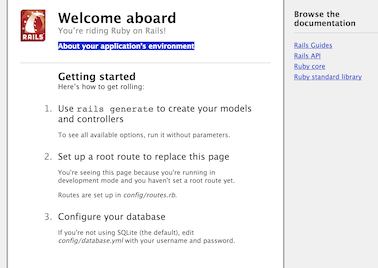
这种话打开 http://localhost:3000 就能够看到,Rails的欢迎界面Welcome aboard,有点类似于Django-CMS的小马哥~~

创建controller
如官方指南所说http://guides.rubyonrails.org/getting_started.html
运行命令
$rails generate controller welcome index
就会创建以下这些文件(Ruby On Rails 4 hello world,Ruby On Rails上手)
  create  app/controllers/welcome_controller.rb
   route  get "welcome/index"
  invoke  erb
  create    app/views/welcome
  create    app/views/welcome/index.html.erb
  invoke  test_unit
  create    test/controllers/welcome_controller_test.rb
  invoke  helper
  create    app/helpers/welcome_helper.rb
  invoke    test_unit
  create      test/helpers/welcome_helper_test.rb
  invoke  assets
  invoke    coffee
  create      app/assets/javascripts/welcome.js.coffee
  invoke    scss
  create      app/assets/stylesheets/welcome.css.scss
在config/routes.rb加入�默认页面
root 'welcome#index'
再执行
rails server
就会出现
Welcome#index

Find me in app/views/welcome/index.html.erb
一切来得非常快,非常突然
版权声明:本文内容由互联网用户自发贡献,该文观点仅代表作者本人。本站仅提供信息存储空间服务,不拥有所有权,不承担相关法律责任。如发现本站有涉嫌侵权/违法违规的内容, 请联系我们举报,一经查实,本站将立刻删除。
发布者:全栈程序员-站长,转载请注明出处:https://javaforall.net/118879.html原文链接:https://javaforall.net



