hashmap底层实现原理和源码分析(python底层源码)

HashMap是Java开发中常用的集合,那么从我们创建一个空集合到,put添加、get获取元素经历了那些步骤呢?说明:以下源码基于JDK1.7,32位0.HashMap底层的数据结构是数组加链表的形式,存储结构如下图:1.创建一个新的HashMap集合的构造函数://初始默认数组的大小staticfinalintDEFAULT_INITIAL_CAPACITY=1<<…

大家好,又见面了,我是你们的朋友全栈君。

HashMap是Java开发中常用的集合,那么从我们创建一个空集合到,put添加、get获取元素经历了那些步骤呢?

说明:以下源码基于JDK1.7,32位

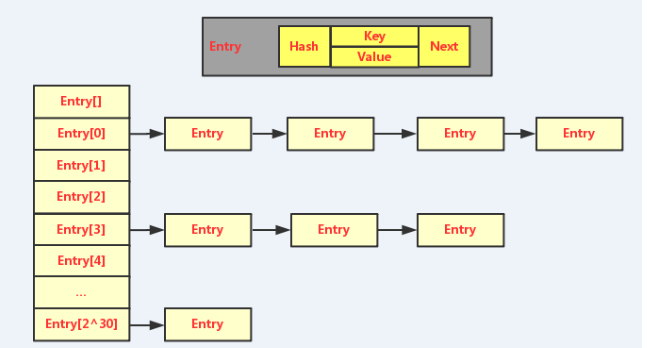
0.HashMap底层的数据结构是数组加链表的形式,存储结构如下图:

hashmap底层实现原理和源码分析(python底层源码)

1.创建一个新的HashMap集合的构造函数:

//初始默认数组的大小
static final int DEFAULT_INITIAL_CAPACITY = 1 << 4; // aka 16
//最大容量 static final int MAXIMUM_CAPACITY = 1 << 30;
//默认的负载因子 static final float DEFAULT_LOAD_FACTOR = 0.75f;   //表示当map集合中存储的数据达到当前数组大小的75%则需要进行扩容

//构造函数 1
public HashMap(int initialCapacity, float loadFactor) {
    //如果初始容量 小于0 则抛异常
    if (initialCapacity < 0)
        throw new IllegalArgumentException("Illegal initial capacity: " +
                                           initialCapacity);
    //超过了最大值,则取最大值
    if (initialCapacity > MAXIMUM_CAPACITY)
        initialCapacity = MAXIMUM_CAPACITY;
    //初始因子为小于等于0,或者不存在则抛异常
    if (loadFactor <= 0 || Float.isNaN(loadFactor))
        throw new IllegalArgumentException("Illegal load factor: " +
                                           loadFactor);

    this.loadFactor = loadFactor;
    threshold = initialCapacity;
    init();
}

//构造函数 2 public HashMap(int initialCapacity) {
    //调用构造函数 1
    this(initialCapacity, DEFAULT_LOAD_FACTOR);
}

//构造函数 3 public HashMap() {
    //调用构造函数 1
    this(DEFAULT_INITIAL_CAPACITY, DEFAULT_LOAD_FACTOR);  
}

分析:对于HashMap对的构造函数有三种,我们通常使用的构造函数 3 ,载荷因子表示当存储容量达到75%时需要对数组进行扩容。当选择 构造函数 2 和 构造函数 3 时,最终都会走构造函数1。
        构造函数 1 :能够设置初始化数组长度,及载荷因子。
        构造函数 2 :能够设置初始化数组长度,对于载荷因子默认为0.75。 会去调构造函数 1

        构造函数 3 :默认初始化数组长度为16,载荷因子为0.75。   会去调构造函数 1

2.map集合添加元素,map.put(“key”,”value”);  。注意一个问题,map是允许存储key=null且value=null的,而hashTable则不允许。

 // public V put(K key, V value) {
    if (table == EMPTY_TABLE) {
        inflateTable(threshold);   //步骤 1  首次添加时 threshold 为 16
    }
    if (key == null)
        return putForNullKey(value);  //步骤 2 如果添加的key = null,则进行单独存储
    int hash = hash(key);      //步骤 3 计算key的hash值
    int i = indexFor(hash, table.length);   //步骤 4 计算数据的存储位置
    for (Entry<K,V> e = table[i]; e != null; e = e.next) {  //步骤5 遍历存储位置上的内容,如果key已存在则覆盖
        Object k;
        if (e.hash == hash && ((k = e.key) == key || key.equals(k))) {
            V oldValue = e.value;
            e.value = value;
            e.recordAccess(this);
            return oldValue;
        }
    }

    modCount++;
    addEntry(hash, key, value, i);    //步骤6 如果table[i]上没有对应的key,则进行新添一个entry对象。
    return null;
}

步骤1:如果发现数组为空,则进行初始化数组长度为16,加载因为为0.75.

private static int roundUpToPowerOf2(int number) {   //number = 16 返回 值为 16
    // assert number >= 0 : "number must be non-negative";
    return number >= MAXIMUM_CAPACITY  ? MAXIMUM_CAPACITY  : (number > 1) ? Integer.highestOneBit((number - 1) << 1) : 1;
}

/**  * 初始化数长度  */ private void inflateTable(int toSize) {
    // Find a power of 2 >= toSize
    int capacity = roundUpToPowerOf2(toSize);      //计算容器大小

    threshold = (int) Math.min(capacity * loadFactor, MAXIMUM_CAPACITY + 1);
    table = new Entry[capacity];     //新建Entry类型长度为capacity的数组
    initHashSeedAsNeeded(capacity);
}

步骤2:如果要存储的key=null,则需要单独调用putForNullKey(key),进行存储,默认存储的位置是table[0]位置,遍历table[0]位置上的内容。如果已经有存储了key=null的内容,则进行覆盖,并返回旧的value值,如果没有就新插入一个entry节点addEntry,并返回null。 

/**  * 当key=null时,则把null存在table[0]处,已存在则覆盖。  */ private V putForNullKey(V value) {
    for (Entry<K,V> e = table[0]; e != null; e = e.next) {
        if (e.key == null) {
            V oldValue = e.value;
            e.value = value;
            e.recordAccess(this);
            return oldValue;
        }
    }
    modCount++;
    addEntry(0, null, value, 0);
    return null;
}

步骤3:计算key的hash值。

final int hash(Object k) {
    int h = hashSeed;
    if (0 != h && k instanceof String) {
        return sun.misc.Hashing.stringHash32((String) k);
    }

    h ^= k.hashCode();

    // This function ensures that hashCodes that differ only by
    // constant multiples at each bit position have a bounded
    // number of collisions (approximately 8 at default load factor).
    h ^= (h >>> 20) ^ (h >>> 12);
    return h ^ (h >>> 7) ^ (h >>> 4);
}

步骤4:计算key=value数据在table上的存储位置

/**  * Returns index for hash code h.  */ static int indexFor(int h, int length) {   //length为table的长度
    // assert Integer.bitCount(length) == 1 : "length must be a non-zero power of 2";
    return h & (length-1);
}

步骤5: 遍历table[i]存储位置上的内容,如果key已存在则覆盖,则返回oldValue

步骤6: 遍历table[i]存储位置上的内容,如果key不存在,则新插入entry对象。就是以链表的形式挂在table[i]上,新插入的不是挂在链表的尾部,而是头部,属于头插法。

 //添加新的entry对象 void addEntry(int hash, K key, V value, int bucketIndex) {
    //判断已存储的容量是否超出了负载因子,超出了则进行2倍扩容
    if ((size >= threshold) && (null != table[bucketIndex])) {  
        resize(2 * table.length);     //2倍扩容
        hash = (null != key) ? hash(key) : 0; //重新计算hash值
        bucketIndex = indexFor(hash, table.length);  //获得在新数组中的存储位置。
    }

    createEntry(hash, key, value, bucketIndex);
}

/**  * 创建新数组,并需要对原数据的内容进行重新计算存储位置  */ void createEntry(int hash, K key, V value, int bucketIndex) {
    Entry<K,V> e = table[bucketIndex];
    table[bucketIndex] = new Entry<>(hash, key, value, e);
    size++;
}

分析:对于当新插入一个数据时,会先判断存储容量是否达到了负载因子所允许的大小,如果达到了需要对原数组进行2倍扩容,并且需要重新计算数据在新数组的存储位置。进行重新计算存储位置和数据复制是很好是的。

3..map集合获取value元素,value = map.get(“key”); 

 */ public V get(Object key) {
    if (key == null)
        return getForNullKey();  //当key == null 时直接去table[0]处去获取
    Entry<K,V> entry = getEntry(key);

    return null == entry ? null : entry.getValue();
}

/**  * Offloaded version of get() to look up null keys. Null keys map  */ private V getForNullKey() {
    if (size == 0) {
        return null;
    }
    for (Entry<K,V> e = table[0]; e != null; e = e.next) {
        if (e.key == null)
            return e.value;
    }
    return null;
}

/** 获取entry对象  */ final Entry<K,V> getEntry(Object key) {
    if (size == 0) {
        return null;
    }

    int hash = (key == null) ? 0 : hash(key);
    for (Entry<K,V> e = table[indexFor(hash, table.length)];
         e != null;
         e = e.next) {
        Object k;
        if (e.hash == hash &&
            ((k = e.key) == key || (key != null && key.equals(k))))
            return e;
    }
    return null;
}

 分析:对于get(key).先判断key是否为null,为null直接去table[0]位置遍历去取,取到则返回。如果不为null,则和put时的套路一样,先计算hash值,如果然后计算出bucketIndex,然后通过equal(key)遍历,遍历到则返回。

4.map.remove(key),map集合一个key=value数据,原理:常规的链表删除操作

 */ public V remove(Object key) {
    Entry<K,V> e = removeEntryForKey(key);
    return (e == null ? null : e.value);
}

/**  * Removes and returns the entry associated with the specified key  */ final Entry<K,V> removeEntryForKey(Object key) {
    if (size == 0) {
        return null;
    }
    int hash = (key == null) ? 0 : hash(key);
    int i = indexFor(hash, table.length);
    Entry<K,V> prev = table[i];
    Entry<K,V> e = prev;

    while (e != null) {
        Entry<K,V> next = e.next;
        Object k;
        if (e.hash == hash &&
            ((k = e.key) == key || (key != null && key.equals(k)))) {
            modCount++;
            size--;
            if (prev == e)
                table[i] = next;
            else
                prev.next = next;
            e.recordRemoval(this);
            return e;
        }
        prev = e;
        e = next;
    }

    return e;
}

分析:对于map集合的删除操作步骤,先通过hash方法找到数组上的位置,然后进行遍历,找到对应的key,把被删除的节点的上一个节点的指针指向被删除节点的下一个节点即可。

5.HashMap集合的遍历方式:

    方式一,map.keySet()。会把所有的key装入set集合中,然后再对set集合遍历。

    方式二,   map.entrySet()。会把所有的entry对象放入set集合中,然后进行遍历set集合。

    比较:方式二要优于方式一,因为方式一只是遍历获取到了所有key,如果要获取value,则需要重新遍历一次。方式二,直接把key,value直接获取到了,无需遍历第二次。

6.总结:
    对于hashmap的put和get方法做汇总。

    1.new首先初始化table数组大小为1 << 4, 即16. 

    2.每一次put时先判断key是否为null,如果为null,则遍历table[0]上的数据,如果已经存在key=null,则进行覆盖并返回oldValue,没有则插入到table[0]的链表头处。

    3.如果put的key不为null,则先计算hash =  hash(key),根据hash值结合table.length,计算出bucketIndex。即存储在table[i]处。

    4.然后遍历table[i],使用equal(key),存在相同的就进行覆盖,返回oldValue。如同不存在就addEntry.链头添加。

    5.addEntry时,先判断已经存储的容量是否达到了75%,达到了则进行new一个是原来2倍容量的新数组,需要对原数组存储的数据,从新计算存储位置进行复制,比较耗时。

    6.对于get,则也是先计算hash(key),得出bucketIndex,即是在table上的存储位置,然后根据key.equals(key)遍历链表,找到对应的value值返回。

    7.对于数据的remove,则就是链表的删除原理,使被删除数据的父节点指向被删除数据的子节点。

7.补充:hashmap的扩容问题:

      随着HashMap中元素的数量越来越多,发生碰撞的概率就越来越大,所产生的链表长度就会越来越长,这样势必会影响HashMap的速度,为了保证HashMap的效率,系统必须要在某个临界点进行扩容处理。该临界点在当HashMap中元素的数量等于table数组长度*加载因子。但是扩容是一个非常耗时的过程,因为它需要重新计算这些数据在新table数组中的位置并进行复制处理。


版权声明:本文内容由互联网用户自发贡献,该文观点仅代表作者本人。本站仅提供信息存储空间服务,不拥有所有权,不承担相关法律责任。如发现本站有涉嫌侵权/违法违规的内容, 请发送邮件至 举报,一经查实,本站将立刻删除。

发布者:全栈程序员-站长,转载请注明出处:https://javaforall.net/127675.html原文链接:https://javaforall.net

赞 (0)
全栈程序员-站长的头像全栈程序员-站长


相关推荐

  • clientheight什么意思_document.body.clientheight

    clientheight什么意思_document.body.clientheight转载自:https://www.imooc.com/article/17571网页可见区域高:document.body.clientHeight网页正文全文高:document.body.scrollHeight网页可见区域高(包括边线的高):document.body.offsetHeight网页被卷去的高:document.body.scrollTop屏幕分辨率高:window.s…

    2022年9月3日
  • javascript nextSibling属性「建议收藏」

    javascript nextSibling属性「建议收藏」对于nextSibling属性,在W3school中的定义为:nextSibling属性返回指定节点之后紧跟的节点,在相同的树层级中。注意所返回的节点必须是与上一个节点是同级关系,且彼此之间不能有空格,否则将会返回:undefinedTitl</p> </div> <div class="item-meta"> <div class="item-meta-li author"> <a data-user="1" target="_blank" href="https://javaforall.net/user-2/1" class="avatar j-user-card"> <img alt='全栈程序员-站长的头像' src='https://javaforall.net/wp-content/uploads/2025/04/2025042212521933-300x300.jpg' class='avatar avatar-60 photo' height='60' width='60' /> <span>全栈程序员-站长</span> </a> </div> <span class="item-meta-li date">2022年7月13日</span> <div class="item-meta-right"> </div> </div> </div> </li> <li class="item"> <div class="item-img"> <a class="item-img-inner" href="https://javaforall.net/155575.html" title="<span role="heading" aria-level="2">Abp配置文件设置IdentityServer客户端" target="_blank" rel="bookmark"> <img class="j-lazy" src="https://javaforall.net/wp-content/uploads/2020/11/2020110817443450-480x300.jpg" data-original="https://javaforall.net/wp-content/uploads/2020/11/2020110817443450-480x300.jpg" width="480" height="300" alt="<span role="heading" aria-level="2">Abp配置文件设置IdentityServer客户端"> </a> </div> <div class="item-content"> <h3 class="item-title"> <a href="https://javaforall.net/155575.html" target="_blank" rel="bookmark"> <span role="heading" aria-level="2">Abp配置文件设置IdentityServer客户端 </a> </h3> <div class="item-excerpt"> <p><span role="heading" aria-level="2">Abp配置文件设置IdentityServer客户端在没有购买商业版,又没实现IdentityServer配置管理页功能时,我们又得配置客户端时。设想通过appsettings.json,临时添加配置,然后执行.DbMigrator迁移数据。这时原</p> </div> <div class="item-meta"> <div class="item-meta-li author"> <a data-user="1" target="_blank" href="https://javaforall.net/user-2/1" class="avatar j-user-card"> <img alt='全栈程序员-站长的头像' src='https://javaforall.net/wp-content/uploads/2025/04/2025042212521933-300x300.jpg' class='avatar avatar-60 photo' height='60' width='60' /> <span>全栈程序员-站长</span> </a> </div> <span class="item-meta-li date">2022年7月3日</span> <div class="item-meta-right"> </div> </div> </div> </li> <li class="item"> <div class="item-img"> <a class="item-img-inner" href="https://javaforall.net/108748.html" title="$(function(){})与window.onload的区别" target="_blank" rel="bookmark"> <img class="j-lazy" src="https://javaforall.net/wp-content/uploads/2020/11/2020110817443450-480x300.jpg" data-original="https://javaforall.net/wp-content/uploads/2020/11/2020110817443450-480x300.jpg" width="480" height="300" alt="$(function(){})与window.onload的区别"> </a> </div> <div class="item-content"> <h3 class="item-title"> <a href="https://javaforall.net/108748.html" target="_blank" rel="bookmark"> $(function(){})与window.onload的区别 </a> </h3> <div class="item-excerpt"> <p>$(function(){})与window.onload的区别</p> </div> <div class="item-meta"> <div class="item-meta-li author"> <a data-user="1" target="_blank" href="https://javaforall.net/user-2/1" class="avatar j-user-card"> <img alt='全栈程序员-站长的头像' src='https://javaforall.net/wp-content/uploads/2025/04/2025042212521933-300x300.jpg' class='avatar avatar-60 photo' height='60' width='60' /> <span>全栈程序员-站长</span> </a> </div> <span class="item-meta-li date">2022年2月23日</span> <div class="item-meta-right"> </div> </div> </div> </li> <li class="item"> <div class="item-img"> <a class="item-img-inner" href="https://javaforall.net/160072.html" title="使用decode函数" target="_blank" rel="bookmark"> <img class="j-lazy" src="https://javaforall.net/wp-content/uploads/2020/11/2020110817443450-480x300.jpg" data-original="https://javaforall.net/wp-content/uploads/2020/11/2020110817443450-480x300.jpg" width="480" height="300" alt="使用decode函数"> </a> </div> <div class="item-content"> <h3 class="item-title"> <a href="https://javaforall.net/160072.html" target="_blank" rel="bookmark"> 使用decode函数 </a> </h3> <div class="item-excerpt"> <p>使用decode函数Decode函数使用:Oracle的decode函数蛮有意思,是oracle独有的,国际标准SQL中并没有decode函数。语法DECODE(col|expression,search1,result1[,search2,result2,…,][,default])例子SELECTproduct_id,DECODE(warehouse_id,1…</p> </div> <div class="item-meta"> <div class="item-meta-li author"> <a data-user="1" target="_blank" href="https://javaforall.net/user-2/1" class="avatar j-user-card"> <img alt='全栈程序员-站长的头像' src='https://javaforall.net/wp-content/uploads/2025/04/2025042212521933-300x300.jpg' class='avatar avatar-60 photo' height='60' width='60' /> <span>全栈程序员-站长</span> </a> </div> <span class="item-meta-li date">2022年7月25日</span> <div class="item-meta-right"> </div> </div> </div> </li> <li class="item"> <div class="item-img"> <a class="item-img-inner" href="https://javaforall.net/109597.html" title="Spring MVC 3 深入总结" target="_blank" rel="bookmark"> <img class="j-lazy" src="https://javaforall.net/wp-content/uploads/2020/11/2020110817443450-480x300.jpg" data-original="https://javaforall.net/wp-content/uploads/2020/11/2020110817443450-480x300.jpg" width="480" height="300" alt="Spring MVC 3 深入总结"> </a> </div> <div class="item-content"> <h3 class="item-title"> <a href="https://javaforall.net/109597.html" target="_blank" rel="bookmark"> Spring MVC 3 深入总结 </a> </h3> <div class="item-excerpt"> <p>Spring MVC 3 深入总结</p> </div> <div class="item-meta"> <div class="item-meta-li author"> <a data-user="1" target="_blank" href="https://javaforall.net/user-2/1" class="avatar j-user-card"> <img alt='全栈程序员-站长的头像' src='https://javaforall.net/wp-content/uploads/2025/04/2025042212521933-300x300.jpg' class='avatar avatar-60 photo' height='60' width='60' /> <span>全栈程序员-站长</span> </a> </div> <span class="item-meta-li date">2021年9月3日</span> <div class="item-meta-right"> </div> </div> </div> </li> </ul> </div> <div id="comments" class="entry-comments"> <div id="respond" class="comment-respond"> <h3 id="reply-title" class="comment-reply-title">发表回复</h3><form action="https://javaforall.net/wp-comments-post.php" method="post" id="commentform" class="comment-form"><p class="comment-notes"><span id="email-notes">您的邮箱地址不会被公开。</span> <span class="required-field-message">必填项已用 <span class="required">*</span> 标注</span></p><div class="comment-form-comment"><textarea autocomplete="new-password" id="j265fd99e5" name="j265fd99e5" class="required" rows="4" placeholder="写下你的评论…"></textarea><textarea id="comment" aria-label="hp-comment" aria-hidden="true" name="comment" autocomplete="new-password" style="padding:0 !important;clip:rect(1px, 1px, 1px, 1px) !important;position:absolute !important;white-space:nowrap !important;height:1px !important;width:1px !important;overflow:hidden !important;" tabindex="-1"></textarea><script data-noptimize>document.getElementById("comment").setAttribute( "id", "a8c9bf8c92c242b1f43d40bb48e8c337" );document.getElementById("j265fd99e5").setAttribute( "id", "comment" );</script><div class="comment-form-smile j-smilies" data-target="#comment"><i class="wpcom-icon wi smile-icon"><svg aria-hidden="true"><use xlink:href="#wi-emotion"></use></svg></i></div></div><div class="comment-form-author"><label for="author">昵称:</label><input id="author" name="author" type="text" value="" size="30"></div> <div class="comment-form-email"><label for="email">邮箱:</label><input id="email" name="email" type="text" value=""></div> <div class="comment-form-url"><label for="url">网址:</label><input id="url" name="url" type="text" value="" size="30"></div> <label class="comment-form-cookies-consent"><input id="wp-comment-cookies-consent" name="wp-comment-cookies-consent" type="checkbox" value="yes"> 记住昵称、邮箱和网址,下次评论免输入</label> <div class="form-submit"><button name="submit" type="submit" id="submit" class="wpcom-btn btn-primary btn-xs submit">提交</button> <input type='hidden' name='comment_post_ID' value='127675' id='comment_post_ID' /> <input type='hidden' name='comment_parent' id='comment_parent' value='0' /> </div></form> </div><!-- #respond --> </div><!-- .comments-area --> </article> </main> <aside class="sidebar"> <div class="widget widget_profile"><div class="profile-cover"><img class="j-lazy" src="https://javaforall.net/wp-content/uploads/2020/11/2020110817443450.jpg" data-original="//javaforall.net/wp-content/uploads/2025/04/anthony-delanoix-urUdKCxsTUI-unsplash-1.webp" alt="全栈程序员-站长"></div> <div class="avatar-wrap"> <a target="_blank" href="https://javaforall.net/user-2/1" class="avatar-link"><img alt='全栈程序员-站长的头像' src='https://javaforall.net/wp-content/uploads/2025/04/2025042212521933-300x300.jpg' class='avatar avatar-120 photo' height='120' width='120' /></a></div> <div class="profile-info"> <a target="_blank" href="https://javaforall.net/user-2/1" class="profile-name"><span class="author-name">全栈程序员-站长</span></a> <p class="author-description">本网站汇聚当前互联网主流语音,持续更新,欢迎关注公众号“全栈程序员社区”</p> <div class="profile-stats"> <div class="profile-stats-inner"> <div class="user-stats-item"> <b>93.1K</b> <span>文章</span> </div> <div class="user-stats-item"> <b>0</b> <span>粉丝</span> </div> </div> </div> <button type="button" class="wpcom-btn btn-xs btn-follow j-follow btn-primary" data-user="1"><i class="wpcom-icon wi"><svg aria-hidden="true"><use xlink:href="#wi-add"></use></svg></i>关注</button> </div> <div class="profile-posts"> <h3 class="widget-title"><span>最近文章</span></h3> <ul> <li><a href="https://javaforall.net/235072.html" title="【2025最新Mac版】Idea 2025.1激活教程,亲测可用">【2025最新Mac版】Idea 2025.1激活教程,亲测可用</a></li> <li><a href="https://javaforall.net/235047.html" title="【2025最新】Idea 2025.1激活教程+一键激活永久使用">【2025最新】Idea 2025.1激活教程+一键激活永久使用</a></li> <li><a href="https://javaforall.net/235030.html" title="IDEA 2025.1 版震撼发布,建议更新">IDEA 2025.1 版震撼发布,建议更新</a></li> <li><a href="https://javaforall.net/234049.html" title="二分查找算法(C语言实现)[通俗易懂]">二分查找算法(C语言实现)[通俗易懂]</a></li> <li><a href="https://javaforall.net/234048.html" title="c# 看门狗 程序_看门狗制作东西怎么切换">c# 看门狗 程序_看门狗制作东西怎么切换</a></li> <li><a href="https://javaforall.net/234047.html" title="Java常用代码_计算机植入木马程序">Java常用代码_计算机植入木马程序</a></li> <li><a href="https://javaforall.net/234046.html" title="GPS通讯协议(NMEA0183)协议解析_台积电回应芯片巨头撤离">GPS通讯协议(NMEA0183)协议解析_台积电回应芯片巨头撤离</a></li> <li><a href="https://javaforall.net/234045.html" title="vmware找不到vmx文件_虚拟机重启后文件丢失">vmware找不到vmx文件_虚拟机重启后文件丢失</a></li> <li><a href="https://javaforall.net/234054.html" title="idea删除项目「建议收藏」">idea删除项目「建议收藏」</a></li> <li><a href="https://javaforall.net/234053.html" title="C++ 单例模式_c 单例模式">C++ 单例模式_c 单例模式</a></li> </ul> </div> </div><div class="widget widget_post_thumb"><h3 class="widget-title"><span>最新发布</span></h3> <ul> <li class="item"> <div class="item-img"> <a class="item-img-inner" href="https://javaforall.net/235072.html" title="【2025最新Mac版】Idea 2025.1激活教程,亲测可用"> <img width="480" height="300" src="https://javaforall.net/wp-content/uploads/2020/11/2020110817443450-480x300.jpg" class="attachment-default size-default wp-post-image j-lazy" alt="【2025最新Mac版】Idea 2025.1激活教程,亲测可用" decoding="async" data-original="https://javaforall.net/wp-content/uploads/2025/04/2025042412393433-480x300.png" /> </a> </div> <div class="item-content"> <p class="item-title"><a href="https://javaforall.net/235072.html" title="【2025最新Mac版】Idea 2025.1激活教程,亲测可用">【2025最新Mac版】Idea 2025.1激活教程,亲测可用</a></p> <p class="item-date">2025年4月24日</p> </div> </li> <li class="item"> <div class="item-img"> <a class="item-img-inner" href="https://javaforall.net/235047.html" title="【2025最新】Idea 2025.1激活教程+一键激活永久使用"> <img width="480" height="300" src="https://javaforall.net/wp-content/uploads/2020/11/2020110817443450-480x300.jpg" class="attachment-default size-default wp-post-image j-lazy" alt="【2025最新】Idea 2025.1激活教程+一键激活永久使用" decoding="async" data-original="https://javaforall.net/wp-content/uploads/2025/04/2025042312182430-480x300.png" /> </a> </div> <div class="item-content"> <p class="item-title"><a href="https://javaforall.net/235047.html" title="【2025最新】Idea 2025.1激活教程+一键激活永久使用">【2025最新】Idea 2025.1激活教程+一键激活永久使用</a></p> <p class="item-date">2025年4月23日</p> </div> </li> <li class="item"> <div class="item-img"> <a class="item-img-inner" href="https://javaforall.net/234054.html" title="idea删除项目「建议收藏」"> <img width="480" height="300" src="https://javaforall.net/wp-content/uploads/2020/11/2020110817443450-480x300.jpg" class="attachment-default size-default wp-post-image j-lazy" alt="idea删除项目「建议收藏」" decoding="async" data-original="https://javaforall.net/wp-content/uploads/2022/11/20180603192926691-3-480x300.png" /> </a> </div> <div class="item-content"> <p class="item-title"><a href="https://javaforall.net/234054.html" title="idea删除项目「建议收藏」">idea删除项目「建议收藏」</a></p> <p class="item-date">2022年11月3日</p> </div> </li> <li class="item"> <div class="item-img"> <a class="item-img-inner" href="https://javaforall.net/234073.html" title="乱码_idea控制台中文乱码解决不了"> <img class="j-lazy" src="https://javaforall.net/wp-content/uploads/2020/11/2020110817443450-480x300.jpg" data-original="https://javaforall.net/wp-content/uploads/2020/11/2020110817443450-480x300.jpg" width="480" height="300" alt="乱码_idea控制台中文乱码解决不了"> </a> </div> <div class="item-content"> <p class="item-title"><a href="https://javaforall.net/234073.html" title="乱码_idea控制台中文乱码解决不了">乱码_idea控制台中文乱码解决不了</a></p> <p class="item-date">2022年11月3日</p> </div> </li> </ul> </div> </aside> </div> </div> <footer class="footer"> <div class="container"> <div class="footer-col-wrap footer-with-logo-icon"> <div class="footer-col footer-col-logo"> <img src="http://javaforall.net/wp-content/uploads/2020/10/4545-头像.jpg" alt="全栈程序员必看"> </div> <div class="footer-col footer-col-copy"> <ul class="footer-nav hidden-xs"><li id="menu-item-152" class="menu-item menu-item-152"><a href="https://javaforall.net/contact">联系我们</a></li> </ul> <div class="copyright"> <p>Copyright ©2018-2025 版权所有 <a href="http://beian.miit.gov.cn" target="_blank" rel="nofollow noopener noreferrer">晋ICP备19011774号</a> Powered by 全栈程序员必看 <a href="/sitemap.xml" target="_blank" rel="noopener">网站地图</a></p> </div> </div> <div class="footer-col footer-col-sns"> <div class="footer-sns"> <a class="sns-wx" href="javascript:;" aria-label="icon"> <i class="wpcom-icon fa fa-wechat sns-icon"></i> <span style="background-image:url('//javaforall.net/wp-content/uploads/2020/11/2020110814274114.jpg');"></span> </a> </div> </div> </div> </div> </footer> <div class="action action-style-0 action-color-1 action-pos-0" style="bottom:15%;"> <div class="action-item"> <i class="wpcom-icon fa fa-wechat action-item-icon"></i> <div class="action-item-inner action-item-type-1"> <img class="action-item-img" src="http://javaforall.net/wp-content/uploads/2020/11/2020110814274114.jpg" alt="关注全栈程序员社区公众号"> </div> </div> <div class="action-item gotop j-top"> <i class="wpcom-icon wi action-item-icon"><svg aria-hidden="true"><use xlink:href="#wi-arrow-up-2"></use></svg></i> </div> </div> <script type="speculationrules"> {"prefetch":[{"source":"document","where":{"and":[{"href_matches":"\/*"},{"not":{"href_matches":["\/wp-*.php","\/wp-admin\/*","\/wp-content\/uploads\/*","\/wp-content\/*","\/wp-content\/plugins\/*","\/wp-content\/themes\/justnews\/*","\/*\\?(.+)"]}},{"not":{"selector_matches":"a[rel~=\"nofollow\"]"}},{"not":{"selector_matches":".no-prefetch, .no-prefetch a"}}]},"eagerness":"conservative"}]} </script> <script type="text/javascript" id="main-js-extra"> /* <![CDATA[ */ var _wpcom_js = {"webp":"","ajaxurl":"https:\/\/javaforall.net\/wp-admin\/admin-ajax.php","theme_url":"https:\/\/javaforall.net\/wp-content\/themes\/justnews","slide_speed":"5000","is_admin":"0","lang":"zh_CN","js_lang":{"share_to":"\u5206\u4eab\u5230:","copy_done":"\u590d\u5236\u6210\u529f\uff01","copy_fail":"\u6d4f\u89c8\u5668\u6682\u4e0d\u652f\u6301\u62f7\u8d1d\u529f\u80fd","confirm":"\u786e\u5b9a","qrcode":"\u4e8c\u7ef4\u7801","page_loaded":"\u5df2\u7ecf\u5230\u5e95\u4e86","no_content":"\u6682\u65e0\u5185\u5bb9","load_failed":"\u52a0\u8f7d\u5931\u8d25\uff0c\u8bf7\u7a0d\u540e\u518d\u8bd5\uff01","expand_more":"\u9605\u8bfb\u5269\u4f59 %s"},"lightbox":"1","post_id":"127675","user_card_height":"356","poster":{"notice":"\u8bf7\u300c\u70b9\u51fb\u4e0b\u8f7d\u300d\u6216\u300c\u957f\u6309\u4fdd\u5b58\u56fe\u7247\u300d\u540e\u5206\u4eab\u7ed9\u66f4\u591a\u597d\u53cb","generating":"\u6b63\u5728\u751f\u6210\u6d77\u62a5\u56fe\u7247...","failed":"\u6d77\u62a5\u56fe\u7247\u751f\u6210\u5931\u8d25"},"video_height":"482","fixed_sidebar":"1","dark_style":"0","font_url":"\/\/fonts.proxy.ustclug.org\/css2?family=Noto+Sans+SC:wght@400;500&display=swap","follow_btn":"<i class=\"wpcom-icon wi\"><svg aria-hidden=\"true\"><use xlink:href=\"#wi-add\"><\/use><\/svg><\/i>\u5173\u6ce8","followed_btn":"\u5df2\u5173\u6ce8","user_card":"1"}; /* ]]> */ </script> <script type="text/javascript" src="https://javaforall.net/wp-content/themes/justnews/js/main.js?ver=6.19.6" id="main-js"></script> <script type="text/javascript" src="https://javaforall.net/wp-content/themes/justnews/themer/assets/js/icons-2.8.9.js?ver=2.8.9" id="wpcom-icons-js"></script> <script type="text/javascript" id="wp-postviews-cache-js-extra"> /* <![CDATA[ */ var viewsCacheL10n = {"admin_ajax_url":"https:\/\/javaforall.net\/wp-admin\/admin-ajax.php","nonce":"03b6c59c68","post_id":"127675"}; /* ]]> */ </script> <script type="text/javascript" src="https://javaforall.net/wp-content/plugins/wp-postviews/postviews-cache.js?ver=1.77" id="wp-postviews-cache-js"></script> <script type="text/javascript" id="wpcom-member-js-extra"> /* <![CDATA[ */ var _wpmx_js = {"ajaxurl":"https:\/\/javaforall.net\/wp-admin\/admin-ajax.php","plugin_url":"https:\/\/javaforall.net\/wp-content\/plugins\/wpcom-member\/","post_id":"127675","js_lang":{"login_desc":"\u60a8\u8fd8\u672a\u767b\u5f55\uff0c\u8bf7\u767b\u5f55\u540e\u518d\u8fdb\u884c\u76f8\u5173\u64cd\u4f5c\uff01","login_title":"\u8bf7\u767b\u5f55","login_btn":"\u767b\u5f55","reg_btn":"\u6ce8\u518c"},"login_url":"https:\/\/javaforall.net\/login","register_url":"https:\/\/javaforall.net\/register","errors":{"require":"\u4e0d\u80fd\u4e3a\u7a7a","email":"\u8bf7\u8f93\u5165\u6b63\u786e\u7684\u7535\u5b50\u90ae\u7bb1","pls_enter":"\u8bf7\u8f93\u5165","password":"\u5bc6\u7801\u5fc5\u987b\u4e3a6~32\u4e2a\u5b57\u7b26","passcheck":"\u4e24\u6b21\u5bc6\u7801\u8f93\u5165\u4e0d\u4e00\u81f4","phone":"\u8bf7\u8f93\u5165\u6b63\u786e\u7684\u624b\u673a\u53f7\u7801","terms":"\u8bf7\u9605\u8bfb\u5e76\u540c\u610f\u6761\u6b3e","sms_code":"\u9a8c\u8bc1\u7801\u9519\u8bef","captcha_verify":"\u8bf7\u70b9\u51fb\u6309\u94ae\u8fdb\u884c\u9a8c\u8bc1","captcha_fail":"\u4eba\u673a\u9a8c\u8bc1\u5931\u8d25\uff0c\u8bf7\u91cd\u8bd5","nonce":"\u968f\u673a\u6570\u6821\u9a8c\u5931\u8d25","req_error":"\u8bf7\u6c42\u5931\u8d25"}}; /* ]]> */ </script> <script type="text/javascript" src="https://javaforall.net/wp-content/plugins/wpcom-member/js/index.js?ver=1.7.8" id="wpcom-member-js"></script> <script type="text/javascript" id="QAPress-js-js-extra"> /* <![CDATA[ */ var QAPress_js = {"ajaxurl":"https:\/\/javaforall.net\/wp-admin\/admin-ajax.php","ajaxloading":"https:\/\/javaforall.net\/wp-content\/plugins\/qapress\/images\/loading.gif","max_upload_size":"2097152","compress_img_size":"0","lang":{"delete":"\u5220\u9664","nocomment":"\u6682\u65e0\u56de\u590d","nocomment2":"\u6682\u65e0\u8bc4\u8bba","addcomment":"\u6211\u6765\u56de\u590d","submit":"\u53d1\u5e03","loading":"\u6b63\u5728\u52a0\u8f7d...","error1":"\u53c2\u6570\u9519\u8bef\uff0c\u8bf7\u91cd\u8bd5","error2":"\u8bf7\u6c42\u5931\u8d25\uff0c\u8bf7\u7a0d\u540e\u518d\u8bd5\uff01","confirm":"\u5220\u9664\u64cd\u4f5c\u65e0\u6cd5\u6062\u590d\uff0c\u5e76\u5c06\u540c\u65f6\u5220\u9664\u5f53\u524d\u56de\u590d\u7684\u8bc4\u8bba\u4fe1\u606f\uff0c\u60a8\u786e\u5b9a\u8981\u5220\u9664\u5417\uff1f","confirm2":"\u5220\u9664\u64cd\u4f5c\u65e0\u6cd5\u6062\u590d\uff0c\u60a8\u786e\u5b9a\u8981\u5220\u9664\u5417\uff1f","confirm3":"\u5220\u9664\u64cd\u4f5c\u65e0\u6cd5\u6062\u590d\uff0c\u5e76\u5c06\u540c\u65f6\u5220\u9664\u5f53\u524d\u95ee\u9898\u7684\u56de\u590d\u8bc4\u8bba\u4fe1\u606f\uff0c\u60a8\u786e\u5b9a\u8981\u5220\u9664\u5417\uff1f","deleting":"\u6b63\u5728\u5220\u9664...","success":"\u64cd\u4f5c\u6210\u529f\uff01","denied":"\u65e0\u64cd\u4f5c\u6743\u9650\uff01","error3":"\u64cd\u4f5c\u5f02\u5e38\uff0c\u8bf7\u7a0d\u540e\u518d\u8bd5\uff01","empty":"\u5185\u5bb9\u4e0d\u80fd\u4e3a\u7a7a","submitting":"\u6b63\u5728\u63d0\u4ea4...","success2":"\u63d0\u4ea4\u6210\u529f\uff01","ncomment":"0\u6761\u8bc4\u8bba","login":"\u62b1\u6b49\uff0c\u60a8\u9700\u8981\u767b\u5f55\u624d\u80fd\u8fdb\u884c\u56de\u590d","error4":"\u63d0\u4ea4\u5931\u8d25\uff0c\u8bf7\u7a0d\u540e\u518d\u8bd5\uff01","need_title":"\u8bf7\u8f93\u5165\u6807\u9898","need_cat":"\u8bf7\u9009\u62e9\u5206\u7c7b","need_content":"\u8bf7\u8f93\u5165\u5185\u5bb9","success3":"\u66f4\u65b0\u6210\u529f\uff01","success4":"\u53d1\u5e03\u6210\u529f\uff01","need_all":"\u6807\u9898\u3001\u5206\u7c7b\u548c\u5185\u5bb9\u4e0d\u80fd\u4e3a\u7a7a","length":"\u5185\u5bb9\u957f\u5ea6\u4e0d\u80fd\u5c11\u4e8e10\u4e2a\u5b57\u7b26","load_done":"\u56de\u590d\u5df2\u7ecf\u5168\u90e8\u52a0\u8f7d","load_fail":"\u52a0\u8f7d\u5931\u8d25\uff0c\u8bf7\u7a0d\u540e\u518d\u8bd5\uff01","load_more":"\u70b9\u51fb\u52a0\u8f7d\u66f4\u591a","approve":"\u786e\u5b9a\u8981\u5c06\u5f53\u524d\u95ee\u9898\u8bbe\u7f6e\u4e3a\u5ba1\u6838\u901a\u8fc7\u5417\uff1f","end":"\u5df2\u7ecf\u5230\u5e95\u4e86","upload_fail":"\u56fe\u7247\u4e0a\u4f20\u51fa\u9519\uff0c\u8bf7\u7a0d\u540e\u518d\u8bd5\uff01","file_types":"\u4ec5\u652f\u6301\u4e0a\u4f20jpg\u3001png\u3001gif\u683c\u5f0f\u7684\u56fe\u7247\u6587\u4ef6","file_size":"\u56fe\u7247\u5927\u5c0f\u4e0d\u80fd\u8d85\u8fc72M","uploading":"\u6b63\u5728\u4e0a\u4f20...","upload":"\u63d2\u5165\u56fe\u7247"}}; /* ]]> */ </script> <script type="text/javascript" src="https://javaforall.net/wp-content/plugins/qapress/js/qa.js?ver=4.10.2" id="QAPress-js-js"></script> <script type="text/javascript" src="https://javaforall.net/wp-content/themes/justnews/js/wp-embed.js?ver=6.19.6" id="wp-embed-js"></script> <script type="text/javascript" src="https://javaforall.net/wp-content/plugins/baidu-submit/assets/baidu_push.js" id="wb-baidu-push-js"></script> <script type="application/ld+json"> { "@context": "https://schema.org", "@type": "Article", "@id": "https://javaforall.net/127675.html", "url": "https://javaforall.net/127675.html", "headline": "hashmap底层实现原理和源码分析(python底层源码)", "image": "https://img-blog.csdn.net/2018051915370797", "description": "HashMap是Java开发中常用的集合,那么从我们创建一个空集合到,put添加、get获取元素经历了那些步骤呢?说明:以下源码基于JDK1.7,32位0.HashMap底层的数据结构是数组加链表的形式,存储结构如下图:1.创建一个新的HashMap集合的构造函数://初始默认数组的大小staticfinalintDE…", "datePublished": "2022-04-16T17:40:00+08:00", "dateModified": "2022-04-16T17:40:00+08:00", "author": {"@type":"Person","name":"全栈程序员-站长","url":"https://javaforall.net/user-2/1","image":"//javaforall.net/wp-content/uploads/2025/04/2025042212371781.jpeg"} } </script> </body> </html>