
大家好,又见面了,我是你们的朋友全栈君。
前言
富文本编辑器,可以对图片、文字进行编辑。
编辑器导出内容支持带标签的 html和纯文本的 text,编辑器内部采用 delta 格式进行存储。
通过setContents接口设置内容时,解析插入的 html 可能会由于一些非法标签导致解析错误,建议开发者在小程序内使用时通过 delta 进行插入。
富文本组件内部引入了一些基本的样式使得内容可以正确的展示,开发时可以进行覆盖。需要注意的是,在其它组件或环境中使用富文本组件导出的html时,需要额外引入 这段样式,并维护<ql-container><ql-editor></ql-editor></ql-container>的结构。
图片控件仅初始化时设置有效。
一、富文本编辑器的使用
1.富文本编辑器属性
| 属性 | 类型 | 默认值 | 必填 | 说明 | 最低版本 |
|---|---|---|---|---|---|
| read-only | boolean | false | 否 | 设置编辑器为只读 | 2.7.0 |
| placeholder | string | 否 | 提示信息 | 2.7.0 | |
| show-img-size | boolean | false | 否 | 点击图片时显示图片大小控件 | 2.7.0 |
| show-img-toolbar | boolean | false | 否 | 点击图片时显示工具栏控件 | 2.7.0 |
| show-img-resize | boolean | false | 否 | 点击图片时显示修改尺寸控件 | 2.7.0 |
| bindready | eventhandle | 否 | 编辑器初始化完成时触发 | 2.7.0 | |
| bindfocus | eventhandle | 否 | 编辑器聚焦时触发,event.detail = {html, text, delta} | 2.7.0 | |
| bindblur | eventhandle | 否 | 编辑器失去焦点时触发,detail = {html, text, delta} | 2.7.0 | |
| bindinput | eventhandle | 否 | 编辑器内容改变时触发,detail = {html, text, delta} | 2.7.0 | |
| bindstatuschange | eventhandle | 否 | 通过 Context 方法改变编辑器内样式时触发,返回选区已设置的样式 | 2.7.0 |
2.富文本编辑器使用
1、定义模板
<template name="skyeditor">
<view class='toolbar' bindtap="format">
          <i class="iconfont icon-zitijiacu {
   {formats.bold ? 'ql-active' : ''}}" data-name="bold" bindtap="editorjs" data-bind="format"></i>
          <i class="iconfont icon-zitixieti {
   {formats.italic ? 'ql-active' : ''}}" data-name="italic"  bindtap="editorjs" data-bind="format"></i>
          <i class="iconfont icon-zitixiahuaxian {
   {formats.underline ? 'ql-active' : ''}}" data-name="underline" bindtap="editorjs" data-bind="format"></i>
          <i class="iconfont icon-zitishanchuxian {
   {formats.strike ? 'ql-active' : ''}}" data-name="strike"  bindtap="editorjs" data-bind="format"></i>
          <i class="iconfont icon-zuoduiqi {
   {formats.align === 'left' ? 'ql-active' : ''}}" data-name="align" data-value="left" bindtap="editorjs" data-bind="format"></i>
          <i class="iconfont icon-juzhongduiqi {
   {formats.align === 'center' ? 'ql-active' : ''}}" data-name="align" data-value="center" bindtap="editorjs" data-bind="format"></i>
          <i class="iconfont icon-youduiqi {
   {formats.align === 'right' ? 'ql-active' : ''}}" data-name="align" data-value="right" bindtap="editorjs" data-bind="format"></i>
          <i class="iconfont icon-zuoyouduiqi {
   {formats.align === 'justify' ? 'ql-active' : ''}}" data-name="align" data-value="justify" bindtap="editorjs" data-bind="format"></i>
          <i class="iconfont icon-line-height {
   {formats.lineHeight ? 'ql-active' : ''}}" data-name="lineHeight" data-value="2" bindtap="editorjs" data-bind="format"></i>
          <i class="iconfont icon-Character-Spacing {
   {formats.letterSpacing ? 'ql-active' : ''}}" data-name="letterSpacing" data-value="2em"  bindtap="editorjs" data-bind="format"></i>
          <i class="iconfont icon-722bianjiqi_duanqianju {
   {formats.marginTop ? 'ql-active' : ''}}" data-name="marginTop" data-value="20px"  bindtap="editorjs" data-bind="format"></i>
          <i class="iconfont icon-723bianjiqi_duanhouju {
   {formats.micon-previewarginBottom ? 'ql-active' : ''}}" data-name="marginBottom" data-value="20px"  bindtap="editorjs" data-bind="format"></i>
          <i class="iconfont icon-clearedformat"  bindtap="editorjs" data-bind="removeFormat"></i>
          <i class="iconfont icon-font {
   {formats.fontFamily ? 'ql-active' : ''}}" data-name="fontFamily" data-value="Pacifico"  bindtap="editorjs" data-bind="format"></i>
          <i class="iconfont icon-fontsize {
   {formats.fontSize === '24px' ? 'ql-active' : ''}}" data-name="fontSize" data-value="24px"  bindtap="editorjs" data-bind="format"></i>

          <i class="iconfont icon-text_color {
   {formats.color === '#0000ff' ? 'ql-active' : ''}}" data-name="color" data-value="#0000ff"  bindtap="editorjs" data-bind="format"></i>
          <i class="iconfont icon-fontbgcolor {
   {formats.backgroundColor === '#00ff00' ? 'ql-active' : ''}}" data-name="backgroundColor" data-value="#00ff00"  bindtap="editorjs" data-bind="format"></i>

          <i class="iconfont icon-date" bindtap="editorjs" data-bind="insertDate"></i>
          <i class="iconfont icon--checklist" data-name="list" data-value="check"  bindtap="editorjs" data-bind="format"></i>
          <i class="iconfont icon-youxupailie {
   {formats.list === 'ordered' ? 'ql-active' : ''}}" data-name="list" data-value="ordered"  bindtap="editorjs" data-bind="format"></i>
          <i class="iconfont icon-wuxupailie {
   {formats.list === 'bullet' ? 'ql-active' : ''}}" data-name="list" data-value="bullet"  bindtap="editorjs" data-bind="format"></i>
          <i class="iconfont icon-undo"  bindtap="editorjs" data-bind="undo"></i>
          <i class="iconfont icon-redo"  bindtap="editorjs" data-bind="redo"></i>

          <i class="iconfont icon-outdent" data-name="indent" data-value="-1"  bindtap="editorjs" data-bind="format"></i>
          <i class="iconfont icon-indent" data-name="indent" data-value="+1"  bindtap="editorjs" data-bind="format"></i>
          <i class="iconfont icon-fengexian"  bindtap="editorjs" data-bind="insertDivider"></i>
          <i class="iconfont icon-charutupian" bindtap="editorjs" data-bind="insertImage"></i>
          <i class="iconfont icon-format-header-1 {
   {formats.header === 1 ? 'ql-active' : ''}}" data-name="header" data-value="{
   {1}}"  bindtap="editorjs" data-bind="format"></i>
          <i class="iconfont icon-zitixiabiao {
   {formats.script === 'sub' ? 'ql-active' : ''}}" data-name="script" data-value="sub"  bindtap="editorjs" data-bind="format"></i>
          <i class="iconfont icon-zitishangbiao {
   {formats.script === 'super' ? 'ql-active' : ''}}" data-name="script" data-value="super"  bindtap="editorjs" data-bind="format"></i>
          <!-- <i class="iconfont icon-quanping"></i> -->
          <i class="iconfont icon-shanchu" bindtap="editorjs" data-bind="clear"></i>
          <i class="iconfont icon-direction-rtl {
   {formats.direction === 'rtl' ? 'ql-active' : ''}}" data-name="direction" data-value="rtl"  bindtap="editorjs" data-bind="format"></i>

        </view>

        <editor id="editor" class="ql-container" placeholder="{
   {placeholder}}" showImgSize showImgToolbar showImgResize bindstatuschange="onStatusChange" read-only="{
   {readOnly}}" bindready="onEditorReady">
        </editor>
</template>
function editorfunction(e) {


  //获取当前工作路径,that变量等同于页面本身的this
  var pages = getCurrentPages();
  var that = pages[pages.length - 1]
  var e = e.currentTarget.dataset
  //改变文本样式方法
  if (e.bind == "format") {

    if (!e.name) return
    that.editorCtx.format(e.name, e.value)
  }
  //删除字体样式方法
  if (e.bind == "removeFormat") {

    that.editorCtx.removeFormat()
  }
  //快速插入日期方法
  if (e.bind == "insertDate") {

    var date = new Date()
    var formatDate = `${
     date.getFullYear()}年${
     date.getMonth() + 1}月${
     date.getDate()}日`
    that.editorCtx.insertText({

      text: formatDate
    })
  }
  //撤销操作方法
  if (e.bind == "undo") {

    that.editorCtx.undo()
  }
  //恢复操作方法
  if (e.bind == "redo") {

    that.editorCtx.redo()
  }
  //添加分割线方法
  if (e.bind == "insertDivider") {

    that.editorCtx.insertDivider()
  }
  //清除内容方法
  if (e.bind == "clear") {

    that.editorCtx.clear()
  }
  //插入图片方法
  if (e.bind == "insertImage") {

    wx.chooseImage({

      count: 1,
      sizeType: ["compressed"], // 可以指定是原图还是压缩图,默认二者都有
      sourceType: ["album", "camera"], // 可以指定来源是相册还是相机,默认二者都有
      success: function (res) {

        wx.showLoading({

          title: "加载中",
          mask: true
        })
        wx.uploadFile({

          url: getApp().globalData.url + "activity/uploadimg",//里填写自己的图片上传方法地址
          header: {
   // 设置请求的 header
            "content-type": "multipart/form-data"
          },
          filePath: res.tempFilePaths[0],
          name: "img",
          success(res) {

            wx.hideLoading()
            var data = JSON.parse(res.data)
            if (data.code == 1) {

              that.editorCtx.insertImage({

                src: data.data,
                data: {

                  id: "abcd",
                  role: "god"
                },
              })
            } else {

              wx.showToast({

                title: data.data,
                icon: "none"
              })
            }
          }
        })
      }
    })
  }
}

module.exports = {

  editorfunction: editorfunction,//引用editor方法,外部唯一暴露接口
}
@import "../../common/lib/weui.wxss";
@import "../../common/lib/iconfont.wxss";
.iconfont {

  display: inline-block;
  padding: 8px 8px;
  width: 24px;
  height: 24px;
  cursor: pointer;
  font-size: 20px;
}

.toolbar {

  box-sizing: border-box;
  /* border: 1px solid #ccc; */
  border-bottom: 0;
  font-family: 'Helvetica Neue', 'Helvetica', 'Arial', sans-serif;
}

.ql-container {

  box-sizing: border-box;
  padding: 12px 15px;
  width: 100%;
  min-height: 30vh;
  height: auto;
  background: #fff;
  margin: 20px 0px;
  font-size: 16px;
  line-height: 1.5;
  border: 1rpx solid #cccccc;
  border-radius: 15rpx;
}

.ql-active {

  color: #06c;
}
2、页面引用模板
<text>
使用说明:
1、在js文件中引入模板文件js
2、在css文件中引入模板文件wxss
3、在wxml文件中引入,不想用的图标只需要删除相应的i即可。
</text>

<import src="../../templates/skyeditor/skyeditor"/>
<template is="skyeditor" data="{
   {formats:editor_formats}}"/>

<button class="button" type="primary" bindtap="gotoyingyong">查看应用</button>
// pages/default/default.js
var editorjs = require('../../templates/skyeditor/skyeditor.js')

Page({


  /** * 页面的初始数据 */
  data: {


  },

  /** * 生命周期函数--监听页面加载 */
  onLoad: function (options) {


  },

  /** * 生命周期函数--监听页面初次渲染完成 */
  onReady: function () {


  },

  /** * 生命周期函数--监听页面显示 */
  onShow: function () {


  },

  /** * 生命周期函数--监听页面隐藏 */
  onHide: function () {


  },

  /** * 生命周期函数--监听页面卸载 */
  onUnload: function () {


  },

  /** * 页面相关事件处理函数--监听用户下拉动作 */
  onPullDownRefresh: function () {


  },

  /** * 页面上拉触底事件的处理函数 */
  onReachBottom: function () {


  },

  /** * 用户点击右上角分享 */
  onShareAppMessage: function () {


  },

  gotoyingyong:function(){

    wx.navigateTo({

      url: '../yingyong/yingyong',
    })
  },
  /** * 重写没有任何实际意义,只是为了编辑器不带警告,删除也不影响运行。 * 如果处女座不想看到警告,把其它的方法写一下就行了。 */
  format:function(){
   },

   //实例化富文本
   onEditorReady() {

    var that = this
    wx.createSelectorQuery().select('#editor').context(function (res) {

     that.editorCtx = res.context
       }).exec()
   },

  //富文本样式改变后,向WXML传值,改变按钮选中状态方法
  onStatusChange(e) {

   this.setData({
   editor_formats: e.detail})
  },
  //设置富文本内容方法
 setEditor:function(e){

     this.setData({

     editorhtml:e.detail.html
 })
 //富文本最终得到的HMTL数据为:this.data.html
 },
 //引用editor方法
 editorjs:function(e){

  editorjs.editorfunction(e)
 },
})
@import "../../templates/skyeditor/skyeditor.wxss";
3.实际效果
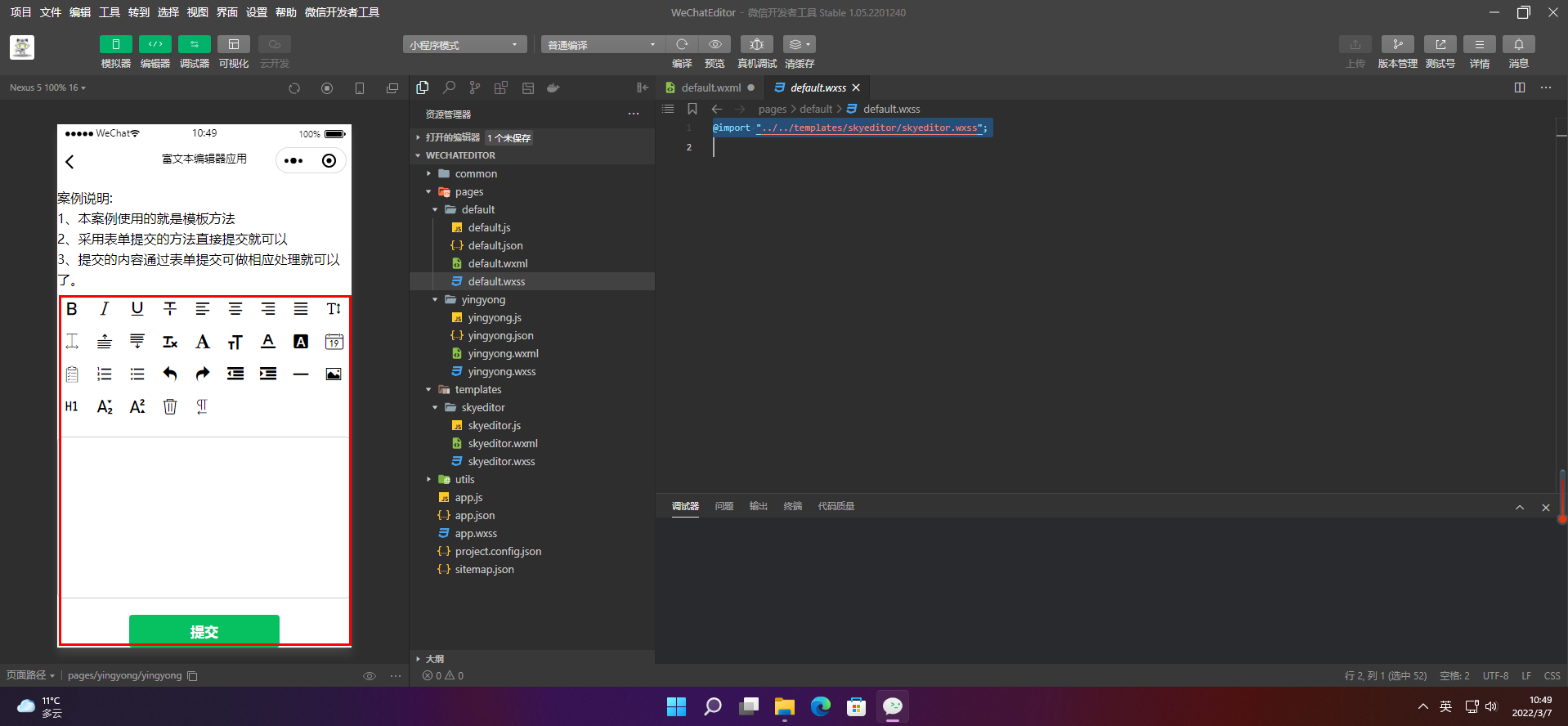

版权声明:本文内容由互联网用户自发贡献,该文观点仅代表作者本人。本站仅提供信息存储空间服务,不拥有所有权,不承担相关法律责任。如发现本站有涉嫌侵权/违法违规的内容, 请联系我们举报,一经查实,本站将立刻删除。
发布者:全栈程序员-站长,转载请注明出处:https://javaforall.net/132786.html原文链接:https://javaforall.net



