
大家好,又见面了,我是你们的朋友全栈君。

 来源:百度动图
我发现网上有很多写得很好的Python表白代码,感觉绘出来的图很漂亮。我整理了一下,挑了一些我觉得不错的代码和部分自认不错的原创分享给大家(这些我都测试过,确实可以生成喔~),选一种喜欢的方式发给你的那个她/他吧。
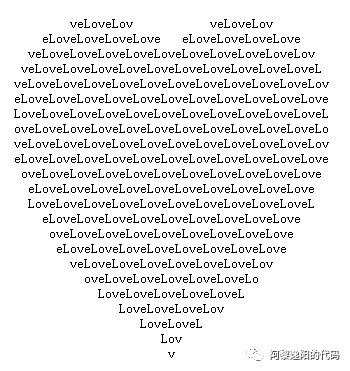
1. 一行代码画爱心
print('\n'.join([''.join([('Love'[(x-y)%4]if((x*0.05)**2+(y*0.1)**2-1)**3-(x*0.05)**2*(y*0.1)**3<=0 else' ')for x in range(-30,30)])for y in range(15,-15,-1)]))
效果图
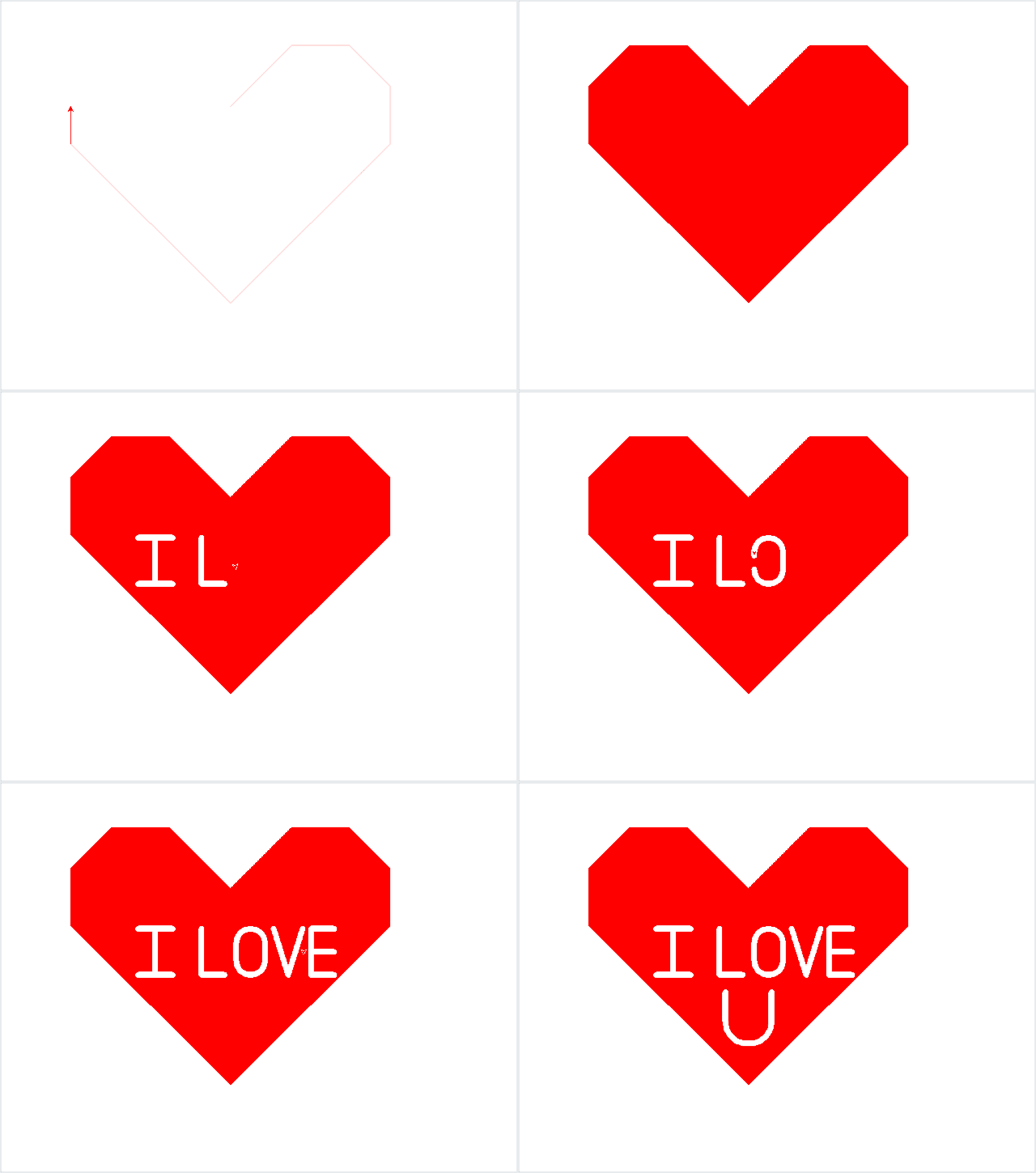
2. 用turtle库画爱心加文字
import turtle
import math
turtle.pen()
t=turtle
t.up()
t.goto(0,150)
t.down()
t.color('red')
t.begin_fill()
t.fillcolor('red')
t.speed(1)
t.left(45)
t.forward(150)
t.right(45)
t.forward(100)
t.right(45)
t.forward(100)
t.right(45)
t.forward(100)
t.right(45)
t.forward(250+math.sqrt(2)*100)
t.right (90)
t.speed(2)
t.forward(250+100*math.sqrt(2))
t.right(45)
t.forward(100)
t.right(45)
t.forward(100)
t.right(45)
t.forward(100)
t.right(45)
t.forward(150)
t.end_fill()
t.goto(-10,0)
t.pencolor('white')
#L
t.pensize(10)
t.goto(-50,0)
t.goto(-50,80)
t.up ()
#I
t.goto(-100,0)
t.down()
t.goto(-160,0)
t.goto(-130,0)
t.goto(-130,80)
t.goto(-160,80)
t.goto(-100,80)
t.up()
#O
t.goto(10,25)
t.down()
t.right(45)
t.circle(25,extent=180)
t.goto(60,55)
t.circle(25,extent=180)
t.goto(10,25)
t.up()
t.goto(75,80)
t.down()
t.goto(100,0)
t.goto(125,80)
t.up()
t.goto(180,80)
t.down()
t.goto(140,80)
t.goto(140,0)
t.goto(180,0)
t.up()
t.goto(180,40)
t.down()
t.goto(140,40)
#U
t.up()
t.goto(-40,-30)
t.down()
t.goto(-40,-80)
t.circle(40,extent=180)
t.goto(40,-30)
t.hideturtle()
效果图
1. 用turtle库画一朵玫瑰花
#!/usr/bin/env python
# coding: utf-8

#绘制玫瑰花并添加文字
import turtle
# 设置画布大小
# turtle.screensize(canvwidth=None, canvheight=None, bg=None)
turtle.setup(width=0.6, height=0.6)
# 设置初始位置
turtle.penup()
turtle.left(90)
turtle.fd(200)
turtle.pendown()
turtle.right(90)

# 输出文字
printer = turtle.Turtle()
printer.hideturtle()
printer.penup()
printer.back(200)
printer.write("赠给亲爱的 XX\n\n", align="right", font=("楷体", 16, "bold"))
printer.write("from XXX", align="center", font=("楷体", 12, "normal"))

# 花蕊
turtle.fillcolor("red")
turtle.begin_fill()
turtle.circle(10, 180)
turtle.circle(25, 110)
turtle.left(50)
turtle.circle(60, 45)
turtle.circle(20, 170)
turtle.right(24)
turtle.fd(30)
turtle.left(10)
turtle.circle(30, 110)
turtle.fd(20)
turtle.left(40)
turtle.circle(90, 70)
turtle.circle(30, 150)
turtle.right(30)
turtle.fd(15)
turtle.circle(80, 90)
turtle.left(15)
turtle.fd(45)
turtle.right(165)
turtle.fd(20)
turtle.left(155)
turtle.circle(150, 80)
turtle.left(50)
turtle.circle(150, 90)
turtle.end_fill()

# 花瓣1
turtle.left(150)
turtle.circle(-90, 70)
turtle.left(20)
turtle.circle(75, 105)
turtle.setheading(60)
turtle.circle(80, 98)
turtle.circle(-90, 40)

# 花瓣2
turtle.left(180)
turtle.circle(90, 40)
turtle.circle(-80, 98)
turtle.setheading(-83)

# 叶子1
turtle.fd(30)
turtle.left(90)
turtle.fd(25)
turtle.left(45)
turtle.fillcolor("green")
turtle.begin_fill()
turtle.circle(-80, 90)
turtle.right(90)
turtle.circle(-80, 90)
turtle.end_fill()
turtle.right(135)
turtle.fd(60)
turtle.left(180)
turtle.fd(85)
turtle.left(90)
turtle.fd(80)

# 叶子2
turtle.right(90)
turtle.right(45)
turtle.fillcolor("green")
turtle.begin_fill()
turtle.circle(80, 90)
turtle.left(90)
turtle.circle(80, 90)
turtle.end_fill()
turtle.left(135)
turtle.fd(60)
turtle.left(180)
turtle.fd(60)
turtle.right(90)
turtle.circle(200, 60)

turtle.done()
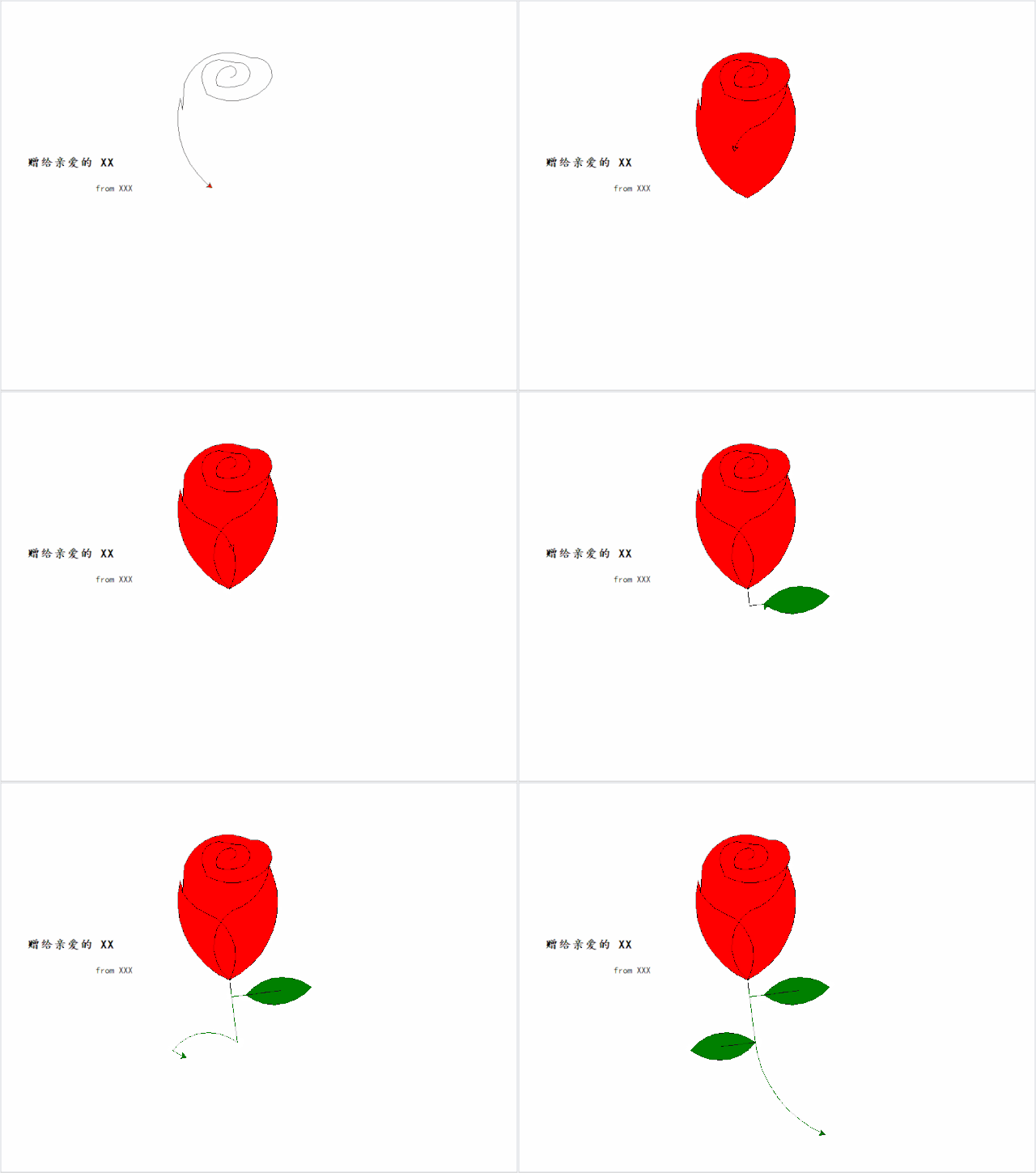
效果图
如果想要把玫瑰花打包成exe文件,发送给没有安装Python的对象,在她/他的电脑上运行,可以参考 Pyinstaller(Python打包为exe文件)。
2. 用turtle库画爱心加文字
import turtle
import random

def love(x, y):  # 在(x,y)处画爱心lalala
    lv = turtle.Turtle()
    lv.hideturtle()
    lv.up()
    lv.goto(x, y)  # 定位到(x,y)

    def curvemove():  # 画圆弧
        for i in range(20):
            lv.right(10)
            lv.forward(2)

    lv.color('red', 'pink')
    lv.speed(10000000)
    lv.pensize(1)
    # 开始画爱心lalala
    lv.down()
    lv.begin_fill()
    lv.left(140)
    lv.forward(22)
    curvemove()
    lv.left(120)
    curvemove()
    lv.forward(22)
    lv.write("YZ", font=("Arial", 12, "normal"), align="center")  # 写上表白的人的名字
    lv.left(140)  # 画完复位
    lv.end_fill()


def tree(branchLen, t):
    if branchLen > 5:  # 剩余树枝太少要结束递归
        if branchLen < 20:  # 如果树枝剩余长度较短则变绿
            t.color("green")
            t.pensize(random.uniform((branchLen + 5) / 4 - 2, (branchLen + 6) / 4 + 5))
            t.down()
            t.forward(branchLen)
            love(t.xcor(), t.ycor())  # 传输现在turtle的坐标
            t.up()
            t.backward(branchLen)
            t.color("brown")
            return
        t.pensize(random.uniform((branchLen + 5) / 4 - 2, (branchLen + 6) / 4 + 5))
        t.down()
        t.forward(branchLen)
        # 以下递归
        ang = random.uniform(15, 45)
        t.right(ang)
        tree(branchLen - random.uniform(12, 16), t)  # 随机决定减小长度
        t.left(2 * ang)
        tree(branchLen - random.uniform(12, 16), t)  # 随机决定减小长度
        t.right(ang)
        t.up()
        t.backward(branchLen)

myWin = turtle.Screen()
t = turtle.Turtle()
t.hideturtle()
t.speed(1000)
t.left(90)
t.up()
t.backward(200)
t.down()
t.color("brown")
t.pensize(32)
t.forward(60)
tree(100, t)
myWin.exitonclick()
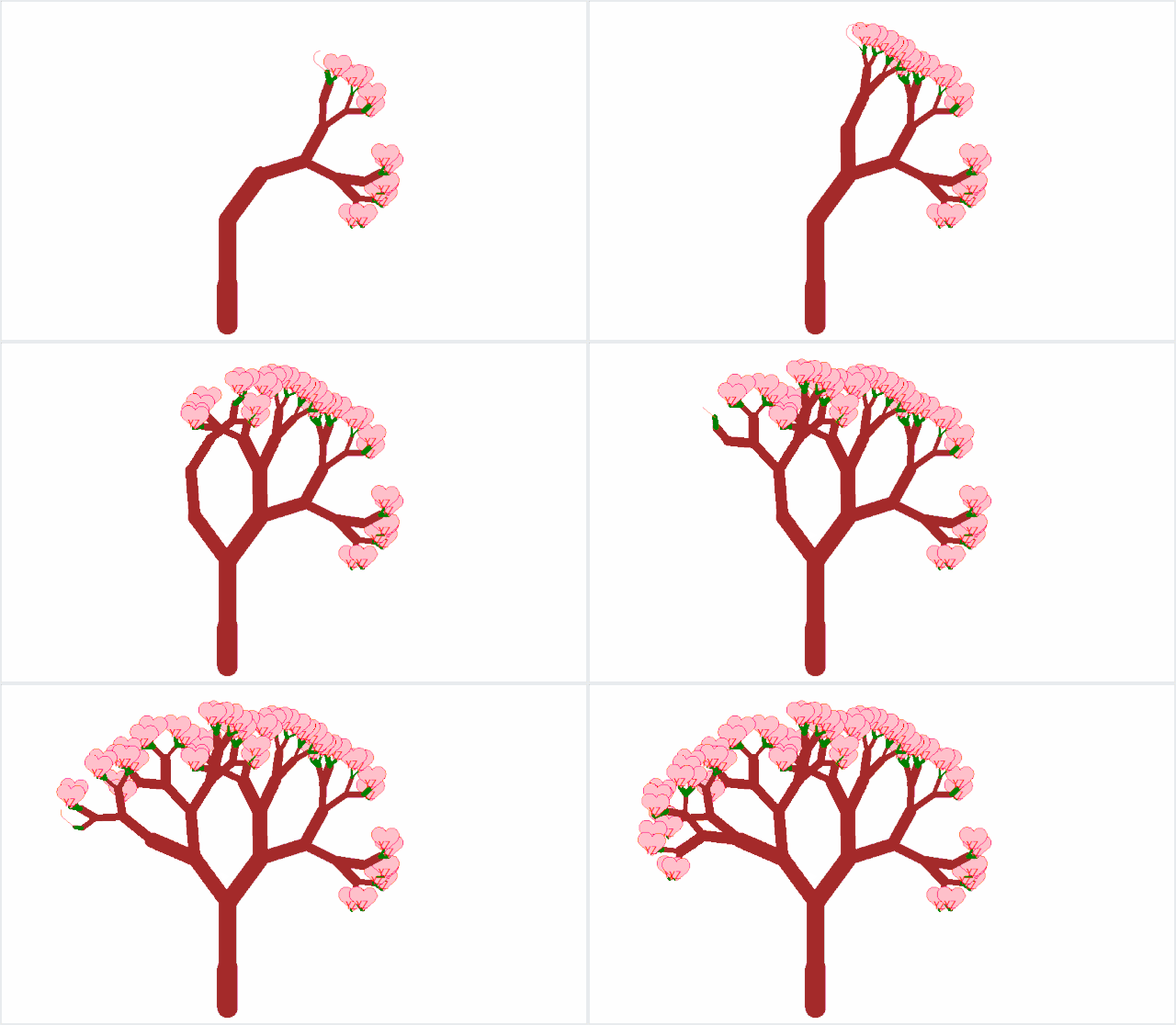
效果图

1. 星空下的告白
""" 代码用途:表白 作者:阿黎逸阳 """

def bgpic(self, picname=None):
        """Set background image or return name of current backgroundimage. Optional argument: picname -- a string, name of a gif-file or "nopic". If picname is a filename, set the corresponding image as background. If picname is "nopic", delete backgroundimage, if present. If picname is None, return the filename of the current backgroundimage. Example (for a TurtleScreen instance named screen): >>> screen.bgpic() 'nopic' >>> screen.bgpic("landscape.gif") >>> screen.bgpic() 'landscape.gif' """
        if picname is None:
            return self._bgpicname
        if picname not in self._bgpics:
            self._bgpics[picname] = self._image(picname)
        self._setbgpic(self._bgpic, self._bgpics[picname])
        self._bgpicname = picname
# coding: utf-8
import pygame
import os
import sys
from pygame.locals import *
os.chdir('F:/微信公众号/Python/29.加载音乐')
os.getcwd()
pygame.init()
pygame.mixer.init()
pygame.mixer.music.load("告白.mp3")
#pygame.mixer.music.set_volume(0.4)
pygame.mixer.music.play()
bg_size = width, height = 300, 200
bg_rgb = (255, 255, 255)
screen1 = pygame.display.set_mode(bg_size)
pygame.display.set_caption("告白音乐")
clock = pygame.time.Clock()
play_image = pygame.image.load("开始和暂停按钮2.png").convert_alpha()
pause_image = pygame.image.load("开始和暂停按钮2.png").convert_alpha()
pause_rect = pause_image.get_rect()
print(pause_rect.width,pause_rect.height)
pause_rect.left, pause_rect.top = (width - pause_rect.width) // 2, (height - pause_rect.height) // 2
from turtle import *
from random import random,randint
os.chdir('F:/微信公众号/Python/0.已发表')
screen = Screen()
width ,height = 900,700
screen.setup(width,height)
screen.title("告白")
screen.bgcolor("black")
screen.bgpic(r'./星空下互相告白的两个人2.gif')
screen.mode("logo")
screen.delay(0)
printer = Turtle()
printer.hideturtle()
printer.penup()
printer.color('red')
printer.goto(-100,-350)
printer.write("In the whole universe\n\n",move = True, align="left", font=("Italic", 30, "bold"))
printer.goto(-50,-400)
printer.write("YZ I only love you!\n\n",move = True, align="left", font=("Italic", 30, "bold"))
t = Turtle(visible = False,shape='circle')
t.pencolor("white")
t.fillcolor("white")
t.penup()
t.setheading(-90)
t.goto(width/2,randint(-height/2,height/2))
stars = []
for i in range(300):
    star = t.clone()
    s =random()/3
    if  s>0.01 and s<0.03:
        star.pencolor("black")
        star.fillcolor("black")
    elif s>0.03 and s<0.04:
        star.pencolor("lightcoral")
        star.fillcolor("lightcoral")
    elif s>0.05 and s<0.1:
        star.pencolor("green")
        star.fillcolor("green")
    elif s>0.15 and s<0.16:
        star.pencolor("yellow")
        star.fillcolor("yellow")
    elif s>0.19 and s<0.2:
        star.pencolor("red")
        star.fillcolor("red")
    elif s>0.21 and s<0.22:
        star.pencolor("purple")
        star.fillcolor("purple")
    elif s>0.29 and s<0.3:
        star.pencolor("darkorange")
        star.fillcolor("darkorange")
    elif s>0.31 and s<0.32:
        star.pencolor("red")
        star.fillcolor("yellow")
    elif s>0.32 and s<0.33:
        star.pencolor("yellow")
        star.fillcolor("white")
    star.shapesize(s,s)
    star.speed(int(s*30))
    star.setx(width/2 + randint(1,width))
    star.sety( randint(-height/2,height/2))
    #star.showturtle()
    stars.append(star)
i = 0
pause = False
while True:
    i += 0
    for star in stars:

        star.setx(star.xcor() - 3 * star.speed())
        if star.xcor()<-width/2:
            star.hideturtle()
            star.setx(width/2 + randint(1,width))
            star.sety( randint(-height/2,height/2))
            star.showturtle()
    if i>= 100:
        break

    # 查找队列事件
    for event in pygame.event.get():
        # 查找点击关闭窗口事件
        if event.type == QUIT:
            sys.exit
        # 查找鼠标左右击事件
        if event.type == MOUSEBUTTONDOWN:
            if event.button == 1:
                pause = not pause
            if event.button == 3:
                pause = not pause

        if event.type == KEYDOWN:
            if event.key == K_SPACE:
                pause = not pause
    screen1.fill(bg_rgb)
    if pause:
        pygame.mixer.music.pause()
        screen1.blit(pause_image, pause_rect)
    else:
        pygame.mixer.music.unpause()
        screen1.blit(play_image, pause_rect)
    pygame.display.flip()
    clock.tick(30)
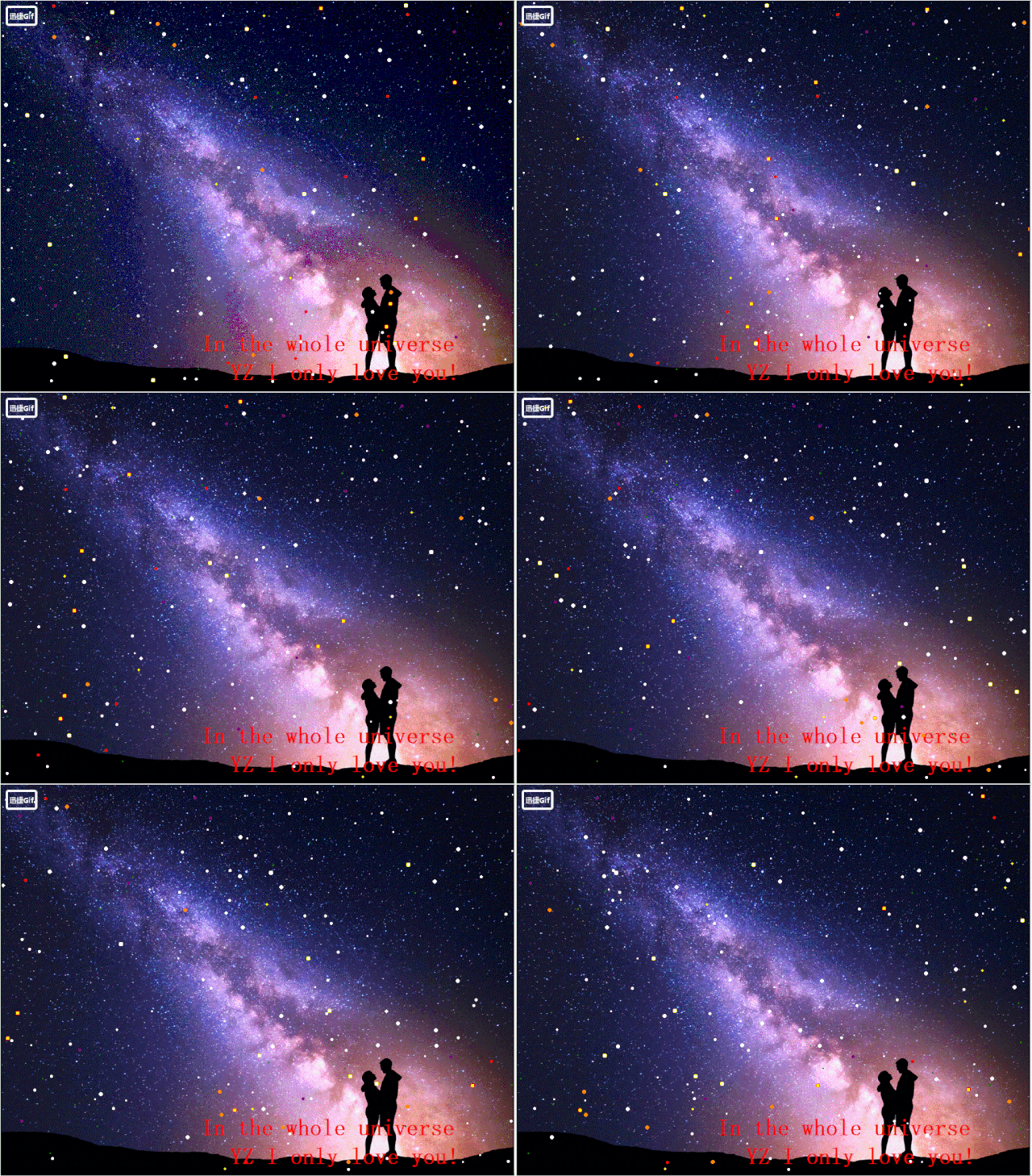
效果图
注:如需上图源代码和照片,请在“阿黎逸阳的代码”公众号中回复“星空下的告白”,即可免费获取。
2.照片墙
怀念香蜜夫妇,所以我用香蜜剧中的图生成了照片墙,放大看每一个小格都有一张照片。你也可以用情侣照生成回忆照片墙,送给喜欢的她/他。
#!/usr/bin/env python
# encoding: utf-8
from PIL import Image
import cv2
import os
os.chdir(r"F:\微信公众号\Python\30.520表白\代码\照片墙\new")
img = cv2.imread("start.jpg")
height,width,channels = img.shape
unit_size = 120
y_index = height//unit_size
x_index = width//unit_size
new_img = Image.new('RGB',(width,height),'#FFFFFF')
pic_list = []
for item in os.listdir("small_pictures"):
    if item.endswith(".jpg") or item.endswith(".JPG") :
        pic_list.append(item)
total = len(pic_list)
x=0
y=0
for i in range(x_index*y_index):
    print(f"目前进度{i}/{x_index*y_index}")
    test = Image.open("small_pictures/" + pic_list[i%total]).resize((unit_size,unit_size), Image.ANTIALIAS)
    new_img.paste(test,(x*unit_size,y*unit_size))
    x+=1
    if x==x_index:
        x=0
        y+=1
print("素材图合成完毕!")
new_img.save("out.jpg",quality=100)
src1 = cv2.imread("start.jpg")
src2 = cv2.imread("out.jpg")
result = cv2.addWeighted(src1,0.7,src2,0.3,0)
cv2.imwrite("result.jpg",result)
效果图1

效果图2

注:如需照片墙源代码和照片,请在“阿黎逸阳的代码”公众号中回复“照片墙”,即可免费获取。
祝大家520、521节日快乐,有情人终成眷属。
你可能感兴趣:
用Python绘制皮卡丘
用Python绘制词云图
Python入门干货经验(免费提供资料)
用Python绘制杨紫作品集动态二维码
【Python】情人节表白烟花(带声音和文字)
Python画浪漫的星空图V2版——唯美的背景和动人的音乐

长按(扫一扫)识别上方二维码学习更多Python和建模知识,让你的学习和工作更出彩。
版权声明:本文内容由互联网用户自发贡献,该文观点仅代表作者本人。本站仅提供信息存储空间服务,不拥有所有权,不承担相关法律责任。如发现本站有涉嫌侵权/违法违规的内容, 请联系我们举报,一经查实,本站将立刻删除。
发布者:全栈程序员-站长,转载请注明出处:https://javaforall.net/137011.html原文链接:https://javaforall.net



