
大家好,又见面了,我是你们的朋友全栈君。
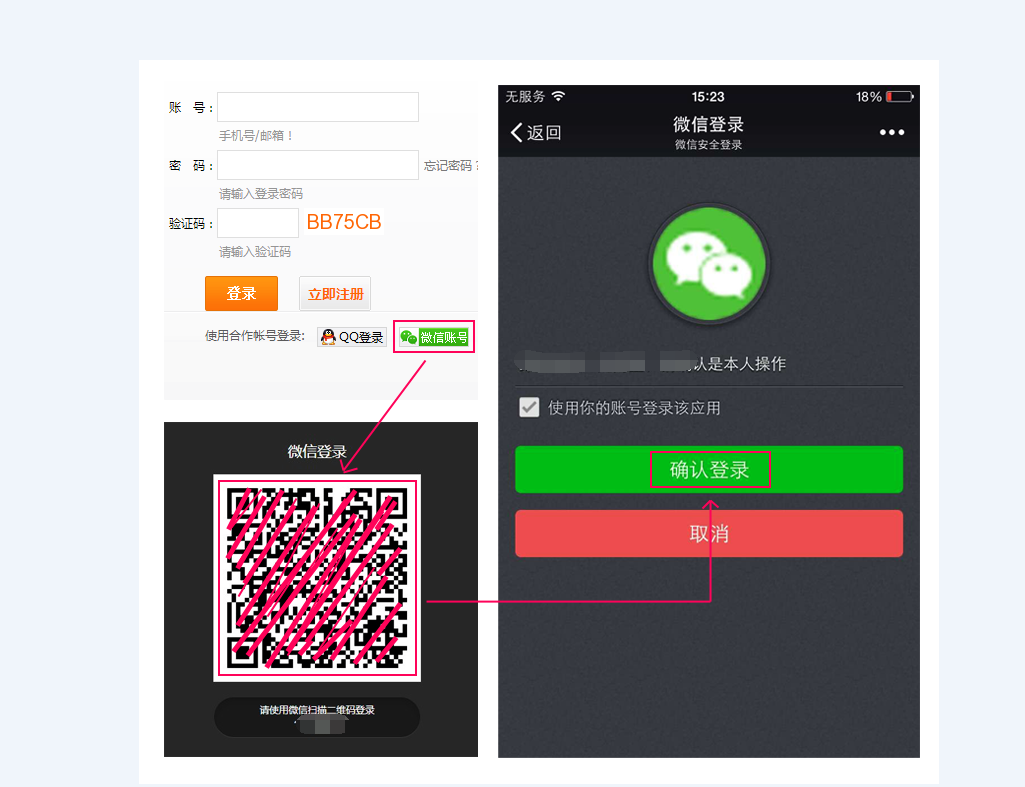

1、首先到微信开放平台申请https://open.weixin.qq.com/ 获取到appid和APPSECRET,前台显示页面如下
var obj = new WxLogin({
id: “login_container”,
appid: “wxed782be999f86e0e”,
scope: “snsapi_login”,
redirect_uri: encodeURIComponent(“http://” + window.location.host + “/login.php”),
state: Math.ceil(Math.random()*1000),
style: “black”,
href: “”});
2、PHP处理代码页面
/*
require_once(‘weixin.class.php’);
$weixin = new class_weixin();
*/
define(‘APPID’, “”);
define(‘APPSECRET’, “”);
class class_weixin
{
var $appid = APPID;
var $appsecret = APPSECRET;
//构造函数,获取Access Token
public function __construct($appid = NULL, $appsecret = NULL)
{
if($appid && $appsecret){
$this->appid = $appid;
$this->appsecret = $appsecret;
}
//扫码登录不需要该Access Token, 语义理解需要
//1. 本地写入
$res = file_get_contents(‘access_token.json’);
$result = json_decode($res, true);
$this->expires_time = $result[“expires_time”];
$this->access_token = $result[“access_token”];
if (time() > ($this->expires_time + 3600)){
$url = “https://api.weixin.qq.com/cgi-bin/token?grant_type=client_credential&appid=”.$this->appid.”&secret=”.$this->appsecret;
$res = $this->http_request($url);
$result = json_decode($res, true);
$this->access_token = $result[“access_token”];
$this->expires_time = time();
file_put_contents(‘access_token.json’, ‘{“access_token”: “‘.$this->access_token.'”, “expires_time”: ‘.$this->expires_time.’}’);
}
}
/*
* PART1 网站应用
*/
/*
header(“Content-type: text/html; charset=utf-8”);
require_once(‘wxopen.class.php’);
$weixin = new class_weixin();
if (!isset($_GET[“code”])){
$redirect_url = ‘http://’.$_SERVER[‘HTTP_HOST’].$_SERVER[‘REQUEST_URI’];
$jumpurl = $weixin->qrconnect($redirect_url, “snsapi_login”, “123”);
Header(“Location: $jumpurl”);
}else{
$oauth2_info = $weixin->oauth2_access_token($_GET[“code”]);
$userinfo = $weixin->oauth2_get_user_info($oauth2_info[‘access_token’], $oauth2_info[‘openid’]);
var_dump($userinfo);
}
*/
//生成扫码登录的URL
public function qrconnect($redirect_url, $scope, $state = NULL)
{
$url = “https://open.weixin.qq.com/connect/qrconnect?appid=”.$this->appid.”&redirect_uri=”.urlencode($redirect_url).”&response_type=code&scope=”.$scope.”&state=”.$state.”#wechat_redirect”;
return $url;
}
//生成OAuth2的Access Token
public function oauth2_access_token($code)
{
$url = “https://api.weixin.qq.com/sns/oauth2/access_token?appid=”.$this->appid.”&secret=”.$this->appsecret.”&code=”.$code.”&grant_type=authorization_code”;
$res = $this->http_request($url);
return json_decode($res, true);
}
//获取用户基本信息(OAuth2 授权的 Access Token 获取 未关注用户,Access Token为临时获取)
public function oauth2_get_user_info($access_token, $openid)
{
$url = “https://api.weixin.qq.com/sns/userinfo?access_token=”.$access_token.”&openid=”.$openid.”&lang=zh_CN”;
$res = $this->http_request($url);
return json_decode($res, true);
}
首先须要申请,必须企业,个体工商户,媒体等,是开放平台,注意不是公众平台,是开放平台:申请地址:https://open.weixin.qq.com
发布者:全栈程序员-站长,转载请注明出处:https://javaforall.net/138542.html原文链接:https://javaforall.net



