
大家好,又见面了,我是你们的朋友全栈君。
layui是一款优秀的模块化前端框架。利用layui弹出层做编辑页面
先上效果图

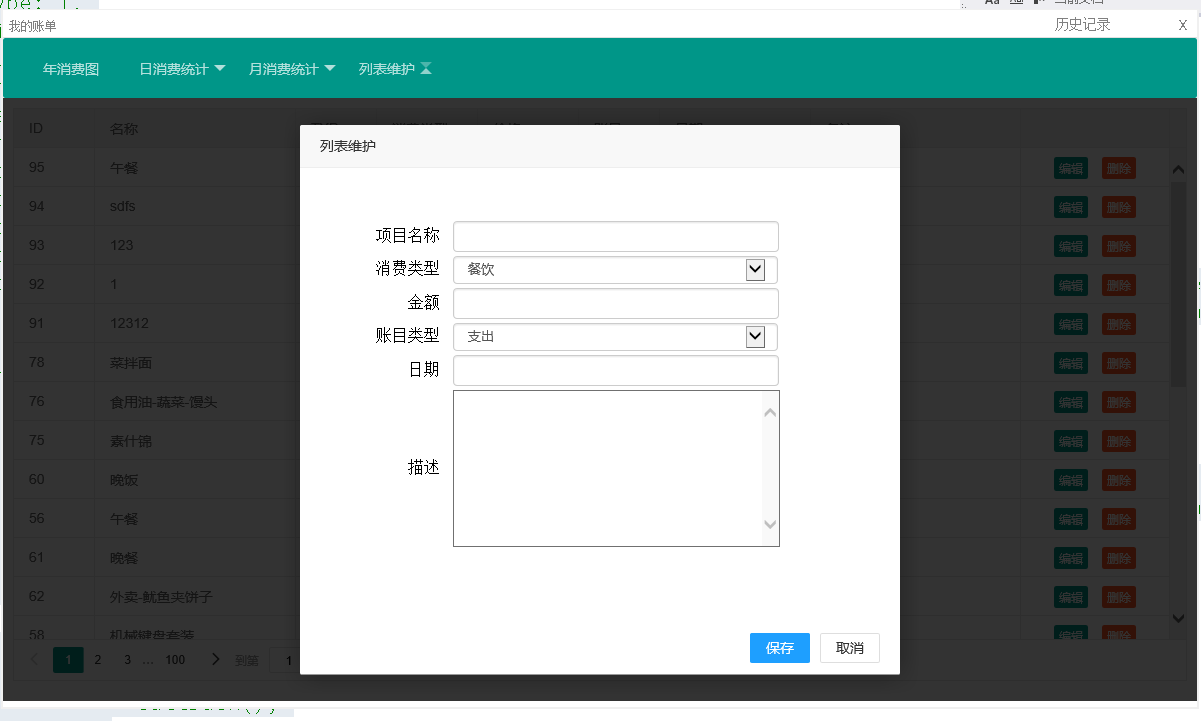
基本准备,引入layui的layui.css,layui.js文件
    <link rel="stylesheet" href="../../../Publics/others/layui/css/layui.css" media="all">
    <script src="../../../Publics/others/layui/layui.js"></script>
Js方法
/**
 * 页面内弹出编辑窗口 //需要引入 layui.js layui.css文件
 * @param {} title 标题 不显示为false
 * @param {} area 大小 ["400px","500px"] 或者 "400px"--->只设置宽度
 * @param {} path 弹出页面路径
 * @param {} sucFunName 执行保存操作后再弹出页面中的保存方法名称
 * @param {} callBack 执行保存操作之后的其他操作
 * @returns {}
 */
function openDetial(title, area, path, sucFunName, callBack) {
    layer.open({
        type: 2,
        title: title, //不显示标题栏
        closeBtn: 2,
        area: area,
        shade: 0.8,
        id: (new Date()).valueOf(), //设定一个id,防止重复弹出 时间戳1280977330748
        btn: ['保存', '取消'],
        btnAlign: 'r',
        moveType: 1, //拖拽模式,0或者1
        content: path,
        yes: function (index, layero) {
            var btn = layero.find('.layui-layer-btn').find('.layui-layer-btn0');
            alert("-----");
            try {
                var _ifr = btn[0].parentNode.parentNode.getElementsByClassName("layui-layer-content")[0].children[0].contentWindow ||
                     btn[0].parentNode.parentNode.getElementsByClassName("layui-layer-content")[0].children[0].children[0].contentWindow;
                var func = new Function('_ifr', "return _ifr." + sucFunName + "();");
                var flg = func(_ifr);
                if (flg == false) {
                    return false;
                } else {
                    if (callBack != null) callBack();
                    window.location.reload();
                }
            } catch (ex) {

            }
        },
        btn2: function (index, layero) {
        }
    });
}
//
以下是测试页面 测试页面中具备保存方法ApplicationSave()
<!--// ========================================================================
// Author              :    Jp
// Email               :    1427953302@qq.com/dongmingzhixiu@outlook.com
// Create Time         :    2018-4-22 15:53:38
// Update Time         :    2018-4-22 15:53:43
// =========================================================================
// CLR Version         :    4.0.30319.42000
// Class Version       :    v1.0.0.0
// Class Description   :    编辑页面
// Computer Name       :    Jp
// =========================================================================
// Copyright ©JiPanwu 2017 . All rights reserved.
// ==========================================================================
-->
<!DOCTYPE html>

<html lang="en" xmlns="http://www.w3.org/1999/xhtml">
<head>
    <meta name="viewport" content="width =device-width, initial-scale=1"/>
    <meta http-equiv="Content-Type" content="text/html; charset=utf-8"/>
    <meta http-equiv="Content-Language" content="utf-8"/>
    <meta http-equiv="X-UA-Compatible" content="IE=edge"/>
    <title>JpAutoFramework</title>
    <meta content="victor" name="author"/>
     <script type="text/javascript">
        function ApplicationSave() {
            //具体保存操作
            //需要返回值,保存成功,返回true,保存失败返回false

        }
    </script>

</head >

<body οnlοad="load()" style="margin: auto">
<form>
    <table id="data" class="editorTable" style="margin: auto; margin-top: 50px; width: 80%;">
        <tr style="display: none;">
            <th> 编号 </th>
            <td> <input type="text" readonly="readonly" id="ID" /></td>
        </tr>
        <tr>
            <th> 项目名称 </th>
            <td> <input type="text" id="Names"  /></td>
        </tr>
        <tr>
            <th> 金额 </th>
            <td> <input type="text" id="PRICE" /></td>
        </tr>
        <tr>
            <th> 账目类型 </th>
            <td>
                <select type="text" id="ISOUT">
                    <option value="0">支出</option>
                    <option value="1">收入</option>
                    <option value="2">信用卡消费</option>
                    <option value="3">信用卡还款</option>
                </select>
            </td>
        </tr>
        <tr>
            <th> 日期 </th>
            <td> <input type="text" id="Dates" /></td>
        </tr>
        <tr>
            <th> 描述 </th>
            <td>
                <textarea rows="10" cols="38" id="Remark"></textarea>
            </td>
        </tr>
    </table>
</form>
</body >
</html >
调用 如下参数中的ApplicationSave和编辑页面的方法名一致
openDetial("列表维护", ['600px', '550px'], "./editor.html", "ApplicationSave", function() {alert("执行完了");});有兴趣的小伙伴,可以试试
//具体保存操作版权声明:本文内容由互联网用户自发贡献,该文观点仅代表作者本人。本站仅提供信息存储空间服务,不拥有所有权,不承担相关法律责任。如发现本站有涉嫌侵权/违法违规的内容, 请发送邮件至 举报,一经查实,本站将立刻删除。
发布者:全栈程序员-站长,转载请注明出处:https://javaforall.net/140974.html原文链接:https://javaforall.net

![rapidjson指针[通俗易懂]](https://javaforall.net/wp-content/uploads/2020/11/2020110817443450-480x300.jpg)
