
大家好,又见面了,我是你们的朋友全栈君。
文章目录
1. DefaultProcessDiagramGenerator
DefaultProcessDiagramGenerator是flowable默认的流程图生成器
该类中定义了各种生成图片和一些画图的方法,还有一些辅助方法(如:获取所有节点)
可以查看源码
2. DefaultProcessDiagramCanvas
DefaultProcessDiagramCanvas :flowable 提供的默认的流程图画布
类中定义了许多字体、颜色、大小、字体等静态变量,还有bpmn中节点(task,gateway,event,flow…)的基本行程,以及各类事件的图标
initialize方法,还有用来画各种节点、连线、事件等等的方法
可以查看源码
3. 使用Flowable默认的流程图生成器
/** * 流程申请 流转图片输入流 */
public void getFlowDiagram(String procInsId){


    String procDefId;
    ProcessInstance processInstance = runtimeService.createProcessInstanceQuery()
            .processInstanceId(procInsId)
            .singleResult();
    if (processInstance == null) {

        HistoricProcessInstance historicProcessInstance = historyService.createHistoricProcessInstanceQuery().processInstanceId(procInsId).singleResult();
        procDefId = historicProcessInstance.getProcessDefinitionId();

    } else {

        procDefId = processInstance.getProcessDefinitionId();
    }

    BpmnModel bpmnModel = repositoryService.getBpmnModel(procDefId);
    DefaultProcessDiagramGenerator defaultProcessDiagramGenerator = new DefaultProcessDiagramGenerator(); // 创建默认的流程图生成器
    String imageType = "png"; // 生成图片的类型
    List<String> highLightedActivities = new ArrayList<>(); // 高亮节点集合
    List<String> highLightedFlows = new ArrayList<>(); // 高亮连线集合
    List<HistoricActivityInstance> hisActInsList = historyService.createHistoricActivityInstanceQuery()
            .processInstanceId(procInsId)
            .list(); // 查询所有历史节点信息
    hisActInsList.forEach(historicActivityInstance -> {
    // 遍历
        if("sequenceFlow".equals(historicActivityInstance.getActivityType())) {

        	// 添加高亮连线
            highLightedFlows.add(historicActivityInstance.getActivityId());
        } else {

        	// 添加高亮节点
            highLightedActivities.add(historicActivityInstance.getActivityId());
        }
    });
    String activityFontName = "宋体"; // 节点字体
    String labelFontName = "微软雅黑"; // 连线标签字体
    String annotationFontName = "宋体"; // 连线标签字体
    ClassLoader customClassLoader = null; // 类加载器
    double scaleFactor = 1.0d; // 比例因子,默认即可
    boolean drawSequenceFlowNameWithNoLabelDI = true; // 不设置连线标签不会画
    // 生成图片
    InputStream inputStream = defaultProcessDiagramGenerator.generateDiagram(bpmnModel, imageType, highLightedActivities
            , highLightedFlows, activityFontName, labelFontName, annotationFontName, customClassLoader,
            scaleFactor, drawSequenceFlowNameWithNoLabelDI); // 获取输入流
    /* try { // 先将图片保存 FileUtils.copyInputStreamToFile(inputStream, new File("E:\\", "1.png")); } catch (IOException e) { e.printStackTrace(); } */

    // 直接写到页面,要先获取HttpServletResponse
    byte[] bytes = IoUtil.readInputStream(inputStream, "flow diagram inputStream");
    response.setContentType("image/png");
    ServletOutputStream outputStream = response.getOutputStream();
    response.reset();
    outputStream.write(bytes);
    outputStream.flush();
    outputStream.close();
}
4. 自定义流程图生成器
4.1 扩展DefaultProcessDiagramCanvas
想画什么只需要覆盖掉DefaultProcessDiagramCanvas中的那个方法即可
package top.theonly.workflow.image;

import org.flowable.bpmn.model.AssociationDirection;
import org.flowable.bpmn.model.GraphicInfo;
import org.flowable.image.impl.DefaultProcessDiagramCanvas;

import java.awt.*;
import java.awt.font.FontRenderContext;
import java.awt.font.LineBreakMeasurer;
import java.awt.font.TextAttribute;
import java.awt.font.TextLayout;
import java.awt.geom.Line2D;
import java.awt.geom.Rectangle2D;
import java.awt.geom.RoundRectangle2D;
import java.text.AttributedCharacterIterator;
import java.text.AttributedString;

public class MyDefaultProcessDiagramCanvas extends DefaultProcessDiagramCanvas {

    //设置高亮线的颜色 这里我设置成绿色
    protected static Color HIGHLIGHT_SEQUENCEFLOW_COLOR = Color.GREEN;
    //设置连接线(网关)的条件字体颜色 这里我设置成绿色
    protected static Color LABEL_COLOR = new Color(10, 176, 213);

    public MyDefaultProcessDiagramCanvas(int width, int height, int minX, int minY, String imageType, String activityFontName, String labelFontName, String annotationFontName, ClassLoader customClassLoader) {

        super(width, height, minX, minY, imageType, activityFontName, labelFontName, annotationFontName, customClassLoader);
    }

    public MyDefaultProcessDiagramCanvas(int width, int height, int minX, int minY, String imageType) {

        super(width, height, minX, minY, imageType);
    }

    /** * 画线颜色设置 * @param xPoints * @param yPoints * @param conditional * @param isDefault * @param connectionType * @param associationDirection * @param highLighted * @param scaleFactor */
    public void drawConnection(int[] xPoints, int[] yPoints, boolean conditional, boolean isDefault, String connectionType,
                               AssociationDirection associationDirection, boolean highLighted, double scaleFactor) {


        Paint originalPaint = g.getPaint();
        Stroke originalStroke = g.getStroke();

        g.setPaint(CONNECTION_COLOR);
        if (connectionType.equals("association")) {

            g.setStroke(ASSOCIATION_STROKE);
        } else if (highLighted) {

            //设置线的颜色
            g.setPaint(HIGHLIGHT_SEQUENCEFLOW_COLOR);
            g.setStroke(HIGHLIGHT_FLOW_STROKE);
        }

        for (int i = 1; i < xPoints.length; i++) {

            Integer sourceX = xPoints[i - 1];
            Integer sourceY = yPoints[i - 1];
            Integer targetX = xPoints[i];
            Integer targetY = yPoints[i];
            Line2D.Double line = new Line2D.Double(sourceX, sourceY, targetX, targetY);
            g.draw(line);
        }

        if (isDefault) {

            Line2D.Double line = new Line2D.Double(xPoints[0], yPoints[0], xPoints[1], yPoints[1]);
            drawDefaultSequenceFlowIndicator(line, scaleFactor);
        }

        if (conditional) {

            Line2D.Double line = new Line2D.Double(xPoints[0], yPoints[0], xPoints[1], yPoints[1]);
            drawConditionalSequenceFlowIndicator(line, scaleFactor);
        }

        if (associationDirection == AssociationDirection.ONE || associationDirection == AssociationDirection.BOTH) {

            Line2D.Double line = new Line2D.Double(xPoints[xPoints.length - 2], yPoints[xPoints.length - 2], xPoints[xPoints.length - 1], yPoints[xPoints.length - 1]);
            drawArrowHead(line, scaleFactor);
        }
        if (associationDirection == AssociationDirection.BOTH) {

            Line2D.Double line = new Line2D.Double(xPoints[1], yPoints[1], xPoints[0], yPoints[0]);
            drawArrowHead(line, scaleFactor);
        }
        g.setPaint(originalPaint);
        g.setStroke(originalStroke);
    }

    /** * 高亮节点设置 * @param x * @param y * @param width * @param height */
    public void drawHighLight(int x, int y, int width, int height) {

        Paint originalPaint = g.getPaint();
        Stroke originalStroke = g.getStroke();
        //设置高亮节点的颜色
        g.setPaint(HIGHLIGHT_COLOR);
        g.setStroke(THICK_TASK_BORDER_STROKE);

        RoundRectangle2D rect = new RoundRectangle2D.Double(x, y, width, height, 20, 20);
        g.draw(rect);

        g.setPaint(originalPaint);
        g.setStroke(originalStroke);
    }

    /** * 条件表达式 value字体设置 * @param text * @param graphicInfo * @param centered */
    public void drawLabel(String text, GraphicInfo graphicInfo, boolean centered) {

        float interline = 1.0f;

        // text
        if (text != null && text.length() > 0) {

            Paint originalPaint = g.getPaint();
            Font originalFont = g.getFont();

            g.setPaint(LABEL_COLOR);
            g.setFont(LABEL_FONT);

            int wrapWidth = 100;
            double textY = graphicInfo.getY();

            // TODO: use drawMultilineText()
            AttributedString as = new AttributedString(text);
            as.addAttribute(TextAttribute.FOREGROUND, g.getPaint());
            as.addAttribute(TextAttribute.FONT, g.getFont());
            AttributedCharacterIterator aci = as.getIterator();
            FontRenderContext frc = new FontRenderContext(null, true, false);
            LineBreakMeasurer lbm = new LineBreakMeasurer(aci, frc);

            while (lbm.getPosition() < text.length()) {

                TextLayout tl = lbm.nextLayout(wrapWidth);
                textY += tl.getAscent();
                Rectangle2D bb = tl.getBounds();
                double tX = graphicInfo.getX();
                if (centered) {

                    tX += (int) (graphicInfo.getWidth() / 2 - bb.getWidth() / 2);
                }
                tl.draw(g, (float) tX, (float) textY);
                textY += tl.getDescent() + tl.getLeading() + (interline - 1.0f) * tl.getAscent();
            }

            // restore originals
            g.setFont(originalFont);
            g.setPaint(originalPaint);
        }
    }
}
4.2 扩展DefaultProcessDiagramGenerator
package top.theonly.workflow.image;

import org.flowable.bpmn.model.*;
import org.flowable.image.impl.DefaultProcessDiagramGenerator;

import java.util.*;

public class MyDefaultProcessDiagramGenerator extends DefaultProcessDiagramGenerator {


    protected MyDefaultProcessDiagramCanvas generateProcessDiagram(BpmnModel bpmnModel, String imageType,
                                                                 List<String> highLightedActivities, List<String> highLightedFlows,
                                                                 String activityFontName, String labelFontName, String annotationFontName, ClassLoader customClassLoader, double scaleFactor, boolean drawSequenceFlowNameWithNoLabelDI) {

        this.prepareBpmnModel(bpmnModel);
        MyDefaultProcessDiagramCanvas processDiagramCanvas = initProcessDiagramCanvas(bpmnModel, imageType,
                activityFontName, labelFontName, annotationFontName, customClassLoader);
        // 实现同父类实现一模一样

        // Draw pool shape, if process is participant in collaboration
        for (Pool pool : bpmnModel.getPools()) {

            GraphicInfo graphicInfo = bpmnModel.getGraphicInfo(pool.getId());
            processDiagramCanvas.drawPoolOrLane(pool.getName(), graphicInfo, scaleFactor);
        }

        // Draw lanes
        for (org.flowable.bpmn.model.Process process : bpmnModel.getProcesses()) {

            for (Lane lane : process.getLanes()) {

                GraphicInfo graphicInfo = bpmnModel.getGraphicInfo(lane.getId());
                processDiagramCanvas.drawPoolOrLane(lane.getName(), graphicInfo, scaleFactor);
            }
        }

        // Draw activities and their sequence-flows
        for (org.flowable.bpmn.model.Process process : bpmnModel.getProcesses()) {

            for (FlowNode flowNode : process.findFlowElementsOfType(FlowNode.class)) {

                if (!isPartOfCollapsedSubProcess(flowNode, bpmnModel)) {

                    drawActivity(processDiagramCanvas, bpmnModel, flowNode, highLightedActivities, highLightedFlows, scaleFactor,drawSequenceFlowNameWithNoLabelDI);
                }
            }
        }

        // Draw artifacts
        for (org.flowable.bpmn.model.Process process : bpmnModel.getProcesses()) {


            for (Artifact artifact : process.getArtifacts()) {

                drawArtifact(processDiagramCanvas, bpmnModel, artifact);
            }

            List<SubProcess> subProcesses = process.findFlowElementsOfType(SubProcess.class, true);
            if (subProcesses != null) {

                for (SubProcess subProcess : subProcesses) {


                    GraphicInfo graphicInfo = bpmnModel.getGraphicInfo(subProcess.getId());
                    if (graphicInfo != null && graphicInfo.getExpanded() != null && !graphicInfo.getExpanded()) {

                        continue;
                    }

                    if (!isPartOfCollapsedSubProcess(subProcess, bpmnModel)) {

                        for (Artifact subProcessArtifact : subProcess.getArtifacts()) {

                            drawArtifact(processDiagramCanvas, bpmnModel, subProcessArtifact);
                        }
                    }
                }
            }
        }

        return processDiagramCanvas;
    }

    protected static MyDefaultProcessDiagramCanvas initProcessDiagramCanvas(BpmnModel bpmnModel, String imageType,
                                                                           String activityFontName, String labelFontName, String annotationFontName, ClassLoader customClassLoader) {

        // 这里与父类代码一模一样
        // We need to calculate maximum values to know how big the image will be in its entirety
        double minX = Double.MAX_VALUE;
        double maxX = 0;
        double minY = Double.MAX_VALUE;
        double maxY = 0;

        for (Pool pool : bpmnModel.getPools()) {

            GraphicInfo graphicInfo = bpmnModel.getGraphicInfo(pool.getId());
            minX = graphicInfo.getX();
            maxX = graphicInfo.getX() + graphicInfo.getWidth();
            minY = graphicInfo.getY();
            maxY = graphicInfo.getY() + graphicInfo.getHeight();
        }

        List<FlowNode> flowNodes = gatherAllFlowNodes(bpmnModel);
        for (FlowNode flowNode : flowNodes) {


            GraphicInfo flowNodeGraphicInfo = bpmnModel.getGraphicInfo(flowNode.getId());

            // width
            if (flowNodeGraphicInfo.getX() + flowNodeGraphicInfo.getWidth() > maxX) {

                maxX = flowNodeGraphicInfo.getX() + flowNodeGraphicInfo.getWidth();
            }
            if (flowNodeGraphicInfo.getX() < minX) {

                minX = flowNodeGraphicInfo.getX();
            }
            // height
            if (flowNodeGraphicInfo.getY() + flowNodeGraphicInfo.getHeight() > maxY) {

                maxY = flowNodeGraphicInfo.getY() + flowNodeGraphicInfo.getHeight();
            }
            if (flowNodeGraphicInfo.getY() < minY) {

                minY = flowNodeGraphicInfo.getY();
            }

            for (SequenceFlow sequenceFlow : flowNode.getOutgoingFlows()) {

                List<GraphicInfo> graphicInfoList = bpmnModel.getFlowLocationGraphicInfo(sequenceFlow.getId());
                if (graphicInfoList != null) {

                    for (GraphicInfo graphicInfo : graphicInfoList) {

                        // width
                        if (graphicInfo.getX() > maxX) {

                            maxX = graphicInfo.getX();
                        }
                        if (graphicInfo.getX() < minX) {

                            minX = graphicInfo.getX();
                        }
                        // height
                        if (graphicInfo.getY() > maxY) {

                            maxY = graphicInfo.getY();
                        }
                        if (graphicInfo.getY() < minY) {

                            minY = graphicInfo.getY();
                        }
                    }
                }
            }
        }

        List<Artifact> artifacts = gatherAllArtifacts(bpmnModel);
        for (Artifact artifact : artifacts) {


            GraphicInfo artifactGraphicInfo = bpmnModel.getGraphicInfo(artifact.getId());

            if (artifactGraphicInfo != null) {

                // width
                if (artifactGraphicInfo.getX() + artifactGraphicInfo.getWidth() > maxX) {

                    maxX = artifactGraphicInfo.getX() + artifactGraphicInfo.getWidth();
                }
                if (artifactGraphicInfo.getX() < minX) {

                    minX = artifactGraphicInfo.getX();
                }
                // height
                if (artifactGraphicInfo.getY() + artifactGraphicInfo.getHeight() > maxY) {

                    maxY = artifactGraphicInfo.getY() + artifactGraphicInfo.getHeight();
                }
                if (artifactGraphicInfo.getY() < minY) {

                    minY = artifactGraphicInfo.getY();
                }
            }

            List<GraphicInfo> graphicInfoList = bpmnModel.getFlowLocationGraphicInfo(artifact.getId());
            if (graphicInfoList != null) {

                for (GraphicInfo graphicInfo : graphicInfoList) {

                    // width
                    if (graphicInfo.getX() > maxX) {

                        maxX = graphicInfo.getX();
                    }
                    if (graphicInfo.getX() < minX) {

                        minX = graphicInfo.getX();
                    }
                    // height
                    if (graphicInfo.getY() > maxY) {

                        maxY = graphicInfo.getY();
                    }
                    if (graphicInfo.getY() < minY) {

                        minY = graphicInfo.getY();
                    }
                }
            }
        }

        int nrOfLanes = 0;
        for (org.flowable.bpmn.model.Process process : bpmnModel.getProcesses()) {

            for (Lane l : process.getLanes()) {


                nrOfLanes++;

                GraphicInfo graphicInfo = bpmnModel.getGraphicInfo(l.getId());
                // // width
                if (graphicInfo.getX() + graphicInfo.getWidth() > maxX) {

                    maxX = graphicInfo.getX() + graphicInfo.getWidth();
                }
                if (graphicInfo.getX() < minX) {

                    minX = graphicInfo.getX();
                }
                // height
                if (graphicInfo.getY() + graphicInfo.getHeight() > maxY) {

                    maxY = graphicInfo.getY() + graphicInfo.getHeight();
                }
                if (graphicInfo.getY() < minY) {

                    minY = graphicInfo.getY();
                }
            }
        }

        // Special case, see https://activiti.atlassian.net/browse/ACT-1431
        if (flowNodes.isEmpty() && bpmnModel.getPools().isEmpty() && nrOfLanes == 0) {

            // Nothing to show
            minX = 0;
            minY = 0;
        }
        //设置返回自定义ProcessDiagramCanvas
        return new MyDefaultProcessDiagramCanvas((int)maxX + 10, (int)maxY + 10, (int)minX, (int)minY, imageType, activityFontName, labelFontName, annotationFontName, customClassLoader);
    }
}
4.3 或者自定义类实现ProcessDiagramGenerator
将DefaultProcessDiagramGenerator的代码拷过来
将类中的 DefaultProcessDiagramCanvas 改成 MyDefaultProcessDiagramCanvas 即可
不要忘了修改构造函数
4.4 使用自定义的流程图生成器生成流程图
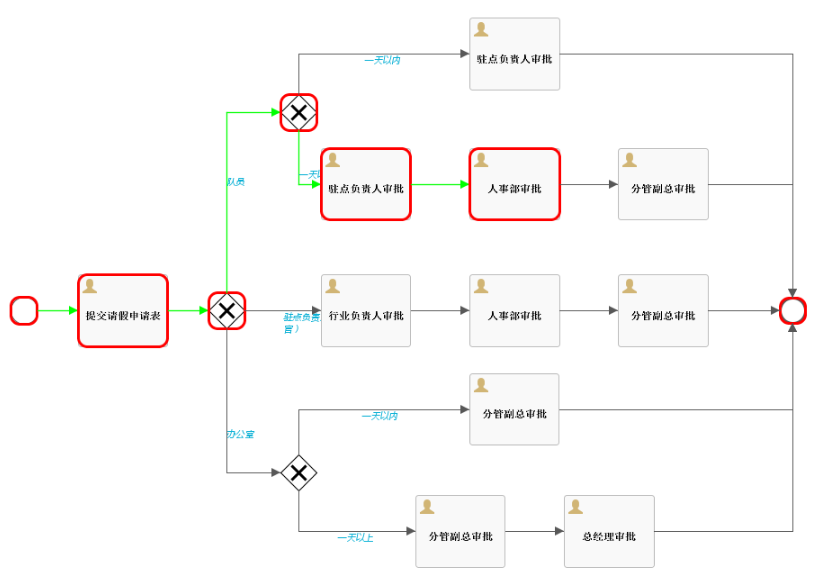
将 3 代码中的默认生成器替换为自定义的生成器即可
//DefaultProcessDiagramGenerator defaultProcessDiagramGenerator = new DefaultProcessDiagramGenerator();
MyDefaultProcessDiagramGenerator defaultProcessDiagramGenerator = new MyDefaultProcessDiagramGenerator();

版权声明:本文内容由互联网用户自发贡献,该文观点仅代表作者本人。本站仅提供信息存储空间服务,不拥有所有权,不承担相关法律责任。如发现本站有涉嫌侵权/违法违规的内容, 请联系我们举报,一经查实,本站将立刻删除。
发布者:全栈程序员-站长,转载请注明出处:https://javaforall.net/146271.html原文链接:https://javaforall.net



