
大家好,又见面了,我是你们的朋友全栈君。
一、cxfreeze基础
1、cxfreeze功能
python代码文件转exe方法有三种,分别是cx_freeze,py2exe,PyInstaller,这三种方式各有千秋,本人只用过py2exe和cxfreeze,这里重点说明cxfreeze。
2、安装包下载地址
https://sourceforge.net/projects/cx-freeze/files/
3、cxfree的官方说明文档
http://cx-freeze.readthedocs.io/en/latest/distutils.html
二、cxfreeze使用方法
1、cxfreeze命令方法
cxfreeze etax.py –target-dir out/ #把etax.py 打包成etax.exe,放在out目录下
2、编写cxsetup.py编译脚本,然后用py去执行。
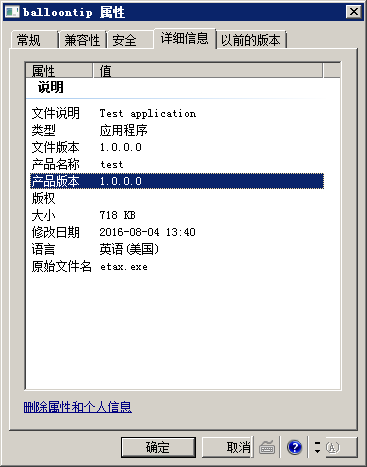
来一个简单的需求:编译etax.py生成test.exe文件。
a、步骤1,先编写一个cxsetup.py脚本文件


#cxsetup.py代码
from cx_Freeze import setup, Executable
setup(
name=”test”,
version=”1.0″,
description=”Test application”,
author=”zhongtang”,
executables=[Executable(“etax.py”)]
)
可以看到,cxsetup.py其实是一个py程序,该程序调用了cx_Freeze 包中的setup、Executable类。
然后用python执行cxsetup.py,就可以实现编译exe。
另外补充一点,cxsetup.py可以随意起名,默认都叫xxsetup.py
编译后的文件属性如下:
b、步骤2,执行py命令
#build方式打包成exe文件,可以脱离python环境运行
python cxsetup.py build
#bdist_msi方式可以打包成windows下msi格式的安装包文件
python cxsetup.py bdist_msi
三、cxsetup.py程序的进阶写法
还是以一个实例说明,需求如下:
1、et是一个基于wxpython编写的图形界面的小程序
2、et中使用了ini配置文件,文件名为et.ini
3、et中使用了PIL类,并使用图片文件et.jpg
4、et程序一共包含4个文件,主程序名为eTMain.py
5、打包py成exe,脱离python环境运行
6、生成windows下的msi安装包,该安装包运行后会安装桌面快捷方式、开始菜单快捷方式、删除程序的快捷方式,并且开始菜单有子目录。
上cxsetup.py代码
#coding=utf-8
# create by :joshua zou 2016.7.23
import sys
import traceback
from cx_Freeze import setup, Executable
import msilib
# Dependencies are automatically detected, but it might need fine tuning.
#中文需要显式用gbk方式编码
product_name = u‘异体‘.encode(‘gbk‘)
unproduct_name = u‘卸载异体‘.encode(‘gbk‘)
product_desc = u“异体客户端程序 Ver1.0“.encode(“gbk“)
#uuid叫通用唯一识别码,后面再卸载快捷方式中要用到
product_code = msilib.gen_uuid()
#主程序手动命名
target_name= ‘etMain.exe‘
build_exe_options = {
“include_files“:[“et.ini“,“et.jpg“,’data’],
#包含外围的ini、jpg文件,以及data目录下所有文件,以上所有的文件路径都是相对于cxsetup.py的路径。
“packages“: [“os“,“wx“], #包含用到的包
“includes“: [“PIL“,“traceback“],
“excludes“: [“tkinter“], #提出wx里tkinter包
“path“: sys.path, #指定上述的寻找路径
“icon“: “et.ico” #指定ico文件
};
#快捷方式表,这里定义了三个快捷方式
shortcut_table = [
#1、桌面快捷方式
(“DesktopShortcut“, # Shortcut
“DesktopFolder“, # Directory_ ,必须在Directory表中
product_name, # Name
“TARGETDIR“, # Component_,必须在Component表中
“[TARGETDIR]“+target_name, # Target
None, # Arguments
product_desc, # Description
None, # Hotkey
None, # Icon
None, # IconIndex
None, # ShowCmd
‘TARGETDIR‘ # WkDir
),
#2、开始菜单快捷方式
(“StartupShortcut“, # Shortcut
“MenuDir“, # Directory_
product_name, # Name
“TARGETDIR“, # Component_
“[TARGETDIR]“+target_name, # Target
None, # Arguments
product_desc, # Description
None, # Hotkey
None, # Icon
None, # IconIndex
None, # ShowCmd
‘TARGETDIR‘ # WkDir
),
#3、程序卸载快捷方式
(“UniShortcut“, # Shortcut
“MenuDir“, # Directory_
unproduct_name, # Name
“TARGETDIR“, # Component_
“[System64Folder]msiexec.exe“, # Target
r“/x“+product_code, # Arguments
product_desc, # Description None, # Hotkey None, # Icon None, # IconIndex None, # ShowCmd ‘TARGETDIR’ # WkDir ) ] #手动建设的目录,在这里定义。 ”’ 自定义目录说明: ============== 1、3个字段分别为 Directory,Directory_Parent,DefaultDir 2、字段1指目录名,可以随意命名,并在后面直接使用 3、字段2是指字段1的上级目录,上级目录本身也是需要预先定义,除了某些系统自动定义的目录,譬如桌面快捷方式中使用DesktopFolder 参考网址 https://msdn.microsoft.com/en-us/library/aa372452(v=vs.85).aspx ”’ directories = [ ( “ProgramMenuFolder”,”TARGETDIR”,”.” ), ( “MenuDir”, “ProgramMenuFolder”, product_name) ] # Now create the table dictionary # 也可把directories放到data里。 ”’ 快捷方式说明: ============ 1、windows的msi安装包文件,本身都带一个install database,包含很多表(用一个Orca软件可以看到)。 2、下面的 Directory、Shortcut都是msi数据库中的表,所以冒号前面的名字是固定的(貌似大小写是区分的)。 3、data节点其实是扩展很多自定义的东西,譬如前面的directories的配置,其实cxfreeze中代码的内容之一,就是把相关配置数据写入到msi数据库的对应表中 参考网址:https://msdn.microsoft.com/en-us/library/aa367441(v=vs.85).aspx ”’ msi_data = {#”Directory”:directories , “Shortcut”: shortcut_table } # Change some default MSI options and specify the use of the above defined tables #注意product_code是我扩展的,现有的官网cx_freeze不支持该参数,为此简单修改了cx_freeze包的代码,后面贴上修改的代码。 bdist_msi_options = { ‘data’: msi_data, ‘upgrade_code’: ‘{9f21e33d-48f7-cf34-33e9-efcfd80eed10}’, ‘add_to_path’: False, ‘directories’: directories, ‘product_code’: product_code, ‘initial_target_dir’: r'[ProgramFilesFolder]\%s’ % (product_name)} # GUI applications require a different base on Windows (the default is for a # console application). base = None; if sys.platform == “win32”: base = “Win32GUI” #简易方式定义快捷方式,放到Executeable()里。 #shortcutName = “AppName”, #shortcutDir = “ProgramMenuFolder” setup( name = “et”, author=’et china corp’, version = “1.0”, description = product_desc.decode(‘gbk’), options = {“build_exe”: build_exe_options, “bdist_msi”: bdist_msi_options}, executables = [Executable(“etMain.py”, targetName= target_name, compress = True, base=base) ])
四、补充说明
1、有关windows install msi 文件
可以去microsoft的官网学习学习,https://msdn.microsoft.com/en-us/library/aa372860(v=vs.85).aspx
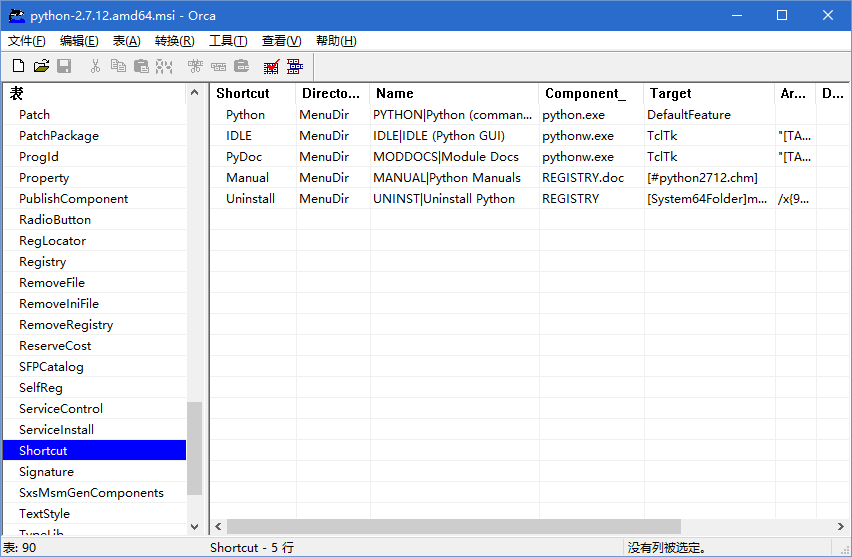
2、Orca编辑工具
查看修改msi文件数据库表的工具,Orca(msi编辑工具) 4.5.6 中文绿色版 。
绝对堪称神器,贴个图片,这玩意太棒了(本文很多写法就是仿照python2.7的安装文件的数据,结合cxfree代码琢磨出来的)。
3、扩展的cxfreeze代码
前文在cxsetup.exe中我提到自定义了product_code参数,这个参数在官方版本的cxfreeze是不支持的(官方版本的productcode是直接写死的代码msilib.gen_uuid())。
所以扩展product_code配置的目的,就是因为在卸载Shortcut,需要用到 msiexec.exe /x {productcode}。
修改原理:
将 msilib.gen_uuid()放到cxsetup.py中,并作为product_code参数传给cxfreeze。
在cxfreeze中判断product_code参数是否定义,没定义则默认取msilib.gen_uuid(),有定义则使用定义值。
修改点:
cx_Free/windist.py文件。
修改点1、
class bdist_msi(distutils.command.bdist_msi.bdist_msi):
user_options = distutils.command.bdist_msi.bdist_msi.user_options + [
(‘add-to-path=’, None, ‘add target dir to PATH environment variable’),
(‘upgrade-code=’, None, ‘upgrade code to use’),
(‘initial-target-dir=’, None, ‘initial target directory’),
(‘target-name=’, None, ‘name of the file to create’),
(‘directories=’, None, ‘list of 3-tuples of directories to create’),
(‘data=’, None, ‘dictionary of data indexed by table name’),
# add by joshua zou 2016.07.23
(‘product-code=’, None, ‘product code to use’)
]
修改点2、
def finalize_options(self):
distutils.command.bdist_msi.bdist_msi.finalize_options(self)
name = self.distribution.get_name()
fullname = self.distribution.get_fullname()
if self.initial_target_dir is None:
if distutils.util.get_platform() == “win-amd64”:
programFilesFolder = “ProgramFiles64Folder”
else:
programFilesFolder = “ProgramFilesFolder”
self.initial_target_dir = r”[%s]\%s” % (programFilesFolder, name)
if self.add_to_path is None:
self.add_to_path = False
if self.target_name is None:
self.target_name = fullname
if not self.target_name.lower().endswith(“.msi”):
platform = distutils.util.get_platform().replace(“win-“, “”)
self.target_name = “%s-%s.msi” % (self.target_name, platform)
if not os.path.isabs(self.target_name):
self.target_name = os.path.join(self.dist_dir, self.target_name)
if self.directories is None:
self.directories = []
if self.data is None:
self.data = {}
# add by joshua zou 2016.7
if self.product_code is None:
self.product_code = msilib.gen_uuid()
修改点3、
def initialize_options(self):
distutils.command.bdist_msi.bdist_msi.initialize_options(self)
self.upgrade_code = None
self.add_to_path = None
self.initial_target_dir = None
self.target_name = None
self.directories = None
self.data = None
# add by joshua zou 2016.7
self.product_code=None
代码点4、
def run(self):
if not self.skip_build:
self.run_command(‘build’)
install = self.reinitialize_command(‘install’, reinit_subcommands = 1)
install.prefix = self.bdist_dir
install.skip_build = self.skip_build
install.warn_dir = 0
distutils.log.info(“installing to %s”, self.bdist_dir)
install.ensure_finalized()
install.run()
self.mkpath(self.dist_dir)
fullname = self.distribution.get_fullname()
if os.path.exists(self.target_name):
os.unlink(self.target_name)
metadata = self.distribution.metadata
author = metadata.author or metadata.maintainer or “UNKNOWN”
version = metadata.get_version()
sversion = “%d.%d.%d” % \
distutils.version.StrictVersion(version).version
”’
modified by joshua zou 2016.7
self.db = msilib.init_database(self.target_name, msilib.schema,
self.distribution.metadata.name, msilib.gen_uuid(), sversion,
author)
”’
self.db = msilib.init_database(self.target_name, msilib.schema,
self.distribution.metadata.name, self.product_code, sversion,
author)
msilib.add_tables(self.db, msilib.sequence)
完整源码

import distutils.errors
import distutils.util
import msilib
import os
__all__ = [ “bdist_msi” ]
# force the remove existing products action to happen first since Windows
# installer appears to be braindead and doesn’t handle files shared between
# different “products” very well
sequence = msilib.sequence.InstallExecuteSequence
for index, info in enumerate(sequence):
if info[0] == ‘RemoveExistingProducts‘:
sequence[index] = (info[0], info[1], 1450)
class bdist_msi(distutils.command.bdist_msi.bdist_msi):
user_options = distutils.command.bdist_msi.bdist_msi.user_options + [
(‘add-to-path=‘, None, ‘add target dir to PATH environment variable‘),
(‘upgrade-code=‘, None, ‘upgrade code to use‘),
(‘initial-target-dir=‘, None, ‘initial target directory‘),
(‘target-name=‘, None, ‘name of the file to create‘),
(‘directories=‘, None, ‘list of 3-tuples of directories to create‘),
(‘data=‘, None, ‘dictionary of data indexed by table name‘),
# add by joshua zou 2016.07.23
(‘product-code=‘, None, ‘product code to use‘)
]
x = y = 50
width = 370
height = 300
title = “[ProductName] Setup“
modeless = 1
modal = 3
def add_config(self, fullname):
if self.add_to_path:
msilib.add_data(self.db, ‘Environment‘,
[(“E_PATH“, “Path“, r“[~];[TARGETDIR]“, “TARGETDIR“)])
if self.directories:
msilib.add_data(self.db, “Directory“, self.directories)
msilib.add_data(self.db, ‘CustomAction‘,
[(“A_SET_TARGET_DIR“, 256 + 51, “TARGETDIR“,
self.initial_target_dir)])
msilib.add_data(self.db, ‘InstallExecuteSequence‘,
[(“A_SET_TARGET_DIR“, ‘TARGETDIR=””‘, 401)])
msilib.add_data(self.db, ‘InstallUISequence‘,
[(“PrepareDlg“, None, 140),
(“A_SET_TARGET_DIR“, ‘TARGETDIR=””‘, 401),
(“SelectDirectoryDlg“, “not Installed“, 1230),
(“MaintenanceTypeDlg“,
“Installed and not Resume and not Preselected“, 1250),
(“ProgressDlg“, None, 1280)
])
for index, executable in enumerate(self.distribution.executables):
if executable.shortcutName is not None \
and executable.shortcutDir is not None:
baseName = os.path.basename(executable.targetName)
msilib.add_data(self.db, “Shortcut“,
[(“S_APP_%s” % index, executable.shortcutDir,
executable.shortcutName, “TARGETDIR“,
“[TARGETDIR]%s” % baseName, None, None, None,
None, None, None, None)])
for tableName, data in self.data.items():
msilib.add_data(self.db, tableName, data)
def add_cancel_dialog(self):
dialog = msilib.Dialog(self.db, “CancelDlg“, 50, 10, 260, 85, 3,
self.title, “No“, “No“, “No“)
dialog.text(“Text“, 48, 15, 194, 30, 3,
“Are you sure you want to cancel [ProductName] installation?“)
button = dialog.pushbutton(“Yes“, 72, 57, 56, 17, 3, “Yes“, “No“)
button.event(“EndDialog“, “Exit“) button = dialog.pushbutton(“No”, 132, 57, 56, 17, 3, “No”, “Yes”) button.event(“EndDialog”, “Return”) def add_error_dialog(self): dialog = msilib.Dialog(self.db, “ErrorDlg”, 50, 10, 330, 101, 65543, self.title, “ErrorText”, None, None) dialog.text(“ErrorText”, 50, 9, 280, 48, 3, “”) for text, x in [(“No”, 120), (“Yes”, 240), (“Abort”, 0), (“Cancel”, 42), (“Ignore”, 81), (“Ok”, 159), (“Retry”, 198)]: button = dialog.pushbutton(text[0], x, 72, 81, 21, 3, text, None) button.event(“EndDialog”, “Error%s” % text) def add_exit_dialog(self): dialog = distutils.command.bdist_msi.PyDialog(self.db, “ExitDialog”, self.x, self.y, self.width, self.height, self.modal, self.title, “Finish”, “Finish”, “Finish”) dialog.title(“Completing the [ProductName] installer”) dialog.back(“< Back”, “Finish”, active = False) dialog.cancel(“Cancel”, “Back”, active = False) dialog.text(“Description”, 15, 235, 320, 20, 0x30003, “Click the Finish button to exit the installer.”) button = dialog.next(“Finish”, “Cancel”, name = “Finish”) button.event(“EndDialog”, “Return”) def add_fatal_error_dialog(self): dialog = distutils.command.bdist_msi.PyDialog(self.db, “FatalError”, self.x, self.y, self.width, self.height, self.modal, self.title, “Finish”, “Finish”, “Finish”) dialog.title(“[ProductName] installer ended prematurely”) dialog.back(“< Back”, “Finish”, active = False) dialog.cancel(“Cancel”, “Back”, active = False) dialog.text(“Description1”, 15, 70, 320, 80, 0x30003, “[ProductName] setup ended prematurely because of an error. ” “Your system has not been modified. To install this program ” “at a later time, please run the installation again.”) dialog.text(“Description2”, 15, 155, 320, 20, 0x30003, “Click the Finish button to exit the installer.”) button = dialog.next(“Finish”, “Cancel”, name = “Finish”) button.event(“EndDialog”, “Exit”) def add_files(self): db = self.db cab = msilib.CAB(“distfiles”) f = msilib.Feature(db, “default”, “Default Feature”, “Everything”, 1, directory=”TARGETDIR”) f.set_current() rootdir = os.path.abspath(self.bdist_dir) root = msilib.Directory(db, cab, None, rootdir, “TARGETDIR”, “SourceDir”) db.Commit() todo = [root] while todo: dir = todo.pop() for file in os.listdir(dir.absolute): if os.path.isdir(os.path.join(dir.absolute, file)): newDir = msilib.Directory(db, cab, dir, file, file, “%s|%s” % (dir.make_short(file), file)) todo.append(newDir) else: dir.add_file(file) cab.commit(db) def add_files_in_use_dialog(self): dialog = distutils.command.bdist_msi.PyDialog(self.db, “FilesInUse”, self.x, self.y, self.width, self.height, 19, self.title, “Retry”, “Retry”, “Retry”, bitmap = False) dialog.text(“Title”, 15, 6, 200, 15, 0x30003, r”{\DlgFontBold8}Files in Use”) dialog.text(“Description”, 20, 23, 280, 20, 0x30003, “Some files that need to be updated are currently in use.”) dialog.text(“Text”, 20, 55, 330, 50, 3, “The following applications are using files that need to be ” “updated by this setup. Close these applications and then ” “click Retry to continue the installation or Cancel to exit ” “it.”) dialog.control(“List”, “ListBox”, 20, 107, 330, 130, 7, “FileInUseProcess”, None, None, None) button = dialog.back(“Exit”, “Ignore”, name = “Exit”) button.event(“EndDialog”, “Exit”) button = dialog.next(“Ignore”, “Retry”, name = “Ignore”) button.event(“EndDialog”, “Ignore”) button = dialog.cancel(“Retry”, “Exit”, name = “Retry”) button.event(“EndDialog”, “Retry”) def add_maintenance_type_dialog(self): dialog = distutils.command.bdist_msi.PyDialog(self.db, “MaintenanceTypeDlg”, self.x, self.y, self.width, self.height, self.modal, self.title, “Next”, “Next”, “Cancel”) dialog.title(“Welcome to the [ProductName] Setup Wizard”) dialog.text(“BodyText”, 15, 63, 330, 42, 3, “Select whether you want to repair or remove [ProductName].”) group = dialog.radiogroup(“RepairRadioGroup”, 15, 108, 330, 60, 3, “MaintenanceForm_Action”, “”, “Next”) group.add(“Repair”, 0, 18, 300, 17, “&Repair [ProductName]”) group.add(“Remove”, 0, 36, 300, 17, “Re&move [ProductName]”) dialog.back(“< Back”, None, active = False) button = dialog.next(“Finish”, “Cancel”) button.event(“[REINSTALL]”, “ALL”, ‘MaintenanceForm_Action=”Repair”‘, 5) button.event(“[Progress1]”, “Repairing”, ‘MaintenanceForm_Action=”Repair”‘, 6) button.event(“[Progress2]”, “repairs”, ‘MaintenanceForm_Action=”Repair”‘, 7) button.event(“Reinstall”, “ALL”, ‘MaintenanceForm_Action=”Repair”‘, 8) button.event(“[REMOVE]”, “ALL”, ‘MaintenanceForm_Action=”Remove”‘, 11) button.event(“[Progress1]”, “Removing”, ‘MaintenanceForm_Action=”Remove”‘, 12) button.event(“[Progress2]”, “removes”, ‘MaintenanceForm_Action=”Remove”‘, 13) button.event(“Remove”, “ALL”, ‘MaintenanceForm_Action=”Remove”‘, 14) button.event(“EndDialog”, “Return”, ‘MaintenanceForm_Action<>”Change”‘, 20) button = dialog.cancel(“Cancel”, “RepairRadioGroup”) button.event(“SpawnDialog”, “CancelDlg”) def add_prepare_dialog(self): dialog = distutils.command.bdist_msi.PyDialog(self.db, “PrepareDlg”, self.x, self.y, self.width, self.height, self.modeless, self.title, “Cancel”, “Cancel”, “Cancel”) dialog.text(“Description”, 15, 70, 320, 40, 0x30003, “Please wait while the installer prepares to guide you through” “the installation.”) dialog.title(“Welcome to the [ProductName] installer”) text = dialog.text(“ActionText”, 15, 110, 320, 20, 0x30003, “Pondering…”) text.mapping(“ActionText”, “Text”) text = dialog.text(“ActionData”, 15, 135, 320, 30, 0x30003, None) text.mapping(“ActionData”, “Text”) dialog.back(“Back”, None, active = False) dialog.next(“Next”, None, active = False) button = dialog.cancel(“Cancel”, None) button.event(“SpawnDialog”, “CancelDlg”) def add_progress_dialog(self): dialog = distutils.command.bdist_msi.PyDialog(self.db, “ProgressDlg”, self.x, self.y, self.width, self.height, self.modeless, self.title, “Cancel”, “Cancel”, “Cancel”, bitmap = False) dialog.text(“Title”, 20, 15, 200, 15, 0x30003, r”{\DlgFontBold8}[Progress1] [ProductName]”) dialog.text(“Text”, 35, 65, 300, 30, 3, “Please wait while the installer [Progress2] [ProductName].”) dialog.text(“StatusLabel”, 35, 100 ,35, 20, 3, “Status:”) text = dialog.text(“ActionText”, 70, 100, self.width – 70, 20, 3, “Pondering…”) text.mapping(“ActionText”, “Text”) control = dialog.control(“ProgressBar”, “ProgressBar”, 35, 120, 300, 10, 65537, None, “Progress done”, None, None) control.mapping(“SetProgress”, “Progress”) dialog.back(“< Back”, “Next”, active = False) dialog.next(“Next >”, “Cancel”, active = False) button = dialog.cancel(“Cancel”, “Back”) button.event(“SpawnDialog”, “CancelDlg”) def add_properties(self): metadata = self.distribution.metadata props = [ (‘DistVersion’, metadata.get_version()), (‘DefaultUIFont’, ‘DlgFont8’), (‘ErrorDialog’, ‘ErrorDlg’), (‘Progress1’, ‘Install’), (‘Progress2’, ‘installs’), (‘MaintenanceForm_Action’, ‘Repair’), (‘ALLUSERS’, ‘1’) ] email = metadata.author_email or metadata.maintainer_email if email: props.append((“ARPCONTACT”, email)) if metadata.url: props.append((“ARPURLINFOABOUT”, metadata.url)) if self.upgrade_code is not None: props.append((“UpgradeCode”, self.upgrade_code)) msilib.add_data(self.db, ‘Property’, props) def add_select_directory_dialog(self): dialog = distutils.command.bdist_msi.PyDialog(self.db, “SelectDirectoryDlg”, self.x, self.y, self.width, self.height, self.modal, self.title, “Next”, “Next”, “Cancel”) dialog.title(“Select destination directory”) dialog.back(“< Back”, None, active = False) button = dialog.next(“Next >”, “Cancel”) button.event(“SetTargetPath”, “TARGETDIR”, ordering = 1) button.event(“SpawnWaitDialog”, “WaitForCostingDlg”, ordering = 2) button.event(“EndDialog”, “Return”, ordering = 3) button = dialog.cancel(“Cancel”, “DirectoryCombo”) button.event(“SpawnDialog”, “CancelDlg”) dialog.control(“DirectoryCombo”, “DirectoryCombo”, 15, 70, 272, 80, 393219, “TARGETDIR”, None, “DirectoryList”, None) dialog.control(“DirectoryList”, “DirectoryList”, 15, 90, 308, 136, 3, “TARGETDIR”, None, “PathEdit”, None) dialog.control(“PathEdit”, “PathEdit”, 15, 230, 306, 16, 3, “TARGETDIR”, None, “Next”, None) button = dialog.pushbutton(“Up”, 306, 70, 18, 18, 3, “Up”, None) button.event(“DirectoryListUp”, “0”) button = dialog.pushbutton(“NewDir”, 324, 70, 30, 18, 3, “New”, None) button.event(“DirectoryListNew”, “0”) def add_text_styles(self): msilib.add_data(self.db, ‘TextStyle’, [(“DlgFont8”, “Tahoma”, 9, None, 0), (“DlgFontBold8”, “Tahoma”, 8, None, 1), (“VerdanaBold10”, “Verdana”, 10, None, 1), (“VerdanaRed9”, “Verdana”, 9, 255, 0) ]) def add_ui(self): self.add_text_styles() self.add_error_dialog() self.add_fatal_error_dialog() self.add_cancel_dialog() self.add_exit_dialog() self.add_user_exit_dialog() self.add_files_in_use_dialog() self.add_wait_for_costing_dialog() self.add_prepare_dialog() self.add_select_directory_dialog() self.add_progress_dialog() self.add_maintenance_type_dialog() def add_upgrade_config(self, sversion): if self.upgrade_code is not None: msilib.add_data(self.db, ‘Upgrade’, [(self.upgrade_code, None, sversion, None, 513, None, “REMOVEOLDVERSION”), (self.upgrade_code, sversion, None, None, 257, None, “REMOVENEWVERSION”) ]) def add_user_exit_dialog(self): dialog = distutils.command.bdist_msi.PyDialog(self.db, “UserExit”, self.x, self.y, self.width, self.height, self.modal, self.title, “Finish”, “Finish”, “Finish”) dialog.title(“[ProductName] installer was interrupted”) dialog.back(“< Back”, “Finish”, active = False) dialog.cancel(“Cancel”, “Back”, active = False) dialog.text(“Description1”, 15, 70, 320, 80, 0x30003, “[ProductName] setup was interrupted. Your system has not ” “been modified. To install this program at a later time, ” “please run the installation again.”) dialog.text(“Description2”, 15, 155, 320, 20, 0x30003, “Click the Finish button to exit the installer.”) button = dialog.next(“Finish”, “Cancel”, name = “Finish”) button.event(“EndDialog”, “Exit”) def add_wait_for_costing_dialog(self): dialog = msilib.Dialog(self.db, “WaitForCostingDlg”, 50, 10, 260, 85, self.modal, self.title, “Return”, “Return”, “Return”) dialog.text(“Text”, 48, 15, 194, 30, 3, “Please wait while the installer finishes determining your ” “disk space requirements.”) button = dialog.pushbutton(“Return”, 102, 57, 56, 17, 3, “Return”, None) button.event(“EndDialog”, “Exit”) def finalize_options(self): distutils.command.bdist_msi.bdist_msi.finalize_options(self) name = self.distribution.get_name() fullname = self.distribution.get_fullname() if self.initial_target_dir is None: if distutils.util.get_platform() == “win-amd64”: programFilesFolder = “ProgramFiles64Folder” else: programFilesFolder = “ProgramFilesFolder” self.initial_target_dir = r”[%s]\%s” % (programFilesFolder, name) if self.add_to_path is None: self.add_to_path = False if self.target_name is None: self.target_name = fullname if not self.target_name.lower().endswith(“.msi”): platform = distutils.util.get_platform().replace(“win-“, “”) self.target_name = “%s-%s.msi” % (self.target_name, platform) if not os.path.isabs(self.target_name): self.target_name = os.path.join(self.dist_dir, self.target_name) if self.directories is None: self.directories = [] if self.data is None: self.data = {} # add by joshua zou 2016.7 if self.product_code is None: self.product_code = msilib.gen_uuid() def initialize_options(self): distutils.command.bdist_msi.bdist_msi.initialize_options(self) self.upgrade_code = None self.add_to_path = None self.initial_target_dir = None self.target_name = None self.directories = None self.data = None # add by joshua zou 2016.7 self.product_code=None def run(self): if not self.skip_build: self.run_command(‘build’) install = self.reinitialize_command(‘install’, reinit_subcommands = 1) install.prefix = self.bdist_dir install.skip_build = self.skip_build install.warn_dir = 0 distutils.log.info(“installing to %s”, self.bdist_dir) install.ensure_finalized() install.run() self.mkpath(self.dist_dir) fullname = self.distribution.get_fullname() if os.path.exists(self.target_name): os.unlink(self.target_name) metadata = self.distribution.metadata author = metadata.author or metadata.maintainer or “UNKNOWN” version = metadata.get_version() sversion = “%d.%d.%d” % \ distutils.version.StrictVersion(version).version ”’ modified by joshua zou 2016.7 self.db = msilib.init_database(self.target_name, msilib.schema, self.distribution.metadata.name, msilib.gen_uuid(), sversion, author) ”’ self.db = msilib.init_database(self.target_name, msilib.schema, self.distribution.metadata.name, self.product_code, sversion, author) msilib.add_tables(self.db, msilib.sequence) self.add_properties() self.add_config(fullname) self.add_upgrade_config(sversion) self.add_ui() self.add_files() self.db.Commit() if not self.keep_temp: distutils.dir_util.remove_tree(self.bdist_dir, dry_run = self.dry_run)
五、总结
至此,cxfreeze的用法基本全了,更深入的用法,建议大家去阅读cxfreeze的源码。
学习python,个人觉得有几点非常关键:
一、查看官方帮助文档,二、阅读源码,三、借助google(百度上资料太少,而且相对不准确)
以上。
发布者:全栈程序员-站长,转载请注明出处:https://javaforall.net/155147.html原文链接:https://javaforall.net



