
大家好,又见面了,我是你们的朋友全栈君。
目录
一、两者不同
- m3u8 是一种基于 HTTP Live Streaming 文件视频格式,它主要是存放整个视频的基本信息和分片(Segment)组成。
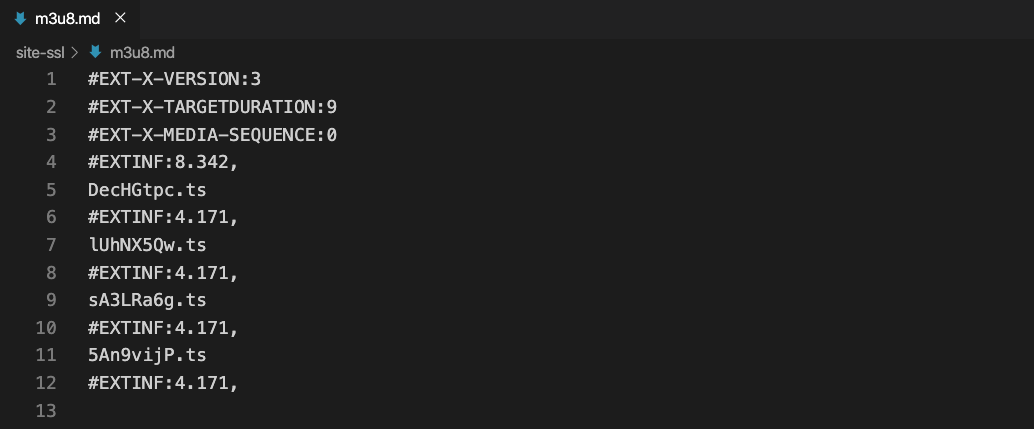
- 相信大家都看过m3u8格式文件的内容,我们直来对比一下有什么不同,然后教大家怎么用python多进程实现下载并且合并。
-
非加密 的m3u8文件

-
加密 的m3u8文件
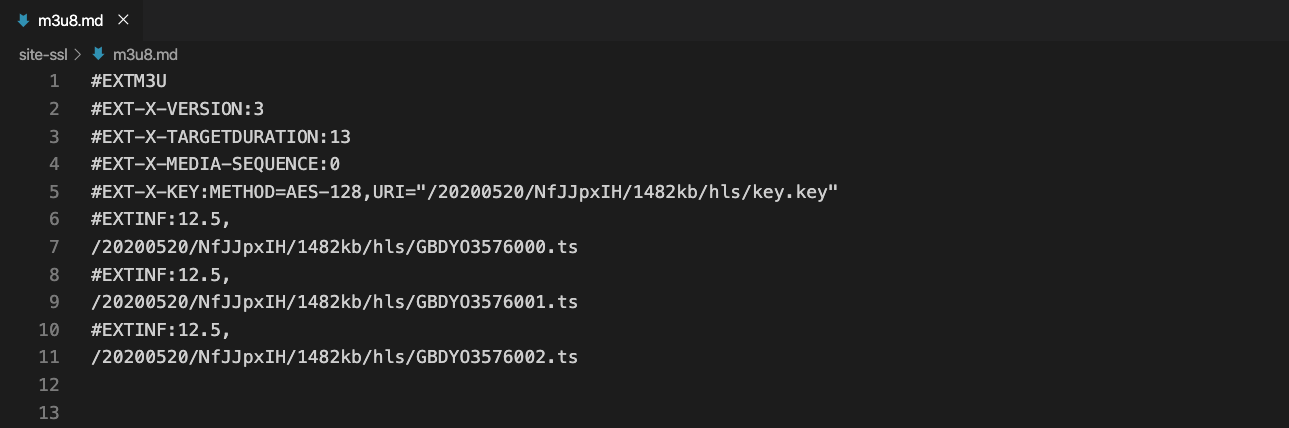
- 相信眼尖的小伙伴已经看出了2个内容的不同之处,对的,其实区别就在加密文件的第 5 行的 #EXT-X-KEY 的信息
- 这个信息就是用来视频内容解密的,其实里面的内容大多是一段字符串,其实也就是解密时候的KEY值
- 那么这个怎么去解密呢,我们暂时不管,我们先来解释一下每行的意思
- 第一行: #EXTM3U 声明这是一个m3u8的文件
- 第二行: #EXT-X-VERSION 协议的版本号
- 第三行: #EXT-X-MEDIA-SEQUENCE 每一个media URI 在 PlayList中只有唯一的序号,相邻之间序号+1
- 第四行: #EXT-X-KEY 记录了加密的方式,一般是AES-128以及加密的KEY信息
- 第五行: #EXTINF 表示这段视频碎片的持续时间有多久
- 第六行: sA3LRa6g.ts 视频片段的名称,获取的时候需要拼接上域名,找到文件的正确的路径
二、爬虫源码
#!/usr/bin/env python
# encoding: utf-8
'''
#-------------------------------------------------------------------
#                   CONFIDENTIAL --- CUSTOM STUDIOS
#-------------------------------------------------------------------
#
#                   @Project Name : 多进程M3U8视频下载助手
#
#                   @File Name    : main.py
#
#                   @Programmer   : Felix
#
#                   @Start Date   : 2020/7/30 14:42
#
#                   @Last Update  : 2020/7/30 14:42
#
#-------------------------------------------------------------------
'''
import requests, os, platform, time
from Crypto.Cipher import AES
import multiprocessing
from retrying import retry

class M3u8:
    '''
     This is a main Class, the file contains all documents.
     One document contains paragraphs that have several sentences
     It loads the original file and converts the original file to new content
     Then the new content will be saved by this class
    '''
    def __init__(self):
        '''
        Initial the custom file by self
        '''
        self.encrypt = False
        self.headers = {
            "User-Agent": "Mozilla/5.0 (Windows NT 6.1; Win64; x64; rv:78.0) Gecko/20100101 Firefox/78.0"
        }

    def hello(self):
        '''
        This is a welcome speech
        :return: self
        '''
        print("*" * 50)
        print(' ' * 15 + 'm3u8链接下载小助手')
        print(' ' * 5 + '作者: Felix  Date: 2020-05-20 13:14')
        print(' ' * 10 + '适用于非加密 | 加密链接')
        print("*" * 50)
        return self

    def checkUrl(self, url):
        '''
        Determine if it is a available link of m3u8
        :return: bool
        '''
        if '.m3u8' not in url:
            return False
        elif not url.startswith('http'):
            return False
        else:
            return True

    def parse(self, url):
        '''
        Analyze a link of m3u8
        :param url: string, the link need to analyze
        :return: list
        '''
        container = list()
        response = self.request(url).text.split('\n')
        for ts in response:
            if '.ts' in ts:
                container.append(ts)
            if '#EXT-X-KEY:' in ts:
                self.encrypt = True
        return container

    def getEncryptKey(self, url):
        '''
        Access to the secret key
        :param url: string, Access to the secret key by the url
        :return: string
        '''
        encryptKey = self.request("{}/key.key".format(url)).content
        return encryptKey

    def aesDecode(self, data, key):
        '''
        Decode the data
        :param data: stream, the data need to decode
        :param key: secret key
        :return: decode the data
        '''
        crypt = AES.new(key, AES.MODE_CBC, key)
        plain_text = crypt.decrypt(data)
        return plain_text.rstrip(b'\0')

    def download(self, queue, sort, file, downPath, url):
        '''
        Download the debris of video
        :param queue: the queue
        :param sort: which number debris
        :param file: the link of debris
        :param downPath: the path to save debris
        :param url: the link of m3u8
        :return: None
        '''
        queue.put(file)

        baseUrl = '/'.join(url.split("/")[:-1])

        if self.encrypt:
            self.encryptKey = self.getEncryptKey(baseUrl)

        if not file.startswith("http"):
            file = baseUrl + '/' +file

        debrisName = "{}/{}.ts".format(downPath, sort)

        if not os.path.exists(debrisName):
            response = self.request(file)
            with open(debrisName, "wb") as f:
                if self.encrypt:
                    data = self.aesDecode(response.content, self.encryptKey)
                    f.write(data)
                    f.flush()
                else:
                    f.write(response.content)
                    f.flush()

    def progressBar(self, queue, count):
        '''
        Show progress bar
        :param queue: the queue
        :param count: the number count of debris
        :return: None
        '''
        print('---一共{}个碎片...'.format(count))
        offset = 0
        while True:
            offset += 1
            file = queue.get()
            rate = offset * 100 / count
            print("\r%s下载成功,当前进度%0.2f%%, 第%s/%s个" % (file, rate, offset, count))
            if offset >= count:
                break

    @retry(stop_max_attempt_number=3)
    def request(self, url, params):
        '''
        Send a request
        :param url: the url of request
        :param params: the params of request
        :return: the result of request
        '''
        response = requests.get(url, params=params, headers=self.headers, timeout=10)
        assert response.status_code == 200
        return response

    def run(self):
        '''
        program entry, Input basic information
        '''
        downPath = str(input("碎片的保存路径, 默认./Download:")) or "./Download"
        savePath = str(input("视频的保存路径, 默认./Complete:")) or "./Complete"
        clearDebris = bool(input("是否清除碎片, 默认True:")) or True
        saveSuffix = str(input("视频格式, 默认ts:")) or "ts"

        while True:
            url = str(input("请输入合法的m3u8链接:"))
            if self.checkUrl(url):
                break

        # create a not available folder
        if not os.path.exists(downPath):
            os.mkdir(downPath)

        if not os.path.exists(savePath):
            os.mkdir(savePath)

        # start analyze a link of m3u8
        print('---正在分析链接...')
        container = self.parse(url)
        print('---链接分析成功...')

        # run processing to do something
        print('---进程开始运行...')
        po = multiprocessing.Pool(30)
        queue = multiprocessing.Manager().Queue()
        size = 0
        for file in container:
            sort = str(size).zfill(5)
            po.apply_async(self.download, args=(queue, sort, file, downPath, url,))
            size += 1

        po.close()
        self.progressBar(queue, len(container))
        print('---进程运行结束...')

        # handler debris
        sys = platform.system()
        saveName = time.strftime("%Y%m%d_%H%M%S", time.localtime())

        print('---文件合并清除...')
        if sys == "Windows":
            os.system("copy /b {}/*.ts {}/{}.{}".format(downPath, savePath, saveName, saveSuffix))
            if clearDebris:
                os.system("rmdir /s/q {}".format(downPath))
        else:
            os.system("cat {}/*.ts>{}/{}.{}".format(downPath, savePath, saveName, saveSuffix))
            if clearDebris:
                os.system("rm -rf {}".format(downPath))
        print('---合并清除完成...')
        print('---任务下载完成...')
        print('---欢迎再次使用...')

if __name__ == "__main__":
    M3u8().hello().run()
三、爬虫内容详解
初始化m3u8下载类
if __name__ == "__main__":
    M3u8().hello().run()
-
hello方法
def hello(self):
    '''
    This is a welcome speech
    :return: self
    '''
    print("*" * 50)
    print(' ' * 15 + 'm3u8链接下载小助手')
    print(' ' * 5 + '作者: Felix  Date: 2020-05-20 13:14')
    print(' ' * 10 + '适用于非加密 | 加密链接')
    print("*" * 50)
return self-
run方法
- hello方法其实就是欢迎语,介绍了一些基本信息
- 如果链式调用的话,必须返回 self,初学者需要注意
def run(self):
    '''
    program entry, Input basic information
    '''
    downPath = str(input("碎片的保存路径, 默认./Download:")) or "./Download"
    savePath = str(input("视频的保存路径, 默认./Complete:")) or "./Complete"
    clearDebris = bool(input("是否清除碎片, 默认True:")) or True
    saveSuffix = str(input("视频格式, 默认ts:")) or "ts"

    while True:
    url = str(input("请输入合法的m3u8链接:"))
    if self.checkUrl(url):
        break

    # create a not available folder
    if not os.path.exists(downPath):
        os.mkdir(downPath)

    if not os.path.exists(savePath):
os.mkdir(savePath)- 就是提示一些保存碎片的路径,合并完成后是否需要进行碎片清除
- 保存的视频格式,默认是ts,因为ts一般的视频软件都可以打开,如果不放心可以输入mp4
- 合法的连接这里调用了一个方法,checkUrl 其实就是检测下是否是合格的m3u8链接
- 然后创建了一些不存在的文件夹
def checkUrl(self, url):
    '''
    Determine if it is a available link of m3u8
    :return: bool
    '''
    if '.m3u8' not in url:
        return False
    elif not url.startswith('http'):
        return False
    else:
return True- 这里我简单的判断了下链接是否是m3u8
- 首先链接要是m3u8结尾的
- 其次链接需要是http打头
-
分析输入的链接
# start analyze a link of m3u8
print('---正在分析链接...')
container = self.parse(url)
print('---链接分析成功...')
def parse(self, url):
'''
Analyze a link of m3u8
:param url: string, the link need to analyze
:return: list
'''
container = list()
response = self.request(url).text.split('\n')
for ts in response:
if '.ts' in ts:
container.append(ts)
if '#EXT-X-KEY:' in ts:
self.encrypt = True
return container- 请求链接,判断是否是加密m3u8还是非加密
- 将所有碎片文件进行返回
-
打开多进程,开启进程池,加速下载速度
# run processing to do something
print('---进程开始运行...')
po = multiprocessing.Pool(30)
queue = multiprocessing.Manager().Queue()
size = 0
for file in container:
    sort = str(size).zfill(5)
    po.apply_async(self.download, args=(queue, sort, file, downPath, url,))
    size += 1

po.close()- zfill方法,其实就是在数字前填充0,因为我希望下载的文件是00001.ts,00002.ts这样有序的,最后合并的时候才不会混乱
- queue 是多进程共享变量的一种方式,用来显示下载的进度条
-
download方法
def download(self, queue, sort, file, downPath, url):
    '''
    Download the debris of video
    :param queue: the queue
    :param sort: which number debris
    :param file: the link of debris
    :param downPath: the path to save debris
    :param url: the link of m3u8
    :return: None
    '''
    queue.put(file)

    baseUrl = '/'.join(url.split("/")[:-1])

    if self.encrypt:
        self.encryptKey = self.getEncryptKey(baseUrl)

    if not file.startswith("http"):
    file = baseUrl + '/' +file

    debrisName = "{}/{}.ts".format(downPath, sort)

    if not os.path.exists(debrisName):
        response = self.request(file)
        with open(debrisName, "wb") as f:
            if self.encrypt:
                data = self.aesDecode(response.content, self.encryptKey)
                f.write(data)
                f.flush()
            else:
                f.write(response.content)
f.flush()-
一开始就加入队列,是为了防止文件之前已经存在的情况下,导致长度不对
-
如果是加密m3u8就通过 getEncryptKey 去获取KEY值
-
写入文件的时候如果是加密的,就将文件进行 aesDecode 方法解密,具体请看源码
-
进度条显示
def progressBar(self, queue, count):
    '''
    Show progress bar
    :param queue: the queue
    :param count: the number count of debris
    :return: None
    '''
    print('---一共{}个碎片...'.format(count))
    offset = 0
    while True:
        offset += 1
        file = queue.get()
        rate = offset * 100 / count
        print("\r%s下载成功,当前进度%0.2f%%, 第%s/%s个" % (file, rate, offset, count))
        if offset >= count:
break - 其实就是通过当前的下载到第几个碎片,和所有碎片的数量进行比较
- 一旦大于等于总数的时候,就退出循环
-
文件合并,碎片清除
- 这里兼容了 window 和 linux 下的合并清除命令
- 是否清除,刚开始的选择中可设置
# handler debris
sys = platform.system()
saveName = time.strftime("%Y%m%d_%H%M%S", time.localtime())

print('---文件合并清除...')
if sys == "Windows":
    os.system("copy /b {}/*.ts {}/{}.{}".format(downPath, savePath, saveName, saveSuffix))
    if clearDebris:
        os.system("rmdir /s/q {}".format(downPath))
else:
    os.system("cat {}/*.ts>{}/{}.{}".format(downPath, savePath, saveName, saveSuffix))
        if clearDebris:
            os.system("rm -rf {}".format(downPath))
print('---合并清除完成...')
print('---任务下载完成...')
print('---欢迎再次使用...')
版权声明:本文内容由互联网用户自发贡献,该文观点仅代表作者本人。本站仅提供信息存储空间服务,不拥有所有权,不承担相关法律责任。如发现本站有涉嫌侵权/违法违规的内容, 请联系我们举报,一经查实,本站将立刻删除。
发布者:全栈程序员-站长,转载请注明出处:https://javaforall.net/161227.html原文链接:https://javaforall.net



