
大家好,又见面了,我是你们的朋友全栈君。如果您正在找激活码,请点击查看最新教程,关注关注公众号 “全栈程序员社区” 获取激活教程,可能之前旧版本教程已经失效.最新Idea2022.1教程亲测有效,一键激活。
Jetbrains全系列IDE使用 1年只要46元 售后保障 童叟无欺
前言
Docker的三大核心概念:镜像、容器、仓库。初学者对镜像和容器往往分不清楚,学过面向对象的应该知道类和实例,这跟面向对象里面的概念很相似
我们可以把镜像看作类,把容器看作类实例化后的对象。
| docker | 面向对象 |
|---|---|
| 镜像 | 类 |
| 容器 | 实例 |
当运行容器时,使用的镜像如果在本地中不存在,docker 就会自动从 docker 镜像仓库中下载,默认是从 Docker Hub 公共镜像源下载。
查看镜像列表
使用docker images查看本地已经下载的镜像
- REPOSITORY:表示镜像的仓库源
- TAG:镜像的标签,区分不同版本
- IMAGE ID:镜像ID,16进制组成,唯一标识
- CREATED:镜像创建时间
- SIZE:镜像大小
[root@jkc docker]# docker images
REPOSITORY                 TAG                 IMAGE ID            CREATED             SIZE
mysql                      5.7                 ae0658fdbad5        2 months ago        449MB
centos/python-36-centos7   latest              602660fa9b4e        4 months ago        650MB
training/webapp            latest              6fae60ef3446        5 years ago         349MB
我们本地下载的镜像文件是从仓库下载过来的,每个镜像在仓库源都有个名称,也就是 REPOSITORY,同一个镜像源可以有不同的版本,同标签(TAG)区分
下载镜像
直接使用 docker pull centos 默认是下载的最新的latest版本
[root@jkc docker]# docker pull centos
Using default tag: latest
latest: Pulling from library/centos
7a0437f04f83: Pull complete
Digest: sha256:5528e8b1b1719d34604c87e11dcd1c0a20bedf46e83b5632cdeac91b8c04efc1
Status: Downloaded newer image for centos:latest
docker.io/library/centos:latest
[root@jkc docker]# docker images
REPOSITORY                 TAG                 IMAGE ID            CREATED             SIZE
centos                     latest              300e315adb2f        6 weeks ago         209MB
mysql                      5.7                 ae0658fdbad5        2 months ago        449MB
centos/python-36-centos7   latest              602660fa9b4e        4 months ago        650MB
training/webapp            latest              6fae60ef3446        5 years ago         349MB
搜索镜像
docker search搜索相关的镜像文件
[root@jkc docker]# docker search centos
NAME                               DESCRIPTION                                     STARS               OFFICIAL            AUTOMATED
centos                             The official build of CentOS.                   6370                [OK]
ansible/centos7-ansible            Ansible on Centos7                              132                                     [OK]
consol/centos-xfce-vnc             Centos container with "headless" VNC session…   125                                     [OK]
jdeathe/centos-ssh                 OpenSSH / Supervisor / EPEL/IUS/SCL Repos - …   117                                     [OK]
centos/systemd                     systemd enabled base container.                 93                                      [OK]
centos/mysql-57-centos7            MySQL 5.7 SQL database server                   87
imagine10255/centos6-lnmp-php56    centos6-lnmp-php56                              58                                      [OK]
tutum/centos                       Simple CentOS docker image with SSH access      46
centos/postgresql-96-centos7       PostgreSQL is an advanced Object-Relational …   45
kinogmt/centos-ssh                 CentOS with SSH                                 29                                      [OK]
pivotaldata/centos-gpdb-dev        CentOS image for GPDB development. Tag names…   13
guyton/centos6                     From official centos6 container with full up…   10                                      [OK]
centos/tools                       Docker image that has systems administration…   7                                       [OK]
drecom/centos-ruby                 centos ruby                                     6                                       [OK]
pivotaldata/centos                 Base centos, freshened up a little with a Do…   5
pivotaldata/centos-gcc-toolchain   CentOS with a toolchain, but unaffiliated wi…   3
darksheer/centos                   Base Centos Image -- Updated hourly             3                                       [OK]
pivotaldata/centos-mingw           Using the mingw toolchain to cross-compile t…   3
mamohr/centos-java                 Oracle Java 8 Docker image based on Centos 7    3                                       [OK]
indigo/centos-maven                Vanilla CentOS 7 with Oracle Java Developmen…   1                                       [OK]
mcnaughton/centos-base             centos base image                               1                                       [OK]
blacklabelops/centos               CentOS Base Image! Built and Updates Daily!     1                                       [OK]
pivotaldata/centos6.8-dev          CentosOS 6.8 image for GPDB development         0
pivotaldata/centos7-dev            CentosOS 7 image for GPDB development           0
smartentry/centos                  centos with smartentry                          0                                       [OK]
如果我想下载一个centos7.5的镜像版本,该如何找到呢?
查找TAG版本
如果要找到指定的TAG版本,需打开docker官网https://hub.docker.com/search/?type=image,搜索框输入:centos搜索。
点击详情,找到TAGS,就可以看到不同的标签版本了
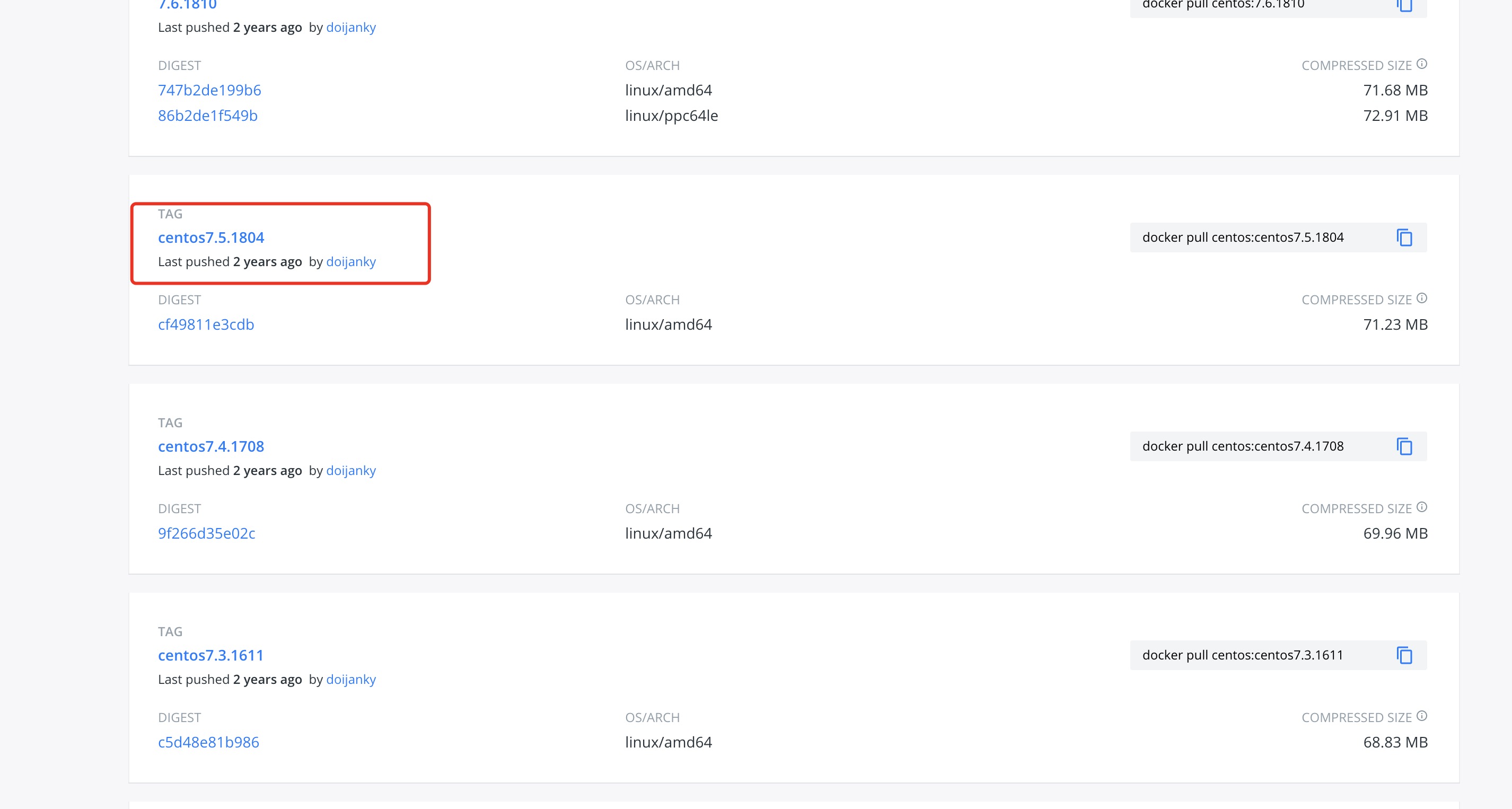

接下来指定TAG名称下载,后面加个冒号:标签名称
[root@jkc docker]# docker pull centos:centos7.5.1804
centos7.5.1804: Pulling from library/centos
5ad559c5ae16: Pull complete
Digest: sha256:7a45e4a1efbaafc1d9aa89925b6fdb33288a96d35ea0581412316e2f0ad3720a
Status: Downloaded newer image for centos:centos7.5.1804
docker.io/library/centos:centos7.5.1804
[root@jkc docker]# docker images
REPOSITORY                 TAG                 IMAGE ID            CREATED             SIZE
centos                     latest              300e315adb2f        6 weeks ago         209MB
mysql                      5.7                 ae0658fdbad5        2 months ago        449MB
centos/python-36-centos7   latest              602660fa9b4e        4 months ago        650MB
centos                     centos7.5.1804      cf49811e3cdb        22 months ago       200MB
training/webapp            latest              6fae60ef3446        5 years ago         349MB
[root@jkc docker]#
创建镜像
当我们从 docker 镜像仓库中下载的镜像不能满足我们的需求时,我们可以通过以下两种方式对镜像进行更改。
1、从已经创建的容器中更新镜像,并且提交这个镜像
2、使用 Dockerfile 指令来创建一个新的镜像
更新镜像
更新镜像之前,我们需要使用镜像来创建一个容器。
[root@jkc ~]# docker run -it training/webapp /bin/bash
root@182e335d9533:/opt/webapp#
在运行的容器内使用apt-get update命令进行更新。
在完成操作之后,输入 exit 命令来退出这个容器。
此时 ID 为 182e335d9533 的容器,是按我们的需求更改的容器。我们可以通过命令 docker commit 来提交容器副本。
[root@jkc ~]# docker commit -m="update" -a="jkc" 182e335d9533 training/webapp:v1
sha256:ada1265bb5ecb431565e24d7f8ff8c2f5f876896379df2db620913ee7fad0609
各个参数说明:
-m: 提交的描述信息
-a: 指定镜像作者
182e335d9533:容器 ID
training/webapp:v1 : 指定要创建的目标镜像名
我们可以使用 docker images 命令来查看我们的新镜像training/webapp:v1:
[root@jkc ~]# docker images
REPOSITORY                 TAG                 IMAGE ID            CREATED             SIZE
training/webapp            v1                  ada1265bb5ec        59 seconds ago      372MB
mysql                      5.7                 ae0658fdbad5        2 months ago        449MB
centos/python-36-centos7   latest              602660fa9b4e        4 months ago        650MB
easymock/easymock          1.6.0               193a7b904d4f        20 months ago       699MB
redis                      4.0.6               1e70071f4af4        3 years ago         107MB
mongo                      3.4.1               0dffc7177b06        4 years ago         402MB
training/webapp            latest              6fae60ef3446        5 years ago         349MB
使用我们的新镜像training/webapp来启动一个容器
[root@jkc ~]# docker run -it training/webapp:v1 /bin/bash
root@9df5ba988772:/opt/webapp#
构建镜像
这块需要Dockerfile的知识,我们后续另开一篇单独讲解
删除镜像
上面多了个7.5的TAG,并且IMAGE ID是重复的,可以使用docker rmi 删掉它,可以加-f参数强制删除
- -f :强制删除;
- –no-prune :不移除该镜像的过程镜像,默认移除;
[root@jkc docker]# docker rmi centos:7.5
Untagged: centos:7.5
[root@jkc docker]# docker images
REPOSITORY                 TAG                 IMAGE ID            CREATED             SIZE
centos                     v7.5                35297ad2b15c        4 minutes ago       200MB
centos                     latest              300e315adb2f        6 weeks ago         209MB
mysql                      5.7                 ae0658fdbad5        2 months ago        449MB
centos/python-36-centos7   latest              602660fa9b4e        4 months ago        650MB
centos                     centos7.5.1804      cf49811e3cdb        22 months ago       200MB
training/webapp            latest              6fae60ef3446        5 years ago         349MB
设置镜像TAG
我们可以用docker tag给镜像取个新的tag名称, 这里的id是镜像的id
[root@jkc docker]# docker tag 35297ad2b15c  centos:v7.5
[root@jkc docker]# docker images
REPOSITORY                 TAG                 IMAGE ID            CREATED             SIZE
centos                     7.5                 35297ad2b15c        3 minutes ago       200MB
centos                     v7.5                35297ad2b15c        3 minutes ago       200MB
centos                     latest              300e315adb2f        6 weeks ago         209MB
mysql                      5.7                 ae0658fdbad5        2 months ago        449MB
centos/python-36-centos7   latest              602660fa9b4e        4 months ago        650MB
centos                     centos7.5.1804      cf49811e3cdb        22 months ago       200MB
training/webapp            latest              6fae60ef3446        5 years ago         349MB
这时候会多了一个v7.5的标签
发布者:全栈程序员-站长,转载请注明出处:https://javaforall.net/166250.html原文链接:https://javaforall.net



