
一、Petshop4解决方案
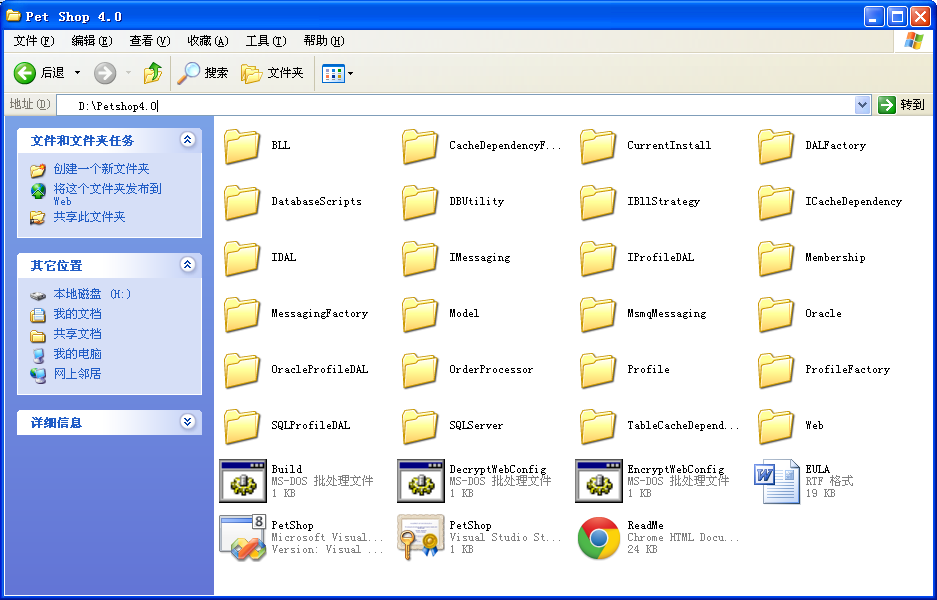

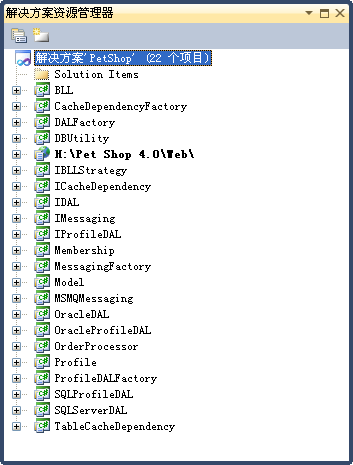
Petshop4代码和数据库:下载
Petshop4详解:下载
安装要求:
Operating System: Windows XP SP2 or Windows Server 2003
Microsoft.NET Framework 2.0
Microsoft SQL Server 2005, SQL Server Express, or Oracle 10g
Microsoft Internet Explorer 6 or greater
Microsoft Visual Studio® .NET 2005
后续步骤:
1、手动编译:运行<Pet Shop 4 Install Folder>\Build.bat,将编译整个解决方案。
2、用VisualStudio自带的浏览器运行:
(1)打开解决方案。Start Menu | All Programs | Microsoft .NET Pet Shop 4 | Petshop.sln
(2)设置Web项目为启动项目
(3)右键单击“解决方案”节点,点“构建”
(4)打开Web项目,右键单击“Default.aspx”,点“在浏览器中查看”
(5)如果安装了Membership/Profile数据库,系统会创建12个帐号,即demo, AdamBarr, KimAbercrombie,RobYoung, TomYoutsey, GaryWYukish, RobCaron, KarinZimprich, RandallBoseman, KevinKennedy, DianeTibbott, 或GarrettYoung。密码是pass@word1
3、运行在windows server 2003的IIS上
(1)先解密web.config文件中的连接串。
点击<Pet Shop 4 Install Folder>\DecryptWebConfig.bat解密连接串。不解密的话IIS会报错。
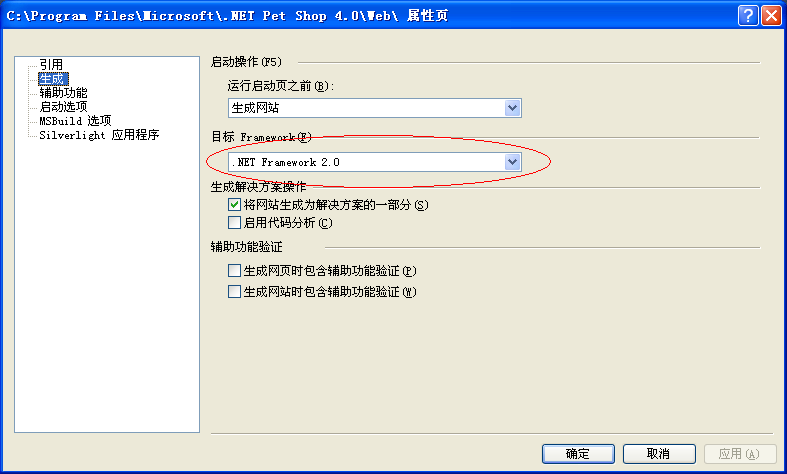
(2)由于2003IIS的.net版本最高为2.0。笔者在编译Petshop的Web项目时,需要设置属性页的“目标Framework”为2.0。如下图:
(3)视情况修改web.config中的数据库连接串,确保能正确连上数据库。
(4)将Web文件夹实施到IIS中。
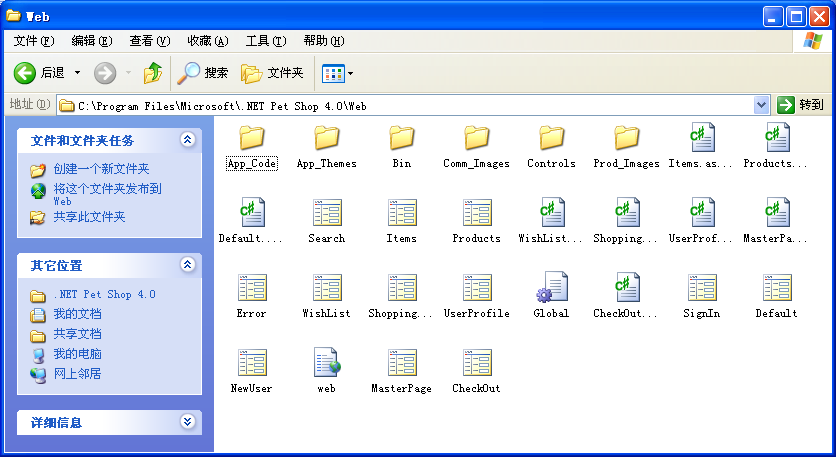
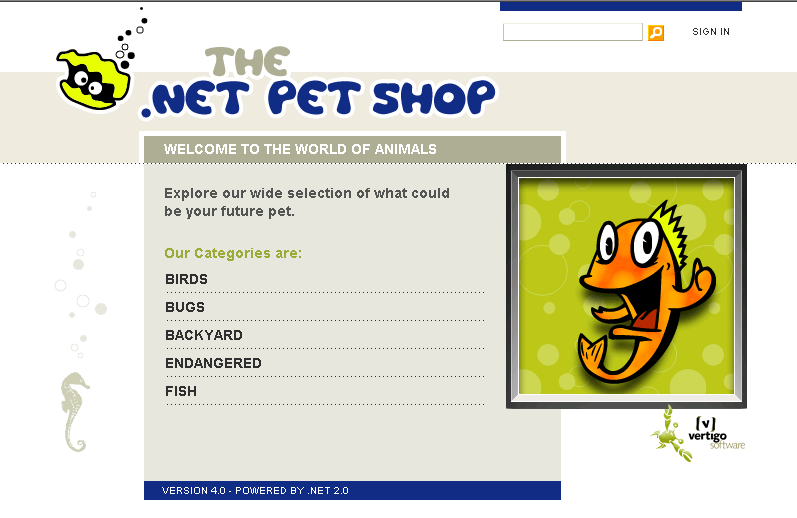
运行效果如下:
二、Petshop4体系结构
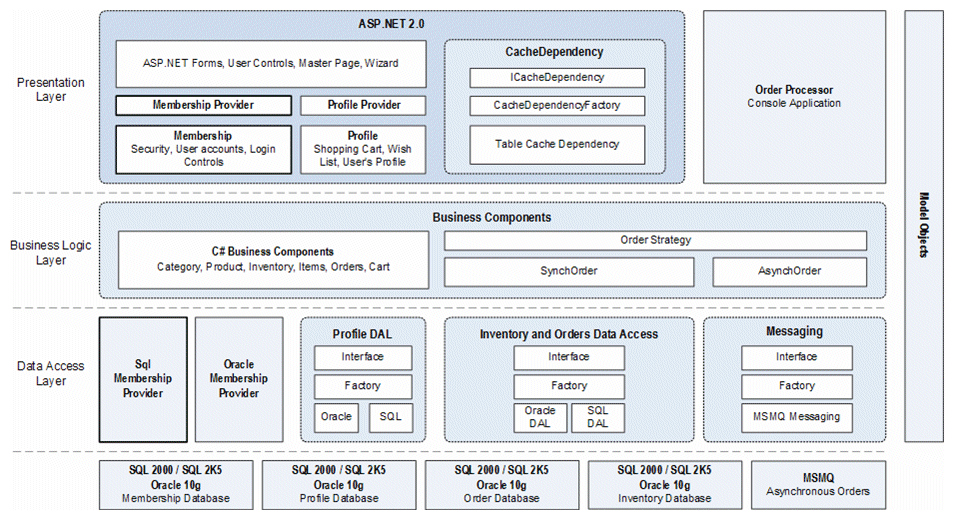
三、Petshop三层结构总结
1、表记录 –> 实体类
将Category数据库表中的单个记录定义为一个类(叫产品实体),类的属性就是数据库表中每个记录的字段。产品实体承载数据表的记录。所有实体类的集合形成了Petshop中Model模块。Category实体的代码如下所示:
namespace PetShop.Model {
public
class CategoryInfo {
//属性
private
string id;
private
string name;
private
string description;
public CategoryInfo() { }
public CategoryInfo(
string id,
string name,
string description) {
this.id = id;
this.name = name;
this.description = description;
}
//
属性的get操作
public
string Id {
get {
return id; }
}
public
string Name {
get {
return name; }
}
public
string Description {
get {
return description; }
}
}
}
2、记录的删改增查等操作 -> 转换成访问数据库的函数 -> 函数组织到一起形成类
3、-> 由于数据库多样性&访库操作的一致性(不外乎删改增查操作) -> 抽象出一个接口
数据访问层采用“面向接口编程”思想,抽象出来的IDAL模块,脱离了与具体数据库的依赖,从而使得整个数据访问层利于数据库迁移。SQLServerDAL和OracleDAL模块均实现IDAL模块的接口,其中包含的逻辑就是对数据库的Select,Insert,Update和Delete操作。因为数据库类型的不同,对数据库的操作也有所不同,代码也会因此有所区别。
using PetShop.Model;
using System.Collections.Generic;
namespace PetShop.IDAL{
///
<summary>
///
类别数据访问层的接口
///
</summary>
public
interface ICategory {
///
<summary>
///
此方法用于获得所有宠物类别
///
</summary>
///
<returns>
此接口用于生成普通类别的模型集合
</returns>
IList<CategoryInfo> GetCategories();
///
<summary>
///
获取某个宠物类别的信息
///
</summary>
///
<param name=”categoryId”>
宠物的唯一标示符
</param>
///
<returns>
描述一个宠物业务逻辑的实体类
</returns>
CategoryInfo GetCategory(
string categoryId);
}
}
针对SQLServer数据库的实现
using System.Data;
using System.Data.SqlClient;
using PetShop.Model;
using PetShop.IDAL;
using System.Collections.Generic;
using PetShop.DBUtility;
namespace PetShop.SQLServerDAL {
public
class Category : ICategory {
//
声明静态变量
private
const
string SQL_SELECT_CATEGORIES =
“
SELECT CategoryId, Name, Descn FROM Category
“;
private
const
string SQL_SELECT_CATEGORY =
“
SELECT CategoryId, Name, Descn FROM Category WHERE CategoryId = @CategoryId
“;
private
const
string PARM_CATEGORY_ID =
“
@CategoryId
“;
///
<summary>
///
此方法用于获得所有宠物类别信息
///
</summary>
public IList<CategoryInfo> GetCategories() {
IList<CategoryInfo> categories =
new List<CategoryInfo>();
//
执行获取所有宠物类别的SQL语句
using(SqlDataReader rdr = SqlHelper.ExecuteReader(SqlHelper.ConnectionStringLocalTransaction, CommandType.Text, SQL_SELECT_CATEGORIES,
null)) {
while (rdr.Read()) {
CategoryInfo cat =
new CategoryInfo(rdr.GetString(
0), rdr.GetString(
1), rdr.GetString(
2));
categories.Add(cat);
}
}
return categories;
}
///
<summary>
///
根据提供的id ,获取指定的单个宠物类别信息
///
</summary>
///
<param name=”categoryId”>
宠物类别标识码d
</param>
///
<returns>
单个宠物类别的详细资料
</returns>
public CategoryInfo GetCategory(
string categoryId) {
//
设置一个返回值
CategoryInfo category =
null;
//
创建一个参数
SqlParameter parm =
new SqlParameter(PARM_CATEGORY_ID, SqlDbType.VarChar,
10);
//
绑定参数
parm.Value = categoryId;
//
执行查询
using (SqlDataReader rdr = SqlHelper.ExecuteReader(SqlHelper.ConnectionStringLocalTransaction, CommandType.Text, SQL_SELECT_CATEGORY, parm)) {
if (rdr.Read())
category =
new CategoryInfo(rdr.GetString(
0), rdr.GetString(
1), rdr.GetString(
2));
else
category =
new CategoryInfo();
}
return category;
}
///
<summary>
///
为创建宠物类别创建一个SqlCommand对象
///
</summary>
///
<param name=”id”>
宠物类别码
</param>
///
<returns>
用于找回宠物类别的sql命令
</returns>
public
static SqlCommand GetCommand() {
return
new SqlCommand(SQL_SELECT_CATEGORIES);
}
}
}
针对Oracle数据库的实现
using System.Data;
using System.Data.OracleClient;
using PetShop.Model;
using PetShop.IDAL;
using System.Collections.Generic;
using PetShop.DBUtility;
namespace PetShop.OracleDAL {
public
class Category : ICategory {
//
Static constants
private
const
string SQL_SELECT_CATEGORIES =
“
SELECT CategoryId, Name, Descn FROM Category
“;
private
const
string SQL_SELECT_CATEGORY =
“
SELECT CategoryId, Name, Descn FROM Category WHERE CategoryId = :CategoryId
“;
private
const
string PARM_CATEGORY_ID =
“
:CategoryId
“;
///
<summary>
///
Method to get all categories
///
</summary>
public IList<CategoryInfo> GetCategories() {
IList<CategoryInfo> categories =
new List<CategoryInfo>();
//
Execute a query to read the categories
using(OracleDataReader rdr = OracleHelper.ExecuteReader(OracleHelper.ConnectionStringLocalTransaction, CommandType.Text, SQL_SELECT_CATEGORIES,
null)) {
while (rdr.Read()) {
CategoryInfo cat =
new CategoryInfo(rdr.GetString(
0), rdr.GetString(
1), rdr.GetString(
2));
categories.Add(cat);
}
}
return categories;
}
///
<summary>
///
Get an individual category based on a provided id
///
</summary>
///
<param name=”categoryId”>
Category id
</param>
///
<returns>
Details about the Category
</returns>
public CategoryInfo GetCategory(
string categoryId) {
//
Set up a return value
CategoryInfo category =
null;
//
Create a parameter
OracleParameter parm =
new OracleParameter(PARM_CATEGORY_ID, OracleType.Char,
10);
//
Bind the parameter
parm.Value = categoryId;
//
Execute the query
using (OracleDataReader rdr = OracleHelper.ExecuteReader(OracleHelper.ConnectionStringLocalTransaction, CommandType.Text, SQL_SELECT_CATEGORY, parm)) {
if (rdr.Read())
category =
new CategoryInfo(rdr.GetString(
0), rdr.GetString(
1), rdr.GetString(
2));
else
category =
new CategoryInfo();
}
return category;
}
}
}
4、到配置文件中做“决定”
用户如何决定用哪种访问数据的类来访问数据库?用户不必关心。因为这个决定写在配置文件web.config中了。迁移到另一种数据时,只需修改web.config,而不需要修改代码。 为了做到这一点,.NET用反射。代码如下:
web.config如下:
“
1.0
“?>
<configuration xmlns=
“
http://schemas.microsoft.com/.NetConfiguration/v2.0
“>
<connectionStrings>
<!– SQL connection
string
for Profile database –>
<add name=
“
SQLProfileConnString
“ connectionString=
“
server=(local);user id=sa;password=jazzking;database=MSPetShop4Profile;min pool size=4;max pool size=4;packet size=3072
“ providerName=
“
System.Data.SqlClient
“/>
<!– SQL connection
string
for Membership database –>
<add name=
“
SQLMembershipConnString
“ connectionString=
“
server=(local);user id=sa;password=jazzking;database=MSPetShop4Services;min pool size=4;max pool size=4;packet size=3072
“ providerName=
“
System.Data.SqlClient
“/>
<!– SQL connection
string
for Inventory database lookup –>
<add name=
“
SQLConnString1
“ connectionString=
“
server=(local);user id=sa;password=jazzking;database=MSPetShop4;min pool size=4;max pool size=4;packet size=3072
“ providerName=
“
System.Data.SqlClient
“/>
<!– SQL connection
string
for handling transactions on the Inventory database–>
<add name=
“
SQLConnString2
“ connectionString=
“
server=(local);user id=sa;password=jazzking;database=MSPetShop4;min pool size=4;max pool size=4;packet size=1024
“ providerName=
“
System.Data.SqlClient
“/>
<!– SQL connection
string
for Orders database–>
<add name=
“
SQLConnString3
“ connectionString=
“
server=(local);user id=sa;password=jazzking;database=MSPetShop4Orders;min pool size=4;max pool size=4;packet size=1024
“ providerName=
“
System.Data.SqlClient
“/>
<!– Oracle connection strings–>
<add name=
“
OraProfileConnString
“ connectionString=
“
Data Source=localhost;user id=MSPETSHOPPROFILE;password=pass@word1;min pool size=4;max pool size=4
“ providerName=
“
System.Data.OracleClient
“/>
<add name=
“
OraMembershipConnString
“ connectionString=
“
Data Source=localhost;user id=MSPETSHOPMEMBERSHIP;password=pass@word1;min pool size=4;max pool size=4
“ providerName=
“
System.Data.OracleClient
“/>
<add name=
“
OraConnString1
“ connectionString=
“
Data Source=localhost;user id=MSPETSHOP;password=pass@word1;min pool size=4;max pool size=4
“ providerName=
“
System.Data.OracleClient
“></add>
<add name=
“
OraConnString2
“ connectionString=
“
Data Source=localhost;user id=MSPETSHOP;password=pass@word1;min pool size=4;max pool size=4
“ providerName=
“
System.Data.OracleClient
“></add>
<add name=
“
OraConnString3
“ connectionString=
“
Data Source=localhost;user id=MSPETSHOPORDERS;password=pass@word1;min pool size=4;max pool size=4
“ providerName=
“
System.Data.OracleClient
“></add>
</connectionStrings>
<appSettings>
<!– Pet Shop DAL configuration settings –>
<!–设置数据库连接类型 value 此数据库联接类 –>
<add key=“WebDAL“ value=“PetShop.SQLServerDAL“/>
<add key=“OrdersDAL“ value=“PetShop.SQLServerDAL“/>
<add key=
“
ProfileDAL
“ value=
“
PetShop.SQLProfileDAL
“/>
对数据库中所有表的操作接口打成包方便统一访问,Petshop中叫数据库访问层工厂。如下:
using System.Configuration;
namespace PetShop.DALFactory {
public
sealed
class DataAccess {
//
查找我们将要使用的数据访问层
private
static
readonly
string path = ConfigurationManager.AppSettings[
“
WebDAL
“];
//对照web.config,此时path的值为“PetShop.SQLServerDAL
”。表示该系统使用了SQLServer数据库。
private
static
readonly
string orderPath = ConfigurationManager.AppSettings[
“
OrdersDAL
“];
private DataAccess() { }
//
实现 CreateCategory 方法,用于创建Category类实例
public
static PetShop.IDAL.ICategory CreateCategory() {
string className = path +
“
.Category
“;
//
利用反射技术,动态加载指定类型
return (PetShop.IDAL.ICategory)Assembly.Load(path).CreateInstance(className);
}
//
实现 CreateInventory 方法,用于创建Inventory类实例
public
static PetShop.IDAL.IInventory CreateInventory() {
string className = path +
“
.Inventory
“;
return (PetShop.IDAL.IInventory)Assembly.Load(path).CreateInstance(className);
}
//
实现 CreateItem 方法,用于创建Item类实例
public
static PetShop.IDAL.IItem CreateItem() {
string className = path +
“
.Item
“;
return (PetShop.IDAL.IItem)Assembly.Load(path).CreateInstance(className);
}
//
实现 CreateOrder 方法,用于创建Order类实例
public
static PetShop.IDAL.IOrder CreateOrder() {
string className = orderPath +
“
.Order
“;
return (PetShop.IDAL.IOrder)Assembly.Load(orderPath).CreateInstance(className);
}
//
实现 CreateProduct 方法,用于创建Product类实例
public
static PetShop.IDAL.IProduct CreateProduct() {
string className = path +
“
.Product
“;
return (PetShop.IDAL.IProduct)Assembly.Load(path).CreateInstance(className);
}
}
}
以上是数据库访问层的内容
5、业务逻辑层必须独立
既然是逻辑,那么该层处理的内容可以说基本上是一些if…else等等。另外,业务逻辑层需要访问数据库时,是通过“数据库访问层工厂”进行的,不再是直接在里面傻傻的写sql语句。
using PetShop.Model;
using PetShop.IDAL;
namespace PetShop.BLL
{
///
<summary>
///
实现有关宠物类别的业务逻辑类
///
</summary>
public
class Category
{
//
从数据访问层工厂类得到一个种类的数据访问层的实例
//
确保这个静态可以在初始化后缓存数据访问层
private static readonly ICategory dal = PetShop.DALFactory.DataAccess.CreateCategory(); 通过数据访问层工厂访问数据库
public IList<CategoryInfo> GetCategories()
{
return dal.GetCategories();
}
public CategoryInfo GetCategory(
string c
ategoryId)
{
//
确认输入参数
if
(
string
.IsNullOrEmpty(catego
ryId)) ///逻辑层的if语句
return
null;
//
通过类别ID到数据访问层去查询
return dal.GetCategory(categoryId);
}
}
}
四、Global.asax和web.config
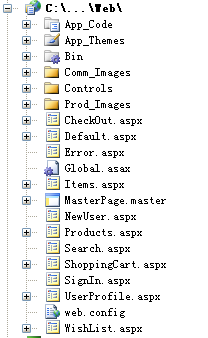
Global.asax:http://hi.baidu.com/mycolorwind/blog/item/45384980228cbfdf9023d960.html
global.asax详解:http://club.topsage.com/thread-485397-1-1.html
global.asax介绍:http://blog.csdn.net/suntanyong88/article/details/6009278
关于global.asax总结经验:http://hi.baidu.com/chinadaima/blog/item/32e0c9ef53b81f32adafd566.html
web.config详解:http://blog.csdn.net/zhoufoxcn/article/details/3265141
数据连接串:http://www.cnblogs.com/zlytu/archive/2011/11/22/2258364.html
Petshop分析:http://www.cnblogs.com/sunfishlu/archive/2008/02/02/1062049.html
走进.net架构:http://www.cnblogs.com/yanyangtian/category/265762.html
转载于:https://www.cnblogs.com/JCSU/articles/2542868.html
发布者:全栈程序员-站长,转载请注明出处:https://javaforall.net/181004.html原文链接:https://javaforall.net


![ps测量精灵图[通俗易懂]](https://javaforall.net/wp-content/uploads/2020/11/2020110817443450-480x300.jpg)
