
大家好,又见面了,我是你们的朋友全栈君。如果您正在找激活码,请点击查看最新教程,关注关注公众号 “全栈程序员社区” 获取激活教程,可能之前旧版本教程已经失效.最新Idea2022.1教程亲测有效,一键激活。
Jetbrains全系列IDE稳定放心使用
一、基本画图
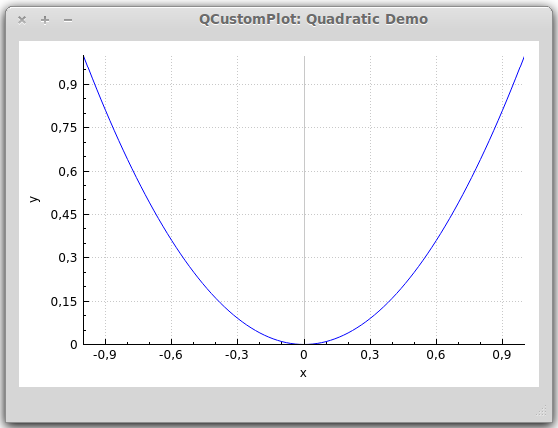
首先,给个简单的例子:


- // 生成数据,画出的是抛物线
- QVector<double> x(101), y(101); // initialize with entries 0..100
- for (int i=0; i<101; ++i)
- {
- x[i] = i/50.0 – 1; // x goes from -1 to 1
- y[i] = x[i]*x[i]; // let’s plot a quadratic function
- }
- // 添加数据曲线(一个图像可以有多个数据曲线)
- customPlot->addGraph();
- // graph(0);可以获取某个数据曲线(按添加先后排序)
- // setData();为数据曲线关联数据
- customPlot->graph(0)->setData(x, y);
- // 为坐标轴添加标签
- customPlot->xAxis->setLabel(“x”);
- customPlot->yAxis->setLabel(“y”);
- // 设置坐标轴的范围,以看到所有数据
- customPlot->xAxis->setRange(-1, 1);
- customPlot->yAxis->setRange(0, 1);
- // 重画图像
- customPlot->replot();
上面代码生成的结果大致是这样的:

- 外观
- QCustomPlot的外观由很多方面特性组成,都可以改变:
- 坐标轴:
- QCustomPlot有四个QCPAxis成员变量,分别代表四个坐标轴:xAxis(下)yAxis(左)xAxis2(上)yAxis2(右)
- QCPAxis有相应的函数可以设置坐标轴的刻度、间距、范围等:
- setTickStep(double step);//设置刻度间距
- setTickVector(const QVector<double> &vec);//将坐标轴刻度设置为vec
- setAutoTickStep(bool on);//设置是否自动分配刻度间距
- setAutoTicks(bool on);//设置是否自动分配刻度
- setAutoTickCount(int approximateCount);//设置是否自动分配刻度数量
- 还有setBasePen、setTickPen、setTickLength、setSubTickLength、setSubTickPen、setTickLabelFont、setLabelFont、setTickLabelPadding、setLabelPadding、setRangeReversed等
- 等后面专门讲QCPAxis的时候再详细介绍
曲线风格:
- QCPGraph::setPen(const QPen &pen);
曲线画笔:
- QCPGraph::setLineStyle(LineStyle ls);
可以设置颜色、宽度、实虚等
曲线形状:
- QCPGraph::setScatterStyle(QCPScatterStyle &style);
曲线形状像*、+、x、o等等
填充曲线方式:
- QCPGraph::setBrush(const QBrush &brush);
- QCPGraph::setChannelFillGraph(otherGraph);//设置与某之间曲线填充
- QCPGraph::setBrush(Qt::NoBrush);//移除填充
以上会等到专门将QCPGraph和QCPScatterStyle类的时候再细讲网格:
- customPlot->yAxis->grid();
- setPen、setZeroLinePen、setSubGridVisible等
- 等讲QCPGrid类再细讲
二、高级画图
- 1、多曲线与多风格
- <pre name=“code” class=“cpp”>customPlot->setLocale(QLocale(QLocale::English, QLocale::UnitedKingdom)); // period as decimal separator and comma as thousand separator
- customPlot->legend->setVisible(true);
- QFont legendFont = font(); // start out with MainWindow’s font..
- legendFont.setPointSize(9); // and make a bit smaller for legend
- customPlot->legend->setFont(legendFont);
- customPlot->legend->setBrush(QBrush(QColor(255,255,255,230)));
- // by default, the legend is in the inset layout of the main axis rect. So this is how we access it to change legend placement:
- customPlot->axisRect()->insetLayout()->setInsetAlignment(0, Qt::AlignBottom|Qt::AlignRight);
- // setup for graph 0: key axis left, value axis bottom
- // will contain left maxwell-like function
- customPlot->addGraph(customPlot->yAxis, customPlot->xAxis);
- customPlot->graph(0)->setPen(QPen(QColor(255, 100, 0)));
- customPlot->graph(0)->setBrush(QBrush(QPixmap(“./dali.png”))); // fill with texture of specified png-image
- customPlot->graph(0)->setLineStyle(QCPGraph::lsLine);
- customPlot->graph(0)->setScatterStyle(QCPScatterStyle(QCPScatterStyle::ssDisc, 5));
- customPlot->graph(0)->setName(“Left maxwell function”);
- // setup for graph 1: key axis bottom, value axis left (those are the default axes)
- // will contain bottom maxwell-like function
- customPlot->addGraph();
- customPlot->graph(1)->setPen(QPen(Qt::red));
- customPlot->graph(1)->setBrush(QBrush(QPixmap(“./dali.png”))); // same fill as we used for graph 0
- customPlot->graph(1)->setLineStyle(QCPGraph::lsStepCenter);
- customPlot->graph(1)->setScatterStyle(QCPScatterStyle(QCPScatterStyle::ssCircle, Qt::red, Qt::white, 7));
- customPlot->graph(1)->setErrorType(QCPGraph::etValue);
- customPlot->graph(1)->setName(“Bottom maxwell function”);
- // setup for graph 2: key axis top, value axis right
- // will contain high frequency sine with low frequency beating:
- customPlot->addGraph(customPlot->xAxis2, customPlot->yAxis2);
- customPlot->graph(2)->setPen(QPen(Qt::blue));
- customPlot->graph(2)->setName(“High frequency sine”);
- // setup for graph 3: same axes as graph 2
- // will contain low frequency beating envelope of graph 2
- customPlot->addGraph(customPlot->xAxis2, customPlot->yAxis2);
- QPen blueDotPen;
- blueDotPen.setColor(QColor(30, 40, 255, 150));
- blueDotPen.setStyle(Qt::DotLine);
- blueDotPen.setWidthF(4);
- customPlot->graph(3)->setPen(blueDotPen);
- customPlot->graph(3)->setName(“Sine envelope”);
- // setup for graph 4: key axis right, value axis top
- // will contain parabolically distributed data points with some random perturbance
- customPlot->addGraph(customPlot->yAxis2, customPlot->xAxis2);
- customPlot->graph(4)->setPen(QColor(50, 50, 50, 255));
- customPlot->graph(4)->setLineStyle(QCPGraph::lsNone);
- customPlot->graph(4)->setScatterStyle(QCPScatterStyle(QCPScatterStyle::ssCircle, 4));
- customPlot->graph(4)->setName(“Some random data around\na quadratic function”);
- // generate data, just playing with numbers, not much to learn here:
- QVector<double> x0(25), y0(25);
- QVector<double> x1(15), y1(15), y1err(15);
- QVector<double> x2(250), y2(250);
- QVector<double> x3(250), y3(250);
- QVector<double> x4(250), y4(250);
- for (int i=0; i<25; ++i) // data for graph 0
- {
- x0[i] = 3*i/25.0;
- y0[i] = exp(-x0[i]*x0[i]*0.8)*(x0[i]*x0[i]+x0[i]);
- }
- for (int i=0; i<15; ++i) // data for graph 1
- {
- x1[i] = 3*i/15.0;;
- y1[i] = exp(-x1[i]*x1[i])*(x1[i]*x1[i])*2.6;
- y1err[i] = y1[i]*0.25;
- }
- for (int i=0; i<250; ++i) // data for graphs 2, 3 and 4
- {
- x2[i] = i/250.0*3*M_PI;
- x3[i] = x2[i];
- x4[i] = i/250.0*100-50;
- y2[i] = sin(x2[i]*12)*cos(x2[i])*10;
- y3[i] = cos(x3[i])*10;
- y4[i] = 0.01*x4[i]*x4[i] + 1.5*(rand()/(double)RAND_MAX-0.5) + 1.5*M_PI;
- }
- // pass data points to graphs:
- customPlot->graph(0)->setData(x0, y0);
- customPlot->graph(1)->setDataValueError(x1, y1, y1err);
- customPlot->graph(2)->setData(x2, y2);
- customPlot->graph(3)->setData(x3, y3);
- customPlot->graph(4)->setData(x4, y4);
- // activate top and right axes, which are invisible by default:
- customPlot->xAxis2->setVisible(true);
- customPlot->yAxis2->setVisible(true);
- // set ranges appropriate to show data:
- customPlot->xAxis->setRange(0, 2.7);
- customPlot->yAxis->setRange(0, 2.6);
- customPlot->xAxis2->setRange(0, 3.0*M_PI);
- customPlot->yAxis2->setRange(-70, 35);
- // set pi ticks on top axis:
- QVector<double> piTicks;
- QVector<QString> piLabels;
- piTicks << 0 << 0.5*M_PI << M_PI << 1.5*M_PI << 2*M_PI << 2.5*M_PI << 3*M_PI;
- piLabels << “0” << QString::fromUtf8(“½π”) << QString::fromUtf8(“π”) << QString::fromUtf8(“1½π”) << QString::fromUtf8(“2π”) << QString::fromUtf8(“2½π”) << QString::fromUtf8(“3π”);
- customPlot->xAxis2->setAutoTicks(false);
- customPlot->xAxis2->setAutoTickLabels(false);
- customPlot->xAxis2->setTickVector(piTicks);
- customPlot->xAxis2->setTickVectorLabels(piLabels);
- // add title layout element:
- customPlot->plotLayout()->insertRow(0);
- customPlot->plotLayout()->addElement(0, 0, new QCPPlotTitle(customPlot, “Way too many graphs in one plot”));
- // set labels:
- customPlot->xAxis->setLabel(“Bottom axis with outward ticks”);
- customPlot->yAxis->setLabel(“Left axis label”);
- customPlot->xAxis2->setLabel(“Top axis label”);
- customPlot->yAxis2->setLabel(“Right axis label”);
- // make ticks on bottom axis go outward:
- customPlot->xAxis->setTickLength(0, 5);
- customPlot->xAxis->setSubTickLength(0, 3);
- // make ticks on right axis go inward and outward:
- customPlot->yAxis2->setTickLength(3, 3);
- customPlot->yAxis2->setSubTickLength(1, 1);
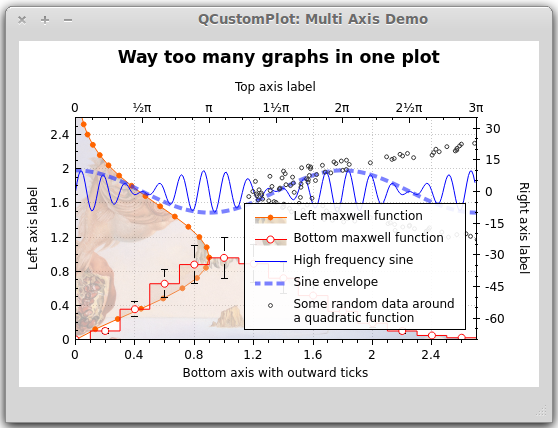
效果图:
2、日期和时间数据曲线
- // set locale to english, so we get english month names:
- customPlot->setLocale(QLocale(QLocale::English, QLocale::UnitedKingdom));
- // seconds of current time, we’ll use it as starting point in time for data:
- double now = QDateTime::currentDateTime().toTime_t();
- srand(8); // set the random seed, so we always get the same random data
- // create multiple graphs:
- for (int gi=0; gi<5; ++gi)
- {
- customPlot->addGraph();
- QPen pen;
- pen.setColor(QColor(0, 0, 255, 200));
- customPlot->graph()->setLineStyle(QCPGraph::lsLine);
- customPlot->graph()->setPen(pen);
- customPlot->graph()->setBrush(QBrush(QColor(255/4.0*gi,160,50,150)));
- // generate random walk data:
- QVector<double> time(250), value(250);
- for (int i=0; i<250; ++i)
- {
- time[i] = now + 24*3600*i;
- if (i == 0)
- value[i] = (i/50.0+1)*(rand()/(double)RAND_MAX-0.5);
- else
- value[i] = fabs(value[i-1])*(1+0.02/4.0*(4-gi)) + (i/50.0+1)*(rand()/(double)RAND_MAX-0.5);
- }
- customPlot->graph()->setData(time, value);
- }
- // configure bottom axis to show date and time instead of number:
- customPlot->xAxis->setTickLabelType(QCPAxis::ltDateTime);
- customPlot->xAxis->setDateTimeFormat(“MMMM\nyyyy”);
- // set a more compact font size for bottom and left axis tick labels:
- customPlot->xAxis->setTickLabelFont(QFont(QFont().family(), 8));
- customPlot->yAxis->setTickLabelFont(QFont(QFont().family(), 8));
- // set a fixed tick-step to one tick per month:
- customPlot->xAxis->setAutoTickStep(false);
- customPlot->xAxis->setTickStep(2628000); // one month in seconds
- customPlot->xAxis->setSubTickCount(3);
- // apply manual tick and tick label for left axis:
- customPlot->yAxis->setAutoTicks(false);
- customPlot->yAxis->setAutoTickLabels(false);
- customPlot->yAxis->setTickVector(QVector<double>() << 5 << 55);
- customPlot->yAxis->setTickVectorLabels(QVector<QString>() << “Not so\nhigh” << “Very\nhigh”);
- // set axis labels:
- customPlot->xAxis->setLabel(“Date”);
- customPlot->yAxis->setLabel(“Random wobbly lines value”);
- // make top and right axes visible but without ticks and labels:
- customPlot->xAxis2->setVisible(true);
- customPlot->yAxis2->setVisible(true);
- customPlot->xAxis2->setTicks(false);
- customPlot->yAxis2->setTicks(false);
- customPlot->xAxis2->setTickLabels(false);
- customPlot->yAxis2->setTickLabels(false);
- // set axis ranges to show all data:
- customPlot->xAxis->setRange(now, now+24*3600*249);
- customPlot->yAxis->setRange(0, 60);
- // show legend:
- customPlot->legend->setVisible(true);
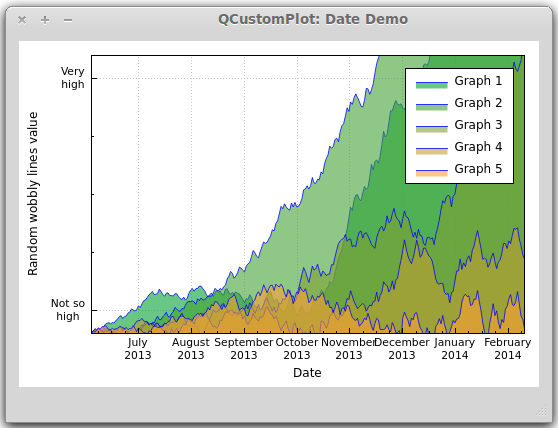
效果图:
三、曲线、柱形图、统计图…
到目前为止,我们为图像添加曲线都是使用
- QCustomPlot::addGraph();
- QCustomPlot::graph();
其实,除了
QCPGraph ,QCustomPlot 还提供了多个画图类:
QCPCurve:与QCPGraph 类似,差别在于它是用于展示参数化曲线,可以有循环。
QCPBars:柱形图,如果有多个QCPBars ,可以依次重叠。
QCPStatisticalBox、QCPColorMap、QCPFinancial
与QCPGraph 不同的是,这些画图类在添加到QCustomPlot 的时候需要使用new创建一个实例,而不能直接
- <span style=“color: rgb(53, 53, 53); font-family: monospace; line-height: 19.5px; background-color: rgb(240, 240, 240);”>addPlottable</span>();
简单例子如下:
- QCPBars *myBars = new QCPBars(customPlot->xAxis, customPlot->yAxis);
- customPlot->addPlottable(myBars);
- // now we can modify properties of myBars:
- myBars->setName(“Bars Series 1”);
- QVector<double> keyData;
- QVector<double> valueData;
- keyData << 1 << 2 << 3;
- valueData << 2 << 4 << 8;
- myBars->setData(keyData, valueData);
- customPlot->rescaleAxes();
- customPlot->replot();
好吧,这篇就到这里。水平有限,如有出错,敬请指出,互相学习。
版权声明:本文内容由互联网用户自发贡献,该文观点仅代表作者本人。本站仅提供信息存储空间服务,不拥有所有权,不承担相关法律责任。如发现本站有涉嫌侵权/违法违规的内容, 请联系我们举报,一经查实,本站将立刻删除。
发布者:全栈程序员-站长,转载请注明出处:https://javaforall.net/181167.html原文链接:https://javaforall.net


![navicate 15 激活码 在线[在线序列号]「建议收藏」](https://javaforall.net/wp-content/uploads/2020/11/2020110817443450-480x300.jpg)
