
如果使用的是redis3.x中的集群,在项目中使用jedisCluster。
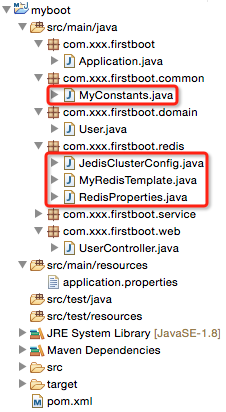
1、项目结构

2、pom.xml


1 <?xml version=”1.0″ encoding=”UTF-8″?>
2
3 xsi:schemaLocation=”http://maven.apache.org/POM/4.0.0 http://maven.apache.org/maven-v4_0_0.xsd”>
4
5 4.0.0
6
7 com.xxx
8 myboot
9 1.0-SNAPSHOT
10
11
12 1.8
13
14
19
20 org.springframework.boot
21 spring-boot-starter-parent
22 1.2.5.RELEASE
23
24
25
37
38
39
40
41 org.springframework.boot
42 spring-boot-starter-web
43
44
45 redis.clients
46 jedis
47
48
49 com.alibaba
50 fastjson
51 1.1.15
52
53
54 org.apache.commons
55 commons-lang3
56 3.3.2
57
58
59
60
61
62
64
65 org.springframework.boot
66 spring-boot-maven-plugin
67
68
69
70
View Code
说明:相对于上一章的代码仅仅引入了jedis的依赖jar。
3、application.properties
1 #user info2 user.id=13 user.username=zhaojigang4 user.password=1235
6 #redis cluster7 redis.cache.clusterNodes=localhost:80808 redis.cache.commandTimeout=59 #unit:second10 redis.cache.expireSeconds=120
View Code
说明:相对于上一章的代码仅仅引入了redis cluster的配置信息
4、Application.java(springboot启动类,与上一章一样)
5、RedisProperties.java(Redis属性装配)
1 packagecom.xxx.firstboot.redis;2
3 importorg.springframework.boot.context.properties.ConfigurationProperties;4 importorg.springframework.stereotype.Component;5
6 @Component7 @ConfigurationProperties(prefix = “redis.cache”)8 public classRedisProperties {9
10 private intexpireSeconds;11 privateString clusterNodes;12 private intcommandTimeout;13
14 public intgetExpireSeconds() {15 returnexpireSeconds;16 }17
18 public void setExpireSeconds(intexpireSeconds) {19 this.expireSeconds =expireSeconds;20 }21
22 publicString getClusterNodes() {23 returnclusterNodes;24 }25
26 public voidsetClusterNodes(String clusterNodes) {27 this.clusterNodes =clusterNodes;28 }29
30 public intgetCommandTimeout() {31 returncommandTimeout;32 }33
34 public void setCommandTimeout(intcommandTimeout) {35 this.commandTimeout =commandTimeout;36 }37
38 }
View Code
说明:与上一章的User类似,采用@ConfigurationProperties注解自动读取application.properties文件的内容并装配到RedisProperties的每一个属性中去。
6、JedisClusterConfig.java(获取JedisCluster单例)
1 packagecom.xxx.firstboot.redis;2
3 importjava.util.HashSet;4 importjava.util.Set;5
6 importorg.springframework.beans.factory.annotation.Autowired;7 importorg.springframework.context.annotation.Bean;8 importorg.springframework.context.annotation.Configuration;9
10 importredis.clients.jedis.HostAndPort;11 importredis.clients.jedis.JedisCluster;12
13 @Configuration14 public classJedisClusterConfig {15
16 @Autowired17 privateRedisProperties redisProperties;18
19 /**
20 * 注意:21 * 这里返回的JedisCluster是单例的,并且可以直接注入到其他类中去使用22 *@return
23 */
24 @Bean25 publicJedisCluster getJedisCluster() {26 String[] serverArray = redisProperties.getClusterNodes().split(“,”);//获取服务器数组(这里要相信自己的输入,所以没有考虑空指针问题)
27 Set nodes = new HashSet<>();28
29 for(String ipPort : serverArray) {30 String[] ipPortPair = ipPort.split(“:”);31 nodes.add(new HostAndPort(ipPortPair[0].trim(), Integer.valueOf(ipPortPair[1].trim())));32 }33
34 return newJedisCluster(nodes, redisProperties.getCommandTimeout());35 }36
37 }
View Code
说明:
该类注入了RedisProperties类,可以直接读取其属性
这里没有对jedis链接池提供更多的配置(jedis-2.5.x好像不支持,jedis-2.6.x支持),具体的配置属性可以查看文章开头第一篇博客
注意:
该类使用了Java注解,@Configuration与@Bean,
在方法上使用@Bean注解可以让方法的返回值为单例,
该方法的返回值可以直接注入到其他类中去使用
@Bean注解是方法级别的
如果使用的是常用的spring注解@Component,
在方法上没有注解的话,方法的返回值就会是一个多例,
该方法的返回值不可以直接注入到其他类去使用
该方式的注解是类级别的
7、MyRedisTemplate.java(具体redis操作)
1 packagecom.xxx.firstboot.redis;2
3 importorg.slf4j.Logger;4 importorg.slf4j.LoggerFactory;5 importorg.springframework.beans.factory.annotation.Autowired;6 importorg.springframework.stereotype.Component;7
8 importredis.clients.jedis.JedisCluster;9
10 @Component11 public classMyRedisTemplate {12 private static final Logger LOGGER = LoggerFactory.getLogger(MyRedisTemplate.class);13
14 @Autowired15 privateJedisCluster jedisCluster;16
17 @Autowired18 privateRedisProperties redisProperties;19
20 private static final String KEY_SPLIT = “:”; //用于隔开缓存前缀与缓存键值
21
22 /**
23 * 设置缓存24 *@paramprefix 缓存前缀(用于区分缓存,防止缓存键值重复)25 *@paramkey 缓存key26 *@paramvalue 缓存value27 */
28 public voidset(String prefix, String key, String value) {29 jedisCluster.set(prefix + KEY_SPLIT +key, value);30 LOGGER.debug(“RedisUtil:set cache key={},value={}”, prefix + KEY_SPLIT +key, value);31 }32
33 /**
34 * 设置缓存,并且自己指定过期时间35 *@paramprefix36 *@paramkey37 *@paramvalue38 *@paramexpireTime 过期时间39 */
40 public void setWithExpireTime(String prefix, String key, String value, intexpireTime) {41 jedisCluster.setex(prefix + KEY_SPLIT +key, expireTime, value);42 LOGGER.debug(“RedisUtil:setWithExpireTime cache key={},value={},expireTime={}”, prefix + KEY_SPLIT +key, value,43 expireTime);44 }45
46 /**
47 * 设置缓存,并且由配置文件指定过期时间48 *@paramprefix49 *@paramkey50 *@paramvalue51 */
52 public voidsetWithExpireTime(String prefix, String key, String value) {53 int EXPIRE_SECONDS =redisProperties.getExpireSeconds();54 jedisCluster.setex(prefix + KEY_SPLIT +key, EXPIRE_SECONDS, value);55 LOGGER.debug(“RedisUtil:setWithExpireTime cache key={},value={},expireTime={}”, prefix + KEY_SPLIT +key, value,56 EXPIRE_SECONDS);57 }58
59 /**
60 * 获取指定key的缓存61 *@paramprefix62 *@paramkey63 */
64 publicString get(String prefix, String key) {65 String value = jedisCluster.get(prefix + KEY_SPLIT +key);66 LOGGER.debug(“RedisUtil:get cache key={},value={}”, prefix + KEY_SPLIT +key, value);67 returnvalue;68 }69
70 /**
71 * 删除指定key的缓存72 *@paramprefix73 *@paramkey74 */
75 public voiddeleteWithPrefix(String prefix, String key) {76 jedisCluster.del(prefix + KEY_SPLIT +key);77 LOGGER.debug(“RedisUtil:delete cache key={}”, prefix + KEY_SPLIT +key);78 }79
80 public voiddelete(String key) {81 jedisCluster.del(key);82 LOGGER.debug(“RedisUtil:delete cache key={}”, key);83 }84
85 }
View Code
注意:
这里只是使用了jedisCluster做了一些字符串的操作,对于list/set/sorted set/hash的操作,可以参考开头的两篇博客。
8、MyConstants.java(缓存前缀常量定义类)
1 packagecom.xxx.firstboot.common;2
3 /**
4 * 定义一些常量5 */
6 public classMyConstants {7 public static final String USER_FORWARD_CACHE_PREFIX = “myboot:user”;//user缓存前缀
8 }
View Code
注意:
根据业务特点定义redis的缓存前缀,有助于防止缓存重复导致的缓存覆盖问题
缓存前缀使用”:”做分隔符,这是推荐做法(这个做法可以在使用redis-desktop-manager的过程看出来)
9、UserController.java(测试)
1 packagecom.xxx.firstboot.web;2
3 importorg.apache.commons.lang3.StringUtils;4 importorg.springframework.beans.factory.annotation.Autowired;5 importorg.springframework.web.bind.annotation.RequestMapping;6 importorg.springframework.web.bind.annotation.RequestParam;7 importorg.springframework.web.bind.annotation.RestController;8
9 importcom.alibaba.fastjson.JSON;10 importcom.xxx.firstboot.common.MyConstants;11 importcom.xxx.firstboot.domain.User;12 importcom.xxx.firstboot.redis.MyRedisTemplate;13 importcom.xxx.firstboot.service.UserService;14
15 /**
16 * @RestController:spring mvc的注解,17 * 相当于@Controller与@ResponseBody的合体,可以直接返回json18 */
19 @RestController20 @RequestMapping(“/user”)21 public classUserController {22
23 @Autowired24 privateUserService userService;25
26 @Autowired27 privateMyRedisTemplate myRedisTemplate;28
29 @RequestMapping(“/getUser”)30 publicUser getUser() {31 returnuserService.getUser();32 }33
34 @RequestMapping(“/testJedisCluster”)35 public User testJedisCluster(@RequestParam(“username”) String username){36 String value =myRedisTemplate.get(MyConstants.USER_FORWARD_CACHE_PREFIX, username);37 if(StringUtils.isBlank(value)){38 myRedisTemplate.set(MyConstants.USER_FORWARD_CACHE_PREFIX, username, JSON.toJSONString(getUser()));39 return null;40 }41 return JSON.parseObject(value, User.class);42 }43
44 }
View Code
说明:相对于上一章,只是添加了测试缓存的方法testJedisCluster。
测试:
在Application.properties右击–>run as–>java application,在浏览器输入”localhost:8080/user/testJedisCluster?username=xxx”即可。
附:对于redis的测试,我们有时需要查看执行set后,缓存是否存入redis的db中了,有两种方式
执行set后,get数据,之后修改数据,在get数据,比较两次get的数据是否相同即可
有时,这些数据是无法修改的(假设该数据是我们从第三方接口得来的),这个时候可以使用redis-desktop-manager这个软件来查看缓存是否存入redis(该软件的使用比较简单,查看官网)
发布者:全栈程序员-站长,转载请注明出处:https://javaforall.net/181916.html原文链接:https://javaforall.net


