
大家好,又见面了,我是你们的朋友全栈君。如果您正在找激活码,请点击查看最新教程,关注关注公众号 “全栈程序员社区” 获取激活教程,可能之前旧版本教程已经失效.最新Idea2022.1教程亲测有效,一键激活。
Jetbrains全系列IDE稳定放心使用
一、unittest简介
unittest 是python 的单元测试框架。unittest 单元测试提供了创建测试用例,测试套件以及批量执行的方案, unittest 在安装pyhton 以后就直接自带了,直接import unittest 就可以使用。
作为单元测试的框架, unittest 也是可以对程序最小模块的一种敏捷化的测试。在自动化测试中,我们虽然不需要做白盒测试,但是必须需要知道所使用语言的单元测试框架。
利用单元测试框架,创建一个类,该类继承unittest的TestCase,这样可以把每个case看成是一个最小的单元, 由测试容器组织起来,到时候直接执行,同时引入测试报告。
unittest各组件的关系为:
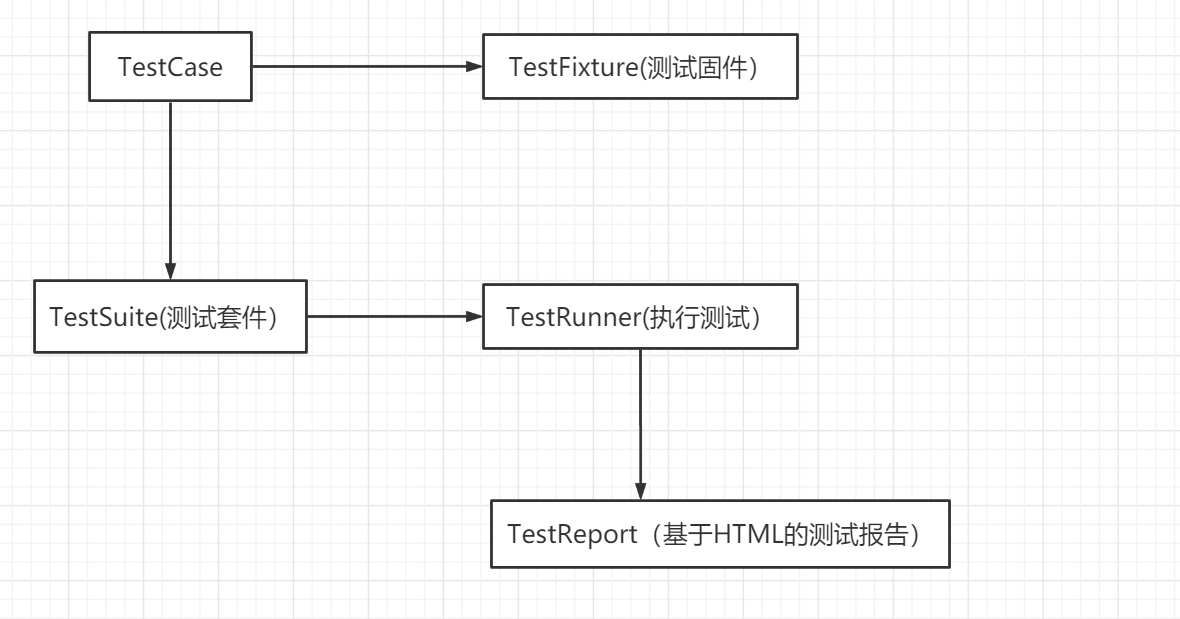

- test fixture:初始化和清理测试环境,比如创建临时的数据库,文件和目录等,其中 setUp() 和 setDown() 是最常用的方法
- test case:单元测试用例,TestCase 是编写单元测试用例最常用的类
- test suite:单元测试用例的集合,TestSuite 是最常用的类
- test runner:执行单元测试
- test report:生成测试报告
一个单元测试示例:
__author__ = 'sunraylily'
# -*- coding: utf-8 -*-
from selenium import webdriver
from selenium.webdriver.common.by import By
from selenium.webdriver.common.keys import Keys
from selenium.webdriver.support.ui import Select
from selenium.common.exceptions import NoSuchElementException
from selenium.common.exceptions import NoAlertPresentException
import unittest, time, re
class Baidu1(unittest.TestCase):
 	def setUp(self):
 		self.driver = webdriver.Firefox()
 		self.driver.implicitly_wait(30)
		self.base_url = "http://www.baidu.com/"
		self.verificationErrors = []
		self.accept_next_alert = True
	 def test_baidusearch(self):
		driver = self.driver
 		driver.get(self.base_url + "/")
		driver.find_element_by_id("kw").click()
 		driver.find_element_by_id("kw").clear()
 		driver.find_element_by_id("kw").send_keys(u"测试")
 		driver.find_element_by_id("su").click()
 	def test_hao(self):
 		driver = self.driver
 		driver.get(self.base_url + "/")
 		driver.find_element_by_link_text("hao123").click()
 		self.assertEqual(u"hao123_上网从这里开始", driver.title)
 	def is_element_present(self, how, what):
 		try: self.driver.find_element(by=how, value=what)
 			except NoSuchElementException as e: return False
	return True
 #判断alert是否存在,可删除
	def is_alert_present(self):
 		try: self.driver.switch_to_alert()
 			except NoAlertPresentException as e: return False
 	return True
 	def close_alert_and_get_its_text(self):
 		try:
 			alert = self.driver.switch_to_alert()
 			alert_text = alert.text
 			if self.accept_next_alert:
 				alert.accept()
 			else:
 				alert.dismiss()
 			return alert_text
 			finally: self.accpet_next_alert
 #test fixture 清除环境
 	def tearDown(self):
 		self.driver.quit()
 		self.assertEqual([].self.verificationErrors)
 if __name__ == "__main__":
 	unittest.main()
''' 可以增加verbosity参数,例如unittest.main(verbosity=2) 在主函数中,直接调用main() ,在main中加入verbosity=2 ,这样测试的结果就会显示的更加详细。 这里的verbosity 是一个选项, 表示测试结果的信息复杂度,有三个值: 0 ( 静默模式): 你只能获得总的测试用例数和总的结果比如总共100个失败,20 成功80 1 ( 默认模式): 非常类似静默模式只是在每个成功的用例前面有个“ . ” 每个失败的用例前面有个“F” 2 ( 详细模式): 测试结果会显示每个测试用例的所有相关的信息 '''
二、批量执行脚本
2.1 构建测试套件
完整的单元测试很少只执行一个测试用例,开发人员通常都需要编写多个测试用例才能对某一软件功能进行比较完整的测试,这些相关的测试用例称为一个测试用例集,在unittest中是用TestSuite 类来表示的。
假设我们已经编写了testbaidu1.py,testbaidu2.py两个文件,那么我们怎么同时执行这两个文件呢?
2.1.1 addTest()的应用
当有多个或者几百测试用例的时候, 这样就需要一个测试容器( 测试套件) ,把测试用例放在该容器中进行执行,unittest 模块中提供了TestSuite 类来生成测试套件,使用该类的构造函数可以生成一个测试套件的实例,该类提
供了addTest来把每个测试用例加入到测试套件中。
将testbaidu1.py、testbaidu2.py、runall.py放在同一个目录testcase中
runall.py
# -*- coding: utf-8 -*-
import unittest,csv
import os,sys
import time
#导入testbaidu1,testbaidu2
import testbaidu1
import testbaidu2
#手工添加案例到套件,
def createsuite():
	suite = unittest.TestSuite()
 #将测试用例加入到测试容器(套件)中
 	suite.addTest(testbaidu1.Baidu1("test_baidusearch"))
 	suite.addTest(testbaidu1.Baidu1("test_hao"))
 	suite.addTest(testbaidu2.Baidu2("test_baidusearch"))
 	return suite
if __name__=="__main__":
	suite=createsuite()
	runner = unittest.TextTestRunner(verbosity=2)
 	runner.run(suite)
上述做法有两个不方面的地方,阻碍脚本的快速执行,必须每次修改runall.py:
1)需要导入所有的py文件,比如import testbaidu1,每新增一个需要导入一个
2)addTest需要增加所有的testcase,如果一个py文件中有10个case,就需要增加10次
2.1.2 makeSuite()和TestLoader()的应用
在unittest 框架中提供了makeSuite() 的方法,makeSuite可以实现把测试用例类内所有的测试case组成的测试套件TestSuite ,unittest 调用makeSuite的时候,只需要把测试类名称传入即可。
TestLoader 用于创建类和模块的测试套件,一般的情况下,使TestLoader().loadTestsFromTestCase(TestClass)
来加载测试类。
# -*- coding: utf-8 -*-
import unittest,csv
import os,sys
import time
import testbaidu1
import testbaidu2
#手工添加案例到套件,
def createsuite():
	suite = unittest.TestSuite()
 #将测试用例加入到测试容器(套件)中
	suite.addTest(unittest.makeSuite(testbaidu1.Baidu1))
	suite.addTest(unittest.makeSuite(testbaidu2.Baidu2))
 	return suite
 ''' suite1 = unittest.TestLoader().loadTestsFromTestCase(testbaidu1.Baidu1) suite2 = unittest.TestLoader().loadTestsFromTestCase(testbaidu2.Baidu2) suite = unittest.TestSuite([suite1, suite2]) return suite '''

if __name__=="__main__":
 	suite=createsuite()
 	runner = unittest.TextTestRunner(verbosity=2)
 	runner.run(suite)
经过makeSuite()和TestLoader()的引入,我们不用一个py文件测试类,只需要导入一次即可。
那么能不能测试类也不用每次添加指定呢?
2.1.3 discover()的应用
discover 是通过递归的方式到其子目录中从指定的目录开始, 找到所有测试模块并返回一个包含它们对象的TestSuite ,然后进行加载与模式匹配唯一的测试文件,discover 参数分别discover(dir,pattern,top_level_dir=None)
runall.py—注意路径
# -*- coding: utf-8 -*-
import unittest,csv
import os,sys
import time
#手工添加案例到套件,
def createsuite():

discover=unittest.defaultTestLoader.discover('../test',pattern='test*.py',top_level_dir=None)
 print discover
 return discover

if __name__=="__main__":
 suite=createsuite()
 runner = unittest.TextTestRunner(verbosity=2)
 runner.run(suite)
2.2 用例的执行顺序
unittest 框架默认加载测试用例的顺序是根据ASCII 码的顺序,数字与字母的顺序为: 0-9,A-Z,a~z 。
所以, TestAdd 类会优先于TestBdd 类被发现, test_aaa() 方法会优先于test_ccc() 被执行。对于测试目录与测试文件来说, unittest框架同样是按照这个规则来加载测试用例。
addTest()方法按照增加顺序来执行。
2.3 忽略用例执行
@unittest.skip("skipping") #只需加上这个注解即可
 def test_baidusearch(self):
 driver = self.driver
 driver.get(self.base_url + "/")
 driver.find_element_by_id("kw").click()
 driver.find_element_by_id("kw").clear()
 driver.find_element_by_id("kw").send_keys(u"测试")
 driver.find_element_by_id("su").click()
 driver.find_element_by_id("su").click()
三、unittest断言
自动化的测试中, 对于每个单独的case来说,一个case的执行结果中, 必然会有期望结果与实际结果, 来判断该case是通过还是失败, 在unittest 的库中提供了大量的实用方法来检查预期值与实际值, 来验证case的结果, 一般来说, 检查条件大体分为等价性, 逻辑比较以及其他, 如果给定的断言通过, 测试会继续执行到下一行的代码, 如果断言失败, 对应的case测试会立即停止或者生成错误信息( 一般打印错误信息即可) ,但是不要影响其他的case执行。
unittest 的单元测试库提供了标准的xUnit 断言方法。下面是一些常用的断言
| 序号 | 断言方法 | 断言描述 | |
|---|---|---|---|
| 1 | assertEqual(arg1, arg2, msg=None) | 验证arg1=arg2,不等则fail | |
| 2 | assertNotEqual(arg1, arg2, msg=None) | 验证arg1 != arg2, 相等则fail | |
| 3 | assertTrue(expr, msg=None) | 验证expr是true,如果为false,则fail | |
| 4 | assertFalse(expr,msg=None) | 验证expr是false,如果为true,则fail | |
| 5 | assertIs(arg1, arg2, msg=None) | 验证arg1、arg2是同一个对象,不是则fail | |
| 6 | assertIsNot(arg1, arg2, msg=None) | 验证arg1、arg2不是同一个对象,是则fail | |
| 7 | assertIsNone(expr, msg=None) | 验证expr是None,不是则fail | |
| 8 | assertIsNotNone(expr, msg=None) | 验证expr是None,不是则fail |
四、HTML报告生成
脚本执行完毕之后,还需要看到HTML报告,下面我们就通过HTMLTestRunner.py 来生成测试报告。
修改runall.py
# -*- coding: utf-8 -*-
import unittest,csv
import os,sys
import time
import HTMLTestRunner
#手工添加案例到套件,
def createsuite():

	discover=unittest.defaultTestLoader.discover('../test',pattern='test*.py',top_level_dir=None)
 	print discover
 	return discover
 if __name__=="__main__":
	 curpath=sys.path[0]
 #取当前时间
 	now=time.strftime("%Y-%m-%d-%H %M %S",time.localtime(time.time()))
 if not os.path.exists(curpath+'/resultreport'):
 	os.makedirs(curpath+'/resultreport')

 	filename=curpath+'/resultreport/'+now+'resultreport.html'
 	with open(filename,'wb') as fp:
 #出html报告
	 runner=HTMLTestRunner.HTMLTestRunner(stream=fp,title=u'测试报告',description=u'用例执行
情况',verbosity=2)
	 suite=createsuite()
	 runner.run(suite)
五、异常捕捉和错误截图
用例不可能每一次运行都成功,肯定运行时候有不成功的时候。如果可以捕捉到错误,并且把错误截图保存,这将是一个非常棒的功能,也会给我们错误定位带来方便。
def savescreenshot(self,driver,file_name):
 if not os.path.exists('./image'):
	 os.makedirs('./image')
	 now=time.strftime("%Y%m%d-%H%M%S",time.localtime(time.time()))
 #截图保存
 	driver.get_screenshot_as_file('./image/'+now+'-'+file_name)
 	time.sleep(1)
发布者:全栈程序员-站长,转载请注明出处:https://javaforall.net/182229.html原文链接:https://javaforall.net



