
Themleaf模板基础语法使用介绍
项目首页地址:https://blog.csdn.net/weixin_/article/details/
一、 Thymeleaf 是什么
二、Thymeleaf的作用
问题:动态页面技术已经有JSP,为什么还要用Thymeleaf?
主要原因包括以下几点:
- 使用模块引擎来编写动态页面,让开发人员无法在页面上编写 Java 代码,使得java代码和前端代码绝对的分离。
- SpringBoot默认整合Thymeleaf,不需要任何配置直接整合成功,打jar包发布不需要做任何配置。
- Thymeleaf相对于其他的模板引擎(如:Freemaker、velocity),有强大的工具支持。
- 相对于Jsp页面,执行效率高。
总结:所有JSP可以使用的地方,Thymeleaf都可以使用,并根据Thymeleaf的优势,可以得出结论:Thymeleaf的作用就是取代JSP。
三、Springboot整和Thymeleaf
1、添加Thymeleaf依赖
要想使用Thhymeleaf,首先要在pom.xml文件中单独添加Thymeleaf依赖。
<dependency> <groupId>org.springframework.boot</groupId> <artifactId>spring-boot-starter-thymeleaf</artifactId> </dependency> 2、自定义Thymeleaf文件配置
注: Spring Boot默认存放模板页面的路径在src/main/resources/templates或者src/main/view/templates,这个无论是使用什么模板语言都一样,当然默认路径是可以自定义的,不过一般不推荐这样做。另外Thymeleaf默认的页面文件后缀是.html。
也可以在配置文件中指定自己的模板,这里通过yml配置修改:
spring: thymeleaf: prefix: classpath:/templates/ check-template-location: true cache: false
    suffix: .html
    encoding: UTF-8
    content-type: text/html
    mode: HTML5
prefix:指定模板所在的目录
check-tempate-location: 检查模板路径是否存在
cache: 是否缓存,开发模式下设置为false,避免改了模板还要重启服务器,线上设置为true,可以提高性能。
encoding&content-type:这个大家应该比较熟悉了,与Servlet中设置输出对应属性效果一致。
mode:这个还是参考官网的说明吧,并且这个是2.X与3.0不同。
四、Thymeleaf基本语法介绍
Thymeleaf的主要作用是把model中的数据渲染到html中,因此其语法主要是如何解析model中的数据。
1、属性介绍
在使用Thymeleaf时页面要引入名称空间: xmlns:th=“http://www.thymeleaf.org”
html有的属性,Thymeleaf基本都有,而常用的属性大概有七八个。其中th属性执行的优先级从1~8,数字越低优先级越高。
1)th:text:设置当前元素的文本内容,相同功能的还有th:utext,两者的区别在于前者不会转义html标签,后者会。优先级不高:order=7
2)th:value:设置当前元素的value值,类似修改指定属性的还有th:src,th:href。优先级不高:order=6
3)th:each:遍历循环元素,和th:text或th:value一起使用。注意该属性修饰的标签位置,详细往后看。优先级很高:order=2
4)th:if:条件判断,类似的还有th:unless,th:switch,th:case。优先级较高:order=3
5)th:insert:代码块引入,类似的还有th:replace,th:include,三者的区别较大,若使用不恰当会破坏html结构,常用于公共代码块提取的场景。优先级最高:order=1
6)th:fragment:定义代码块,方便被th:insert引用。优先级最低:order=8
7)th:object:声明变量,一般和*{}一起配合使用,达到偷懒的效果。优先级一般:order=4
8)th:attr:修改任意属性,实际开发中用的较少,因为有丰富的其他th属性帮忙,类似的还有th:attrappend,th:attrprepend。优先级一般:order=5
2、表达式介绍
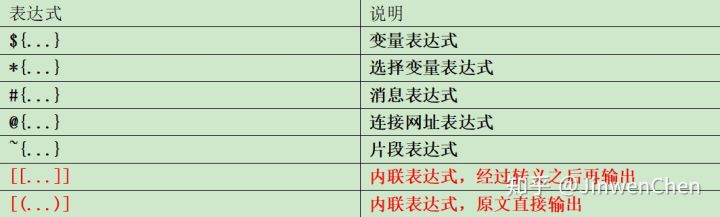

2.1 ~{…} 代码块表达式:
作用:用代码块片段操作页面代码。
代码块表达式需要配合th属性(th:insert,th:replace,th:include)一起使用。
th:insert:将代码块片段整个插入到使用了th:insert的HTML标签中
th:replace:将代码块片段整个替换使用了th:replace的HTML标签中
th:include:将代码块片段包含的内容插入到使用了th:include的HTML标签中
2.2 @{…} 链接表达式
作用:提交请求,访问资源。
链接表达式好处:不管是静态资源的引用,form表单的请求,凡是链接都可以用@{…} 。这样可以动态获取项目路径,即便项目名变了,依然可以正常访问。
案例: <!--引入内部图片资源--> th:src="@{/images/weChatInn.jpg}" <!--引入外部资源--> <link th:href="@{/webjars/bootstrap/4.0.0/css/bootstrap.css}" rel="stylesheet"> <!--引入本地资源--> <link th:href="@{/main/css/itdragon.css}" rel="stylesheet"> <!--表单提交路径--> <form class="form-login" th:action="@{/user/login}" th:method="post" > <!--超链接跳转路径附带参数--> <a class="btn btn-sm" th:href="@{/login.html(l='zh_CN')}">中文</a> <a class="btn btn-sm" th:href="@{/login.html(l='en_US')}">English</a> 2.3 ${…}变量表达式(最常用)
作用:从web作用域里面取到对应的值,作用域包括 request、session、application。
变量表达式有丰富的内置方法(request,response,session等),使其更强大,更方便。
1、后台代码 :返回不同作用域的数据到前端。
@GetMapping("/index") public String showPage(HttpServletRequest request, HttpSession session) {
    User user1 = new User(1L, "zhangsan", ""); request.setAttribute("user1", user1); User user2 = new User(2L, "lisi", ""); session.setAttribute("user2", user2); User user3 = new User(3L, "wangwu", ""); ServletContext application = request.getServletContext(); application.setAttribute("user3", user3); return "index"; }
2、 页面代码:接收后台传回来不同作用域的数据。
<!DOCTYPE html> <html lang="en" xmlns:th="http://www.thymeleaf.org/"> <head> <meta charset="UTF-8"> <title>Title</title> </head> <body> request: <br/> <div> 编号: <label th:text="${user1.id}"></label><br/> 用户名:<label th:text="${user1.username}"></label> <br/> 密码:<label th:text="${user1.password}"></label><br/> </div> session:<br/> <div> 编号: <label th:text="${session.user2.id}"></label><br/> 用户名:<label th:text="${session.user2.username}"></label> <br/> 密码:<label th:text="${session.user2.password}"></label><br/> </div> application:<br/> <div> 编号:<label th:text="${application.user3.id}"></label><br/> 用户名:<label th:text="${application.user3.username}"></label><br/> 密码:<label th:text="${application.user3.password}"></label><br/> </div> </body> </html> 2.4 *{…} 选择变量表达式
作用:避免书写重复引用代码,指定对象的方式获取变量。
使用前: request: <br/> <div> 编号: <label th:text="${user1.id}"></label><br/> 用户名:<label th:text="${user1.username}"></label> <br/> 密码:<label th:text="${user1.password}"></label><br/> </div> session:<br/> <div> 编号: <label th:text="${session.user2.id}"></label><br/> 用户名:<label th:text="${session.user2.username}"></label> <br/> 密码:<label th:text="${session.user2.password}"></label><br/> </div> 等用于:
使用后: request: <br/> <div th:object="${user1}"> 编号: <label th:text="*{id}"></label><br/> 用户名:<label th:text="*{username}"></label> <br/> 密码:<label th:text="*{password}"></label><br/> </div> session:<br/> <div th:object="${session.user2}"> 编号: <label th:text="*{id}"></label><br/> 用户名:<label th:text="*{username}"></label> <br/> 密码:<label th:text="*{password}"></label><br/> </div> 2.5 #{…} 消息表达式
作用:就是用于对国际化功能的支持。所谓的国际化功能就是指,根据浏览器的编码,返回对应编码的内容的支持。
配置国际化支持 spring.messages.basename=message 第三步:Thymeleaf 对国际化的支持,消息表达式(取值)
方法一:标签消息表达式取值:<span th:text="#{home.welcome}"></span><br /> 方法二:内嵌消息表达式取值:[[#{home.welcome}]] 3、常用方法介绍
1.1. Thymeleaf支持四种判断:
1) 第一种:if & unless
<!-- 如果条件为真,执行标签内的内容 --> <div th:if="${false}"> 天天18 </div> <!-- 如果添加为假,执行标签内的内容 --> <div th:unless="${false}"> 别做梦 </div> 2)第二种:and、or、not
<div th:if="${true or false}"> 真的18岁 </div> <div th:if="${not false}"> 真的别做梦 </div> 3)第三种:三目运算符
<span th:text="true ? '今年不是18岁' : '总算清醒了'"></span> 4)第四种:switch
<div th:switch="${21}"> <div th:case="16">我今年16岁</div> <div th:case="17">我今年17岁</div> <div th:case="18">我今年18岁</div> <div th:case="*">我年年18岁</div> </div> 1.2. 循环
Thymeleaf使用th:each来实现循环遍历。
页面代码:后端传回数据 model.addAttribute(“users”, users);
<h3>需求:输出用户信息</h3> <table border="1" cellspacing="0"> <tr> <th>编号</th> <th>姓名</th> <th>密码</th> </tr> <tr th:each="user, iterStat:${users}"> <td th:text="${user.id}"></td> <td th:text="${user.username}"></td> <td th:text="${user.password}"></td> </tr> </table> <h3>需求:输出用户信息,声明状态对象</h3> <table border="1" cellspacing="0"> <tr> <td>当前迭代索引</td> <td>当前迭代序号</td> <td>编号</td> <td>姓名</td> <td>密码</td> </tr> <tr th:each="user, iter:${users}"> <td th:text="${iter.index}"></td> <td th:text="${iter.count}"></td> <td th:text="${user.id}"></td> <td th:text="${user.username}"></td> <td th:text="${user.password}"></td> </tr> </table> 1.3 时间格式化
<span th:text="${#dates.format(user.date, 'yyyy-MM-dd')}"></span> 或者 <span th:text="${#dates.format(billingForm.startTime,'yyyy-MM-dd HH:mm:ss')}"></span> 1.4 请求带参数
//带一个参数 <a href="#" th:href="@{/quartz/pause(name=${job.name})}">暂停</a> //带两个参数 <a href="#" th:href="@{/quartz/pause(name=${job.name},group=${job.group})}">暂停</a> Themleaf模板基础语法使用介绍已讲解完毕,上面是我对此模板引擎的一些学习笔记和心得,如有不足的地方还请指正,共同交流与学习!
发布者:全栈程序员-站长,转载请注明出处:https://javaforall.net/198183.html原文链接:https://javaforall.net




