
OpenCV进行图像相似度对比的几种办法

OpenCV进行图像相似度对比的几种办法转载请注明出处 http blog csdn net wangyaninglm article details 来自 shiter 编写程序的艺术对计算图像相似度的方法 本文做了如下总结 主要有三种办法 1 PSNR 峰值信噪比 PSNR PeakSignalto 一种全参考的图像质量评价指标 简介 https en wikipedia

在这里插入图片描述
对计算图像相似度的方法,本文做了如下总结,主要有三种办法:


1.PSNR峰值信噪比

PSNR(Peak Signal to Noise Ratio),一种全参考的图像质量评价指标。

原理简介

https://en.wikipedia.org/wiki/Peak_signal-to-noise_ratio

PSNR是最普遍和使用最为广泛的一种图像客观评价指标,然而它是基于对应像素点间的误差,即基于误差敏感的图像质量评价。由于并未考虑到人眼的视觉特性(人眼对空间频率较低的对比差异敏感度较高,人眼对亮度对比差异的敏感度较色度高,人眼对一个区域的感知结果会受到其周围邻近区域的影响等),因而经常出现评价结果与人的主观感觉不一致的情况。

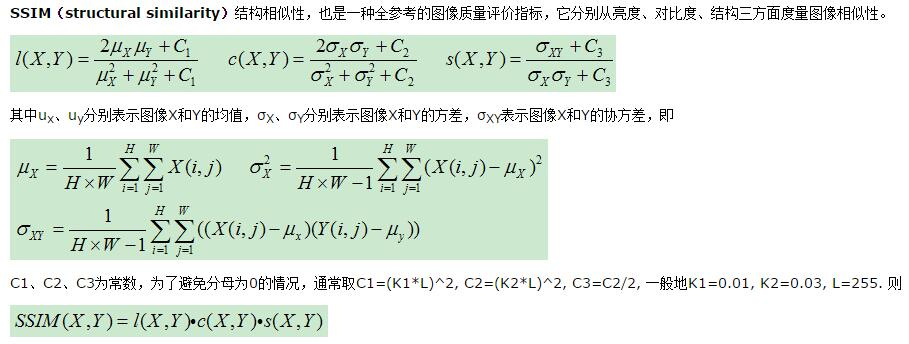
SSIM(structural similarity)结构相似性,也是一种全参考的图像质量评价指标,它分别从亮度、对比度、结构三方面度量图像相似性。
在这里插入图片描述

SSIM取值范围[0,1],值越大,表示图像失真越小.

在实际应用中,可以利用滑动窗将图像分块,令分块总数为N,考虑到窗口形状对分块的影响,采用高斯加权计算每一窗口的均值、方差以及协方差,然后计算对应块的结构相似度SSIM,最后将平均值作为两图像的结构相似性度量,即平均结构相似性MSSIM:


参考资料

[1] 峰值信噪比-维基百科

官方文档的说明,不过是GPU版本的,我们可以修改不用gpu不然还得重新编译


代码

// PSNR.cpp : 定义控制台应用程序的入口点。 // #include "stdafx.h" #include  
        // Console I/O #include  
        // String to number conversion #include  
        // Basic OpenCV structures #include  
       // Image processing methods for the CPU #include  
       // Read images #include  
        // GPU structures and methods using namespace std; using namespace cv; double getPSNR(const Mat& I1, const Mat& I2); // CPU versions Scalar getMSSIM( const Mat& I1, const Mat& I2); double getPSNR_GPU(const Mat& I1, const Mat& I2); // Basic GPU versions Scalar getMSSIM_GPU( const Mat& I1, const Mat& I2); struct BufferPSNR // Optimized GPU versions { 
       // Data allocations are very expensive on GPU. Use a buffer to solve: allocate once reuse later. gpu::GpuMat gI1, gI2, gs, t1,t2; gpu::GpuMat buf; }; double getPSNR_GPU_optimized(const Mat& I1, const Mat& I2, BufferPSNR& b); struct BufferMSSIM // Optimized GPU versions { 
       // Data allocations are very expensive on GPU. Use a buffer to solve: allocate once reuse later. gpu::GpuMat gI1, gI2, gs, t1,t2; gpu::GpuMat I1_2, I2_2, I1_I2; vector<gpu::GpuMat> vI1, vI2; gpu::GpuMat mu1, mu2; gpu::GpuMat mu1_2, mu2_2, mu1_mu2; gpu::GpuMat sigma1_2, sigma2_2, sigma12; gpu::GpuMat t3; gpu::GpuMat ssim_map; gpu::GpuMat buf; }; Scalar getMSSIM_GPU_optimized( const Mat& i1, const Mat& i2, BufferMSSIM& b); void help() { 
       cout << "\n--------------------------------------------------------------------------" << endl << "This program shows how to port your CPU code to GPU or write that from scratch." << endl << "You can see the performance improvement for the similarity check methods (PSNR and SSIM)." << endl << "Usage:" << endl << "./gpu-basics-similarity referenceImage comparedImage numberOfTimesToRunTest(like 10)." << endl << "--------------------------------------------------------------------------" << endl << endl; } int main(int argc, char *argv[]) { 
       help(); Mat I1 = imread("swan1.jpg",1); // Read the two images Mat I2 = imread("swan2.jpg",1); if (!I1.data || !I2.data) // Check for success { 
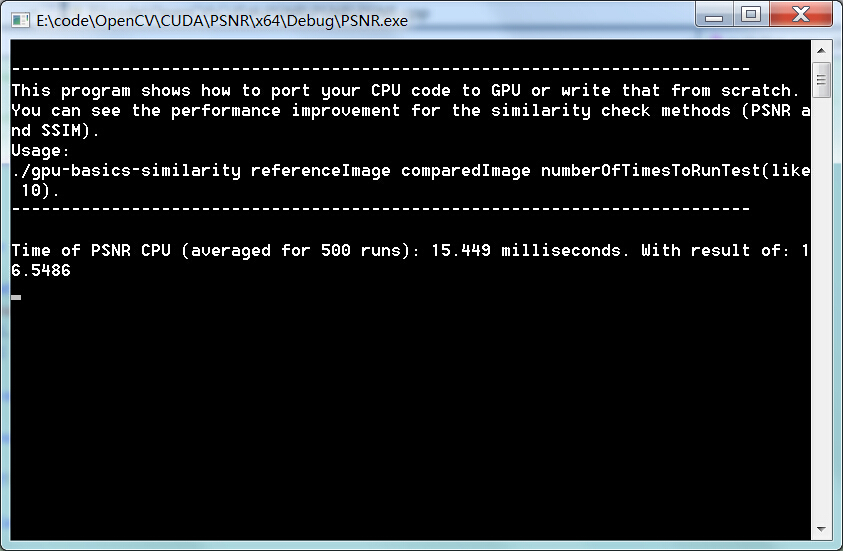
       cout << "Couldn't read the image"; return 0; } BufferPSNR bufferPSNR; BufferMSSIM bufferMSSIM; int TIMES; stringstream sstr("500"); sstr >> TIMES; double time, result; //------------------------------- PSNR CPU ---------------------------------------------------- time = (double)getTickCount(); for (int i = 0; i < TIMES; ++i) result = getPSNR(I1,I2); time = 1000*((double)getTickCount() - time)/getTickFrequency(); time /= TIMES; cout << "Time of PSNR CPU (averaged for " << TIMES << " runs): " << time << " milliseconds." << " With result of: " << result << endl; ------------------------------- PSNR GPU ---------------------------------------------------- //time = (double)getTickCount();  //for (int i = 0; i < TIMES; ++i) // result = getPSNR_GPU(I1,I2); //time = 1000*((double)getTickCount() - time)/getTickFrequency(); //time /= TIMES; //cout << "Time of PSNR GPU (averaged for " << TIMES << " runs): " << time << " milliseconds." // << " With result of: " << result << endl;  /* //------------------------------- PSNR GPU Optimized-------------------------------------------- time = (double)getTickCount(); // Initial call result = getPSNR_GPU_optimized(I1, I2, bufferPSNR); time = 1000*((double)getTickCount() - time)/getTickFrequency(); cout << "Initial call GPU optimized: " << time <<" milliseconds." << " With result of: " << result << endl; time = (double)getTickCount(); for (int i = 0; i < TIMES; ++i) result = getPSNR_GPU_optimized(I1, I2, bufferPSNR); time = 1000*((double)getTickCount() - time)/getTickFrequency(); time /= TIMES; cout << "Time of PSNR GPU OPTIMIZED ( / " << TIMES << " runs): " << time << " milliseconds." << " With result of: " << result << endl << endl; //------------------------------- SSIM CPU ----------------------------------------------------- Scalar x; time = (double)getTickCount(); for (int i = 0; i < TIMES; ++i) x = getMSSIM(I1,I2); time = 1000*((double)getTickCount() - time)/getTickFrequency(); time /= TIMES; cout << "Time of MSSIM CPU (averaged for " << TIMES << " runs): " << time << " milliseconds." << " With result of B" << x.val[0] << " G" << x.val[1] << " R" << x.val[2] << endl; //------------------------------- SSIM GPU ----------------------------------------------------- time = (double)getTickCount(); for (int i = 0; i < TIMES; ++i) x = getMSSIM_GPU(I1,I2); time = 1000*((double)getTickCount() - time)/getTickFrequency(); time /= TIMES; cout << "Time of MSSIM GPU (averaged for " << TIMES << " runs): " << time << " milliseconds." << " With result of B" << x.val[0] << " G" << x.val[1] << " R" << x.val[2] << endl; //------------------------------- SSIM GPU Optimized-------------------------------------------- time = (double)getTickCount(); x = getMSSIM_GPU_optimized(I1,I2, bufferMSSIM); time = 1000*((double)getTickCount() - time)/getTickFrequency(); cout << "Time of MSSIM GPU Initial Call " << time << " milliseconds." << " With result of B" << x.val[0] << " G" << x.val[1] << " R" << x.val[2] << endl; time = (double)getTickCount(); for (int i = 0; i < TIMES; ++i) x = getMSSIM_GPU_optimized(I1,I2, bufferMSSIM); time = 1000*((double)getTickCount() - time)/getTickFrequency(); time /= TIMES; cout << "Time of MSSIM GPU OPTIMIZED ( / " << TIMES << " runs): " << time << " milliseconds." << " With result of B" << x.val[0] << " G" << x.val[1] << " R" << x.val[2] << endl << endl; return 0; */ getchar(); } double getPSNR(const Mat& I1, const Mat& I2) { 
       Mat s1; absdiff(I1, I2, s1); // |I1 - I2| s1.convertTo(s1, CV_32F); // cannot make a square on 8 bits s1 = s1.mul(s1); // |I1 - I2|^2 Scalar s = sum(s1); // sum elements per channel double sse = s.val[0] + s.val[1] + s.val[2]; // sum channels if( sse <= 1e-10) // for small values return zero return 0; else { 
       double mse =sse /(double)(I1.channels() * I1.total()); double psnr = 10.0*log10((255*255)/mse); return psnr; } } double getPSNR_GPU_optimized(const Mat& I1, const Mat& I2, BufferPSNR& b) { 
       b.gI1.upload(I1); b.gI2.upload(I2); b.gI1.convertTo(b.t1, CV_32F); b.gI2.convertTo(b.t2, CV_32F); gpu::absdiff(b.t1.reshape(1), b.t2.reshape(1), b.gs); gpu::multiply(b.gs, b.gs, b.gs); double sse = gpu::sum(b.gs, b.buf)[0]; if( sse <= 1e-10) // for small values return zero return 0; else { 
       double mse = sse /(double)(I1.channels() * I1.total()); double psnr = 10.0*log10((255*255)/mse); return psnr; } } double getPSNR_GPU(const Mat& I1, const Mat& I2) { 
       gpu::GpuMat gI1, gI2, gs, t1,t2; gI1.upload(I1); gI2.upload(I2); gI1.convertTo(t1, CV_32F); gI2.convertTo(t2, CV_32F); gpu::absdiff(t1.reshape(1), t2.reshape(1), gs); gpu::multiply(gs, gs, gs); Scalar s = gpu::sum(gs); double sse = s.val[0] + s.val[1] + s.val[2]; if( sse <= 1e-10) // for small values return zero return 0; else { 
       double mse =sse /(double)(gI1.channels() * I1.total()); double psnr = 10.0*log10((255*255)/mse); return psnr; } } Scalar getMSSIM( const Mat& i1, const Mat& i2) { 
       const double C1 = 6.5025, C2 = 58.5225; /* INITS / int d = CV_32F; Mat I1, I2; i1.convertTo(I1, d); // cannot calculate on one byte large values i2.convertTo(I2, d); Mat I2_2 = I2.mul(I2); // I2^2 Mat I1_2 = I1.mul(I1); // I1^2 Mat I1_I2 = I1.mul(I2); // I1 * I2 /* END INITS / Mat mu1, mu2; // PRELIMINARY COMPUTING GaussianBlur(I1, mu1, Size(11, 11), 1.5); GaussianBlur(I2, mu2, Size(11, 11), 1.5); Mat mu1_2 = mu1.mul(mu1); Mat mu2_2 = mu2.mul(mu2); Mat mu1_mu2 = mu1.mul(mu2); Mat sigma1_2, sigma2_2, sigma12; GaussianBlur(I1_2, sigma1_2, Size(11, 11), 1.5); sigma1_2 -= mu1_2; GaussianBlur(I2_2, sigma2_2, Size(11, 11), 1.5); sigma2_2 -= mu2_2; GaussianBlur(I1_I2, sigma12, Size(11, 11), 1.5); sigma12 -= mu1_mu2; / FORMULA  Mat t1, t2, t3; t1 = 2 * mu1_mu2 + C1; t2 = 2 * sigma12 + C2; t3 = t1.mul(t2); // t3 = ((2*mu1_mu2 + C1).*(2*sigma12 + C2)) t1 = mu1_2 + mu2_2 + C1; t2 = sigma1_2 + sigma2_2 + C2; t1 = t1.mul(t2); // t1 =((mu1_2 + mu2_2 + C1).*(sigma1_2 + sigma2_2 + C2)) Mat ssim_map; divide(t3, t1, ssim_map); // ssim_map = t3./t1; Scalar mssim = mean( ssim_map ); // mssim = average of ssim map return mssim; } Scalar getMSSIM_GPU( const Mat& i1, const Mat& i2) { 
       const float C1 = 6.5025f, C2 = 58.5225f; /* INITS / gpu::GpuMat gI1, gI2, gs1, t1,t2; gI1.upload(i1); gI2.upload(i2); gI1.convertTo(t1, CV_MAKE_TYPE(CV_32F, gI1.channels())); gI2.convertTo(t2, CV_MAKE_TYPE(CV_32F, gI2.channels())); vector<gpu::GpuMat> vI1, vI2; gpu::split(t1, vI1); gpu::split(t2, vI2); Scalar mssim; for( int i = 0; i < gI1.channels(); ++i ) { 
       gpu::GpuMat I2_2, I1_2, I1_I2; gpu::multiply(vI2[i], vI2[i], I2_2); // I2^2 gpu::multiply(vI1[i], vI1[i], I1_2); // I1^2 gpu::multiply(vI1[i], vI2[i], I1_I2); // I1 * I2 /* END INITS / gpu::GpuMat mu1, mu2; // PRELIMINARY COMPUTING gpu::GaussianBlur(vI1[i], mu1, Size(11, 11), 1.5); gpu::GaussianBlur(vI2[i], mu2, Size(11, 11), 1.5); gpu::GpuMat mu1_2, mu2_2, mu1_mu2; gpu::multiply(mu1, mu1, mu1_2); gpu::multiply(mu2, mu2, mu2_2); gpu::multiply(mu1, mu2, mu1_mu2); gpu::GpuMat sigma1_2, sigma2_2, sigma12; gpu::GaussianBlur(I1_2, sigma1_2, Size(11, 11), 1.5); //sigma1_2 = sigma1_2 - mu1_2; gpu::subtract(sigma1_2,mu1_2,sigma1_2); gpu::GaussianBlur(I2_2, sigma2_2, Size(11, 11), 1.5); //sigma2_2 = sigma2_2 - mu2_2; gpu::GaussianBlur(I1_I2, sigma12, Size(11, 11), 1.5); (Mat)sigma12 =(Mat)sigma12 - (Mat)mu1_mu2; //sigma12 = sigma12 - mu1_mu2 / FORMULA  gpu::GpuMat t1, t2, t3; // t1 = 2 * mu1_mu2 + C1;  // t2 = 2 * sigma12 + C2;  // gpu::multiply(t1, t2, t3); // t3 = ((2*mu1_mu2 + C1).*(2*sigma12 + C2)) //  // t1 = mu1_2 + mu2_2 + C1;  // t2 = sigma1_2 + sigma2_2 + C2;  // gpu::multiply(t1, t2, t1); // t1 =((mu1_2 + mu2_2 + C1).*(sigma1_2 + sigma2_2 + C2)) gpu::GpuMat ssim_map; gpu::divide(t3, t1, ssim_map); // ssim_map = t3./t1; Scalar s = gpu::sum(ssim_map); mssim.val[i] = s.val[0] / (ssim_map.rows * ssim_map.cols); } return mssim; } Scalar getMSSIM_GPU_optimized( const Mat& i1, const Mat& i2, BufferMSSIM& b) { 
       int cn = i1.channels(); const float C1 = 6.5025f, C2 = 58.5225f; /* INITS / b.gI1.upload(i1); b.gI2.upload(i2); gpu::Stream stream; stream.enqueueConvert(b.gI1, b.t1, CV_32F); stream.enqueueConvert(b.gI2, b.t2, CV_32F); gpu::split(b.t1, b.vI1, stream); gpu::split(b.t2, b.vI2, stream); Scalar mssim; for( int i = 0; i < b.gI1.channels(); ++i ) { 
       gpu::multiply(b.vI2[i], b.vI2[i], b.I2_2, stream); // I2^2 gpu::multiply(b.vI1[i], b.vI1[i], b.I1_2, stream); // I1^2 gpu::multiply(b.vI1[i], b.vI2[i], b.I1_I2, stream); // I1 * I2 //gpu::GaussianBlur(b.vI1[i], b.mu1, Size(11, 11), 1.5, 0, BORDER_DEFAULT, -1, stream); //gpu::GaussianBlur(b.vI2[i], b.mu2, Size(11, 11), 1.5, 0, BORDER_DEFAULT, -1, stream); gpu::multiply(b.mu1, b.mu1, b.mu1_2, stream); gpu::multiply(b.mu2, b.mu2, b.mu2_2, stream); gpu::multiply(b.mu1, b.mu2, b.mu1_mu2, stream); //gpu::GaussianBlur(b.I1_2, b.sigma1_2, Size(11, 11), 1.5, 0, BORDER_DEFAULT, -1, stream); //gpu::subtract(b.sigma1_2, b.mu1_2, b.sigma1_2, stream); //b.sigma1_2 -= b.mu1_2; - This would result in an extra data transfer operation //gpu::GaussianBlur(b.I2_2, b.sigma2_2, Size(11, 11), 1.5, 0, BORDER_DEFAULT, -1, stream); //gpu::subtract(b.sigma2_2, b.mu2_2, b.sigma2_2, stream); //b.sigma2_2 -= b.mu2_2; //gpu::GaussianBlur(b.I1_I2, b.sigma12, Size(11, 11), 1.5, 0, BORDER_DEFAULT, -1, stream); //gpu::subtract(b.sigma12, b.mu1_mu2, b.sigma12, stream); //b.sigma12 -= b.mu1_mu2; //here too it would be an extra data transfer due to call of operator*(Scalar, Mat) gpu::multiply(b.mu1_mu2, 2, b.t1, stream); //b.t1 = 2 * b.mu1_mu2 + C1;  //gpu::add(b.t1, C1, b.t1, stream); gpu::multiply(b.sigma12, 2, b.t2, stream); //b.t2 = 2 * b.sigma12 + C2;  //gpu::add(b.t2, C2, b.t2, stream);  gpu::multiply(b.t1, b.t2, b.t3, stream); // t3 = ((2*mu1_mu2 + C1).*(2*sigma12 + C2)) //gpu::add(b.mu1_2, b.mu2_2, b.t1, stream); //gpu::add(b.t1, C1, b.t1, stream); //gpu::add(b.sigma1_2, b.sigma2_2, b.t2, stream); //gpu::add(b.t2, C2, b.t2, stream); gpu::multiply(b.t1, b.t2, b.t1, stream); // t1 =((mu1_2 + mu2_2 + C1).*(sigma1_2 + sigma2_2 + C2))  gpu::divide(b.t3, b.t1, b.ssim_map, stream); // ssim_map = t3./t1; stream.waitForCompletion(); Scalar s = gpu::sum(b.ssim_map, b.buf); mssim.val[i] = s.val[0] / (b.ssim_map.rows * b.ssim_map.cols); } return mssim; } 

效果

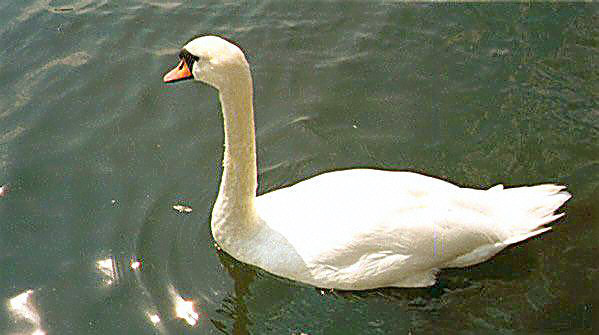
两幅一样的图片,对比结果:

在这里插入图片描述


2.感知哈希算法

(perceptual hash algorithm)

http://blog.csdn.net/fengbingchun/article/details/

感知哈希算法(perceptual hash algorithm),它的作用是对每张图像生成一个“指纹”(fingerprint)字符串,然后比较不同图像的指纹。结果越接近,就说明图像越相似。

实现步骤

  1. 缩小尺寸:将图像缩小到8*8的尺寸,总共64个像素。
  2. 这一步的作用是去除图像的细节,只保留结构/明暗等基本信息,摒弃不同尺寸/比例带来的图像差异;这一步的作用是去除图像的细节,只保留结构/明暗等基本信息,摒弃不同尺寸/比例带来的图像差异;
  3. 简化色彩:将缩小后的图像,转为64级灰度,即所有像素点总共只有64种颜色;
  4. 计算平均值:计算所有64个像素的灰度平均值;
  5. 比较像素的灰度:将每个像素的灰度,与平均值进行比较,大于或等于平均值记为1,小于平均值记为0;
  6. 计算哈希值:将上一步的比较结果,组合在一起,就构成了一个64位的整数,这就是这张图像的指纹。组合的次序并不重要,只要保证所有图像都采用同样次序就行了;
  7. 得到指纹以后,就可以对比不同的图像,看看64位中有多少位是不一样的。在理论上,这等同于”汉明距离”(Hamming distance,在信息论中,两个等长字符串之间的汉明距离是两个字符串对应位置的不同字符的个数)。

如果不相同的数据位数不超过5,就说明两张图像很相似;
如果大于10,就说明这是两张不同的图像。

以上内容摘自:http://www.ruanyifeng.com/blog/2011/07/principle_of_similar_image_search.html

代码

// similarity.cpp : 定义控制台应用程序的入口点。 // #include "stdafx.h" #include  
         #include  
         #include  
         #include  
         #pragma comment(lib,"opencv_core2410d.lib")  #pragma comment(lib,"opencv_highgui2410d.lib")  #pragma comment(lib,"opencv_imgproc2410d.lib")  using namespace std; int _tmain(int argc, _TCHAR* argv[]) { 
        string strSrcImageName = "swan.jpg"; cv::Mat matSrc, matSrc1, matSrc2; matSrc = cv::imread(strSrcImageName, CV_LOAD_IMAGE_COLOR); CV_Assert(matSrc.channels() == 3); cv::resize(matSrc, matSrc1, cv::Size(357, 419), 0, 0, cv::INTER_NEAREST); //cv::flip(matSrc1, matSrc1, 1); cv::resize(matSrc, matSrc2, cv::Size(2177, 3233), 0, 0, cv::INTER_LANCZOS4); cv::Mat matDst1, matDst2; cv::resize(matSrc1, matDst1, cv::Size(8, 8), 0, 0, cv::INTER_CUBIC); cv::resize(matSrc2, matDst2, cv::Size(8, 8), 0, 0, cv::INTER_CUBIC); //update for the bug cvtColor cv::Mat temp1 = matDst1; cv::Mat temp2 = matDst2; cv::cvtColor(temp1 , matDst1, CV_BGR2GRAY); cv::cvtColor(temp2 , matDst2, CV_BGR2GRAY); int iAvg1 = 0, iAvg2 = 0; int arr1[64], arr2[64]; for (int i = 0; i < 8; i++) { 
        uchar* data1 = matDst1.ptr<uchar>(i); uchar* data2 = matDst2.ptr<uchar>(i); int tmp = i * 8; for (int j = 0; j < 8; j++) { 
        int tmp1 = tmp + j; arr1[tmp1] = data1[j] / 4 * 4; arr2[tmp1] = data2[j] / 4 * 4; iAvg1 += arr1[tmp1]; iAvg2 += arr2[tmp1]; } } iAvg1 /= 64; iAvg2 /= 64; for (int i = 0; i < 64; i++) { 
        arr1[i] = (arr1[i] >= iAvg1) ? 1 : 0; arr2[i] = (arr2[i] >= iAvg2) ? 1 : 0; } int iDiffNum = 0; for (int i = 0; i < 64; i++) if (arr1[i] != arr2[i]) ++iDiffNum; cout<<"iDiffNum = "<<iDiffNum<<endl; if (iDiffNum <= 5) cout<<"two images are very similar!"<<endl; else if (iDiffNum > 10) cout<<"they are two different images!"<<endl; else cout<<"two image are somewhat similar!"<<endl; getchar(); return 0; } 

效果

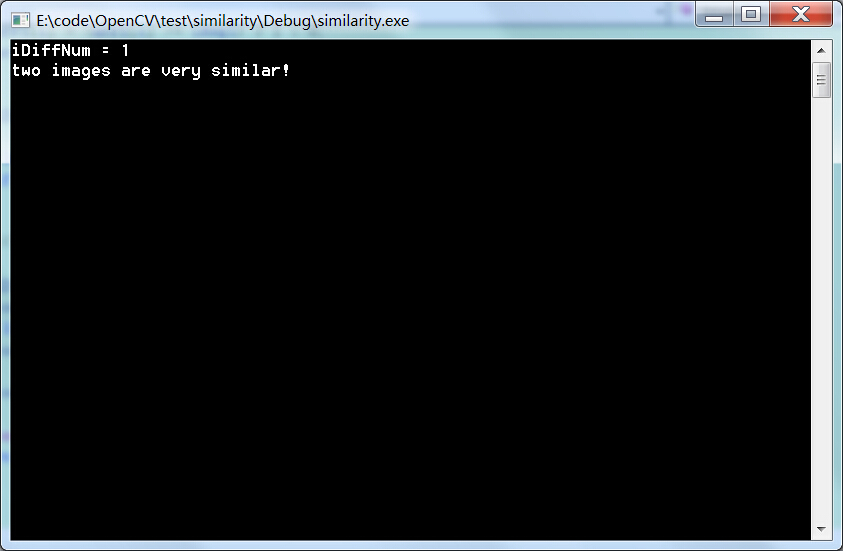
一幅图片自己对比:

在这里插入图片描述

结果:

在这里插入图片描述


3.计算特征点

OpenCV的feature2d module中提供了从局部图像特征(Local image feature)的检测、特征向量(feature vector)的提取,到特征匹配的实现。其中的局部图像特征包括了常用的几种局部图像特征检测与描述算子,如FAST、SURF、SIFT、以及ORB。对于高维特征向量之间的匹配,OpenCV主要有两种方式:

feature2d module: http://docs.opencv.org/modules/features2d/doc/features2d.html

OpenCV FLANN: http://docs.opencv.org/modules/flann/doc/flann.html

FLANN: http://www.cs.ubc.ca/~mariusm/index.php/FLANN/FLANN

原文:

http://blog.csdn.net/icvpr/article/details/

代码

//localfeature.h #ifndef _FEATURE_H_  #define _FEATURE_H_ #include  
          #include  
          #include  
          #include  
          #include  
          #include  
          #include  
          #include  
           #include  
           using namespace cv; using namespace std; class Feature { 
         public: Feature(); ~Feature(); Feature(const string& detectType, const string& extractType, const string& matchType); public: void detectKeypoints(const Mat& image, vector<KeyPoint>& keypoints); // 检测特征点 void extractDescriptors(const Mat& image, vector<KeyPoint>& keypoints, Mat& descriptor); // 提取特征向量 void bestMatch(const Mat& queryDescriptor, Mat& trainDescriptor, vector<DMatch>& matches); // 最近邻匹配 void knnMatch(const Mat& queryDescriptor, Mat& trainDescriptor, vector<vector<DMatch>>& matches, int k); // K近邻匹配 void saveKeypoints(const Mat& image, const vector<KeyPoint>& keypoints, const string& saveFileName = ""); // 保存特征点 void saveMatches(const Mat& queryImage, const vector<KeyPoint>& queryKeypoints, const Mat& trainImage, const vector<KeyPoint>& trainKeypoints, const vector<DMatch>& matches, const string& saveFileName = ""); // 保存匹配结果到图片中 private: Ptr<FeatureDetector> m_detector; Ptr<DescriptorExtractor> m_extractor; Ptr<DescriptorMatcher> m_matcher; string m_detectType; string m_extractType; string m_matchType; }; #endif //localfeature.cpp #include "stdafx.h" #include "localfeature.h" Feature::Feature() { 
         m_detectType = "SIFT"; m_extractType = "SIFT"; m_matchType = "BruteForce"; } Feature::~Feature() { 
         } Feature::Feature(const string& detectType, const string& extractType, const string& matchType) { 
         assert(!detectType.empty()); assert(!extractType.empty()); assert(!matchType.empty()); m_detectType = detectType; m_extractType = extractType; m_matchType = matchType; } void Feature::detectKeypoints(const Mat& image, std::vector<KeyPoint>& keypoints) { 
         assert(image.type() == CV_8UC1); assert(!m_detectType.empty()); keypoints.clear(); initModule_nonfree(); m_detector = FeatureDetector::create(m_detectType); m_detector->detect(image, keypoints); } void Feature::extractDescriptors(const Mat& image, std::vector<KeyPoint>& keypoints, Mat& descriptor) { 
         assert(image.type() == CV_8UC1); assert(!m_extractType.empty()); initModule_nonfree(); m_extractor = DescriptorExtractor::create(m_extractType); m_extractor->compute(image, keypoints, descriptor); } void Feature::bestMatch(const Mat& queryDescriptor, Mat& trainDescriptor, std::vector<DMatch>& matches) { 
         assert(!queryDescriptor.empty()); assert(!trainDescriptor.empty()); assert(!m_matchType.empty()); matches.clear(); m_matcher = DescriptorMatcher::create(m_matchType); m_matcher->add(std::vector<Mat>(1, trainDescriptor)); m_matcher->train(); m_matcher->match(queryDescriptor, matches); } void Feature::knnMatch(const Mat& queryDescriptor, Mat& trainDescriptor, std::vector<std::vector<DMatch>>& matches, int k) { 
         assert(k > 0); assert(!queryDescriptor.empty()); assert(!trainDescriptor.empty()); assert(!m_matchType.empty()); matches.clear(); m_matcher = DescriptorMatcher::create(m_matchType); m_matcher->add(std::vector<Mat>(1, trainDescriptor)); m_matcher->train(); m_matcher->knnMatch(queryDescriptor, matches, k); } void Feature::saveKeypoints(const Mat& image, const vector<KeyPoint>& keypoints, const string& saveFileName) { 
         assert(!saveFileName.empty()); Mat outImage; cv::drawKeypoints(image, keypoints, outImage, Scalar(255,255,0), DrawMatchesFlags::DRAW_RICH_KEYPOINTS ); // string saveKeypointsImgName = saveFileName + "_" + m_detectType + ".jpg"; imwrite(saveKeypointsImgName, outImage); } void Feature::saveMatches(const Mat& queryImage, const vector<KeyPoint>& queryKeypoints, const Mat& trainImage, const vector<KeyPoint>& trainKeypoints, const vector<DMatch>& matches, const string& saveFileName) { 
         assert(!saveFileName.empty()); Mat outImage; cv::drawMatches(queryImage, queryKeypoints, trainImage, trainKeypoints, matches, outImage, Scalar(255, 0, 0), Scalar(0, 255, 255), vector<char>(), DrawMatchesFlags::NOT_DRAW_SINGLE_POINTS); // string saveMatchImgName = saveFileName + "_" + m_detectType + "_" + m_extractType + "_" + m_matchType + ".jpg"; imwrite(saveMatchImgName, outImage); } // main.cpp : 定义控制台应用程序的入口点。 // #include "stdafx.h" #include  
          #include  
          #include  
          #include  
          #include  
           #include  
           #include "localfeature.h" #pragma comment(lib,"opencv_core2410d.lib")  #pragma comment(lib,"opencv_highgui2410d.lib")  #pragma comment(lib,"opencv_imgproc2410d.lib")  #pragma comment(lib,"opencv_nonfree2410d.lib")  #pragma comment(lib,"opencv_features2d2410d.lib")  using namespace std; int main(int argc, char** argv) { 
         /*if (argc != 6) { cout << "wrong usage!" << endl; cout << "usage: .exe FAST SIFT BruteForce queryImage trainImage" << endl; return -1; }*/ string detectorType = "SIFT"; string extractorType = "SIFT"; string matchType = "BruteForce"; string queryImagePath = "swan.jpg"; string trainImagePath = "swan.jpg"; Mat queryImage = imread(queryImagePath, CV_LOAD_IMAGE_GRAYSCALE); if (queryImage.empty()) { 
         cout<<"read failed"<< endl; return -1; } Mat trainImage = imread(trainImagePath, CV_LOAD_IMAGE_GRAYSCALE); if (trainImage.empty()) { 
         cout<<"read failed"<< endl; return -1; } Feature feature(detectorType, extractorType, matchType); vector<KeyPoint> queryKeypoints, trainKeypoints; feature.detectKeypoints(queryImage, queryKeypoints); feature.detectKeypoints(trainImage, trainKeypoints); Mat queryDescriptor, trainDescriptor; feature.extractDescriptors(queryImage, queryKeypoints, queryDescriptor); feature.extractDescriptors(trainImage, trainKeypoints, trainDescriptor); vector<DMatch> matches; feature.bestMatch(queryDescriptor, trainDescriptor, matches); vector<vector<DMatch>> knnmatches; feature.knnMatch(queryDescriptor, trainDescriptor, knnmatches, 2); Mat outImage; feature.saveMatches(queryImage, queryKeypoints, trainImage, trainKeypoints, matches, "../"); return 0; } 

效果

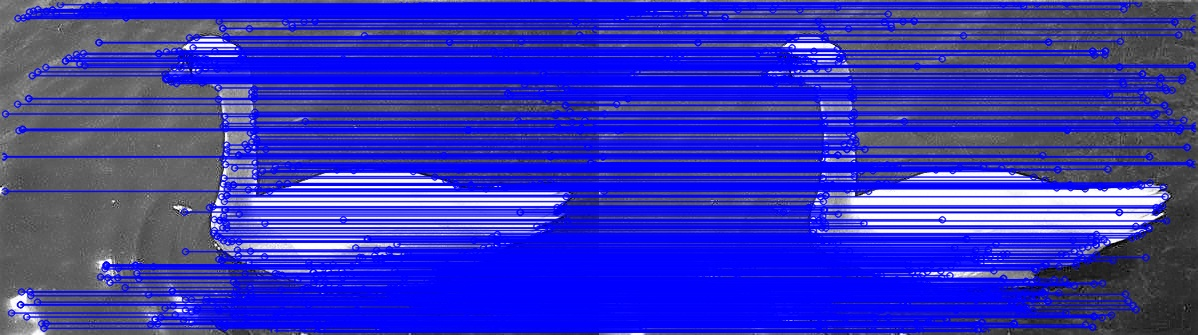
两幅同样图片结果:

在这里插入图片描述

几年前上学时候写了这个文章,没想到现在居然是博客访问最高的一篇文章,现在我又收集了一些论文文档资料,当然衡量图像相似度的方法有很多不止上述的三种方法,具体我们再看看论文和外围资料,下载链接:

http://download.csdn.net/detail/wangyaninglm/


更新

参照大牛@yuanwenmao,大家可能得对部分代码做出修改

cv::cvtColor(matDst1, matDst1, CV_BGR2GRAY); cv::cvtColor(matDst2, matDst2, CV_BGR2GRAY); 

感知哈希算法,的这里有个bug,入参与出参不能是同一个变量,内部应该在计算时被自己修改了,造成判断结果都是很相似。由于博主采用了同一个图片进行比较,所以没发现问题。

void cv::cvtColor( cv::InputArray src, // 输入序列 cv::OutputArray dst, // 输出序列 int code, // 颜色映射码 int dstCn = 0 // 输出的通道数 (0='automatic') ); 

你src、dst都传同一个array,内部计算的同时又在修改array的值,自然有问题。可以看看cvtColor的实现。dst换用另外的变量即可,后面的计算也以更换的变量来。


版权声明:本文内容由互联网用户自发贡献,该文观点仅代表作者本人。本站仅提供信息存储空间服务,不拥有所有权,不承担相关法律责任。如发现本站有涉嫌侵权/违法违规的内容, 请联系我们举报,一经查实,本站将立刻删除。

发布者:全栈程序员-站长,转载请注明出处:https://javaforall.net/199564.html原文链接:https://javaforall.net

(0)
上一篇 2026年3月20日 下午12:43
下一篇 2026年3月20日 下午12:43


相关推荐

  • Linux系统安装tomcat7

    Linux系统安装tomcat7Linux上如果尚未安装JDK,可以参考博文https://mp.csdn.net/postedit/801814221.下载Linux版tomcat7,官网即可下载https://tomcat.apache.org/download-70.cgi2.确定好在Linux上你tomcat要放的路径,我的是/usr/tomcat,可以在/usr目录下mkdirtomcat3.将本地tomcat的文件…

    2022年5月24日
    39
  • AvaTrade · 爱华MT4软件下载

    AvaTrade · 爱华MT4软件下载这里写自定义目录标题爱华简称AVA,使用的交易软件为多数投资者使用的交易软件:MT4。因此爱华的下载和安装方式和其它的平台的MT4的下载和安装方法是一致的。首先要下载MT4软件,下载方法各个版本是一样的。首先要看版本,MT4软件分为网页版,手机版,mac版。手机版又细分为安卓版和IOS版。mt4。yhtz。cc可以看到上述的所有版本。网页和安卓版以及mac版是需要在网页下载的,当然就可以在爱华的网页上去下载安装包。另外IOS版的除在爱华的网页上下载外,也可以在苹果应用商店下载。爱华的MT4交

    2022年5月30日
    61
  • 关于用户路径分析模型_spark用户行为路径

    关于用户路径分析模型_spark用户行为路径在网页或者营销渠道中,用户行为模型有比较多,基于渠道的,笔者觉得有:渠道类型渠道重要性渠道跳转与流失单渠道,多节点路径分析,漏斗功能多渠道归因分析这里多渠道指的是,单渠道多节点的场景比较好理解,就是进入某个web\小程序,在不同页面之间进行跳转,多渠道这里比较多的就是,同一用户在不同的较大的场景下的流转,比如在小红书种草->微信好友推荐->淘宝上买了。归因分析是通过一定的逻辑方法,计算每个渠道、或者触点对最终结果贡献程度的方法。有一套合理

    2022年8月24日
    13
  • mysql创建数据库的步骤_MySQL创建数据表

    mysql创建数据库的步骤_MySQL创建数据表MYSQL建立数据库的步骤:通过练习查询、创建数据库,并且向数据库内单个或通过txt文件批量插入数据的方法。

    2026年3月11日
    6
  • hashmap和hashtable数组扩容_散列表扩容

    hashmap和hashtable数组扩容_散列表扩容前言众所周知,hashmap和Arraylist作为java中非常重要的一种数据结构,应用场景非常广泛,这篇文章主要针对HashMap和ArrayList的扩容机制进行分析。HashMap扩容机制分析在说HashMap扩容机制之前,有必要简述下HashMap的基本结构。以便各位更加清除的理解HashMap的底层是如何扩容的。HashMap自JDK1.8之后结构采用数组+单链表【单链表长度达到…

    2025年11月28日
    12
  • java 构造函数是如何执行的「建议收藏」

    java 构造函数是如何执行的「建议收藏」1.构造函数不是方法!!  原因1:方法的话,会直接执行方法体内的代码,但是构造函数首先执行的不是{}里的代码块,而是给对象的成员初始化;      2.方法可以被调用其他方法调用,但是构造函数不能被方法或变量调用。  packagecom.statics.www;publicclassSon{//构造函数执行第二步:privateintnum2=

    2022年7月8日
    27

发表回复

您的邮箱地址不会被公开。 必填项已用 * 标注

关注全栈程序员社区公众号