
Shapely目录
Introduction
Shapely 是通过Python的ctypes模块,对平面特征进行集合理论分析和操作,使用的函数来自于GEOS库.GEOS是Java Topology Suite (JTS)的移植,是PostgreSQL RDBMS的PostGIS空间扩展的几何引擎。JTS和GEOS的设计主要是以Open Geospatial Consortium的Simple Features Access Specification 为指导,Shapely主要坚持了同一套标准类和操作。因此,Shapely深深植根于地理信息系统(GIS)世界的惯例,但也希望对处理非常规问题的程序员同样有用。
DE-9IM
要使用DE-9IM首先要建立几何对象的interior,boundary和exterior。
首先boundary是指对几何进行一次降维之后得到对象,举例来说一个点的boundary为空,未封闭的线的boundary为其两个端点,封闭线的boundary为空,多边形的boundary为它的环状边界。
interior是指几何对象的边界被移除之后剩下的部分。
exterior则是指不在boundary和interior中点构成的几何对象。
Geometric Object
Point
点
class Point(coordinates)
Point构造函数采用位置坐标值或点元组参数
from shapely.geometry import Point point = Point(0.0, 0.0) Point的面积area为0, 周长length为0
Point.coords: 返回坐标值
Point.x,Point.y,Point.z : 获取对应x,y,z坐标值
Point可以接受另一个Point实例进行复制
LineString
线
class LineString(coordinates)
from shapely.geometry import LineString line = LineString([(0, 0), (1, 1)]) - LineString的面积area为0, 周长length不为0
- object.interpolate(distance[, normalized=False])
- 返回指定距离处的点
- normalized=True, 则距离是几何对象长度的一部分
>>> ip = LineString([(0, 0), (0, 1), (1, 1)]).interpolate(1.5) >>> ip <shapely.geometry.point.Point object at 0x> >>> ip.wkt 'POINT (0.00000 1.0000000000000000)' >>> LineString([(0, 0), (0, 1), (1, 1)]).interpolate(0.75, normalized=True).wkt 'POINT (0.00000 1.0000000000000000)' - object.project(other[, normalized=False])
- 返回该几何对象到最接近另一个对象的点的距离
- normalized=True, 归一化为对象长度的距离
- 是interpolate()的逆函数
>>> LineString([(0, 0), (0, 1), (1, 1)]).project(ip) 1.5 >>> LineString([(0, 0), (0, 1), (1, 1)]).project(ip, normalized=True) 0.75 举个栗子: 在指定距离处切割线
def cut(line, distance): # Cuts a line in two at a distance from its starting point if distance <= 0.0 or distance >= line.length: return [LineString(line)] coords = list(line.coords) for i, p in enumerate(coords): pd = line.project(Point(p)) if pd == distance: return [ LineString(coords[:i+1]), LineString(coords[i:])] if pd > distance: cp = line.interpolate(distance) return [ LineString(coords[:i] + [(cp.x, cp.y)]), LineString([(cp.x, cp.y)] + coords[i:])] >>> line = LineString([(0, 0), (1, 0), (2, 0), (3, 0), (4, 0), (5, 0)]) >>> pprint([list(x.coords) for x in cut(line, 1.0)]) [[(0.0, 0.0), (1.0, 0.0)], [(1.0, 0.0), (2.0, 0.0), (3.0, 0.0), (4.0, 0.0), (5.0, 0.0)]] >>> pprint([list(x.coords) for x in cut(line, 2.5)]) [[(0.0, 0.0), (1.0, 0.0), (2.0, 0.0), (2.5, 0.0)], [(2.5, 0.0), (3.0, 0.0), (4.0, 0.0), (5.0, 0.0)]] - LineString可以接受另一个LineString实例进行复制
- LineString也可以使用一系列混合的Point实例或坐标元组构造
LinearRing
闭合线
class LinearRing(coordinates)
LinearRing的面积area为0, 周长length非0
LinearRing构造函数还接受另一个LineString或LinearRing实例,从而进行复制
Polygon
多边形
class Polygon(shell[, holes=None])
Polygon构造函数采用两个位置参数。 第一个是(x,y [,z])点元组的有序序列,其处理方式与LinearRing情况完全相同。 第二个是可选的无序环状序列,用于指定特征的内部边界或“孔”。

c是一个无效的多边形,因为它的外部和内部环沿线接触
d是一个无效的多边形,因为它的内环沿线接触
Polygon的面积area非0, 周长length非0
from shapely.geometry import Polygon polygon = Polygon([(0, 0), (1, 1), (1, 0)]) - Polygon.exterior.coords: 外部轮廓的点
- Polygon.interiors.coords: 内部轮廓的点
- Polygon构造函数还接受LineString和LinearRing的实例
- 构建矩形多边形
from shapely.geometry import box # box(minx, miny, maxx, maxy, ccw=True), 默认情况下右下角作为第一个点,为逆时针顺序 b = box(0.0, 0.0, 1.0, 1.0) list(b.exterior.coords) # [(1.0, 0.0), (1.0, 1.0), (0.0, 1.0), (0.0, 0.0), (1.0, 0.0)] - 获取已知方向的多边形
- shapely.geometry.polygon.orient(polygon, sign=1.0)
- 返回一个给定多边形的正确方向的多边形
- sign=1.0: 生成的多边形外环坐标 逆时针, 内环坐标 顺时针
- shapely.geometry.polygon.orient(polygon, sign=1.0)
Collections
集合
多个几何对象可以通过 geoms 或者 in / list(), 进行迭代获取GeometryCollection的成员
MultiPoint
多个点
class MultiPoint(points)
构造函数还接受另一个MultiPoint实例或Point实例的无序序列,从而进行复制
MultiLineString
多条线
class MultiLineString(lines)
构造函数还接受MultiLineString的另一个实例或LineString实例的无序序列,从而进行复制
MultiPolygon
多个多边形
class MultiPolygon (polygons)
MultiPolygon构造函数采用一系列外部环和孔列表元组:[((a1, …, aM), [(b1, …, bN), …]), …]
构造函数还接受无序的Polygon实例序列,从而进行复制。
a是有效的
b是无效的, 两个多边形沿线接触
General Attributes and Methods
General Attributes
通用属性和方法
object.area
- 面积(float)
object.bounds
- 边界元组(Xmin, Ymin, Xmax, Ymax)
object.length
- 周长
object.minimum_clearance
- 最小间隙 返回可以移动节点以产生无效几何的最小距离 不存在最小间隙,则将返回math.infinity
object.geom_type
- 返回几何对象的类型
Coordinate sequences
坐标序列
描述几何对象的坐标列是CoordinateSequence对象, 可进行索引,切片和迭代
Point / LineString / LinearRing 直接coords
Polygon 的外部(exterior)和内部(interior)都具有coords
多个几何对象没有坐标序列, 集合内的单个对象具有坐标序列
General Methods
通用方法
object.distance(other)
- 到另一个几何对象的最小距离
object.hausdorff_distance(other)
- 到另一个几何对象的Hausdorff距离(到另一个几何对象最近点的最大距离)
object.representative_point()
- 返回保证在几何对象内的廉价计算点
Predicates and Relationships
Unary Predicates
一元谓词
object.has_z
- 是否有z坐标
object.is_ccw
- LinearRing对象是否逆时针
object.is_empty
- 是否为空
object.is_ring
- 是否为封闭且简单的LineString
object.is_simple
- 是否交叉
object.is_valid
- 是否有效
- 有效的
LinearRing不能在一个点上交叉或接触到自己 - 有效的
Polygon不能拥有任何重叠的外环或内环 - 有效的
MultiPolygon不能包含任何重叠的多边形
Binary Predicates
二元谓词
object.__eq__(other)
- 两个对象几何类型相同且坐标精确匹配,返回True
object.equals(other)
- 两个对象集合理论上的边界,内部和外部一致,返回True
object.almost_equals(other[, decimal=6])
- 两个对象在指定点的小数点精度上的所有点都近似相等,则返回True
object.contains(other)
- 另一个对象没有点在对象外部,并且至少有一个点在对象(a包含b), 返回True
object.within(other)
- 对象的边界和内部仅与另一个的内部(而不是其边界或外部)相交(a被包含于b)返回True
- contains 与within相反,
a.contains(b)== b.within(a)
>>> coords = [(0, 0), (1, 1)] >>> LineString(coords).contains(Point(0.5, 0.5)) True >>> Point(0.5, 0.5).within(LineString(coords)) True # 线的端点是其边界的一部分,因此不包含在内 >>> LineString(coords).contains(Point(1.0, 1.0)) False object.crosses(other)
- 对象的内部与另一个的内部相交但不包含该对象,并且交集的尺寸小于一个或另一个的尺寸(a,b相交),则返回True
>>> LineString(coords).crosses(LineString([(0, 1), (1, 0)])) True # 一条线不与它包含的点相交 >>> LineString(coords).crosses(Point(0.5, 0.5)) False object.disjoint(other)
- 对象的边界和内部与其他对象都不相交(a,b不相交),则返回True
object.intersects(other)
- 如果对象的边界或内部以任何方式相交与另一个对象(a,b相交),则返回True
- intersects 是 disjoint 的逆函数
object.overlaps(other)
- 如果两个对象相交intersects 但互相都不包含(a,b重叠),则返回True
object.touches(other)
- 如果两个对象至少有一个公共点,并且它们的内部不与另一个的任何部分相交(a,b相切),则返回True
DE-9IM Relationships
object.relate(other)
- 返回对象内部,边界,外部与另一个几何对象的DE-9IM关系矩阵的字符串表示
object.relate_pattern(other, pattern)
- 如果几何之间的关系的DE-9IM字符串满足该模式,则返回True
Spatial Analysis Methods
空间分析方法
Set-theoretic Methods
集合论方法
object.boundary
- 返回表示对象的集合论边界的低维对象
>>> coords = [((0, 0), (1, 1)), ((-1, 0), (1, 0))] >>> lines = MultiLineString(coords) >>> lines.boundary object.centroid
- 返回对象的几何质心
LineString([(0, 0), (1, 1)]) LineString([(0, 0), (1, 1)]).centroid object.difference(other)
- 返回组成该几何对象的点的表示,这些点不组成另一个对象
- a – (a,b相交的部分) 即 a – (a∩b)
object.intersection(other)
- 返回此对象与另一个几何对象的交集的表示形式
- a,b相交的部分 即 a∩b
object.symmetric_difference(other)
- 返回此对象中不在另一个几何对象中的点以及另一个不在此几何对象中的点的表示
- a,b的并集-a,b的交集 即 (a∪b) – (a∩b)
object.union(other)
- 返回此对象和另一个几何对象的点并集的表示形式
- a,b的并集 即 a∪b
- 更高效的方法:
shapely.ops.unary_union()
Constructive Methods
产生新对象的方法,这些新对象不是从集合论分析中得出的
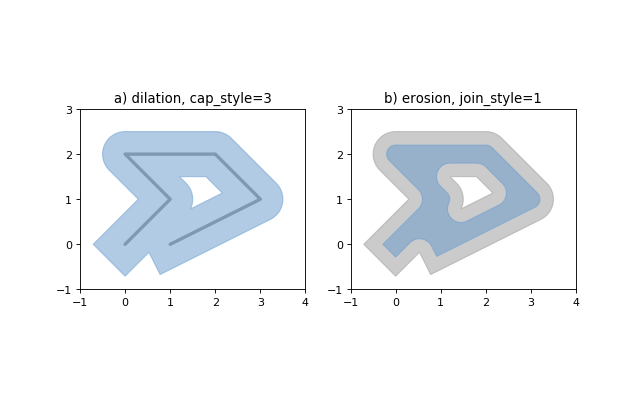
object.buffer(distance, resolution=16, cap_style=1, join_style=1, mitre_limit=5.0)
- 返回此几何对象给定距离内所有点的近似表示
- distance: 为正 扩张,为负侵蚀
- resolution: 近似于围绕一个点的四分之一圆的线段数 默认值16近似于圆形.面积的99.8%
- cap_style 集合样式 1 round 圆形, 2 flat 扁平, 3 square 正方形
- join_style 线条相交处的样式 1 round 圆角 2 mitre 方角 3 bevel 切掉顶角
# 正方形 1 * 4 Point(0, 0).buffer(10, resolution=1) # 正八边形 2 * 4 Point(0, 0).buffer(10, resolution=2) # 正六十四边形 默认 16 * 4 Point(0, 0).buffer(10) object.convex_hull
- 返回包含对象中所有点的最小凸多边形的表示形式,除非对象中的点数少于三个。对于两点,返回LineString;对于一点,返回本身
object.envelope
- 返回包含对象的点或最小矩形多边形(边与坐标轴平行)的表示形式
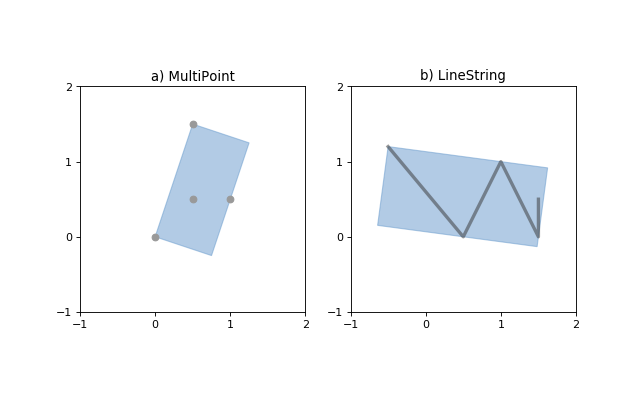
object.minimum_rotated_rectangle
- 返回包含对象的最小矩形多边形(不一定平行于坐标轴)
- 线或点, 返回本身
object.parallel_offset(distance, side, resolution=16, join_style=1, mitre_limit=5.0) - 仅适用于 LineString或LineRing
- 返回距对象左侧或右侧一定距离的LineString或MultiLineString
- distance 必须是浮点数, 平行偏移量
- side: 根据LineString的给定几何点的方向来确定的方向(左右)
- left: 与LineString或LineRing 同向
- right: 与LineString或LineRing 反向
- resolution: 近似于围绕一个点的四分之一圆的线段数 默认值16
- join_style: 线条相交处的样式 1 round 圆角 2 mitre 方角 3 bevel 切掉顶角
- mitre_limit: 平行线的距离与指定距离的比 就是斜角比, 超过,边角会变成倒角
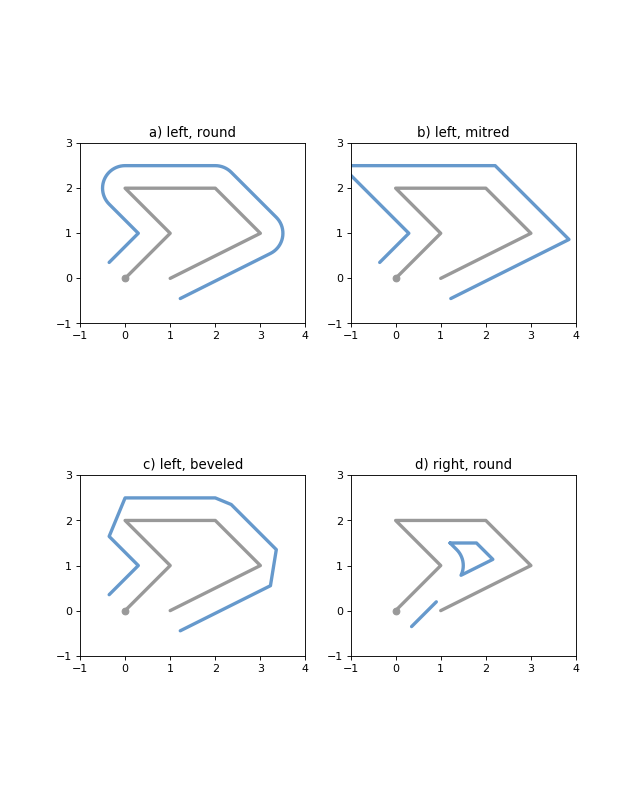
- mitre_limit的效果
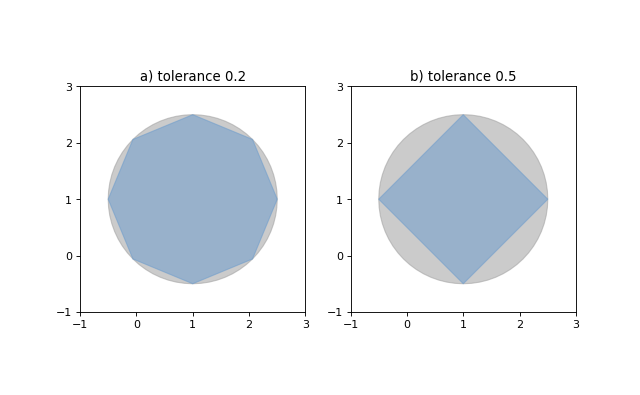
object.simplify(tolerance, preserve_topology=True)
- 返回几何对象的简化表示
- 简化后的对象中的所有点将在原始几何体的公差距离内
- preserve_topology
- 默认为True, 使用较慢的算法保留拓扑结构
- False, 使用更快的Douglas-Peucker 算法保留拓扑结构
Affine Transformations
仿射变换
shapely.affinity.affine_transform(geom, matrix)
- 返回经过仿射变换后的矩阵
- 系数矩阵以2D或3D转换的列表或元组形式分别提供6或12个项
- 2D仿射变换, 矩阵为6个参数 [a, b, d, e, xoff, yoff]
- 3D仿射变换, 矩阵为12个参数 [a, b, c, d, e, f, g, h, i, xoff, yoff, zoff]
shapely.affinity.rotate(geom, angle, origin=‘center’, use_radians=False)
- 返回二维平面上的旋转几何
>>> from shapely import affinity >>> line = LineString([(1, 3), (1, 1), (4, 1)]) >>> rotated_a = affinity.rotate(line, 90) >>> rotated_b = affinity.rotate(line, 90, origin='centroid') 
shapely.affinity.scale(geom, xfact=1.0, yfact=1.0, zfact=1.0, origin=‘center’)
- 返回沿每个维度按比例缩放的几何图形
- origin: 缩放的原点,默认是center 即 2D几何对象的边界框中心centerid, 也可以是单个点对象 或者 坐标元组
- xfact / yfact / zfact: 缩放比例. 设缩放原点为(X0,Y0, Z0 )
- 正值, 直接缩放
- 负值, 缩放后再沿着x=X0 / y=Y0 / z=Z0 对称
>>> triangle = Polygon([(1, 1), (2, 3), (3, 1)]) >>> triangle_a = affinity.scale(triangle, xfact=1.5, yfact=-1) >>> triangle_a.exterior.coords[:] [(0.5, 3.0), (2.0, 1.0), (3.5, 3.0), (0.5, 3.0)] >>> triangle_b = affinity.scale(triangle, xfact=2, origin=(1,1)) >>> triangle_b.exterior.coords[:] [(1.0, 1.0), (3.0, 3.0), (5.0, 1.0), (1.0, 1.0)]
shapely.affinity.skew(geom,xs=0.0, ys=0.0, origin=‘center’, use_radians=False)
- 返回倾斜的几何体,沿x和y维度剪切角度。
- use_radians=True, 以度或者弧度指定裁切角
- origin: 默认是边界框中心(几何质心centerid),也可以是Point对象 或者坐标元组
shapely.affinity.translate(geom,xs=0.0, ys=0.0, origin=‘center’, use_radians=False)
- 返回沿每个方向偏移量的平移几何体
Other Transformations
地图投影和转换
shapely.ops.transform(func, geom)
- 将func应用于geom的所有坐标,并从转换后的坐标中返回相同类型的新几何
Other Operations
其他操作
Merging Linear Features
shapely.ops.polygonize(lines)
- 返回多边形迭代器
shapely.ops.polygonize_full(lines)
- 返回多边形和剩余的几何形状
- 输入可以是 MultiLineString / LineString对象序列 / 可以适应 LineString的对象序列
- 返回对象的元组:(多边形,悬挂,切割边,无效的环形线)。每个都是几何集合
shapely.ops.linemerge(lines)
- 返回一个LineString或MultiLineString,表示所有线的连续元素的合并
Efficient Unions
高效联合
shapely.ops.unary_union(geoms)
- 返回给定几何对象的并集表示
- 重叠的多边形将被合并.线会溶解并结点, 重复的点将被合并
- 比union()更有效
- 可用于尝试修复无效的MultiPolygons, 面积可能会不一样
from shapely.ops import unary_union polygons = [Point(i, 0).buffer(0.7) for i in range(5)] unary_union(polygons) 
shapely.ops.cascaded_union(geoms)
- 返回给定几何对象的并集表示
- 在1.2.16中, 如果使用了GEOS 3.3+,则会将shapely.ops.cascaded_union()透明地替换为shapely.ops.unary_union()
Delaunay triangulation
shapely.ops.triangulate(geoms, tolerance=0.0, edges=False)
- 返回输入几何图形的顶点的Delaunay三角剖分
- geoms: 任何的几何类型,所有顶点将用作三角剖分的点
- tolerance: 提高三角剖分计算的鲁棒性的捕捉公差, 0.0表示不会发生贴紧
- edges:
- False: 返回被剖分的三角形的列表
- True: 返回LineString边缘的列表
from shapely.ops import triangulate points = MultiPoint([(0, 0), (1, 1), (0, 2), (2, 2), (3, 1), (1, 0)]) triangles = triangulate(points) print([triangle.wkt for triangle in triangles]) ['POLYGON ((0 2, 0 0, 1 1, 0 2))', 'POLYGON ((0 2, 1 1, 2 2, 0 2))', 'POLYGON ((2 2, 1 1, 3 1, 2 2))', 'POLYGON ((3 1, 1 1, 1 0, 3 1))', 'POLYGON ((1 0, 1 1, 0 0, 1 0))'] triangles2 = triangulate(points, edges=True) print([triangle.wkt for triangle in triangles2]) ['LINESTRING (2 2, 3 1)', 'LINESTRING (0 2, 2 2)', 'LINESTRING (0 0, 0 2)', 'LINESTRING (0 0, 1 0)', 'LINESTRING (1 0, 3 1)', 'LINESTRING (1 0, 1 1)', 'LINESTRING (1 1, 3 1)', 'LINESTRING (1 1, 2 2)', 'LINESTRING (0 2, 1 1)', 'LINESTRING (0 0, 1 1)'] 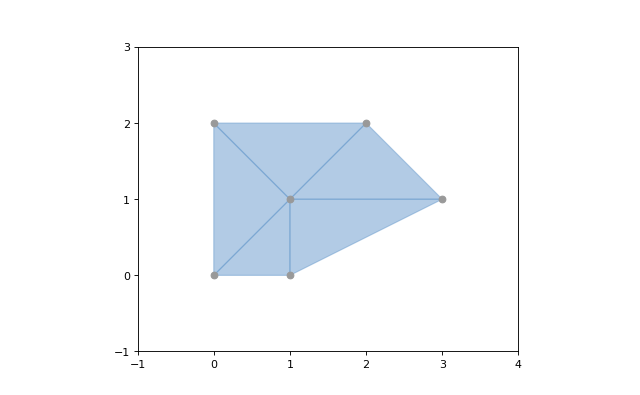
Voronoi Diagram
shapely.ops.voronoi_diagram(geoms, envelope=None, tolerance=0.0, edges=False)
- 根据输入几何的顶点构造Voronoi图(v1.18才支持)
- geoms: 任何的几何类型,所有顶点将用作三角剖分的点
- envelope: 提供一个信封,用于裁剪结果图,None自动计算.会被裁剪到所提供的较大的信封或站点周围的信封
- tolerance: 提高三角剖分计算的鲁棒性的捕捉公差, 0.0表示不会发生贴紧
- edges:
- False: 返回被剖分的三角形的列表
- True: 返回LineString边缘的列表
from shapely.ops import voronoi_diagram points = MultiPoint([(0, 0), (1, 1), (0, 2), (2, 2), (3, 1), (1, 0)]) regions = voronoi_diagram(points) print([region.wkt for region in regions]) ['POLYGON ((2 1, 2 0.5, 0.5 0.5, 0 1, 1 2, 2 1))', 'POLYGON ((6 5, 6 -3, 3.75 -3, 2 0.5, 2 1, 6 5))', 'POLYGON ((0.5 -3, -3 -3, -3 1, 0 1, 0.5 0.5, 0.5 -3))', 'POLYGON ((3.75 -3, 0.5 -3, 0.5 0.5, 2 0.5, 3.75 -3))', 'POLYGON ((-3 1, -3 5, 1 5, 1 2, 0 1, -3 1))', 'POLYGON ((1 5, 6 5, 2 1, 1 2, 1 5))']
Nearest points
shapely.ops.nearest_points(geoms1, geoms2)
- 返回输入几何中最近点的元组, 与输入相同的顺序返回
from shapely.ops import nearest_points triangle = Polygon([(0, 0), (1, 0), (0.5, 1), (0, 0)]) square = Polygon([(0, 2), (1, 2), (1, 3), (0, 3), (0, 2)]) [o.wkt for o in nearest_points(triangle, square)] ['POINT (0.5 1)', 'POINT (0.5 2)'] Snapping
shapely.ops.snap(geoms1, geoms2, tolerance)
- 将geom1中的顶点对齐到geom2中的顶点。返回捕捉的几何体的副本。输入的几何形状未修改。
- tolerance: 指定顶点之间的最小距离
>>> from shapely.ops import snap >>> square = Polygon([(1,1), (2, 1), (2, 2), (1, 2), (1, 1)]) >>> line = LineString([(0,0), (0.8, 0.8), (1.8, 0.95), (2.6, 0.5)]) >>> result = snap(line, square, 0.5) >>> result.wkt 'LINESTRING (0 0, 1 1, 2 1, 2.6 0.5)' Shared paths
shapely.ops.shared_paths(geoms1, geoms2, tolerance)
- 查找两个线性几何之间的共享路径
- geoms1/geoms2: LineStrings类型
- 返回值是一个集合: 同向的MultiLineString 和 反向的MultiLineString
>>> from shapely.ops import shared_paths >>> g1 = LineString([(0, 0), (10, 0), (10, 5), (20, 5)]) >>> g2 = LineString([(5, 0), (30, 0), (30, 5), (0, 5)]) >>> forward, backward = shared_paths(g1, g2) >>> forward.wkt 'MULTILINESTRING ((5 0, 10 0))' >>> backward.wkt 'MULTILINESTRING ((10 5, 20 5))' Splitting
shapely.ops.split(geoms, splitter)
- 将一个几何体分割成另一个几何体,并返回一个几何体集合。这个函数理论上与被拆分的几何体部分的联合相反。如果拆分器不拆分几何体,则返回一个与输入几何体相等的单个几何体集合。
- 通过 (Multi)Point or (Multi)LineString or (Multi)Polygon的边界去拆分 (Multi)LineString
- 通过LineString分割(Multi)Polygon
>>> pt = Point((1, 1)) >>> line = LineString([(0,0), (2,2)]) >>> result = split(line, pt) >>> result.wkt 'GEOMETRYCOLLECTION (LINESTRING (0 0, 1 1), LINESTRING (1 1, 2 2))' Substring
shapely.ops.substring(geom, start_dist, end_dist[, normalized=False])
- 沿线性几何返回指定距离之间的线段
- 负距离值是从几何形状的末端沿相反方向测量的。超出范围的索引值可通过将它们限制在值的有效范围内进行处理
- 起始距离等于终止距离,则返回一个点
- normalized:True, 距离将被解释为几何长度的一部分
>>> line = LineString(([0, 0], [2, 0])) >>> result = substring(line, 0.5, 0.6) >>> result.wkt 'LINESTRING (0.5 0, 0.6 0)' Prepared Geometry Operations
shapely.prepared.prep(geom)
- 创建并返回准备好的几何对象
- 准备好的几何实例具有以下方法:
contains,contains_properly,covers和intersects。与未准备好的几何对象中的所有参数和用法完全相同。 - 测试一个多边形是否包含大量的点
from shapely.geometry import Point from shapely.prepared import prep points = MultiPoint([(0, 0), (1, 1), (0, 2), (2, 2), (3, 1), (1, 0)]) polygon = Point(0.0, 0.0).buffer(2.0) prepared_polygon = prep(polygon) hits = filter(prepared_polygon.contains, points) for i in list(hits): print(i.wkt) """ POINT (0 0) POINT (1 1) POINT (1 0) """ Diagnostics
shapely.validation.explain_validity(geom)
- 返回几何对象是否有效的字符串(无效对象返回问题点)
>>> coords = [(0, 0), (0, 2), (1, 1), (2, 2), (2, 0), (1, 1), (0, 0)] >>> p = Polygon(coords) >>> from shapely.validation import explain_validity >>> explain_validity(p) 'Ring Self-intersection[1 1]' shapely.__version__
- 查看shapely版本
shapely.geos.geos_version
- 查看GEOS库版本
shapely.geos.geos_version_string
- 查看GEOS C API版本
Polylabel
shapely.ops.polylabel(polygon, tolerance)
- 返回多边形的极点
>>> from shapely.ops import polylabel >>> polygon = LineString([(0, 0), (50, 200), (100, 100), (20, 50), ... (-100, -20), (-150, -200)]).buffer(100) >>> label = polylabel(polygon, tolerance=10) >>> label.wkt 'POINT (59.569 121.44)' STR-packed R-tree
Shapely提供只查询的GEOS R-tree接口去使用Sort-Tile-Recursive算法.将几何对象列表传递给STRtree构造函数以创建空间索引,使用另一个几何对象进行查询.query-only意味着一旦创建STRtree,就是不可变的,无法添加或者删除几何对象.
class strtree.STRtree(geometries)
- STRtree构造函数采用一系列几何对象, 几何对象的引用将保留并存储在R-tree中
- strtree.query(geom)
- 返回strtree中所有几何体的外延与geom的外延相交的几何体的列表
- 后续使用所需的二进制谓语(intersects相交、crosses交叉、contains包含、overlaps重叠)对返回的子集进行搜索,可能需要根据特定的空间关系进一步筛选结果
>>> from shapely.strtree import STRtree >>> points = [Point(i, i) for i in range(10)] >>> tree = STRtree(points) >>> query_geom = Point(2,2).buffer(0.99) >>> [o.wkt for o in tree.query(query_geom)] ['POINT (2 2)'] >>> query_geom = Point(2, 2).buffer(1.0) >>> [o.wkt for o in tree.query(query_geom)] ['POINT (1 1)', 'POINT (2 2)', 'POINT (3 3)'] >>> [o.wkt for o in tree.query(query_geom) if o.intersects(query_geom)] ['POINT (2 2)'] - 获取查询结果的原始索引,需要创建一个辅助字典,使用几何ID作为键,因为形状几何本身不可哈希
>>> index_by_id = dict((id(pt), i) for i, pt in enumerate(points)) >>> [(index_by_id[id(pt)], pt.wkt) for pt in tree.query(Point(2,2).buffer(1.0))] [(1, 'POINT (1 1)'), (2, 'POINT (2 2)'), (3, 'POINT (3 3)')] - strtree.nearest(geom)
- 返回在strtree中离geom最近的对象
>>> tree = STRtree([Point(i, i) for i in range(10)]) >>> tree.nearest(Point(2.2, 2.2)).wkt 'Point (2 2)'
Interoperation
shapely提供了4种与其他软件进行互相操作的途径
Well-Known Formats
可以通过wkt/wkb 属性获取几何对象的wkt 或者 wkb
>>> Point(0, 0).wkt 'POINT (0.0000000000000000 0.0000000000000000)' >>> Point(0, 0).wkb.encode('hex') '0000000000000000000000000000000' shapely.wkb.dumps(geom)
- 将几何对象序列化为wkb形式
shapely.wkb.loads(wkb)
- 将wkb形式转为几何对象
>>> from shapely.wkb import dumps, loads >>> ob_wkb = dumps(Point(0, 0)) >>> ob_wkb.encode('hex') '0000000000000000000000000000000' >>> loads(ob_wkb).wkt 'POINT (0.0000000000000000 0.0000000000000000)' shapely.wkt.dumps(geom)
- 将几何对象序列化为wkt形式
shapely.wkt.loads(wkb)
- 将wkt形式转为几何对象
>>> from shapely.wkt import dumps, loads >>> ob_wkt = dumps(Point(0, 0)) >>> ob_wkt 'POINT (0.0000000000000000 0.0000000000000000)' >>> loads(ob_wkt).wkt 'POINT (0 0)' Numpy and Python Arrays
所有具有坐标序列(点,线性环,线串)的几何对象都提供了Numpy数组接口,因此可以将其转换或调整为Numpy数组
>>> from numpy import array >>> array(Point(0, 0)) array([ 0., 0.]) >>> array(LineString([(0, 0), (1, 1)])) array([[ 0., 0.], [ 1., 1.]]) numpy.asarray()不会复制坐标值,代价就是Numpy访问Shapely对象的坐标速度较慢
可以通过xy属性将相同类型的几何对象的坐标作为x和y值的标准Python数组
>>> Point(0, 0).xy (array('d', [0.0]), array('d', [0.0])) >>> LineString([(0, 0), (1, 1)]).xy (array('d', [0.0, 1.0]), array('d', [0.0, 1.0])) shape.geometry.asShape()系列函数可以包装Numpy坐标数组,以便于使用Shapely进行分析,同时保持原始存储
>>> from shapely.geometry import asPoint, asLineString, asMultiPoint, asPolygon >>> import numpy as np # 1 X 2 数组可以转成 Point >>> pa = asPoint(array([0.0, 0.0])) >>> pa.wkt 'POINT (0.0000000000000000 0.0000000000000000)' # N X 2 数组可以转成 LineString / MultiPoint / Polygon >>> la = asLineString(np.array([[1.0, 2.0], [3.0, 4.0]])) >>> la.wkt 'LINESTRING (1.0000000000000000 2.0000000000000000, 3.0000000000000000 4.0000000000000000)' >>> ma = asMultiPoint(np.array([[1.1, 2.2], [3.3, 4.4], [5.5, 6.6]])) >>> ma.wkt 'MULTIPOINT (1.1 2.2, 3.3 4.4, 5.5 6.6)' >>> pa = asPolygon(np.array([[1.1, 2.2], [3.3, 4.4], [5.5, 6.6]])) >>> pa.wkt 'POLYGON ((1.1 2.2, 3.3 4.4, 5.5 6.6, 1.1 2.2))' Python Geo Interface
任何提供类似于GeoJSON的Python geo接口的对象都可以使用shapely.geometry.asShape()或shapely.geometry.shape()函数进行调整,并用作Shapely几何。
shape.geometry.asShape(context)
- 使context适应几何接口。坐标保留在context中
shape.geometry.shape(context)
- 返回一个新的几何对象,其坐标是从context中复制的
举个栗子: 一个字典
>>> from shapely.geometry import shape >>> data = {
   "type": "Point", "coordinates": (0.0, 0.0)} >>> geom = shape(data) >>> geom.geom_type 'Point' >>> list(geom.coords) [(0.0, 0.0)]
再举个栗子: 一个简单的地标类型的对象
>>> class GeoThing(object): ... def __init__(self, d): ... self.__geo_interface__ = d >>> thing = GeoThing({
"type": "Point", "coordinates": (0.0, 0.0)}) >>> geom = shape(thing) >>> geom.geom_type 'Point' >>> list(geom.coords) [(0.0, 0.0)] shape.geometry.mapping(ob)
- 获得几何对象的类似于GeoJSON的映射
- 返回一个新的几何对象,其坐标是从context中复制的
>>> from shapely.geometry import mapping >>> thing = GeoThing({
   "type": "Point", "coordinates": (0.0, 0.0)}) >>> m = mapping(thing) >>> m['type'] 'Point' >>> m['coordinates'] (0.0, 0.0)}
Performance
Shapely使用GEOS库进行所有操作。GEOS是用C++编写的。shapely.speedups模块包含用C编写的性能增强。当Python在安装过程中访问编译器和GEOS开发标头时,将自动安装它们
shapely.speedups.available
- 检查是否安装了加速
shapely.speedups.enable()
- 开启加速
shapely.speedups.disable()
- 关闭加速
shapely.speedups.enabled
- 检查是否开启加速
发布者:全栈程序员-站长,转载请注明出处:https://javaforall.net/199784.html原文链接:https://javaforall.net



