
Springboot下载文件比较简单,以下是代码:
目录结构
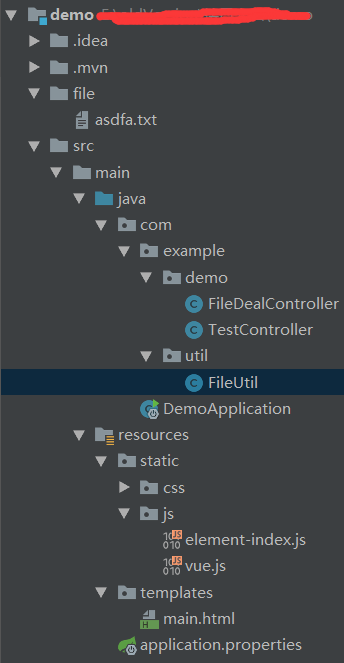

FileUtil为文件工具类,里面包括下载的方法,以下为FileUtil的代码:
public class FileUtil {
    public static void download(String filename, HttpServletResponse res) throws IOException {
    // 发送给客户端的数据 OutputStream outputStream = res.getOutputStream(); byte[] buff = new byte[1024]; BufferedInputStream bis = null; // 读取filename bis = new BufferedInputStream(new FileInputStream(new File("./file/" + filename))); int i = bis.read(buff); while (i != -1) {
    outputStream.write(buff, 0, buff.length); outputStream.flush(); i = bis.read(buff); } } }
file文件夹中asdfa.txt文件是我们要的目标下载,内容如下:
fafa favadf ad adsf adsf adsf a a 2.后台代码
FileDealController .java代码:
@RequestMapping("/file") @RestController public class FileDealController {
    @RequestMapping(value = "download") public void download( @RequestParam("fileName") String filename ) throws IOException {
    ServletRequestAttributes requestAttributes = (ServletRequestAttributes) RequestContextHolder.getRequestAttributes(); HttpServletResponse response = requestAttributes.getResponse(); // 设置信息给客户端不解析 String type = new MimetypesFileTypeMap().getContentType(filename); // 设置contenttype,即告诉客户端所发送的数据属于什么类型 response.setHeader("Content-type",type); // 设置编码 String hehe = new String(filename.getBytes("utf-8"), "iso-8859-1"); // 设置扩展头,当Content-Type 的类型为要下载的类型时 , 这个信息头会告诉浏览器这个文件的名字和类型。 response.setHeader("Content-Disposition", "attachment;filename=" + hehe); FileUtil.download(filename, response); } }
3.前端代码
 <html xmlns:th="http://www.thymeleaf.org"> <head> <meta charset="UTF-8"> <title>Title
     title> <link th:href="@{/css/element-index.css}" rel="stylesheet"/>
      head> <body> <div id="test1">
      <el-button size="small" @click="downLoad('asdfa.txt')">下载
       el-button>
        div>
         body> <script th:src="@{/js/vue.js}">
          script> <script th:src="@{/js/element-index.js}">
           script> <script> new Vue({
            el: '#test1', data:function () {
            return {
            } }, methods: {
            //下载文件 downLoad: function (val) {
            window.open("http://" + window.location.host + "/file/download?fileName=" + val, '_blank') } } });
            script>
             html>
注意:这里用的vue+element插件
4.测试


我这里用的是chrome浏览器,打开asdfa(1).txt文件:

下载内容与file里的一样,则下载成功。
版权声明:本文内容由互联网用户自发贡献,该文观点仅代表作者本人。本站仅提供信息存储空间服务,不拥有所有权,不承担相关法律责任。如发现本站有涉嫌侵权/违法违规的内容, 请联系我们举报,一经查实,本站将立刻删除。
发布者:全栈程序员-站长,转载请注明出处:https://javaforall.net/200270.html原文链接:https://javaforall.net




