
autossh用法整理
首先,我们从autossh的manpage来看下:
NAME autossh — monitor and restart ssh sessions SYNOPSIS autossh [-V] [-M port[:echo_port]] [-f] [SSH_OPTIONS] DESCRIPTION autossh is a program to start a copy of ssh and monitor it, restarting it as necessary should it die or stop passing traffic.从这几句简单清楚的描述,我们知道autossh本身就是个管理、维护ssh的命令,所以其参数也只有最基本的-V(version)、-M(monitoring)、-f(background)。而我们常说的端口转发,反向代理等厉害的功能其实是ssh实现的,我们把参数传给autossh,然后autossh传给ssh来实现特定的功能。
接着,我们看下ssh的manpage:
NAME ssh — OpenSSH SSH client (remote login program) SYNOPSIS ssh [-1246AaCfGgKkMNnqsTtVvXxYy] [-b bind_address] [-c cipher_spec] [-D [bind_address:]port] [-E log_file] [-e escape_char] [-F configfile] [-I pkcs11] [-i identity_file] [-L address] [-l login_name] [-m mac_spec] [-O ctl_cmd] [-o option] [-p port] [-Q query_option] [-R address] [-S ctl_path] [-W host:port] [-w local_tun[:remote_tun]] [user@]hostname [command] DESCRIPTION ssh (SSH client) is a program for logging into a remote machine and for executing commands on a remote machine. It is intended to provide secure encrypted communications between two untrusted hosts over an insecure network. X11 connections, arbitrary TCP ports and UNIX-domain sockets can also be forwarded over the secure channel.可见ssh参数相对复杂一些,我们针对几种常见的用法来解释一些重要参数。
-
为方便表述,我们先构造一种场景: 两个公网ip:
-
A(小明所在公司):111.111.111.111 其子网如下
A1:192.168.1.1
A2:192.168.1.2
A3:192.168.1.3 -
B(小明家庭):222.222.222.222 其子网如下
B1:192.168.2.1
B2:192.168.2.2
B3:192.168.2.3
其中A2是小明在公司的办公PC,B2是小明在家的laptop。
情形一:
- 端口映射(Port Forwarding),将内网主机通过防火墙转发出来(需要防火墙管理权限)
- VPN链路,开启专用通道
- 反向链接(Reverse Connection),内网主机主动连接外网主机
我们这里要介绍的就是使用ssh实现 反向链接(Reverse Connection)。
首先在公司主机A2执行如下命令:
ssh -NfR 11222:localhost:22 user_of_2.2@222.222.222.222 -p 22222 -i pri_key_of_2.2.pem注:这里有个潜在前提就是,小明家里的主机B2的sshd端口已经映射到家庭网络B的网关设备的22222端口(采用上述 端口映射 的方法),可以直接从外部网络访问。否则,如果网络A和B都不能从外部访问,就完全没有办法实现目标了。
用到的几个参数:
- -N:Do not execute a remote command. This is useful for just forwarding ports
- -f:Requests ssh to go to background just before command execution.
This is useful if ssh is going to ask for passwords or passphrases, but the user wants it in the background. This implies -n
- -R:[bind_address:]port:host:hostport
-R [bind_address:]port:local_socket
-R remote_socket:host:hostport
-R remote_socket:local_socket
Specifies that connections to the given TCP port or Unix socket on the remote (server) host are to be forwarded to the given host and port, or Unix socket, on the local side.
这样,主机A2(命令中的localhost)的端口22,就被映射到了B2(此命令中的222.222.222.222:22222)的11222端口。此时,在主机B上能够看到端口11222处于监听状态(使用命令ss -ant 查看),并可使用如下命令登录:
ssh user_of_1.2@localhost -p 11222By default, TCP listening sockets on the server will be bound to the loopback interface only. This may be overridden by specifying a bind_address. An empty bind_address, or the address‘*’, indicates that the remote socket should listen on all interfaces.
由于是内网主机主动连接外网主机,这样NAT路由/防火墙会在内网与外网之间建立映射关系。但是这种链接方式是NAT路由/防火墙维持的,不稳定,可能随时断开,这时就需要内网主机再次向外网发起连接,这时需要个“朋友”帮你在内网B主机执行这条命令,它就是Autossh。所以使用autossh代替ssh,如下:
autossh -NfR 11222:localhost:22 user_of_2.2@222.222.222.222 -p 22222 -i pri_key_of_2.2.pem所以这种情况下,ssh的功能就是主动把内网主机的端口暴露到子网以外的环境中,从而实现在子网以外,可以登录内网。
情形二:
- 端口映射(Port Forwarding),将内网主机提供服务的端口通过防火墙转发出来
另外一种解决方法就是使用ssh进行端口转发。
- 端口转发,将指定端口上的请求转发到另一个端口。
直接在公司主机A2上执行如下命令:
ssh -Nnf -L 0.0.0.0:11111:192.168.2.3:80 user_of_2.2@222.222.222.222 -p 22222 -i pri_key_of_2.2.pem用到的几个参数:
- -N:Do not execute a remote command. This is useful for just forwarding ports
- -f:Requests ssh to go to background just before command execution.
This is useful if ssh is going to ask for passwords or passphrases, but the user wants it in the background. This implies -n
- -L [bind_address:]port:host:hostport : the given port on the local (client) host is to be forwarded to the given host and port on the remote side.
an explicit bind_address may be used to bind the connection to a specific address. The bind_address of “localhost” indicates that the listening port be bound for local use only, while an empty address or ‘*’ indicates that the port should be available from all interfaces.
- -n:Redirects stdin from /dev/null (actually, prevents reading from stdin). This must be used when ssh is run in the background.
这样,主机直接访问A2本地11111端口即可访问到B3:80的服务。同样改用autossh时,如果ssh断掉了就可以重新建立连接。
情形三
- 代理!
首先在公司A2执行以下命令:
ssh -Nnf -D *:22211 user_of_2.2@222.222.222.222 -p 22222 -i pri_key_of_2.2.pem用到的重要参数:
- -D [bind_address:]port :
Specifies a local“dynamic”application-level port forwarding. This works by allocating a socket to listen to port on the local side, optionally bound to the specified bind_address. Whenever a connection is made to this port, the connection is forwarded over the secure channel, and the application protocol is then used to determine where to connect to from the remote machine. Currently the SOCKS4 and SOCKS5 protocols are supported, and ssh will act as a SOCKS server.
然后修改浏览器设置,使用代理访问

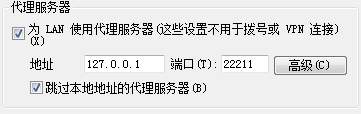
这样所有的流量先到B再转发到目标服务。(如果你在长城以外有主机的话,可以使用这种方法翻墙。)
总结
这里描述了三种情况,分别介绍了反向代理、端口转发、socket代理。
发布者:全栈程序员-站长,转载请注明出处:https://javaforall.net/204215.html原文链接:https://javaforall.net



