
Matlab scatter/plot绘制图时,单点的’MarkerSize’与空间位置的
Matlab scatter/plot绘制图时,单点的’MarkerSize’与空间位置的关系
scatter
scatter(axes, x, y, sz, ‘Marker’, ‘o’);
scatter()函数中参数sz决定’Marker’(即’o’)的标记面积(大小),默认单位是平方磅(points),’o’在坐标轴中的宽度为
sz1/2?widthaxes/widthpoints
sz^{1/2}*width_{axes}/width_{points}sz1/2?widthaxes?/widthpoints?
其中widthaxeswidth_{axes}widthaxes?为当前Units下坐标轴的宽度(即axes.Position(3)),widthpointswidth_{points}widthpoints?为将当前坐标轴的Units设为points后的坐标轴宽度(即axes.Position(3))
示例
handles.axes1.Units=’points’;
handles.Position=[100,100,500,500];
handles.axes1.XLim=[0,500];
handles.axes1.YLim=[0,500];
scatter(handles.axes1,250,250,40000,’Marker’,’o’);
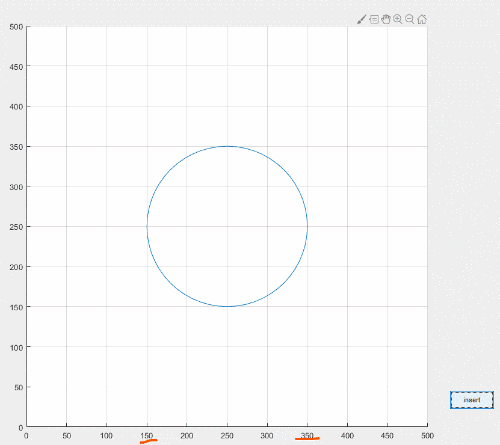

与其他’Marker’比较,‘s’, ‘d’
handles.axes1.Units=’points’;
handles.Position=[100,100,500,500];
handles.axes1.XLim=[0,500];
handles.axes1.YLim=[0,500];
scatter(handles.axes1,250,250,40000,’Marker’,’o’);
scatter(handles.axes1,250,250,40000,’Marker’,’s’);
scatter(handles.axes1,250,250,40000,’Marker’,’d’);
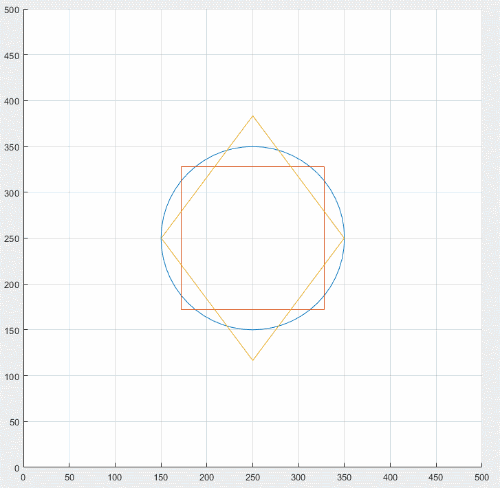
与其他’Marker’比较,’’, ‘^’, ‘v’
handles.axes1.Units=’points’;
handles.Position=[100,100,500,500];
handles.axes1.XLim=[0,500];
handles.axes1.YLim=[0,500];
scatter(handles.axes1,250,250,40000,’Marker’,’
scatter(handles.axes1,250,250,40000,’Marker’,’>’);
scatter(handles.axes1,250,250,40000,’Marker’,’^’);
scatter(handles.axes1,250,250,40000,’Marker’,’v’);
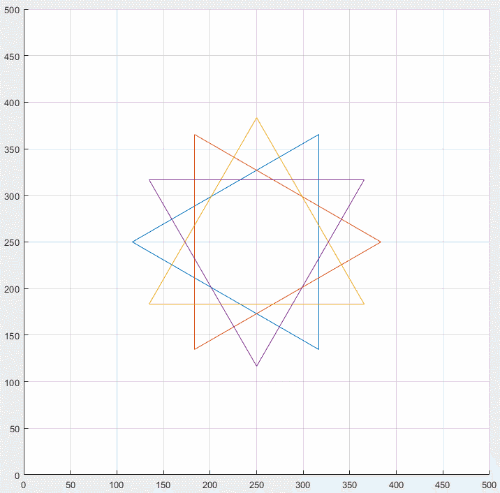
可以看出只有’o’和’d’严格符合宽度计算公式,其他略有差距(为什么还有待考究)
plot
plot(axes, x, y, ‘Marker’, ‘o’, ‘MarkerSize’, sz)
plot()函数中参数sz决定’Marker’(即’o’)的大小,默认单位是磅(points),’o’在坐标轴中的宽度为
sz?widthaxes/widthpoints
sz*width_{axes}/width_{points}sz?widthaxes?/widthpoints?
其中widthaxeswidth_{axes}widthaxes?为当前Units下坐标轴的宽度(即axes.Position(3)),widthpointswidth_{points}widthpoints?为将当前坐标轴的Units设为points后的坐标轴宽度(即axes.Position(3))
示例
handles.axes1.Units=’points’;
handles.Position=[100,100,500,500];
handles.axes1.XLim=[0,500];
handles.axes1.YLim=[0,500];
plot(handles.axes1,250,250,’Marker’,’o’,’MarkerSize’,200);
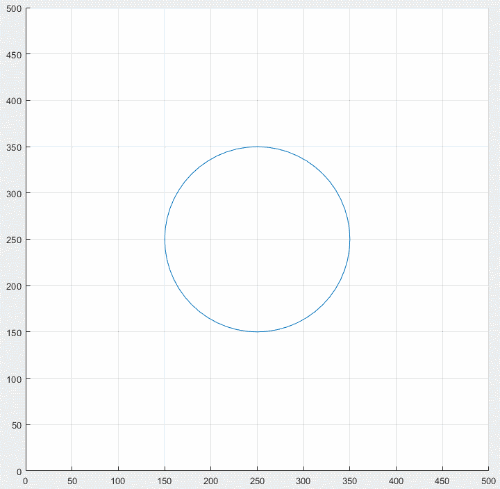
与其他’Marker’比较,‘s’, ‘d’
handles.axes1.Units=’points’;
handles.Position=[100,100,500,500];
handles.axes1.XLim=[0,500];
handles.axes1.YLim=[0,500];
plot(handles.axes1,250,250,’Marker’,’o’,’MarkerSize’,200);
plot(handles.axes1,250,250,’Marker’,’d’,’MarkerSize’,200);
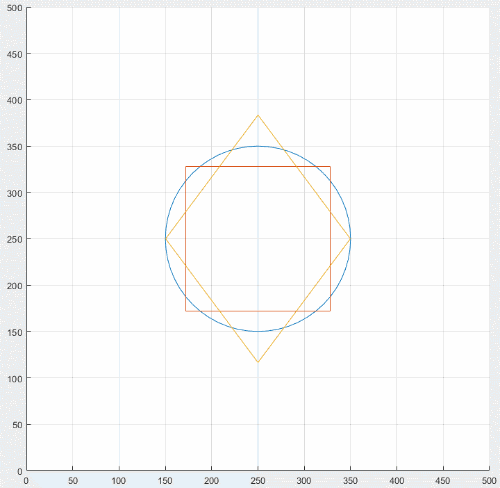
与其他’Marker’比较,’’, ‘^’, ‘v’
handles.axes1.Units=’points’;
handles.Position=[100,100,500,500];
handles.axes1.XLim=[0,500];
handles.axes1.YLim=[0,500];
plot(handles.axes1,250,250,’Marker’,’
plot(handles.axes1,250,250,’Marker’,’>’,’MarkerSize’,200);
plot(handles.axes1,250,250,’Marker’,’^’,’MarkerSize’,200);
plot(handles.axes1,250,250,’Marker’,’v’,’MarkerSize’,200);
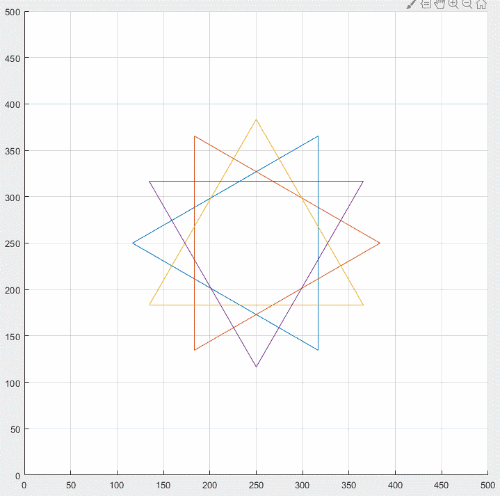
可以看出只有’o’和’d’严格符合宽度计算公式,其他略有差距(为什么还有待考究)
注:scatter()plot()以及scatter属性具体可以查看官方文档
scatter()
plot()
scatter属性
Matlab scatter/plot绘制图时,单点的’MarkerSize’与空间位置的相关教程
一维高斯分布与多维高斯分布及 matlab 实现
一维高斯分布与多维高斯分布及 matlab 实现 一维高斯分布与多维高斯分布 高斯分布(Gaussian distribution),又称正态分布(Normal distribution)。若随机变量X服从一个数学期望为μ、方差为σ^2 的正态分布,记为N(μ,σ^2)。其概率密度函数为正态分布的
Matlab图像九宫格基本操作(翻转,镜像等)+位图操作
Matlab图像九宫格基本操作(翻转,镜像等)+位图操作 这次blog提到的操作对于matlab来说都很基础,而且对于有编程和计算机基础的人来说也很简单,不过我一开始也是对于matlab的语法什么的一知半解,这里把我亲手写的东西push出来,小伙伴们共勉。 废话不多说了
MATLAB中fft
MATLAB中fft 一般的fft需要将点数补成2的整数次幂,MATLAB中有fft函数,输入N点序列则输出也是N点序列,其中N不一定为2的整数次幂。所以会疑惑MATLAB做的fft和N点序列对应的dft是否一样。经过验证,MATLAB中对N点序列做fft的结果与N点dft的结果是完全一样的
python 用matplotlib画一个折线图
python 用matplotlib画一个折线图 函数式绘图例程 import numpy as np# 生成一个 等差数列 ,从0.5 ~ 7.5之间包括 0.5,7.5有1000个元素的数组x = np.linspace(0.5, 7.5, 1000)# 对ndarray类型x 进行矢量运算y = np.sin(x)import matplotlib.pyplot as plt#
Python matplotlib 中填充颜色
Python matplotlib 中填充颜色 Python matplotlib 中填充颜色 matplotlib中填充颜色主要是两个函数,一个是fill,一个是fill_between,这里讲一下详细的关键字, 这里关键字主要有facecolor填充色, where填充条件, alpha透明度,interpolate求交叉边界 impo
C语言结合gnuplot绘制锯齿波
C语言结合gnuplot绘制锯齿波 文章目录 C程序 gnuplot绘图 matlab代码 matlab绘图 C程序 #includestdio.h#define pi 3.main(){int i;double s, t;for(i = 0; i = 800*pi; i++)//因为t=i/100.0,所以t的取值范围为[0,8*pi]{t = i / 100.0;//pi个单位内取
Python-matplotlib 学术散点图 EE 统计及绘制
Python-matplotlib 学术散点图 EE 统计及绘制 公众号后台回复 “图书“ ,了解更多号主新书内容 作者:宁海涛 来源:DataCharm 之前的绘制图文Python-matplotlib 学术散点图完善Python-matplotlib 学术型散点图绘制教程中,对学术散点图已经进行了较为完善的
pandas plotly_使用Pandas和Plotly可视化错误日志
pandas plotly_使用Pandas和Plotly可视化错误日志 pandas plotly Recently I received a dataset from a performance measurement containing data about processing time and errors. After a brief look, I guess what could be an issue; I needed to visu
发布者:全栈程序员-站长,转载请注明出处:https://javaforall.net/204375.html原文链接:https://javaforall.net



