
利用IDEA搭建SpringBoot项目,整合mybatis,实现简单的登录功能。
仅供参考!!!
仅供参考!!!
仅供参考!!!
利用闲余时间想自己搭建一个springboot+mybatis的项目,提升一下自己对项目的了解,毕竟自己还是一个小白,在这里为自己创建项目的过程做一个记录,以便以后回忆。同时将搭建中遇到的问题也在这里做记录。如有遇到同样问题的同学,希望能给你一下借鉴。
springboot的优势之一就是快速搭建项目,省去了自己导入jar包和配置xml的时间,使用非常方便。
一,搭建项目:
1、打开IDEA,点击File→New→Project…,如图1所示

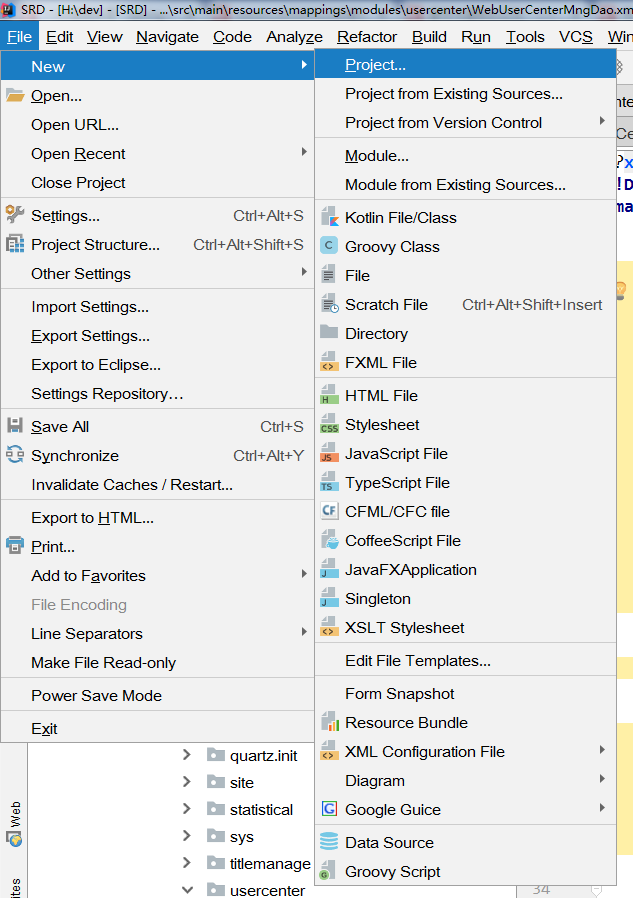
图1 搭建项目
2、当我们选择project…后,会看见如图2所示的页面,选择Spring Initializr,点击NEXT即可。
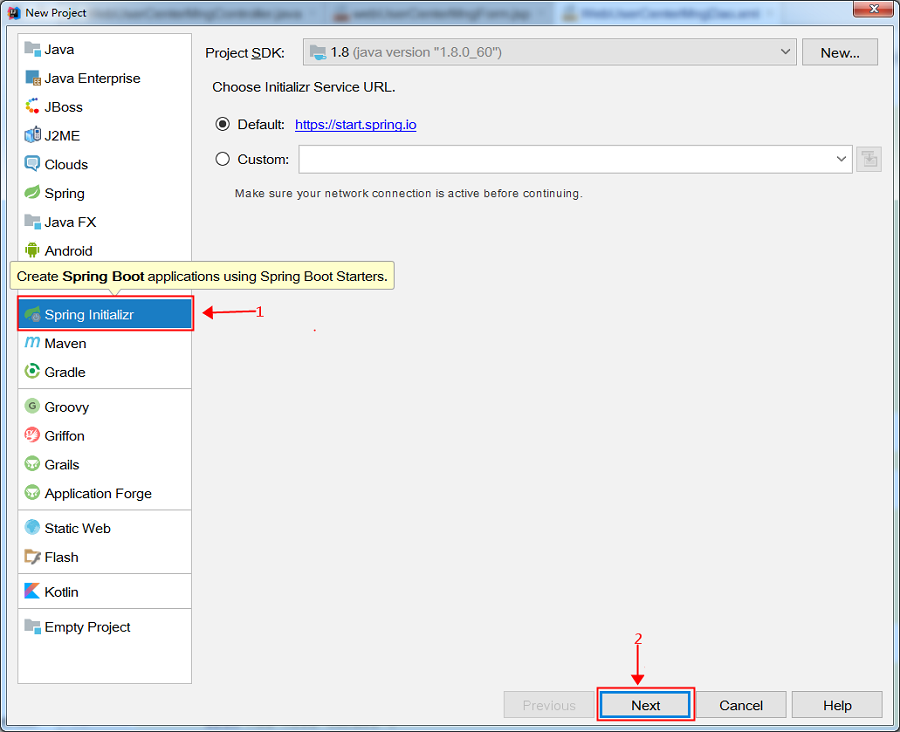
图2 搭建项目
3、接下来将看到如图3所示的页面,在这个页面中我只是修改了名称。然后点击NEXT进行下一步。
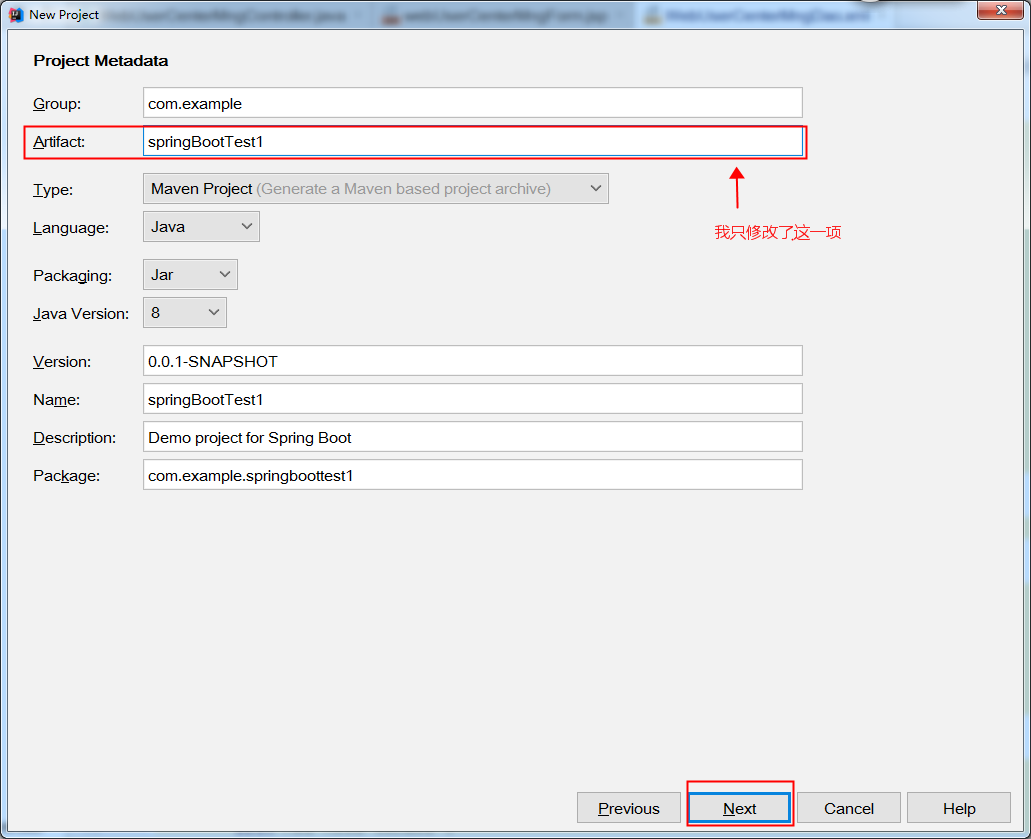
图3 搭建项目
4、当我点击NEXT时,却出现如图4所示的错误,这由于创建时因为Artifact的命名为大小写混合,将大写改为小写即可正常创建。
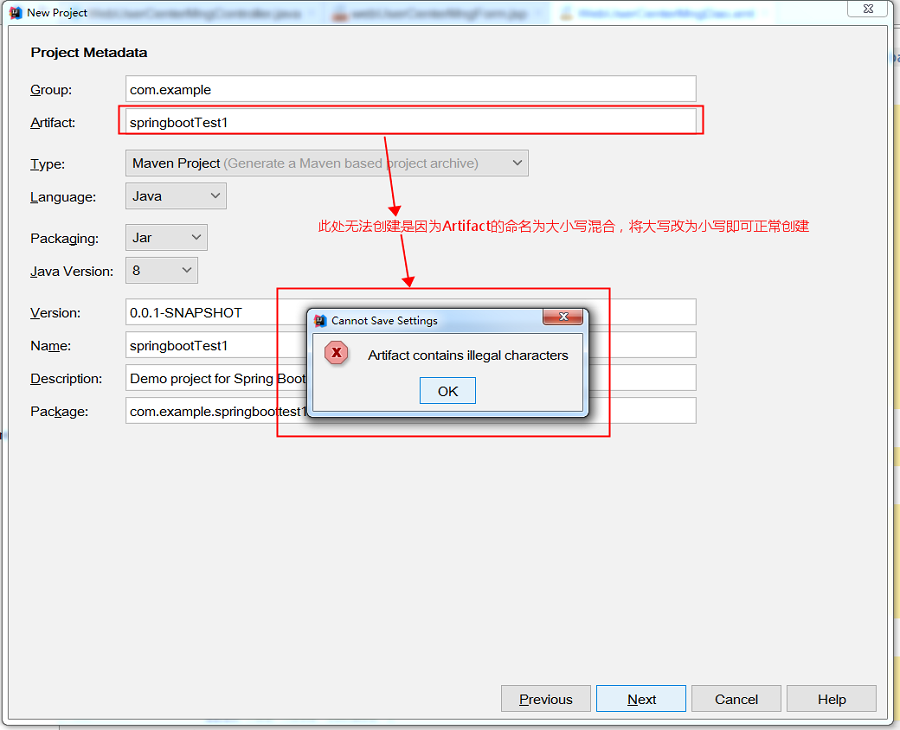
图4 搭建项目 (注意名称大小写问题)
5、接下来我们修改上面的错误,我将springbootTest1→springboottest1,然后进行下一步。会看见如图5所示的页面。 在当前页面中我们一次选择左侧的Web、Template Engines、SQL。然后在中间部分选择我们需要的选项,最终选择结果如最右侧所示。然后点击NEXT,进行下一步。
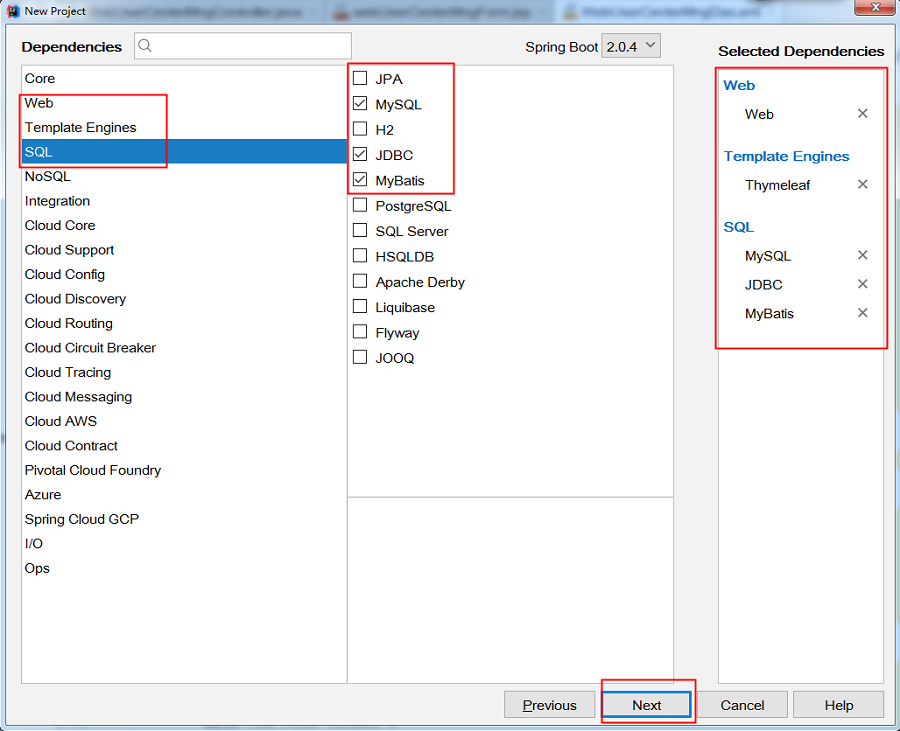
图5 搭建项目(选择需要的内容)
6、如图6所示,进人创建项目的最后一个页面,在这里我们可以修改项目保存的位置。确认自己输入的内容,点击Fiish即可完成项目的创建。
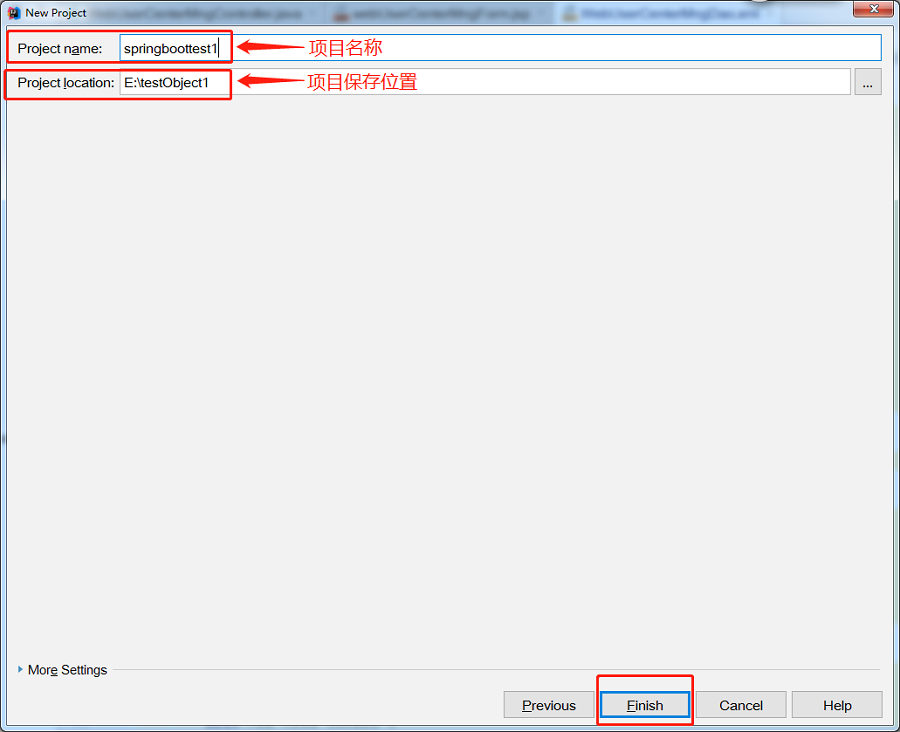
图6 搭建项目(可以修改文件路径)
7、点击Finish后,出现如图7所示页面,我们选择New Window即可,即在新的IDEA中打开我们新建的项目。
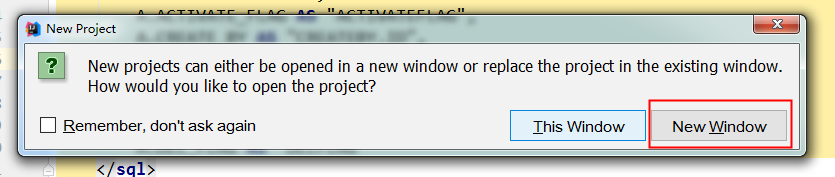
图7 打开项目
二、启动项目、添加配置文件等
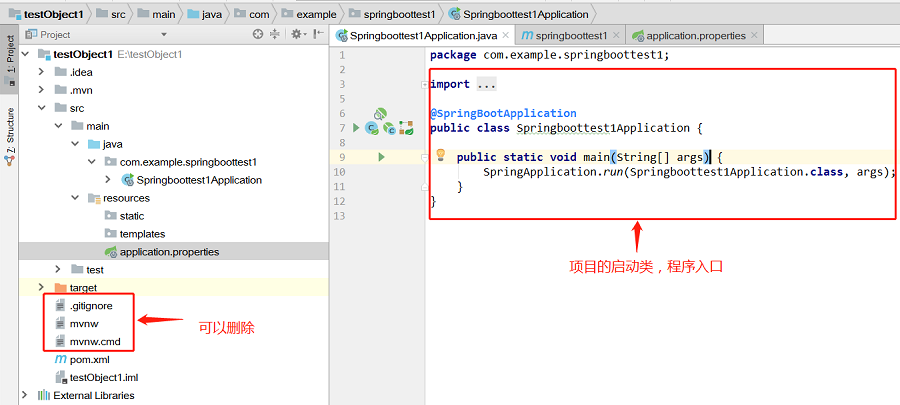
1、打开新项目后,我们可以观察一下左侧的项目结构。如图8所示。
生成的项目中,resources文件夹下,static文件夹下存放静态文件,比如css、js、html和图片等 。
templates下存放html文件,controller默认访问该文件夹下的html文件。
这个在application.properties配置文件中是可以修改的。
下面为项目生成的pom.xml文件:
           4.0.0


           com.example


           springboottest1


           0.0.1-SNAPSHOT


           jar


           springboottest1


           Demo project for Spring Boot


            org.springframework.boot


            spring-boot-starter-parent


            2.0.4.RELEASE


            UTF-8


            UTF-8


            1.8


             org.springframework.boot


             spring-boot-starter-jdbc


             org.springframework.boot


             spring-boot-starter-thymeleaf


             org.springframework.boot


             spring-boot-starter-web


             org.mybatis.spring.boot


             mybatis-spring-boot-starter


             1.3.2


             mysql


             mysql-connector-java


             runtime


             org.springframework.boot


             spring-boot-starter-test


             test


              org.springframework.boot


              spring-boot-maven-plugin
图8 项目文件结构
2、了解项目的文件结构后,我们尝试着启动项目。我们发现项目启动过程中出现错误,错误信息如图9所示。
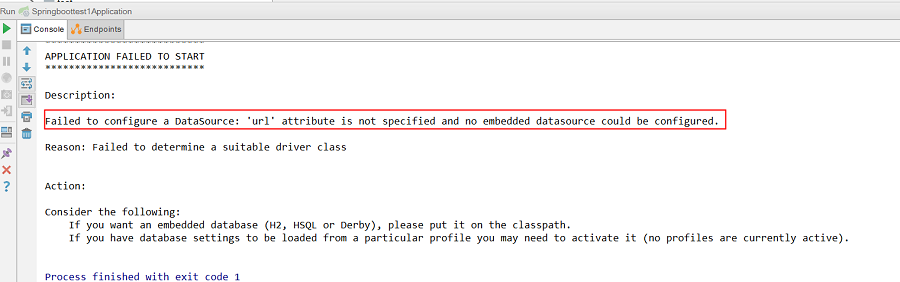
图9 项目启动报错
这是因为我们创建Spring Boot项目时,在选择组件时添加了mysql、mybatis,但现在还没有配置数据库,导致项目启动报错。
我们需要在项目的application.properties文件中配置数据信息。如图10所示,是我自己配置的数据库,具体情况根据自己数据库的设置配置。
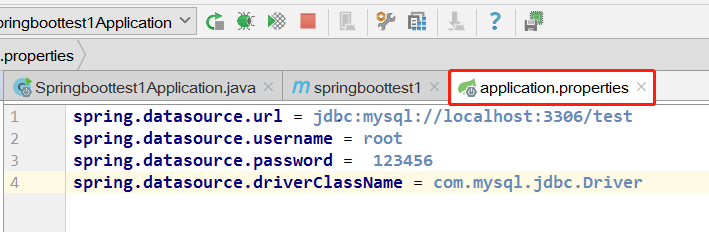
图10 数据库配置
数据库采用MySQL数据库,下面是数据库的设计,只有几个简单的字段。如图11所示。

图11 数据库设计
这里也可以不使用application.properties文件,采用更加简洁的application.yml文件。将resource文件夹下原有的application.properties文件删除,创建application.yml配置文件(备注:其实SpringBoot底层会把application.yml文件解析为application.properties), 文件的内容如下(此处只配置最基本的):
server: port: 8080 spring: datasource: name: test url: jdbc:mysql://127.0.0.1:3306/test username: root password: driver-class-name: com.mysql.jdbc.Driver接下来再次尝试重新启动项目。发现项目可以正常启动了。可以打开浏览器访问http://localhost:8080/,访问结果如图12所示。证明项目正常启动了。
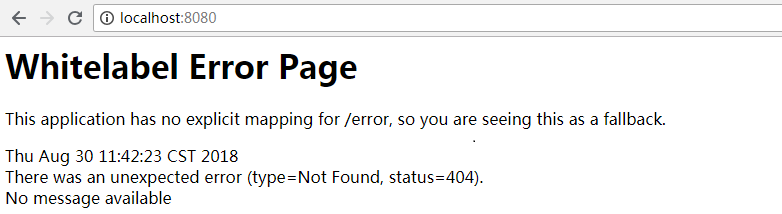
图12 访问结果
三、项目整合mybatis
1、在application.yml文件中添加mybatis。
server: port: 8080 spring: datasource: name: test url: jdbc:mysql://127.0.0.1:3306/test username: root password: driver-class-name: com.mysql.jdbc.Driver mybatis: mapper-locations: classpath:mapper/*.xml #注意:一定要对应mapper映射xml文件的所在路径 type-aliases-package: com.example.springboottest1.entity # 注意:对应实体类的路径2、在pom.xml中添加 mybatis generator 自动生成代码插件。
               org.springframework.boot


               spring-boot-maven-plugin


               org.mybatis.generator


               mybatis-generator-maven-plugin


               1.3.1


                ${basedir}/src/main/resources/generator/generatorConfig.xml


                true


                true
3、在resource文件夹下创建generator文件夹,并在文件夹中创建generatorConfig.xml文件。文件内容如下所示:
4、所有文件创建完成后,还需要进行简单的配置。Run→Edit Configurations…,然后选择maven,配置Command line。
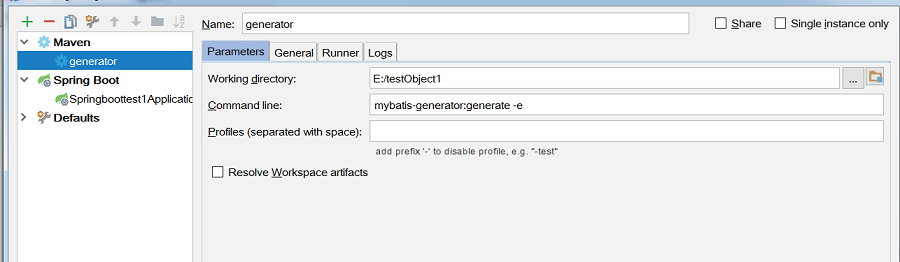
5、所用文件创建完成,并配置好相关设置,重新启动项目,启动后运行generator。通过控制台可以看见代码是否生成成功,或失败的原因。如果代码生成成功,可以在项目文件夹中看见生成的项目。
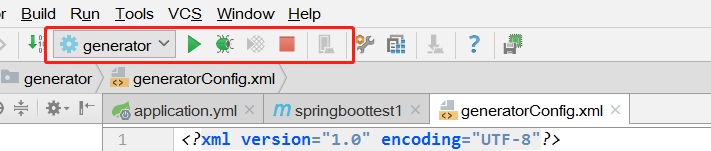
这个过程共生成三个文件,一个实体类,dao,还有sql语句。
5.1、生成的实体类entity:
package com.example.springboottest1.entity; public class user { / * This field was generated by MyBatis Generator. * This field corresponds to the database column user.id * * @mbggenerated */ private Integer id; / * This field was generated by MyBatis Generator. * This field corresponds to the database column user.username * * @mbggenerated */ private String username; / * This field was generated by MyBatis Generator. * This field corresponds to the database column user.password * * @mbggenerated */ private String password; / * This field was generated by MyBatis Generator. * This field corresponds to the database column user.age * * @mbggenerated */ private Integer age; / * This method was generated by MyBatis Generator. * This method returns the value of the database column user.id * * @return the value of user.id * * @mbggenerated */ public Integer getId() { return id; } / * This method was generated by MyBatis Generator. * This method sets the value of the database column user.id * * @param id the value for user.id * * @mbggenerated */ public void setId(Integer id) { this.id = id; } / * This method was generated by MyBatis Generator. * This method returns the value of the database column user.username * * @return the value of user.username * * @mbggenerated */ public String getUsername() { return username; } / * This method was generated by MyBatis Generator. * This method sets the value of the database column user.username * * @param username the value for user.username * * @mbggenerated */ public void setUsername(String username) { this.username = username == null ? null : username.trim(); } / * This method was generated by MyBatis Generator. * This method returns the value of the database column user.password * * @return the value of user.password * * @mbggenerated */ public String getPassword() { return password; } / * This method was generated by MyBatis Generator. * This method sets the value of the database column user.password * * @param password the value for user.password * * @mbggenerated */ public void setPassword(String password) { this.password = password == null ? null : password.trim(); } / * This method was generated by MyBatis Generator. * This method returns the value of the database column user.age * * @return the value of user.age * * @mbggenerated */ public Integer getAge() { return age; } / * This method was generated by MyBatis Generator. * This method sets the value of the database column user.age * * @param age the value for user.age * * @mbggenerated */ public void setAge(Integer age) { this.age = age; } }5.2、生成的Dao:
package com.example.springboottest1.mapper; import com.example.springboottest1.entity.user; public interface userMapper { / * This method was generated by MyBatis Generator. * This method corresponds to the database table user * * @mbggenerated */ int deleteByPrimaryKey(Integer id); / * This method was generated by MyBatis Generator. * This method corresponds to the database table user * * @mbggenerated */ int insert(user record); / * This method was generated by MyBatis Generator. * This method corresponds to the database table user * * @mbggenerated */ int insertSelective(user record); / * This method was generated by MyBatis Generator. * This method corresponds to the database table user * * @mbggenerated */ user selectByPrimaryKey(Integer id); / * This method was generated by MyBatis Generator. * This method corresponds to the database table user * * @mbggenerated */ int updateByPrimaryKeySelective(user record); / * This method was generated by MyBatis Generator. * This method corresponds to the database table user * * @mbggenerated */ int updateByPrimaryKey(user record); }5.3、生成的SQL语句(其中一些没有用的注释被我删掉了):
id, username, password, age
delete from user where id = #{id,jdbcType=INTEGER}
insert into user (id, username, password, age) values ( #{id,jdbcType=INTEGER}, #{username,jdbcType=VARCHAR}, #{password,jdbcType=VARCHAR}, #{age,jdbcType=INTEGER})
insert into user
id,
username,
password,
age,
#{id,jdbcType=INTEGER},
#{username,jdbcType=VARCHAR},
#{password,jdbcType=VARCHAR},
#{age,jdbcType=INTEGER},
update user
username = #{username,jdbcType=VARCHAR},
password = #{password,jdbcType=VARCHAR},
age = #{age,jdbcType=INTEGER},
where id = #{id,jdbcType=INTEGER}
update user set username = #{username,jdbcType=VARCHAR}, password = #{password,jdbcType=VARCHAR}, age = #{age,jdbcType=INTEGER} where id = #{id,jdbcType=INTEGER}
四、测试访问
做好以上的准备以后,可以简单的写一个小页面,试着访问一下。
同时这个时候可以自己了解一下@Controller与@RestController的区别,以及@ResponseBody的用法。
1、比如写一个简单的HTML页面,HelloWord.html。
            HelloWord
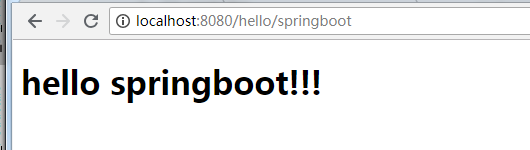
            hello springboot!!!
2、访问页面的controller。helloController.java
package com.example.springboottest1.controller; import org.springframework.stereotype.Controller; import org.springframework.web.bind.annotation.RequestMapping; @Controller @RequestMapping(value = {"/hello"}) public class helloController { @RequestMapping(value = {"/springboot"}) public String hello(){ return "HelloWord"; } } 3、重新启动项目,访问http://localhost:8080/hello/springboot,访问的结果如下所示。
五、编写用户登录过程代码
1、编写简单的登录页面与注册页面
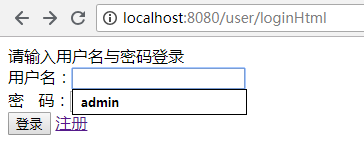
(1)登录页面 userLogin.html
用户登录 请输入用户名与密码登录
页面效果:
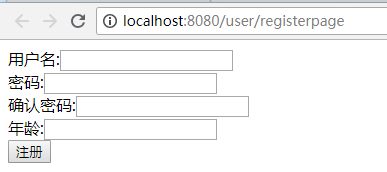
(2)注册页面 register.html
注册
页面效果:
(3)登录成功页面 index.html
            登录成功
            用户名与密码正确,登录成功!!!
页面效果:

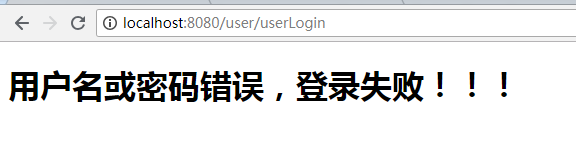
(4)登录失败页面 loginError.html
            登录失败
            用户名或密码错误,登录失败!!!
页面效果:
2、对于写代码的顺序,我是从xml(sql语句)开始写,然后Dao,Service,最后写Controller。下面为我的部分代码。(开始生成的代码没有用到的部分被我删除掉了)
(1)xml(sql语句) userMapper.xml
INSERT INTO user (username,password,age) VALUES (#{username},#{password},#{age})
INSERT INTO user (id,username,password,age) VALUES (UUID(),#{username},#{password},#{age})
(2)Dao层 userMapper.java
package com.example.springboottest1.mapper; import com.example.springboottest1.entity.User; import org.apache.ibatis.annotations.Mapper; import org.apache.ibatis.annotations.Param; import org.springframework.stereotype.Component; import java.util.Map; @Mapper @Component public interface userMapper { //用户登录 User userlogin(@Param("username") String username,@Param("password") String password); //注册新用户(方式1) int adduser(@Param("username") String username, @Param("password") String password, @Param("age") int age); //注册新用户(方式2) int adduser1(@Param("username") String username, @Param("password") String password, @Param("age") int age); }(3)Servicr层 UserLoginService.java
package com.example.springboottest1.service; import com.example.springboottest1.entity.User; import com.example.springboottest1.mapper.userMapper; import org.springframework.beans.factory.annotation.Autowired; import org.springframework.stereotype.Service; import java.util.Map; @Service public class UserLoginService { / * 注入dao */ @Autowired private userMapper usermapper; //用户登录 public User userLogin(String username,String password){ User user = usermapper.userlogin(username,password); return user; } //注册新用户 public int adduser(String username,String password,int age){ return usermapper.adduser(username,password,age); //return usermapper.adduser1(username,password,age); //对应sql语句中的第二种注册方式 } } (4)Controller层 UserLoginController.java
package com.example.springboottest1.controller; import com.example.springboottest1.entity.User; import com.example.springboottest1.service.UserLoginService; import org.springframework.beans.factory.annotation.Autowired; import org.springframework.stereotype.Controller; import org.springframework.web.bind.annotation.RequestBody; import org.springframework.web.bind.annotation.RequestMapping; import org.springframework.web.bind.annotation.RequestParam; import org.springframework.web.bind.annotation.ResponseBody; import javax.servlet.http.HttpServletRequest; @Controller @RequestMapping(value = {"/user"}) public class UserLoginController { / * 注入service */ @Autowired private UserLoginService userLoginService; / * 跳转到用户登录页面 * @return 登录页面 */ @RequestMapping(value = {"/loginHtml"}) public String loginHtml(){ return "userLogin"; } / * 跳转到用户注册页面 * @return 注册页面 */ @RequestMapping(value = {"/registerpage"}) public String registerpage(){ return "register"; } / * 获取用户名与密码,用户登录 * @return 登录成功页面 */ @RequestMapping(value = {"/userLogin"}) public String userLogin(@RequestParam("username") String username, @RequestParam("password") String password, HttpServletRequest request){ User user = userLoginService.userLogin(username,password); if(user != null){ //登录成功 request.getSession().setAttribute("session_user",user); //将用户信息放入session return "index"; } return "loginError"; } / * 注册新用户 * @return 注册结果 */ @ResponseBody @RequestMapping(value = {"/uregister"}) public String addUser(@RequestParam("username") String username, @RequestParam("password") String password, @RequestParam("password2") String password2, @RequestParam("age") int age){ if(!password.equals(password2)){ return "两次密码不相同,注册失败!!"; }else { int res = userLoginService.adduser(username,password,age); if(res == 0){ return "注册失败!"; }else { return "注册成功!"; } } } } 如果文中有错误,希望能够指出,一同进步!
发布者:全栈程序员-站长,转载请注明出处:https://javaforall.net/204396.html原文链接:https://javaforall.net



