
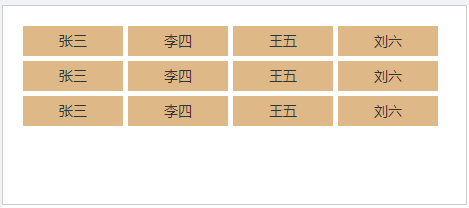
在css中父元素高度确定,使用flex,设置了换行属性之后,元素自动换行。换行之后每行的间距变大,自动撑满了父元素,见下图:
预想中的效果:

实际效果:
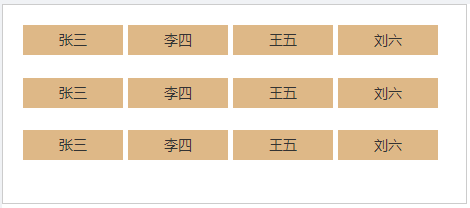
使用flex属性之后,子元素并没有按照预想的排列方式在页面显示,样式代码如下(less)
.list{
    height: 200px; width: 465px; border: 1px solid #ccc; display: flex; flex-wrap: wrap; box-sizing: border-box; padding: 20px; .list-item{
    width: 100px; height: 30px; line-height: 30px; text-align: center; box-sizing: border-box; background:burlywood; margin-right: 5px; margin-bottom: 5px; } }
问题原因:当元素不只一行意味着flex容器在交叉轴上有多行,此时align-content属性生效,align-content默认属性为stretch导致flex容器将交叉轴上的多余空间按行数平均分给每行。处理此问题解决方法也很简单,直接给父元素设置align-content: flex-start即可。
.list{
    height: 200px; width: 465px; border: 1px solid #ccc; display: flex; flex-wrap: wrap; box-sizing: border-box; padding: 20px; align-content: flex-start; .list-item{
    width: 100px; height: 30px; line-height: 30px; text-align: center; box-sizing: border-box; background:burlywood; margin-right: 5px; margin-bottom: 5px; } }
最终效果:
版权声明:本文内容由互联网用户自发贡献,该文观点仅代表作者本人。本站仅提供信息存储空间服务,不拥有所有权,不承担相关法律责任。如发现本站有涉嫌侵权/违法违规的内容, 请联系我们举报,一经查实,本站将立刻删除。
发布者:全栈程序员-站长,转载请注明出处:https://javaforall.net/204543.html原文链接:https://javaforall.net




