
项目下载:超市管理系统JavaSwing+MySQLJDBC开发_javamysql超市管理系统-互联网文档类资源-CSDN下载
1.9元付费赞助下载:超市管理系统JavaSwing+MySQLJDBC开发_-互联网文档类资源-CSDN下载
目录
文档说明:
一、语言和环境
A、实现语言
Java(SWING+JDBC),MySql
B、开发环境
MyEclipse 9.0及以上版本,MySql 5.6及以上版本
二、要求
利用SWING编程实现商品的管理,要求如下:
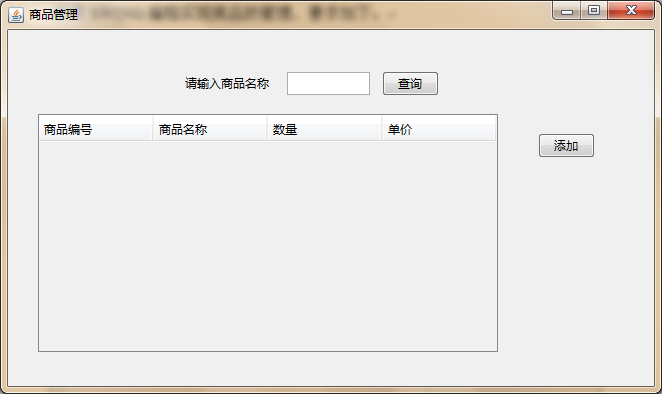
1、商品管理页面布局,添加一个JScrollPanel(内嵌JTable),用来显示所有商品的信息;添加两个JLabel用于显示查询提示信息;添加JTextField用于输入商品商品名称;添加2个JButton,分别用来实现商品查询及添加商品,效果图如图1所示。

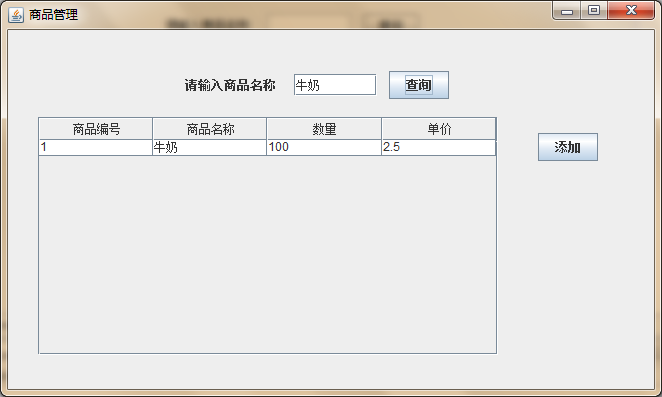
2、在“商品名称”对应的JTextField中输入商品名称,单击“查询”:如果存在该商品,则显示如图2所示的窗体;若输入的名称不存在,则弹出“没找到该商品!”的对话框。
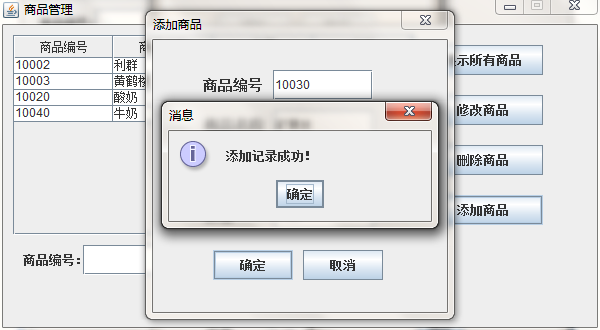
3、单击“添加商品”按钮,弹出如图3所示的窗体,此时必须输入所有商品信息,
否则将弹出如图4所示的对话框;当商品信息输入完毕,单击“确定”按钮,实现商品的添加,
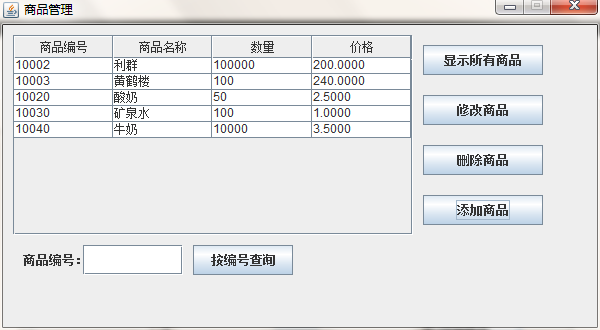
在弹出如图5所示的对话框后,释放窗体,并返回“商品管理”主界面,效果如图6所示。


三、重要说明
对于“添加”功能,程序员可以不用按照上述步骤实现,可以自定义添加界面,只要能实现添加功能即可。
四、推荐实现步骤
创建数据库dbGoods,添加表goods,表结构如表1所示,至少添加5条记录。
|
列名 |
类型 |
约束 |
备注 |
|
goodID |
int或varchar(10) |
主键 |
商品编号 |
|
goodName |
varchar(20) |
非空 |
商品名称 |
|
num |
int |
非空 |
商品数量 |
|
price |
Decimal(3,1) |
非空 |
商品单价 |
1、创建项目GoodsManagement,在其下新建文件夹“lib”,复制jar包文件(mysql-connector-java-5.1.34-bin.jar)存入其中,导入jar包到项目;
2、添加一个类GoodsManager:继承为JFrame,重载构造方法实现图1的布局效果;运行时,窗体居中参考代码如下:
this.setLocationRelativeTo(null);
自由布局参考如下:
this.setLayout(null);
创建一个JPanel,其布局也为自由布局;添加所有控件对象到其中;
控件位置与大小可使用以下方法实现:
对象名.setSize(int Width,int Height)
对象名.setLocation(int x,int y)
或
对象名.setBounds(int x,int y,int Width,int Height)
注意:在使用自由布局方式布局JPanel中的控件时,必须设置其大小,当然JPanel对象亦然,否则很有可能不能正常显示。
3、添加一个类DBManager:在其中创建获取连接对象的方法getConnection;创建查询通用方法runSelectSql;创建实现增、删、改的方法runUpdateSql方法。
4、单击“显示所有商品”、“按编号查询”及“按名称查询”按钮时调用DBManager.runSelectSql方法实现;单击“修改商品”、“删除商品”或“添加商品”按钮调用DBManager.runUpdateSql方法实现。
5、获取选定行的索引值,参考代码如下:
int index=table.getSelectedRow();//table为表格对象
获取选定行的商品名称,参考代码如下:
table.getValueAt(index,1);//index为选定行的索引值
6、在编写代码时,最好用方法对重复使用的代码进行封装,尽量减少代码的冗余;
7、编译程序,并运行。
五、注意事项
A、仔细审题,把题目要求理解准确;
B、请注意按照的界面的设计要求来进行窗体设计;
C、请注意代码的书写、命名符合规范和适当的注释;
评分标准:超市管理系统—商品管理(查询及删除商品) |
|||
|
90 |
窗体布局与设计 |
||
10 |
数据库(5)、表及记录(5) |
||
30 |
窗体布局合理,对象创建正确无误 |
||
25 |
查询正确 |
||
25 |
添加商品正确 |
||
|
10 |
总体编程技术 |
||
5 |
程序逻辑分明,有一定注释 |
||
5 |
命名符合规范,可读性好,编码书写有缩进 |
||
|
总分 |
100分 |
||
实现代码:
一、数据库:
/* Navicat Premium Data Transfer Source Server : Demo Source Server Type : MySQL Source Server Version : 50717 Source Host : localhost:3306 Source Schema : dbgoods Target Server Type : MySQL Target Server Version : 50717 File Encoding : 65001 Date: 16/09/2020 16:36:31 */ SET NAMES utf8mb4; SET FOREIGN_KEY_CHECKS = 0; -- ---------------------------- -- Table structure for goods -- ---------------------------- DROP TABLE IF EXISTS `goods`; CREATE TABLE `goods` ( `goodsID` int(11) NOT NULL, `goodsName` varchar(10) CHARACTER SET utf8 COLLATE utf8_general_ci NOT NULL, `num` int(11) NOT NULL, `price` decimal(10, 4) NOT NULL, PRIMARY KEY (`goodsID`) USING BTREE ) ENGINE = InnoDB CHARACTER SET = utf8 COLLATE = utf8_general_ci ROW_FORMAT = Dynamic; -- ---------------------------- -- Records of goods -- ---------------------------- INSERT INTO `goods` VALUES (10002, '利鲜', 10, 20.0000); INSERT INTO `goods` VALUES (10003, '黄鹤楼', 100, 21.0000); INSERT INTO `goods` VALUES (10020, '酸奶', 50, 1.5000); INSERT INTO `goods` VALUES (10030, '矿泉水', 1000, 1000.0000); INSERT INTO `goods` VALUES (10040, '牛奶', 1000, 3.5000); SET FOREIGN_KEY_CHECKS = 1; 二、Java Swing:
com.ynavc.Bean
Goods.Java
package com.ynavc.Bean; public class Goods { int goodsID; String goodsName; int num; String price; public Goods(int goodsID, String goodsName, int num, String price) { super(); this.goodsID = goodsID; this.goodsName = goodsName; this.num = num; this.price = price; } public Goods() { super(); } @Override public String toString() { return "Goods [goodsID=" + goodsID + ", goodsName=" + goodsName + ", num=" + num + ", price=" + price + "]"; } public int getGoodsID() { return goodsID; } public void setGoodsID(int goodsID) { this.goodsID = goodsID; } public String getGoodsName() { return goodsName; } public void setGoodsName(String goodsName) { this.goodsName = goodsName; } public int getNum() { return num; } public void setNum(int num) { this.num = num; } public String getPrice() { return price; } public void setPrice(String price) { this.price = price; } } com.ynavc.Controller
Select.Java
package com.ynavc.Controller; import java.sql.ResultSet; import java.sql.SQLException; import java.util.ArrayList; import com.ynavc.Bean.Goods; import com.ynavc.Dao.DbConnection; public class Select { public static Object[][] getGoods(String sql) { ResultSet resultSet = DbConnection.query(sql); ArrayList

     list=new ArrayList

      (); try { while (resultSet.next()) { Goods goods=new Goods(); goods.setGoodsID(resultSet.getInt(1)); goods.setGoodsName(resultSet.getString(2)); goods.setNum(resultSet.getInt(3)); goods.setPrice(resultSet.getString(4)); list.add(goods); } } catch (SQLException e) { e.printStackTrace(); } Object[][] objects=new Object[list.size()][4]; for(int i=0;i
Updata.Java
package com.ynavc.Controller; import com.ynavc.Dao.DbConnection; public class Updata { //添加数据 public static int addData(String sql) { return DbConnection.updataInfo(sql); } }com.ynavc.Dao
DbConnection .Java
package com.ynavc.Dao; import java.sql.Connection; import java.sql.DriverManager; import java.sql.PreparedStatement; import java.sql.ResultSet; import java.sql.SQLException; import javax.swing.JOptionPane; import com.mysql.jdbc.Statement; public class DbConnection { //驱动类的类名 private static final String DRIVERNAME="com.mysql.jdbc.Driver"; //连接数据的URL路径 // private static final String URL="jdbc:mysql://118.31.124.77:3306/mydb23660"; private static final String URL="jdbc:mysql://127.0.0.1:3306/dbgoods"; //数据库登录账号 // private static final String USER="mydb23660"; private static final String USER="root"; //数据库登录密码 // private static final String PASSWORD="Hmsyfjdglxt66"; private static final String PASSWORD="root"; //加载驱动 static{ try { Class.forName(DRIVERNAME); } catch (ClassNotFoundException e) { e.printStackTrace(); } } //获取数据库连接 public static Connection getConnection() { try { return DriverManager.getConnection(URL,USER,PASSWORD); } catch (SQLException e) { e.printStackTrace(); } return null; } //查询 public static ResultSet query(String sql) { System.out.println(sql); //获取连接 Connection connection=getConnection(); PreparedStatement psd; try { psd = connection.prepareStatement(sql); return psd.executeQuery(); } catch (SQLException e) { JOptionPane.showMessageDialog(null,"执行语句出错\n"+e.toString()); e.printStackTrace(); } return null; } //增、删、改、查 public static int updataInfo(String sql) { System.out.println(sql); //获取连接 Connection connection=getConnection(); try { PreparedStatement psd=connection.prepareStatement(sql); return psd.executeUpdate(); } catch (SQLException e) { JOptionPane.showMessageDialog(null,"执行语句出错\n"+e.toString()); e.printStackTrace(); } return 0; } //关闭连接 public static void colse(ResultSet rs,Statement stmt,Connection conn) throws Exception{ try { if (rs != null){ rs.close(); } if (stmt != null) { stmt.cancel(); } if (conn != null) { conn.close(); } } catch (Exception e) { e.printStackTrace(); throw new Exception(); } } }com.ynavc.Test
Main.Java
package com.ynavc.Test; import com.ynavc.Vive.GoodsManagement; public class Main { public static void main(String[] args) { GoodsManagement t = new GoodsManagement(); t.setVisible(true); } } com.ynavc.Vive
GoodsManagement.Java
package com.ynavc.Vive; import javax.swing.JFrame; import javax.swing.JLabel; import javax.swing.JScrollPane; import javax.swing.JTable; import javax.swing.JTextField; import javax.swing.ScrollPaneConstants; import javax.swing.table.DefaultTableModel; import com.ynavc.Controller.Select; import javax.swing.JButton; import java.awt.event.ActionListener; import java.awt.event.ActionEvent; public class GoodsManagement extends JFrame { Select select = new Select(); private JTextField textField; Object[] header= {"商品编号","商品名称","数量","单价"}; String sql = "SELECT goodsID,goodsname,num,price FROM goods"; Object[][] data= select.getGoods(sql); DefaultTableModel df = new DefaultTableModel(data, header); int v=ScrollPaneConstants.VERTICAL_SCROLLBAR_AS_NEEDED; int h=ScrollPaneConstants.HORIZONTAL_SCROLLBAR_AS_NEEDED; public GoodsManagement() { super("商品管理系统"); this.setBounds(0, 0, 700, 450); this.setLocationRelativeTo(null);//让窗口在屏幕中间显示 this.setResizable(false);//让窗口大小不可改变 this.setDefaultCloseOperation(JFrame.EXIT_ON_CLOSE);//用户单击窗口的关闭按钮时程序执行的操作 getContentPane().setLayout(null); JLabel label = new JLabel("请输入商品名称:"); label.setBounds(151, 39, 112, 32); getContentPane().add(label); textField = new JTextField(); textField.setBounds(263, 43, 127, 26); getContentPane().add(textField); textField.setColumns(10); JButton button = new JButton("查询"); button.addActionListener(new ActionListener() { public void actionPerformed(ActionEvent arg0) { String sql = "SELECT goodsID,goodsname,num,price FROM goods WHERE goodsname LIKE '%"+textField.getText()+"%'"; Object[][] data = Select.getGoods(sql); df.setDataVector(data, header); } }); button.setBounds(411, 40, 90, 30); getContentPane().add(button); JButton button_1 = new JButton("添加"); button_1.setBounds(559, 140, 90, 30); getContentPane().add(button_1); button_1.addActionListener(new ActionListener() { public void actionPerformed(ActionEvent arg0) { GoodsManage t = new GoodsManage(); t.setVisible(true); dispose(); } }); JTable jTable = new JTable(df); JScrollPane jsp=new JScrollPane(jTable,v,h); jsp.setBounds(44, 103, 480, 282); getContentPane().add(jsp); } public static void main(String[] args) { GoodsManagement t = new GoodsManagement(); t.setVisible(true); } } GoodsManage.Java
package com.ynavc.Vive; import javax.swing.JFrame; import javax.swing.JLabel; import javax.swing.JOptionPane; import javax.swing.JScrollPane; import javax.swing.JTable; import javax.swing.JTextField; import javax.swing.ScrollPaneConstants; import javax.swing.table.DefaultTableModel; import com.ynavc.Bean.Goods; import com.ynavc.Controller.Select; import com.ynavc.Controller.Updata; import javax.swing.JButton; import java.awt.event.ActionListener; import java.awt.event.WindowAdapter; import java.awt.event.WindowEvent; import java.awt.event.ActionEvent; public class GoodsManage extends JFrame { private JTextField textField; Select select = new Select(); Updata updata = new Updata(); Object[] header= {"商品编号","商品名称","数量","单价"}; String sql = "SELECT goodsID,goodsname,num,price FROM goods"; Object[][] data= select.getGoods(sql); DefaultTableModel df = new DefaultTableModel(data, header); int v=ScrollPaneConstants.VERTICAL_SCROLLBAR_AS_NEEDED; int h=ScrollPaneConstants.HORIZONTAL_SCROLLBAR_AS_NEEDED; public GoodsManage() { super("商品管理系统"); this.setBounds(0, 0, 700, 450); this.setLocationRelativeTo(null);//让窗口在屏幕中间显示 this.setResizable(false);//让窗口大小不可改变 getContentPane().setLayout(null); JTable jTable = new JTable(df); JScrollPane jsp=new JScrollPane(jTable,v,h); jsp.setBounds(10, 10, 515, 320); getContentPane().add(jsp); JButton button_1 = new JButton("显示所有商品"); button_1.addActionListener(new ActionListener() { @Override public void actionPerformed(ActionEvent e) { String sql = "SELECT goodsID,goodsname,num,price FROM goods"; Object[][] data = Select.getGoods(sql); df.setDataVector(data, header); } }); button_1.setBounds(535, 80, 127, 30); getContentPane().add(button_1); JButton button_2 = new JButton("修改商品"); button_2.setBounds(535, 140, 127, 30); getContentPane().add(button_2); button_2.addActionListener(new ActionListener() { @Override public void actionPerformed(ActionEvent e) { if (jTable.getSelectedColumn()<0) { JOptionPane.showMessageDialog(null, "请选择要修改的数据!"); } else { int goodsID = Integer.parseInt(jTable.getValueAt(jTable.getSelectedRow(), 0).toString()); String name = jTable.getValueAt(jTable.getSelectedRow(), 1).toString(); int num = Integer.parseInt(jTable.getValueAt(jTable.getSelectedRow(), 2).toString()); String price = jTable.getValueAt(jTable.getSelectedRow(), 3).toString(); Goods goods = new Goods(goodsID,name,num,price); GoodsXG goodsXG = new GoodsXG(goods); goodsXG.setVisible(true); } } }); JButton button_3 = new JButton("删除商品"); button_3.setBounds(535, 200, 127, 30); getContentPane().add(button_3); button_3.addActionListener(new ActionListener() { @Override public void actionPerformed(ActionEvent e) { if (jTable.getSelectedColumn()<0) { JOptionPane.showMessageDialog(null, "请选中要删除的数据!"); } else { int goodsID = Integer.parseInt(jTable.getValueAt(jTable.getSelectedRow(), 0).toString()); String sql="delete from goods where goodsid="+goodsID; int result = updata.addData(sql); if (result>0) { JOptionPane.showMessageDialog(null, "删除成功!"); JOptionPane.showMessageDialog(null, "记得刷新一下哦!"); } else { JOptionPane.showMessageDialog(null, "删除失败!"); } } } }); JButton button_4 = new JButton("添加商品"); button_4.setBounds(535, 258, 127, 30); getContentPane().add(button_4); button_4.addActionListener(new ActionListener() { public void actionPerformed(ActionEvent arg0) { GoodsADD goodsAdd = new GoodsADD(); goodsAdd.setVisible(true); } }); JLabel label = new JLabel("商品编号:"); label.setBounds(40, 354, 112, 32); getContentPane().add(label); textField = new JTextField(); textField.setBounds(154, 358, 127, 26); getContentPane().add(textField); textField.setColumns(10); JButton button = new JButton("按编号查询"); button.addActionListener(new ActionListener() { public void actionPerformed(ActionEvent arg0) { String sql = "SELECT goodsID,goodsname,num,price FROM goods WHERE goodsid LIKE '%"+textField.getText()+"%'"; Object[][] data = Select.getGoods(sql); df.setDataVector(data, header); } }); button.setBounds(305, 355, 112, 30); getContentPane().add(button); this.addWindowListener(new WindowAdapter() { public void windowClosing(WindowEvent e) { super.windowClosing(e); //加入动作 GoodsManagement m = new GoodsManagement(); m.setVisible(true); } }); } public static void main(String[] args) { GoodsManage t = new GoodsManage(); t.setVisible(true); } } GoodsXG.Java
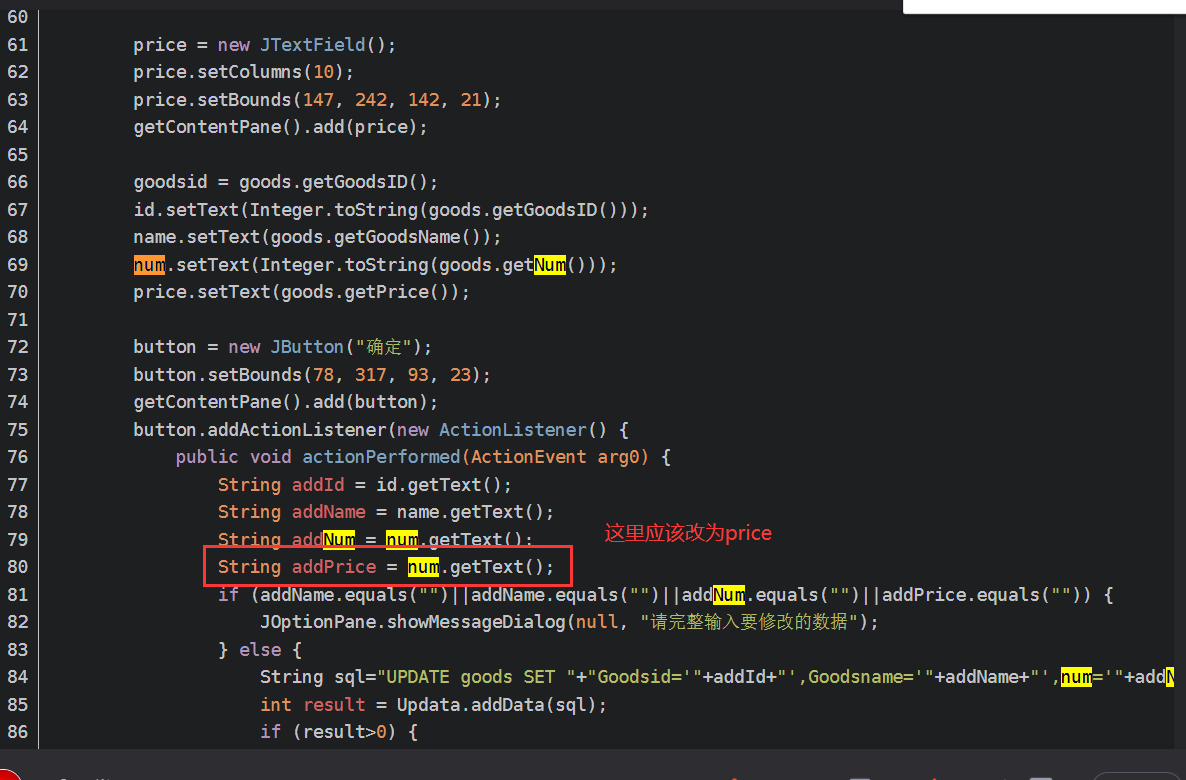
package com.ynavc.Vive; import javax.swing.JFrame; import javax.swing.JLabel; import javax.swing.JOptionPane; import javax.swing.JTextField; import com.ynavc.Bean.Goods; import com.ynavc.Controller.Updata; import java.awt.event.ActionEvent; import java.awt.event.ActionListener; import javax.swing.JButton; public class GoodsXG extends JFrame { private JTextField id,name,num,price; private JButton button; private JButton button_1; int goodsid; public GoodsXG(Goods goods) { super("商品管理系统"); this.setBounds(0, 0, 400, 450); this.setLocationRelativeTo(null);//让窗口在屏幕中间显示 this.setResizable(false);//让窗口大小不可改变 getContentPane().setLayout(null); JLabel label = new JLabel("商品编号:"); label.setBounds(85, 89, 87, 22); getContentPane().add(label); id = new JTextField(); id.setBounds(147, 90, 142, 21); getContentPane().add(id); id.setColumns(10); JLabel label_1 = new JLabel("商品名称"); label_1.setBounds(85, 139, 87, 22); getContentPane().add(label_1); name = new JTextField(); name.setColumns(10); name.setBounds(147, 140, 142, 21); getContentPane().add(name); JLabel label_2 = new JLabel("数量:"); label_2.setBounds(85, 193, 87, 22); getContentPane().add(label_2); num = new JTextField(); num.setColumns(10); num.setBounds(147, 194, 142, 21); getContentPane().add(num); JLabel label_3 = new JLabel("单价:"); label_3.setBounds(85, 241, 87, 22); getContentPane().add(label_3); price = new JTextField(); price.setColumns(10); price.setBounds(147, 242, 142, 21); getContentPane().add(price); goodsid = goods.getGoodsID(); id.setText(Integer.toString(goods.getGoodsID())); name.setText(goods.getGoodsName()); num.setText(Integer.toString(goods.getNum())); price.setText(goods.getPrice()); button = new JButton("确定"); button.setBounds(78, 317, 93, 23); getContentPane().add(button); button.addActionListener(new ActionListener() { public void actionPerformed(ActionEvent arg0) { String addId = id.getText(); String addName = name.getText(); String addNum = num.getText(); String addPrice = num.getText(); if (addName.equals("")||addName.equals("")||addNum.equals("")||addPrice.equals("")) { JOptionPane.showMessageDialog(null, "请完整输入要修改的数据"); } else { String sql="UPDATE goods SET "+"Goodsid='"+addId+"',Goodsname='"+addName+"',num='"+addNum+"',price='"+addPrice+"'where goodsid="+goodsid; int result = Updata.addData(sql); if (result>0) { JOptionPane.showMessageDialog(null, "修改成功!"); JOptionPane.showMessageDialog(null, "记得刷新一下哦!"); dispose(); // GoodsManage i = new GoodsManage(); // i.setVisible(true); } else { JOptionPane.showMessageDialog(null, "修改失败!"); } } } }); button_1 = new JButton("取消"); button_1.setBounds(208, 317, 93, 23); getContentPane().add(button_1); button_1.addActionListener(new ActionListener() { public void actionPerformed(ActionEvent arg0) { dispose(); } }); } public static void main(String[] args) { GoodsXG g = new GoodsXG(null); g.setVisible(true); } } GoodsADD.Java
package com.ynavc.Vive; import javax.swing.JFrame; import javax.swing.JLabel; import javax.swing.JOptionPane; import javax.swing.JTextField; import com.ynavc.Bean.Goods; import com.ynavc.Controller.Updata; import java.awt.event.ActionEvent; import java.awt.event.ActionListener; import javax.swing.JButton; public class GoodsADD extends JFrame { private JTextField id,name,num,price; private JButton button; private JButton button_1; public GoodsADD() { super("商品管理系统"); this.setBounds(0, 0, 400, 450); this.setLocationRelativeTo(null);//让窗口在屏幕中间显示 this.setResizable(false);//让窗口大小不可改变 getContentPane().setLayout(null); JLabel label = new JLabel("商品编号:"); label.setBounds(85, 89, 87, 22); getContentPane().add(label); id = new JTextField(); id.setBounds(147, 90, 142, 21); getContentPane().add(id); id.setColumns(10); JLabel label_1 = new JLabel("商品名称"); label_1.setBounds(85, 139, 87, 22); getContentPane().add(label_1); name = new JTextField(); name.setColumns(10); name.setBounds(147, 140, 142, 21); getContentPane().add(name); JLabel label_2 = new JLabel("数量:"); label_2.setBounds(85, 193, 87, 22); getContentPane().add(label_2); num = new JTextField(); num.setColumns(10); num.setBounds(147, 194, 142, 21); getContentPane().add(num); JLabel label_3 = new JLabel("单价:"); label_3.setBounds(85, 241, 87, 22); getContentPane().add(label_3); price = new JTextField(); price.setColumns(10); price.setBounds(147, 242, 142, 21); getContentPane().add(price); button = new JButton("确定"); button.setBounds(78, 317, 93, 23); getContentPane().add(button); button.addActionListener(new ActionListener() { public void actionPerformed(ActionEvent arg0) { String addId = id.getText(); String addName = name.getText(); String addNum = num.getText(); String addPrice = num.getText(); if (addName.equals("")||addName.equals("")||addNum.equals("")||addPrice.equals("")) { JOptionPane.showMessageDialog(null, "请完整输入要添加的数据"); } else { String sql="INSERT INTO goods VALUES("+addId+",'"+addName+"','"+addNum+"','"+addPrice+"')"; int result = Updata.addData(sql); if (result>0) { JOptionPane.showMessageDialog(null, "添加成功!"); JOptionPane.showMessageDialog(null, "记得刷新一下哦!"); dispose(); // GoodsManage i = new GoodsManage(); // i.setVisible(true); } else { JOptionPane.showMessageDialog(null, "添加失败!"); } } } }); button_1 = new JButton("取消"); button_1.setBounds(208, 317, 93, 23); getContentPane().add(button_1); button_1.addActionListener(new ActionListener() { public void actionPerformed(ActionEvent arg0) { dispose(); } }); } } 特别说明:
项目中有一处代码错误,导致添加商品中的价格会获取到数量,请将【GoodsXG.Java】文件中的变量num改为price。
发布者:全栈程序员-站长,转载请注明出处:https://javaforall.net/204679.html原文链接:https://javaforall.net




