
C#多线程编程实战(一):线程基础
1.1 简介
多线程(英语:multithreading),是指从软件或者硬件上实现多个线程并发执行的技术。具有多线程能力的计算机因有硬件支持而能够在同一时间执行多于一个线程,进而提升整体处理性能。具有这种能力的系统包括对称多处理机、多核心处理器以及芯片级多处理(Chip-level multithreading)或同时多线程(Simultaneous multithreading)处理器。在一个程序中,这些独立运行的程序片段叫作“线程”(Thread),利用它编程的概念就叫作“多线程处理(Multithreading)”。具有多线程能力的计算机因有硬件支持而能够在同一时间执行多于一个线程,进而提升整体处理性能。
多线程优点:可以同时执行多个计算任务,有可能提高计算机的处理能力,使得计算机每秒能执行越来越多的命令
多线程缺点:消耗大量的操作系统资源。多个线程共享一个处理器将导致操作系统忙于管理这些线程,而无法运行程序。
1.2 创建线程
引用命名空间:
using System.Threading;
创建线程对象关键字 Thread
编程实例
using System; using System.Threading; namespace MulityThreadNote { class Program { static void Main(string[] args) { Thread t1 = new Thread(new ThreadStart(PrintNumbers));//无参数的委托 t1.Start(); Thread t2 = new Thread(new ParameterizedThreadStart(PrintNumbers));//有参数的委托 t2.Start(10); Console.ReadKey(); } static void PrintNumbers() { Console.WriteLine("PrintNumbers Starting..."); for (int i = 0; i < 10; i++) { Console.Write(i); } Console.WriteLine(); } //注意:要使用ParameterizedThreadStart,定义的参数必须为object static void PrintNumbers(object count) { Console.WriteLine("PrintNumbers Starting..."); for (int i = 0; i < Convert.ToInt32(count); i++) { Console.Write(i); } Console.WriteLine(); } } }
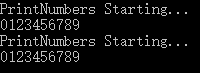
1.3 线程阻塞
阻塞状态可能的原因:
休眠状态;时间一到自动恢复执行,其特点是不占用CPU,其他线程可以继续执行。
线程执行wait方法时,需要其他线程调用
Monitor
.Pulse()或者Monitor.
PulseAll()
进行唤醒或者说是通知等待的队列。
输入 / 输出流的完成;
同步控制方法,但是对象锁不可用,因为另一个任务已经获取了该锁;
sleep() 实例
using System; using System.Threading; namespace MulityThreadNote { class Program { static void Main(string[] args) { Thread t1 = new Thread(PrintNumbersWithDelay); t1.Start(); PrintNumbers(); Console.ReadLine(); } static void PrintNumbers() { Console.WriteLine("PrintNumbers Starting..."); for (int i = 0; i < 10; i++) { Console.Write(i); } Console.WriteLine(); } static void PrintNumbersWithDelay() { Console.WriteLine("PrintNumbersWithDelay Starting..."); for (int i = 0; i < 10; i++) { Thread.Sleep(TimeSpan.FromSeconds(2)); Console.Write(i); } Console.WriteLine(); } } }

1.4 线程等待
using System; using System.Threading; namespace MulityThreadNote { class Program { static void Main(string[] args) { Console.WriteLine("Starting..."); Thread th = new Thread(PrintNumbersWithDelay); th.Start(); th.Join(); //使用Join等待th完成 PrintNumbers(); Console.WriteLine("THread Complete"); Console.ReadLine(); } static void PrintNumbers() { Console.WriteLine("PrintNumbers Starting..."); for (int i = 0; i < 10; i++) { Console.WriteLine(i); } } static void PrintNumbersWithDelay() { Console.WriteLine("PrintNumbersWithDelay Starting..."); for (int i = 0; i < 10; i++) { Thread.Sleep(TimeSpan.FromSeconds(2)); Console.WriteLine(i); } } } 只有th执行完成后才执行其他程序;结果如下

如果没有
th.Join(); //使用Join等待th完成
结果如下

1.5 终止线程
using System; using System.Threading; namespace MulityThreadNote { class Program { static void Main(string[] args) { Console.WriteLine("Starting Program..."); Thread t1 = new Thread(PrintNumbersWithDelay); t1.Start(); Thread.Sleep(TimeSpan.FromSeconds(6)); t1.Abort(); //使用Abort()终止线程 Console.WriteLine("Thread t1 has been aborted"); Thread t2 = new Thread(PrintNumbers); PrintNumbers(); Console.ReadLine(); } static void PrintNumbers() { Console.WriteLine("PrintNumbers Starting..."); for (int i = 0; i < 10; i++) { Console.WriteLine(i); } } static void PrintNumbersWithDelay() { Console.WriteLine("PrintNumbers Starting..."); for (int i = 0; i < 10; i++) { Thread.Sleep(TimeSpan.FromSeconds(2)); Console.WriteLine(i); } } } }1.6 检测线程状态
using System; using System.Threading; namespace MulityThreadNote { class Program { static void Main(string[] args) { Console.WriteLine("Start Program..."); Thread t1 = new Thread(Status); Thread t2 = new Thread(OnlySleep); Console.WriteLine(t1.ThreadState.ToString());//获取实例线程状态 t2.Start(); t1.Start(); for (int i = 0; i < 20; i++) { Console.WriteLine(t1.ThreadState.ToString()); } Thread.Sleep(TimeSpan.FromSeconds(6)); t1.Abort(); Console.WriteLine("thread t1 has been aborted"); Console.WriteLine(t1.ThreadState.ToString()); Console.WriteLine(t2.ThreadState.ToString()); Console.ReadLine(); } private static void Status() { Console.WriteLine("Starting..."); Console.WriteLine(Thread.CurrentThread.ThreadState.ToString());//获取当前线程状态 for (int i = 0; i < 10; i++) { Thread.Sleep(TimeSpan.FromSeconds(2)); Console.WriteLine(i); } } private static void OnlySleep() { Thread.Sleep(TimeSpan.FromSeconds(2)); } } }结果如下:

注释:使用Thread.ThreadState获取线程的运行状态。ThreadState是一个C#枚举。谨记:不要在程序中使用线程终止,否则可能会出现意想不到的结果
1.7 线程优先级
using System; using System.Diagnostics; using System.Threading; namespace MulityThreadNote { class Program { static void Main(string[] args) { Console.WriteLine("Current thread priority: {0}", Thread.CurrentThread.Priority); Console.WriteLine("Running on all cores available");//获取实例线程状态 RunThreads(); Thread.Sleep(TimeSpan.FromSeconds(2)); Console.WriteLine("Running on a single Core"); //让操作系统的所有线程运行在单个CPU核心上 Process.GetCurrentProcess().ProcessorAffinity = new IntPtr(1); RunThreads(); Console.ReadLine(); } private static void RunThreads() { var sample = new ThreadSample(); var t1 = new Thread(sample.CountNumbers); t1.Name = "Thread One"; var t2 = new Thread(sample.CountNumbers); t2.Name = "Thread Two"; t1.Priority = ThreadPriority.Highest;//使用Priority设置线程的优先级 t2.Priority = ThreadPriority.Lowest; t1.Start(); t2.Start(); Thread.Sleep(TimeSpan.FromSeconds(2)); sample.Stop(); } } class ThreadSample { private bool _isStopped = false; public void Stop() { _isStopped = true; } public void CountNumbers() { long counter = 0; while (!_isStopped) { counter++; } Console.WriteLine("{0} with {1} priority has a count={2}", Thread.CurrentThread.Name, Thread.CurrentThread.Priority,counter.ToString("NO")); } } }

注释:单核执行多线程耗费的时间比多核的多很多
1.8 前台线程和后台线程
using System; using System.Diagnostics; using System.Threading; namespace MulityThreadNote { class Program { static void Main(string[] args) { var sampleForground = new ThreadSample(10); var sampleBackground = new ThreadSample(20); var t1 = new Thread(sampleForground.CountNumbers); t1.Name = "ForegroundThread"; //没有明确声明的均为前台线程 var t2 = new Thread(sampleBackground.CountNumbers); t2.Name = "BackgroundThread"; t2.IsBackground = true; //设置为后台线程 t1.Start(); t2.Start(); Console.ReadKey(); } } class ThreadSample { private readonly int _iteration; public ThreadSample(int iteration) { _iteration = iteration; } public void CountNumbers() { for (int i = 0; i < _iteration; i++) { Thread.Sleep(TimeSpan.FromSeconds(0.5)); Console.WriteLine("{0} prints {1}", Thread.CurrentThread.Name, i); } } } }结果如下:

注释:进程会等待所有的前台线程完成后再结束工作,但是如果只剩下后台线程,则会直接结束工作
1.9 向线程传递参数
using System; using System.Diagnostics; using System.Threading; namespace MulityThreadNote { class Program { static void Main(string[] args) { ThreadSample sample = new ThreadSample(5); Thread t1 = new Thread(sample.CountNumbers); t1.Name = "ThreadOne"; t1.Start(); t1.Join(); Console.WriteLine("--------------------------"); Thread t2 = new Thread(Count); t2.Name = "ThreadTwo"; t2.Start(3); t2.Join(); Console.WriteLine("--------------------------"); //使用lambda表达式引用另一个C#对象的方式被称为闭包。当在lambda表达式中使用任何局部变量时,C#会生成一个类,并将该变量作为该类的一个属性,但是我们无须定义该类,C#编译器会自动帮我们实现 Thread t3 = new Thread(()=> CountNumbers(5)); t3.Name = "ThreadThree"; t3.Start(); t3.Join(); Console.WriteLine("--------------------------"); int i = 10; Thread t4 = new Thread(() => PrintNumber(i)); i = 20; Thread t5 = new Thread(() => PrintNumber(i)); t4.Start(); t5.Start(); //t4, t5都会输出20, 因为t4,t5没有Start之前i已经变成20了 Console.ReadKey(); } static void Count(object iterations) { CountNumbers((int)iterations); } static void CountNumbers(int iterations) { for (int i = 1; i <= iterations; i++) { Thread.Sleep(TimeSpan.FromSeconds(0.5)); Console.WriteLine("{0} prints {1}", Thread.CurrentThread.Name,i); } } static void PrintNumber(int number) { Console.WriteLine(number); } } class ThreadSample { private readonly int _iteration; public ThreadSample(int iteration) { _iteration = iteration; } public void CountNumbers() { for (int i = 1; i <= _iteration; i++) { Thread.Sleep(TimeSpan.FromSeconds(0.5)); Console.WriteLine("{0} prints {1}",Thread.CurrentThread.Name,i); } } } }

1.10 使用C# 锁 lock 关键字
using System; using System.Diagnostics; using System.Threading; namespace MulityThreadNote { class Program { static void Main(string[] args) { Console.WriteLine("Incorrect Counter"); Counter c1 = new Counter(); var t1 = new Thread(() => TestCounter(c1)); var t2 = new Thread(() => TestCounter(c1)); var t3 = new Thread(() => TestCounter(c1)); t1.Start(); t2.Start(); t3.Start(); t1.Join(); t2.Join(); t3.Join(); Console.WriteLine("Total Count: {0}",c1.Count); Console.WriteLine("------------------------"); Console.WriteLine("Correct counter"); CounterWithLock c2 = new CounterWithLock(); t1 = new Thread(() => TestCounter(c2)); t2 = new Thread(() => TestCounter(c2)); t3 = new Thread(() => TestCounter(c2)); t1.Start(); t2.Start(); t3.Start(); t1.Join(); t2.Join(); t3.Join(); Console.WriteLine("Total count:{0}",c2.Count); Console.ReadLine(); } static void TestCounter(CounterBase c) { for (int i = 0; i < ; i++) { c.Increment(); c.Decrement(); } } class Counter : CounterBase { public int Count { get; private set; } public override void Decrement() { Count--; } public override void Increment() { Count++; } } class CounterWithLock : CounterBase { private readonly object _asyncRoot = new object(); public int Count { get; private set; } public override void Decrement() { lock (_asyncRoot) { Count--; } } public override void Increment() { lock (_asyncRoot) { Count++; } } } abstract class CounterBase { public abstract void Increment(); public abstract void Decrement(); } } class ThreadSample { private readonly int _iteration; public ThreadSample(int iteration) { _iteration = iteration; } public void CountNumbers() { for (int i = 1; i <= _iteration; i++) { Thread.Sleep(TimeSpan.FromSeconds(0.5)); Console.WriteLine("{0} prints {1}",Thread.CurrentThread.Name,i); } } } }

注释:不加锁,得出的结果不确定,竞争条件下很容易出错。加锁使程序安规定执行,得出的结果是正确的,但是性能受到了影响
1.11 使用Monitor类锁定资源
using System;
using System.Diagnostics;
using System.Threading;

namespace MulityThreadNote
{
    class Program
    {
        static void Main(string[] args)
        {
            object lock1 = new object();
            object lock2 = new object();
            new Thread(() => LockTooMuch(lock1, lock2)).Start();
            lock (lock2)
            {
                Thread.Sleep(1000);
                Console.WriteLine("Monitor.TryEnter allows not to get stuck, returning false after a specified timeout is elapsed");
                //直接使用Monitor.TryEnter, 如果在第二个参数之前还未获取到lock保护的资源会返回false
                if (Monitor.TryEnter(lock1, TimeSpan.FromSeconds(5)))
                {
                    Console.WriteLine("Acquired a protected resource successfully");
                }
                else
                {
                    Console.WriteLine("Timeout acquiring a resource");
                }
            }
            new Thread(() => LockTooMuch(lock1, lock2)).Start();
            Console.WriteLine("-----------------------------");
            /* 下面代码会造成死锁
            lock (lock2)
            {
                Console.WriteLine("This will be a deadlock!");
                Thread.Sleep(1000);
                lock (lock1)
                {
                    Console.WriteLine("Acquired a protected resource successfully");
                }
            }
            */
        }

        static void LockTooMuch(object lock1, object lock2)
        {
            lock (lock1)
            {
                Thread.Sleep(1000);
                lock (lock2) ;
            }
        }
    }
}
注释:Monitor.TryEnter在指定的时间内尝试获取指定对象上的排他锁

1.12 处理异常
using System;
using System.Diagnostics;
using System.Threading;

namespace MulityThreadNote
{
    class Program
    {
        static void Main(string[] args)
        {
            Thread t = new Thread(FaultyThread);
            t.Start();
            t.Join();
            try
            {
                t = new Thread(BadFaultyThread);
                t.Start();
            }
            catch (Exception ex)
            {
                Console.WriteLine("We won't get here");
            }
        }
        static void BadFaultyThread()
        {
            Console.WriteLine("Starting a faulty thread.....");
            Thread.Sleep(TimeSpan.FromSeconds(2));
            //这个异常主线程无法捕捉到,因为是在子线程抛出的异常。需要在子线程中加入try...catch捕获异常
            throw new Exception("Boom!");
        }
        static void FaultyThread()
        {
            try
            {
                Console.WriteLine("Starting a faulty thread...");
                Thread.Sleep(TimeSpan.FromSeconds(1));
                throw new Exception("Boom");
            }
            catch (Exception ex)
            {
                Console.WriteLine("Exception handled: {0}", ex.Message);
            }
        }
    }
}

发布者:全栈程序员-站长,转载请注明出处:https://javaforall.net/205274.html原文链接:https://javaforall.net



