
人脸识别
1、前言和思路
那么通过分析,我们只需要做两步骤:打开摄像头和自动读取视频或照片
2、打开摄像头
分步骤分析:打开摄像头,并展示视频效果在html上,目前有两种方式:
2.1、使用camera组件进行,借用.createCameraContext()对象来打开摄像头
2.2、通过livePusher对象(直播推流技术)实现视频预览和截屏
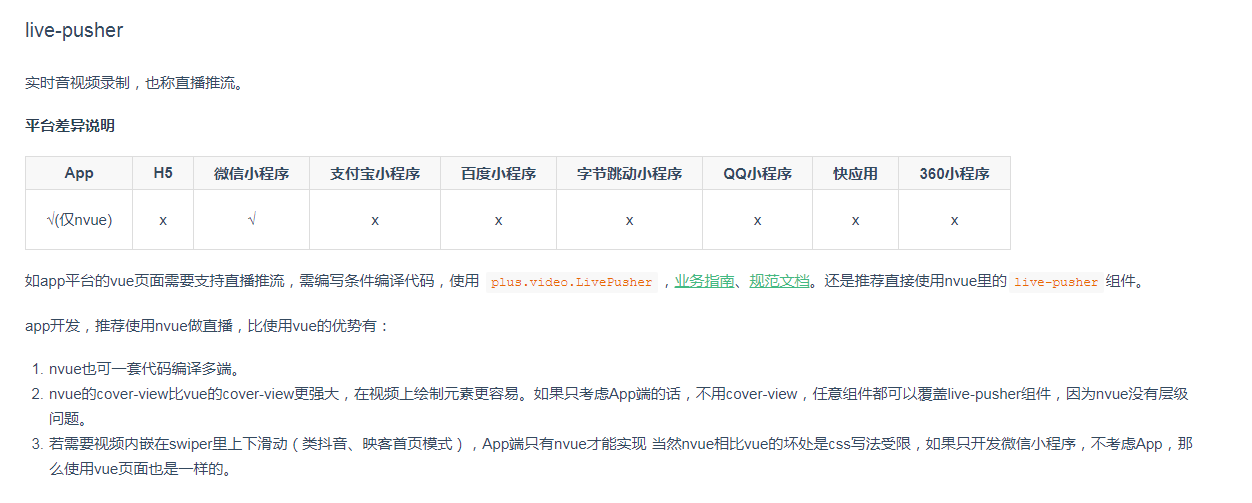

下面我主要是以nvue进行开发,毕竟组件简单明了是吧,然后就遇到了很多坑…
3、使用nvue来开发人脸识别
3.1、效果图
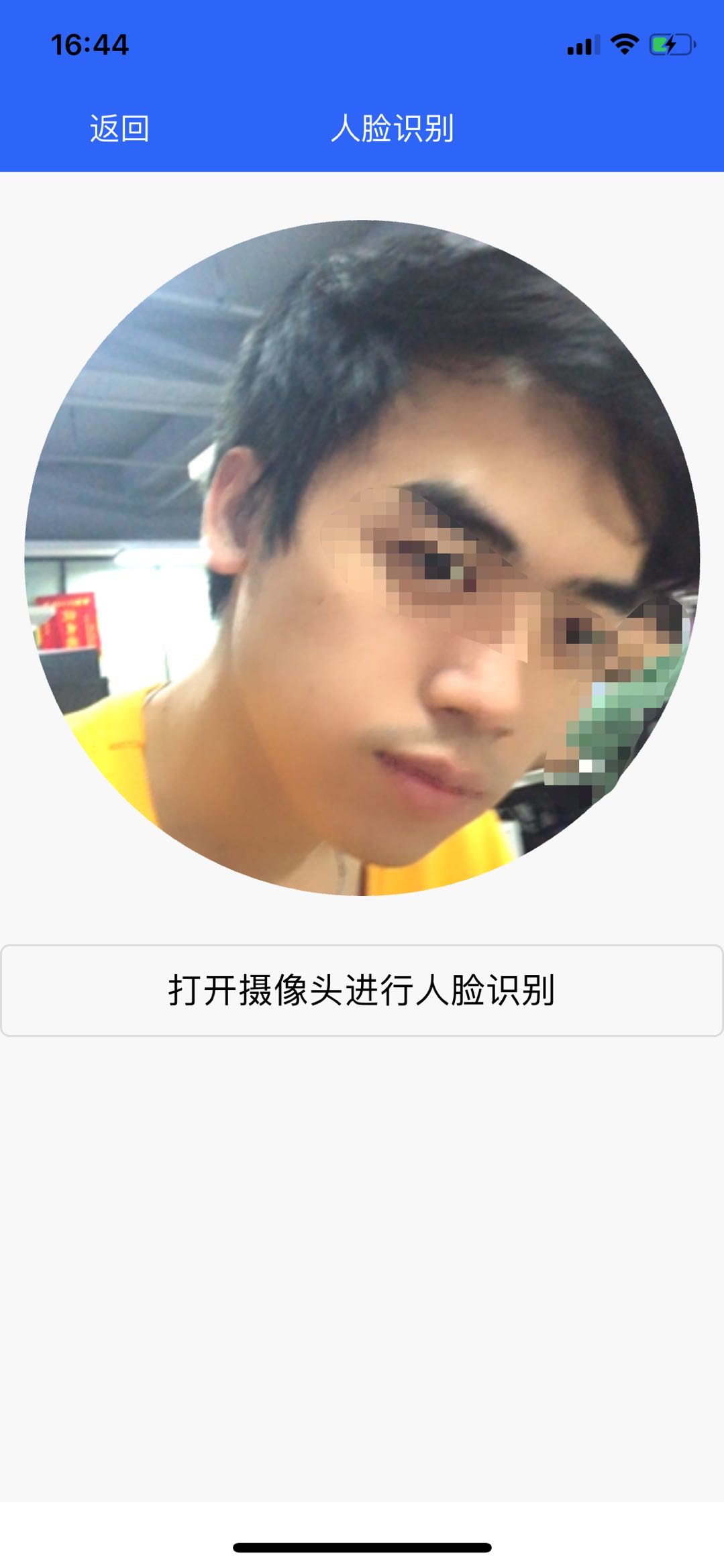
3.2、代码
话不多说,直接上代码
html部分
<template> <view> <div class="custom" :style="{height: CustomBar+'px'}"> <view class="navcontent" :style="[{top:statusBar + 'px'}]"> <text style="color: #FFFFFF;font-size: 16px;line-height: 45px;" class="iconfont icon-xiangzuo" @click="BackPage">返回
     text> <text style="color: #FFFFFF;font-size: 16px;line-height: 45px;">人脸识别
      text> <text>
       text>
        view>
         div> <div class="livefater"> <div style="width: 350px;height: 350px;border-radius: 350px;overflow: hidden;background-color: #CCCCCC;"> <live-pusher id='livePusher' ref="livePusher" class="livePusher" url="" mode="SD" :muted="true" :enable-camera="true" :auto-focus="true" :beauty="1" whiteness="2" aspect="1:1" @statechange="statechange" @netstatus="netstatus" @error = "error" >
          live-pusher>
           div> <cover-image src="../static/image/gai.png" class="gaiimg">
            cover-image>
             div> <button class="btn" @click="startPreview">打开摄像头进行人脸识别
              button>
               view>
                template>
js部分
 export default {
    data: {
    fil: true, imgList:[""], statusBar:'', CustomBar: 0 }, onLoad(){
    // this.startPreview() }, onReady() {
    // 注意:需要在onReady中 或 onLoad 延时 this.context = uni.createLivePusherContext("livePusher", this); var that = this uni.getSystemInfo({
    success:function(e){
    // 计算导航栏高度 that.statusBar = e.statusBarHeight // #ifndef MP  if(e.platform == 'android') {
    that.CustomBar = e.statusBarHeight + 50 }else {
    that.CustomBar = e.statusBarHeight + 45 } console.log(that.statusBar) // #endif  // #ifdef MP-WEIXIN  let custom = wx.getMenuButtonBoundingClientRect() that.CustomBar = custom.bottom + custom.top - e.statusBarHeight // #endif  // #ifdef MP-ALIPAY  that.CustomBar = e.statusBarHeight + e.titleBarHeight // #endif  } }) }, methods: {
    Timer(){
   }, statechange(e) {
    console.log("statechange:" + JSON.stringify(e)); }, netstatus(e) {
    console.log("netstatus:" + JSON.stringify(e)); }, error(e) {
    console.log("error:" + JSON.stringify(e)); }, start: function() {
    this.context.start({
    success: (a) => {
    console.log("livePusher.start:" + JSON.stringify(a)); } }); }, close: function() {
    this.context.close({
    success: (a) => {
    console.log("livePusher.close:" + JSON.stringify(a)); } }); }, // 拍照事件 snapshot: function() {
    var that = this this.context.snapshot({
    success: (e) => {
    console.log(JSON.stringify(e)); that.getMinImage(e.message.tempImagePath) } }); }, // 开启摄像头 startPreview() {
    console.log("1") var that = this this.context.startPreview({
    success: (a) => {
    console.log("livePusher.startPreview:" + JSON.stringify(a)); that.Timer = setInterval(function(){
    that.snapshot() if(that.imgList.length>3){
    console.log("3") clearInterval(that.Timer) } },2000) } }); }, // 使用plus.zip.compressImage压缩图片并转换成base64 getMinImage(imgPath) {
    plus.zip.compressImage( {
    src: imgPath, dst: imgPath, overwrite: true, quality: 40 }, zipRes => {
    setTimeout(() => {
    var reader = new plus.io.FileReader(); reader.onloadend = res => {
    var speech = res.target.result; //base64图片 console.log(speech); this.imgList.push(speech); }; //一定要使用plus.io.convertLocalFileSystemURL将target地址转换为本地文件地址,否则readAsDataURL会找不到文件 reader.readAsDataURL(plus.io.convertLocalFileSystemURL(zipRes.target)); }, 1000); }, function(error) {
    console.log('Compress error!', error); } ); }, BackPage() {
    uni.navigateBack({
    delta: 1 }); } } }
css部分
.custom{
    background-color: #2C65F7; } .navcontent{
    height: 45px; display: -ms-flex; display: -webkit-flex; display: flex; justify-content:space-around; flex-direction:row; color:#FFFFFF; } .livePusher{
    width: 350px; height: 350px; } .livefater{
    display: -ms-flex; display: -webkit-flex; display: flex; justify-content:center; flex-direction:column; align-items:center; margin-top: 50rpx; margin-bottom: 50rpx; height: 350px; } .gaiimg{
    width: 350px; height: 350px; margin-top: -350px; }
4、使用微信小程序开发人脸识别
分两种,一种自主开发,一种借用第三方插件
4.1、自主开发
4.2、E证通
5 nvue的背景图片
版权声明:本文内容由互联网用户自发贡献,该文观点仅代表作者本人。本站仅提供信息存储空间服务,不拥有所有权,不承担相关法律责任。如发现本站有涉嫌侵权/违法违规的内容, 请联系我们举报,一经查实,本站将立刻删除。
发布者:全栈程序员-站长,转载请注明出处:https://javaforall.net/205667.html原文链接:https://javaforall.net




