
在开始本篇文章之前,我们先看一段代码:
@Override protected void onMeasure(int widthMeasureSpec, int heightMeasureSpec) { int expendSpec = MeasureSpec.makeMeasureSpec(Integer.MAX_VALUE >> 2, MeasureSpec.AT_MOST); super.onMeasure(widthMeasureSpec, expendSpec); }是不是很熟悉,没错,它就是我们在 ScrollView 嵌套 ListView 的时候,重写 ListView 来处理 ListView 数据显示不全的问题,那么为什么要这么写呢,而 MeasureSpec.makeMeasureSpec(Integer.MAX_VALUE >> 2, MeasureSpec.AT_MOST) 又是什么意思呢,别着急,重头戏马上到来。
1. MeasureSpec 是干什么的
2. MeasureSpec 的原理
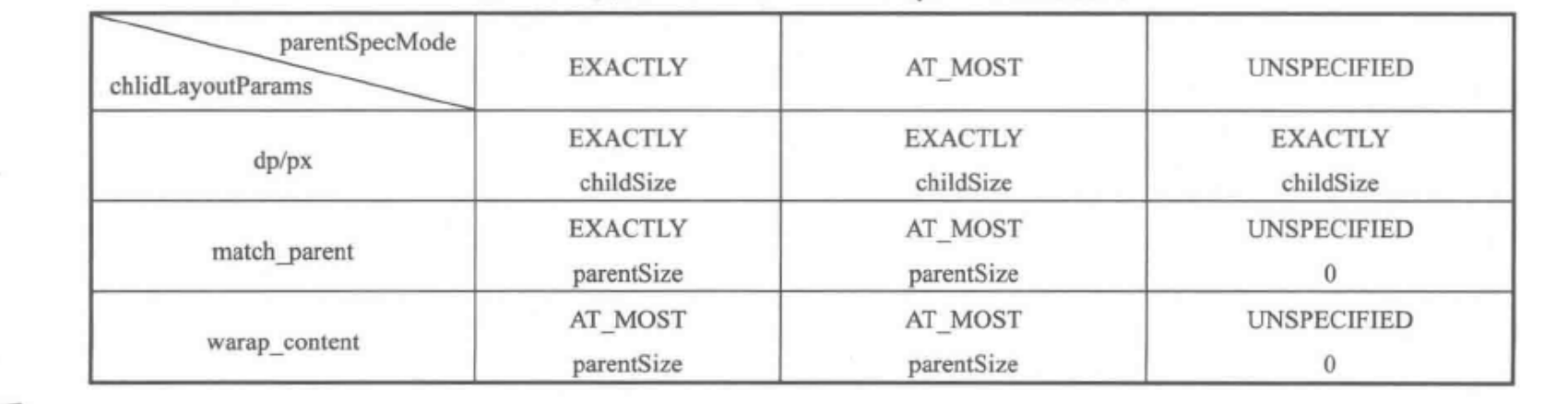

MeasureSpec 代表一个32为的 int 值,高两位是 SpecMode,低30位是 SpecSize,SpecMode 是指测量模式,而 SpecMode 是指在某种测量模式下的规格大小,下面先看下 MeasureSpec 内部的一些常量的定义,通过下面的代码,应该不难理解 MeasureSpec 的工作原理:
private static final int MODE_SHIFT = 30; private static final int MODE_MASK = 0x3 << MODE_SHIFT; / @hide */ @IntDef({UNSPECIFIED, EXACTLY, AT_MOST}) @Retention(RetentionPolicy.SOURCE) public @interface MeasureSpecMode {} / * Measure specification mode: The parent has not imposed any constraint * on the child. It can be whatever size it wants. */ public static final int UNSPECIFIED = 0 << MODE_SHIFT; / * Measure specification mode: The parent has determined an exact size * for the child. The child is going to be given those bounds regardless * of how big it wants to be. */ public static final int EXACTLY = 1 << MODE_SHIFT; / * Measure specification mode: The child can be as large as it wants up * to the specified size. */ public static final int AT_MOST = 2 << MODE_SHIFT; / * Creates a measure specification based on the supplied size and mode. * * The mode must always be one of the following: *
*
- {@link android.view.View.MeasureSpec#UNSPECIFIED}
*
- {@link android.view.View.MeasureSpec#EXACTLY}
*
- {@link android.view.View.MeasureSpec#AT_MOST}
*
* * Note: On API level 17 and lower, makeMeasureSpec's * implementation was such that the order of arguments did not matter * and overflow in either value could impact the resulting MeasureSpec. * {@link android.widget.RelativeLayout} was affected by this bug. * Apps targeting API levels greater than 17 will get the fixed, more strict * behavior.
* * @param size the size of the measure specification * @param mode the mode of the measure specification * @return the measure specification based on size and mode */ public static int makeMeasureSpec(@IntRange(from = 0, to = (1 << MeasureSpec.MODE_SHIFT) - 1) int size, @MeasureSpecMode int mode) { if (sUseBrokenMakeMeasureSpec) { return size + mode; } else { return (size & ~MODE_MASK) | (mode & MODE_MASK); } } / * Like {@link #makeMeasureSpec(int, int)}, but any spec with a mode of UNSPECIFIED * will automatically get a size of 0. Older apps expect this. * * @hide internal use only for compatibility with system widgets and older apps */ public static int makeSafeMeasureSpec(int size, int mode) { if (sUseZeroUnspecifiedMeasureSpec && mode == UNSPECIFIED) { return 0; } return makeMeasureSpec(size, mode); } / * Extracts the mode from the supplied measure specification. * * @param measureSpec the measure specification to extract the mode from * @return {@link android.view.View.MeasureSpec#UNSPECIFIED}, * {@link android.view.View.MeasureSpec#AT_MOST} or * {@link android.view.View.MeasureSpec#EXACTLY} */ @MeasureSpecMode public static int getMode(int measureSpec) { //noinspection ResourceType return (measureSpec & MODE_MASK); } / * Extracts the size from the supplied measure specification. * * @param measureSpec the measure specification to extract the size from * @return the size in pixels defined in the supplied measure specification */ public static int getSize(int measureSpec) { return (measureSpec & ~MODE_MASK); }MeasureSpec 通过将 SpecMode 和 SpecSize 打包成一个 int 值来避免过多的对象内存分配,为了方便操作,其提供了打包和解包的方法。SpecMode 和 SpecSize 也是一个 int 值,一组 SpecMode 和 SpecSize 可以打包成一个 MeasureSpec,而一个 MeasureSpec 可以通过解包的方法来得出原始的 SpecMode 和 SpecSize,需要注意的是这里提到的 MeasureSpec 是值 MeasureSpec 所代表的 int 值,而并非 MeasureSpec 本身。
3. MeasureSpec 的三种模式
(1)UNSPECIFIEND
父容易不对 View 有任何影响,要多大给多大,这种情况一般用于系统内部,表示一种测量模式(我也不是太懂,有懂的大佬指点下)
(2)EXACTLY
父容器已经检测出 View 所需要的精确大小,这个时候 View 的最终大小就是 MeasureSpec 所指定的值,它对应于 LayoutParams 的 match_parent 和具体的数值两种模式。(如果是重写控件,慎用该模式,不然你会发现一件很神奇的事情,想知道的可以自己动手试试)
(3)AT_MOST
父容器指定一个大小即 SpecSize,View 的大小不能大于这个值,具体是什么值要看不同 View 的具体实现,它对应于 LayoutParams 的warp_content。
4.MeasureSpec 和 LayoutParams 对应关系
childWidthMeasureSpec = getRootMeasureSpec(desiredWindowWidth, lp.width); childHeightMeasureSpec = getRootMeasureSpec(desiredWindowHeight, lp.height); performMeasure(childWidthMeasureSpec, childHeightMeasureSpec);接着再看一下 getRootMeasureSpec 方法实现:
/ * Figures out the measure spec for the root view in a window based on it's * layout params. * * @param windowSize * The available width or height of the window * * @param rootDimension * The layout params for one dimension (width or height) of the * window. * * @return The measure spec to use to measure the root view. */ private static int getRootMeasureSpec(int windowSize, int rootDimension) { int measureSpec; switch (rootDimension) { case ViewGroup.LayoutParams.MATCH_PARENT: // Window can't resize. Force root view to be windowSize. measureSpec = MeasureSpec.makeMeasureSpec(windowSize, MeasureSpec.EXACTLY); break; case ViewGroup.LayoutParams.WRAP_CONTENT: // Window can resize. Set max size for root view. measureSpec = MeasureSpec.makeMeasureSpec(windowSize, MeasureSpec.AT_MOST); break; default: // Window wants to be an exact size. Force root view to be that size. measureSpec = MeasureSpec.makeMeasureSpec(rootDimension, MeasureSpec.EXACTLY); break; } return measureSpec; } 根据上述代码, DecorView 的 MeasureSpec 的产生过程就很明了了,具体来说遵守如下规则,根据它的 LayoutParams 中的宽高的参数来划分:
// Note: padding has already been removed from the supplied specs private void measureChildWithMargins2(View child, int parentWidthSpec, int parentHeightSpec, int childWidth, int childHeight) { int childWidthSpec = getChildMeasureSpec(parentWidthSpec, getTotalMargin(child, true), childWidth); int childHeightSpec = getChildMeasureSpec(parentHeightSpec, getTotalMargin(child, false), childHeight); child.measure(childWidthSpec, childHeightSpec); }上述方法会对子元素进行 measure,在调用子元素的 measure 方法之前会先调通过 getChildMeasureSpec 的创建与父容器的 MeasureSpec 和子元素本身的 LayoutParams 有关,此外还和 View 的 margins 及 padding 有关,具体情况可以看一下 ViewGroup 的 getChildMeasureSpec 方法,如下所示:
/ * Does the hard part of measureChildren: figuring out the MeasureSpec to * pass to a particular child. This method figures out the right MeasureSpec * for one dimension (height or width) of one child view. * * The goal is to combine information from our MeasureSpec with the * LayoutParams of the child to get the best possible results. For example, * if the this view knows its size (because its MeasureSpec has a mode of * EXACTLY), and the child has indicated in its LayoutParams that it wants * to be the same size as the parent, the parent should ask the child to * layout given an exact size. * * @param spec The requirements for this view * @param padding The padding of this view for the current dimension and * margins, if applicable * @param childDimension How big the child wants to be in the current * dimension * @return a MeasureSpec integer for the child */ public static int getChildMeasureSpec(int spec, int padding, int childDimension) { int specMode = MeasureSpec.getMode(spec); int specSize = MeasureSpec.getSize(spec); int size = Math.max(0, specSize - padding); int resultSize = 0; int resultMode = 0; switch (specMode) { // Parent has imposed an exact size on us case MeasureSpec.EXACTLY: if (childDimension >= 0) { resultSize = childDimension; resultMode = MeasureSpec.EXACTLY; } else if (childDimension == LayoutParams.MATCH_PARENT) { // Child wants to be our size. So be it. resultSize = size; resultMode = MeasureSpec.EXACTLY; } else if (childDimension == LayoutParams.WRAP_CONTENT) { // Child wants to determine its own size. It can't be // bigger than us. resultSize = size; resultMode = MeasureSpec.AT_MOST; } break; // Parent has imposed a maximum size on us case MeasureSpec.AT_MOST: if (childDimension >= 0) { // Child wants a specific size... so be it resultSize = childDimension; resultMode = MeasureSpec.EXACTLY; } else if (childDimension == LayoutParams.MATCH_PARENT) { // Child wants to be our size, but our size is not fixed. // Constrain child to not be bigger than us. resultSize = size; resultMode = MeasureSpec.AT_MOST; } else if (childDimension == LayoutParams.WRAP_CONTENT) { // Child wants to determine its own size. It can't be // bigger than us. resultSize = size; resultMode = MeasureSpec.AT_MOST; } break; // Parent asked to see how big we want to be case MeasureSpec.UNSPECIFIED: if (childDimension >= 0) { // Child wants a specific size... let him have it resultSize = childDimension; resultMode = MeasureSpec.EXACTLY; } else if (childDimension == LayoutParams.MATCH_PARENT) { // Child wants to be our size... find out how big it should // be resultSize = View.sUseZeroUnspecifiedMeasureSpec ? 0 : size; resultMode = MeasureSpec.UNSPECIFIED; } else if (childDimension == LayoutParams.WRAP_CONTENT) { // Child wants to determine its own size.... find out how // big it should be resultSize = View.sUseZeroUnspecifiedMeasureSpec ? 0 : size; resultMode = MeasureSpec.UNSPECIFIED; } break; } //noinspection ResourceType return MeasureSpec.makeMeasureSpec(resultSize, resultMode); }上述方法不难理解,它的主要作用是根据父容器的 MeasureSpec 同时结合 View 本身的 LayoutParams 来确定子元素的 MeasureSpec ,参数中的 padding 是指父容器中已经占用的空间大小,因此子元素可用的大小为父容器的尺寸减去 padding ,具体代码如下:
int specSize = MeasureSpec.getSize(spec); int size = Math.max(0, specSize - padding);getChildMeasureSpec 清楚展示了普通 View 的 MeasureSpec 的创建规则。这个整个过程正好对应了文章开头那个表格,然后咱们再回来看下这个表格:
发布者:全栈程序员-站长,转载请注明出处:https://javaforall.net/205691.html原文链接:https://javaforall.net



