
OpenWRT版本:17
一、语法介绍
entry(path, target, title=nil, order=nil)这个函数用于注册一个节点
参数介绍:
path: 在调度树的位置,例如:{“foo”, “bar”, “baz”}会插入foo.bar.baz节点(文件树形结构)
target: 用户请求(点击)节点时调用的动作(可以理解为监听器),有三种类型:
call, template, cbi
title: menu上面显示的字符串(可选)
order: 在相同层次的排列顺序(可选)
template(“admin_system/helloworld”)
template :这个方式对应于web页面。
admin_system/helloworld: 对应/view/admin_system目录下的helloworld.htm文件
_(“Helloworld”)
在web页面上显示的标题
二、template方式的htm文件基本语法
2、 输出变量和函数值:
- <% write(value) %>
- <%=value%>
3、 包含模板:
- <% include(templatesName) %>
- <%+templatesName%>
4、 转换:
- <%= translate(“Text to translate”) %>
- <%:Text to translate%>
其他语法跟html和JavaScript一样。
<%+header%> <%: HelloWorld %>
<%+footer%> 就是html标签
<%: HelloWorld %>输出“HelloWorld”字符串
<%+footer%>就是包含一个footer.htm的文件,它在源码中有提供,我们不需要自己写。
三、在源码中添加LuCI页面
上一节我们是在系统上进行添加,这次我们直接在源码上进行添加,然后再进行编译烧录。
- 进入openwrt/feeds/luci/application,添加如下目录结构
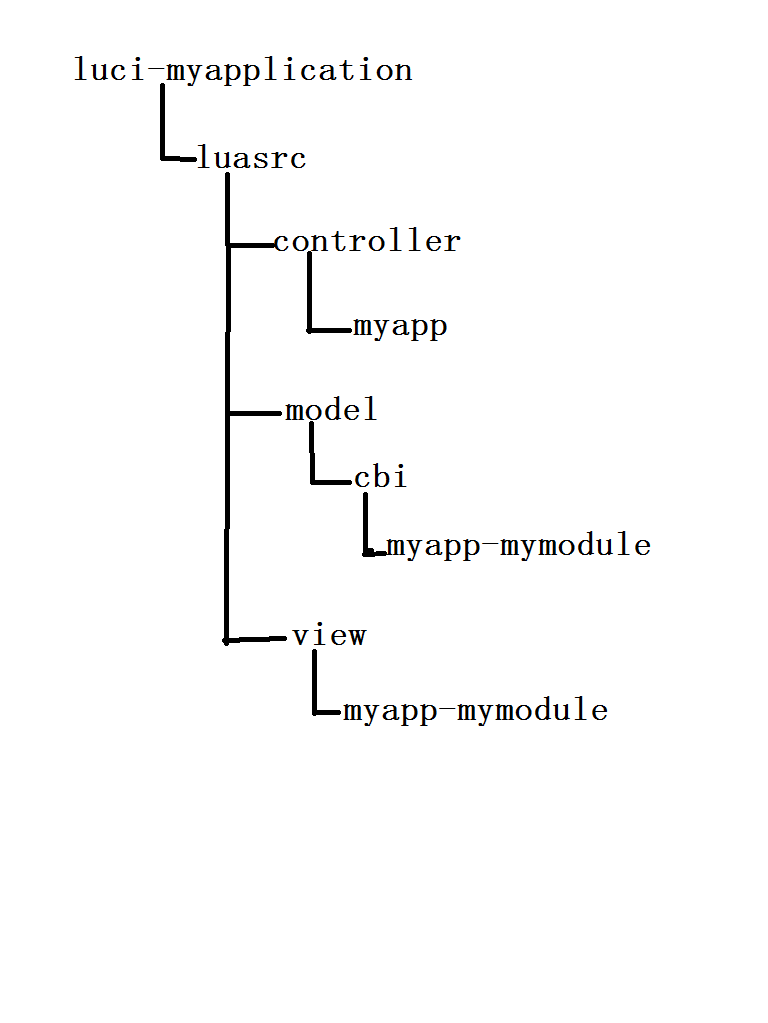

- 在luci-myapplication目录下新建一个Makefile,内容如下:
include $(TOPDIR)/rules.mk LUCI_TITLE:=LuCI Support for Test LUCI_DEPENDS:= include ../../luci.mk # call BuildPackage - OpenWrt buildroot signature 3、在myapp目录下新建new_tab.lua,内容如下:
module("luci.controller.myapp.new_tab", package.seeall) --new_tab要与文件名一致 function index() entry({"admin", "new_tab"}, firstchild(), "New tab", 60).dependent=false --添加一个顶层导航 entry({"admin", "new_tab", "tab_from_cbi"}, cbi("myapp-mymodule/cbi_tab"), "CBI Tab", 1) --在New tab下添加一个子选项CBI Tab entry({"admin", "new_tab", "tab_from_view"}, template("myapp-mymodule/view_tab"), "View Tab", 2) --在New tab下添加一个子选项View Tab end 4、在cbi/myapp-mymodule目录下新建cbi_tab.lua,内容如下:
m = Map("cbi_file", translate("First Tab Form"), translate("Please fill out the form below")) -- cbi_file is the config file in /etc/config d = m:section(TypedSection, "info", "Part A of the form") -- info is the section called info in cbi_file a = d:option(Value, "name", "Name"); a.optional=false; a.rmempty = false; -- name is the option in the cbi_file return m 5、在view/myapp-mymodule目录下新建view_tab.htm,内容如下:
<%+header%> <%:Hello World%>
<%+footer%> config 'info' 'A' option 'name' 'OpenWRT' 这节还是先看到效果,下一节再讲语法规则。。。,如果有兴趣,可以自己研究一下,自己手动改,看一下效果,这样学习效果更好
发布者:全栈程序员-站长,转载请注明出处:https://javaforall.net/206467.html原文链接:https://javaforall.net



