
C#调用C++的dll总归可以有两种方法:
1、非托管C++创建的dll库,需要用静态方法调用;
2、直接使用CLR,生成托管C++dll库。
托管C++dll库方式
1、打开VS创建C++项目”C++_CScharp_DLL”
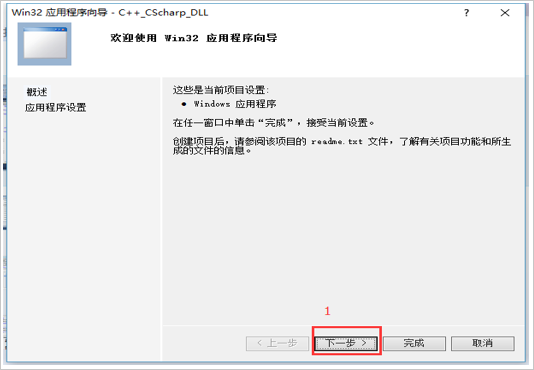

点击完成,C++的项目就新建好了。
2、添加代码文件
右键项目,添加类,如下图所示:

添加类之后会打开添加文件对话框,点击添加即可,如下图所示:
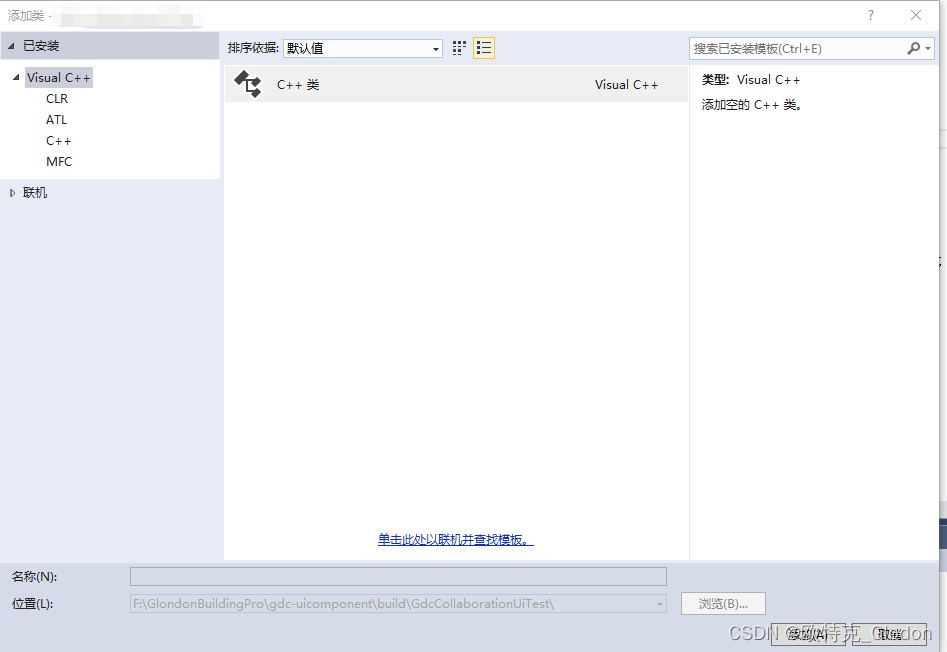
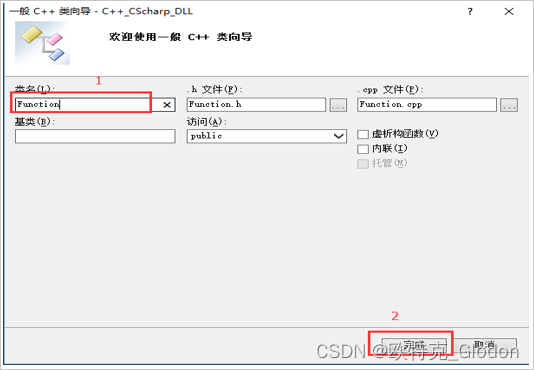
点击确定之后进去下一个对话框,填写文件名Function,如下图所示:
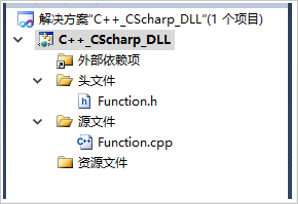
添加好后会生成h文件和cpp文件,如下图所示:
Function类文件代码如下:
//Function.h #pragma once #include
填写完后Function.h文件会报错,错误类型如下:
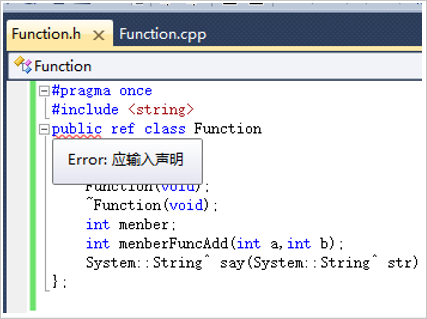
这里需要在C++项目里面设置,让动态库受到公共语言运行时的支持。如下图所示:
3、添加测试程序:
using System; using System.Collections.Generic; using System.Linq; using System.Text; namespace Test {
    class Program {
    static void Main(string[] args) {
    Function fun = new Function(); Console.WriteLine(fun.menberFuncAdd(1, 2)); Console.WriteLine(fun.say("Hello World")); Console.ReadKey(); } } }
非托管C++dll库
非托管模式从功能上来说,只支持函数调用,直接调用C++类库中的公共方法,在被导出的函数前面一定要添加额extern “C来指明导出函数的时候使用C语言方式编译和链接的,这样保证函数定义的名字相同,否则如果默认按C++方式导出,那个函数名字就会变得乱七八糟,我们的程序就无法找到入口点了。
[DllImport(“SampleCppWrapper.dll”)]
private static extern int Add(int n1, int n2);
注意:
在编译C++DLL之前,需要做以下配置,在项目属性对话框中选择”C/C++“|“Advanced”,将Compile AS 选项的值改为”C++”。然后确定,并编译。

以下为摘录例子:
1、 调用C++类库中的类的方法
C#不能直接调用C++类库中的类,需要一种变通的解决方式,通过再做一个C++类库把要调用的类成员方法暴露出来,比如下面这个C++类:
//SampleCppClass.h #pragma once class __declspec(dllexport) SampleCppClass {
    public: SampleCppClass(void); ~SampleCppClass(void); int Add(int n1, int n2); int Sub(int n1, int n2); }; //SampleCppClass.cpp #include "SampleCppClass.h" SampleCppClass::SampleCppClass(void) {
    } SampleCppClass::~SampleCppClass(void) {
    } int SampleCppClass::Add(int n1, int n2) {
    return n1 + n2; } int SampleCppClass::Sub(int n1, int n2) {
    return n1 - n2; }
我们要调用SampleCppClass中的Add和Sub两个方法,所以我们再写一个C++类库,通过公共方法间接调用类成员方法:
//SampleCppWrapper.h #pragma once #include "..\SampleCppClass\SampleCppClass.h" namespace SampleCppWrapper {
    extern "C" __declspec(dllexport) int __stdcall Add(int n1, int n2); extern "C" __declspec(dllexport) int __stdcall Sub(int n1, int n2); } //SampleCppWrapper.cpp #include "SampleCppWrapper.h" namespace SampleCppWrapper {
    SampleCppClass* g_pObj = new SampleCppClass(); int __stdcall Add(int n1, int n2) {
    return g_pObj->Add(n1, n2); } int __stdcall Sub(int n1, int n2) {
    return g_pObj->Sub(n1, n2); } }
在C#中,再调用SampleCppWrapper.dll中的公共方法:
[DllImport("SampleCppWrapper.dll")] private static extern int Add(int n1, int n2); [DllImport("SampleCppWrapper.dll")] private static extern int Sub(int n1, int n2); 3、 使用C++类库中的回调函数
C++的回调函数是一种事件响应机制,和C#的委托相似,比如一个C++类中的回调函数:
// SampleCppClass.h #pragma once typedef void (*LoopCallback)(void* pContext); class __declspec(dllexport) SampleCppClass {
    public: SampleCppClass(void); ~SampleCppClass(void); void SetCallbackFunc(LoopCallback callback); void SetCallbackContext(void* pContext); void Loop(); private: LoopCallback m_callback; void* m_pContext; }; // SampleCppClass.cpp #include "SampleCppClass.h" SampleCppClass::SampleCppClass(void) {
    } SampleCppClass::~SampleCppClass(void) {
    } void SampleCppClass::SetCallbackFunc(LoopCallback callback) {
    m_callback = callback; } void SampleCppClass::SetCallbackContext(void* pContext) {
    m_pContext = pContext; } void SampleCppClass::Loop() {
    for (int i=0; i<10; i++) {
    if (m_callback != NULL) {
    m_callback(m_pContext); } } }
导出方法文件中添加:
//.h #pragma once #include "..\SampleCppClass\SampleCppClass.h" namespace SampleCppWrapper {
    typedef void (__stdcall *LoopCallbackWrapper)(void* pContext); extern "C" __declspec(dllexport) void __stdcall SetCallbackFunc(LoopCallbackWrapper callback); extern "C" __declspec(dllexport) void __stdcall SetCallbackContext(void* pContext); extern "C" __declspec(dllexport) void __stdcall Loop(); } // .CPP #include "SampleCppWrapper.h" namespace SampleCppWrapper {
    LoopCallbackWrapper g_callbackWrapper; SampleCppClass* g_pObj = new SampleCppClass(); void LoopCallbackFunc(void* pContext); void __stdcall SetCallbackFunc(LoopCallbackWrapper callback) {
    g_callbackWrapper = callback; g_pObj->SetCallbackFunc(LoopCallbackFunc); } void __stdcall SetCallbackContext(void* pContext) {
    g_pObj->SetCallbackContext(pContext); } void __stdcall Loop() {
    g_pObj->Loop(); } void LoopCallbackFunc(void* pContext) {
    if (g_callbackWrapper != NULL) {
    g_callbackWrapper(pContext); } } }
C#中调用:
using System; using System.Runtime.InteropServices; using System.Windows.Forms; namespace SampleCsTest {
    public partial class Form1 : Form {
    [StructLayout(LayoutKind.Sequential)] private class Context {
    public Form1 Form {
    get; set; } } private delegate void LoopCallbackHandler(IntPtr pContext); private static LoopCallbackHandler callback = LoopCallback; [DllImport("SampleCppWrapper.dll")] private static extern void SetCallbackFunc(LoopCallbackHandler callback); [DllImport("SampleCppWrapper.dll")] private static extern void SetCallbackContext(IntPtr pContext); [DllImport("SampleCppWrapper.dll")] private static extern void Loop(); private Context ctx = new Context(); public Form1() {
    InitializeComponent(); } private void Form1_Load(object sender, EventArgs e) {
    SetCallbackFunc(callback); ctx.Form = this; IntPtr ptr = Marshal.AllocHGlobal(Marshal.SizeOf(ctx)); Marshal.StructureToPtr(ctx, ptr, false); SetCallbackContext(ptr); } private void button1_Click(object sender, EventArgs e) {
    Loop(); } private static void LoopCallback(IntPtr pContext) {
    Context ctx = (Context)Marshal.PtrToStructure(pContext, typeof(Context)); ctx.Form.textBox1.Text += "callback" + Environment.NewLine; } } }
以上为非托管方式简单参数的传递,实际使用过程中,可能参数类型会复杂很多,这牵涉到C# C++之间的参数转换及C#语法对托管代码的编写,具体做一些项目时,肯定会比例子情况复杂的多,那就需要对各种参数传递及转换好好了解一番,如果解决了各种情况参数传递问题,基本C#调用非托管C++dll没有其它复杂问题。
发布者:全栈程序员-站长,转载请注明出处:https://javaforall.net/206927.html原文链接:https://javaforall.net



