
引用来自“007”的评论
(tf) [root@bogon testpd]# cat test.csv
A,B,C,D,code
1,2,3,4,23
5,6,7,7,234
23,423,4,21,123
(tf) [root@bogon testpd]# python
Python 3.6.6 (default, Aug 13 2018, 18:24:23)
[GCC 4.8.5 (Red Hat 4.8.5-28)] on linux
Type “help”, “copyright”, “credits” or “license” for more information.
>>> import pandas as pd
>>> names = [‘A’,’x’,’C’,’D’,’code’,’xxx’,’yyy’]
>>> opcsv=pd.read_csv(‘test.csv’, header=0, dtype={‘code’:str})
>>> opcsv
A B C D code
0 1 2 3 4 23
1 5 6 7 7 234
2 23 423 4 21 123
>>> opcsv.columns = names[:len(opcsv.columns)]
>>> opcsv
A x C D code
0 1 2 3 4 23
1 5 6 7 7 234
2 23 423 4 21 123
>>>
opcsv=pandas.read_csv(f,header=0,dtype={'code':str})
opcsv.reindex(columns=names)
请问我不太懂reindex(columns=names)是实现什么的 我尝试了一下似乎没有生效
看下结果是不是你要的效果
(tf) [root@bogon testpd]# cat test.csv
A,B,C,D,code
1,2,3,4,23
5,6,7,7,234
23,423,4,21,123
(tf) [root@bogon testpd]# python
Python 3.6.6 (default, Aug 13 2018, 18:24:23)
[GCC 4.8.5 (Red Hat 4.8.5-28)] on linux
Type “help”, “copyright”, “credits” or “license” for more information.
>>> import pandas as pd
>>> names = [‘A’,’B’,’C’,’D’,’code’,’xxx’,’yyy’]
>>> opcsv=pd.read_csv(‘test.csv’, header=0, dtype={‘code’:str})
>>> opcsv
A B C D code
0 1 2 3 4 23
1 5 6 7 7 234
2 23 423 4 21 123
>>> newpocsv = opcsv.reindex(columns=names)
>>> newpocsv
A B C D code xxx yyy
0 1 2 3 4 23 NaN NaN
1 5 6 7 7 234 NaN NaN
2 23 423 4 21 123 NaN NaN
>>>
是的!这正是我想要的结果,但是不知道为什么我按照您给的代码尝试了一遍发现,列名并没有成功生效。
以下是我打印调试的结果,由上面的list替换下面dataframe的表头
但令我无奈的是他并没有生效,我也不清楚具体的原因
是的!这正是我想要的结果,但是不知道为什么我按照您给的代码尝试了一遍发现,列名并没有成功生效。
以下是我打印调试的结果,由上面的list替换下面dataframe的表头
但令我无奈的是他并没有生效,我也不清楚具体的原因
回复 @007 : 我通过回复成功实现了,但又引发了新的问题
opcsv = opcsv.reindex(columns=names)
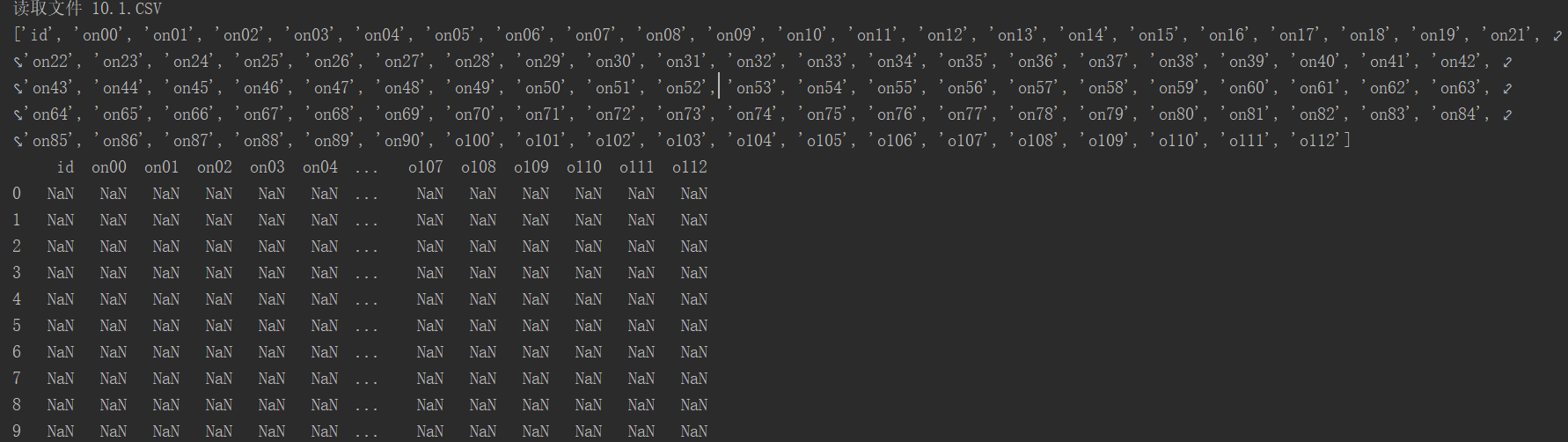

原有的数据也被全部清空赋值NaN了。我不清楚具体原因,我现在正尝试断点debug查看问题所在
当我在debug的时候发现了这样的报错
Traceback (most recent call last): File “E:\Program Files (x86)\PyCharm 2018.1.3\helpers\pydev\pydevd.py”, line 1664, in main() File “E:\Program Files (x86)\PyCharm 2018.1.3\helpers\pydev\pydevd.py”, line 1658, in main globals = debugger.run(setup[‘file’], None, None, is_module) File “E:\Program Files (x86)\PyCharm 2018.1.3\helpers\pydev\pydevd.py”, line 1068, in run pydev_imports.execfile(file, globals, locals) # execute the script File “E:\Program Files (x86)\PyCharm 2018.1.3\helpers\pydev\_pydev_imps\_pydev_execfile.py”, line 18, in execfile exec(compile(contents+”\n”, file, ‘exec’), glob, loc) File “C:/Users/Administrator/Desktop/computerXP/hebing.py”, line 2, in import pymysql,pandas,os,time,numpy File “C:\ProgramData\Anaconda3\lib\site-packages\pandas\__init__.py”, line 19, in “Missing required dependencies {0}”.format(missing_dependencies)) ImportError: Missing required dependencies [‘numpy’]
我不知道是否是他的原因
我似乎找到了原因
frame = pd.DataFrame(np.arange(9).reshape((3, 3)), index=[‘a’, ‘c’, ‘d’], columns=[‘c1’, ‘c2’, ‘c3’]) print frame
因为我本地读取的csv文件是
这样的中文列名,而我需要替换以下列名
因此就好在替换成功的同时将所有原来的数据变为NaN
因为如果从read_csv传参names来更改列名就必须要小于等于csv列数
或者如果只要解决names参数传入的元素少于csv列数dataframe从后抛弃数据这样是否可行?
(tf) [root@bogon testpd]# cat test.csv
A,B,C,D,code 1,2,3,4,23 5,6,7,7,234 23,423,4,21,123 (tf) [root@bogon testpd]# python Python 3.6.6 (default, Aug 13 2018, 18:24:23) [GCC 4.8.5 (Red Hat 4.8.5-28)] on linux Type “help”, “copyright”, “credits” or “license” for more information. >>> import pandas as pd >>> names = [‘A’,’x’,’C’,’D’,’code’,’xxx’,’yyy’] >>> opcsv=pd.read_csv(‘test.csv’, header=0, dtype={‘code’:str}) >>> opcsv A B C D code 0 1 2 3 4 23 1 5 6 7 7 234 2 23 423 4 21 123 >>> opcsv.columns = names[:len(opcsv.columns)] >>> opcsv A x C D code 0 1 2 3 4 23 1 5 6 7 7 234 2 23 423 4 21 123 >>>
我的天,简直不敢相信,这正是我想要得完美结果,请问您是做了理解pandas多深才做到的。能分享一下您是怎么去剖析pandas得到的
发布者:全栈程序员-站长,转载请注明出处:https://javaforall.net/207295.html原文链接:https://javaforall.net




