
开发者可以使用云开发开发微信小程序、小游戏,无需搭建服务器,即可使用云端能力。
云开发为开发者提供完整的云端支持,弱化后端和运维概念,无需搭建服务器,使用平台提供的 API 进行核心业务开发,即可实现快速上线和迭代,同时这一能力,同开发者已经使用的云服务相互兼容,并不互斥。
目前提供三大基础能力支持:
1、云函数:在云端运行的代码,微信私有协议天然鉴权,开发者只需编写自身业务逻辑代码
2、数据库:一个既可在小程序前端操作,也能在云函数中读写的 JSON 数据库
3、存储:在小程序前端直接上传/下载云端文件,在云开发控制台可视化管理
具体的可以去小程序文档上查看,下面用一个登录注册的案例来演示小程序云开发数据库的运用
注册

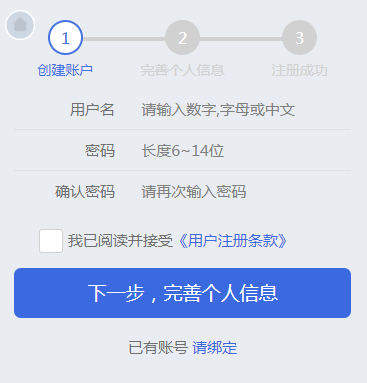
在创建的时候,要在点下一步的时候,调数据库来看用户名有没有重复的。在点击同意的时候来调用数据库,然后把所有的判断放到下一步来判断。所有条件都满足就将用户名和密码放到全局变量中。
var app = getApp(); Page({ data: { userName: '', userPassword: '', userPasswordAgain: '', checkbox: false, repetition: false }, // 返回主页面 backHomeTap: function() { wx.switchTab({ url: '../index/index', }) }, // 绑定 bindingTap: function () { wx.redirectTo({ url: '../login/login', }) }, // 用户名 userNameInput: function(e) { this.setData({ userName: e.detail.value }); }, // 密码 userPasswordInput: function(e) { this.setData({ userPassword: e.detail.value }); }, // 再次输入密码 userPasswordAgainInput: function(e) { this.setData({ userPasswordAgain: e.detail.value }); }, // 同意 checkboxChange: function() { if (this.data.checkbox === false) { this.setData({ checkbox: true }) } else { this.setData({ checkbox: false }) } var that = this; var userName = this.data.userName; // 初始化云 wx.cloud.init({ env: 'wubaib-9543f7', traceUser: true }); // 初始化数据库 const db = wx.cloud.database(); const _ = db.command; db.collection('userInformation').where({ userName: _.eq(userName) }).get({ success: function (res) { if (res.data.length === 1) { that.setData({ repetition: true }) } } }) }, // 下一步,完善个人信息 perfectInforTap: function() { var userName = this.data.userName; var userPassword = this.data.userPassword; var checkbox = this.data.checkbox; var userPasswordAgain = this.data.userPasswordAgain; var name = /^[A-Za-z0-9\u4e00-\u9fa5]+$/; var repetition = this.data.repetition; if (userName === '') { wx.showToast({ title: '请输入用户名', icon: 'none', duration: 2000, mask: true }) } else if (!name.test(userName)) { wx.showToast({ title: '用户名格式不正确', icon: 'none', duration: 2000, mask: true }) } else if (repetition === true) { wx.showToast({ title: '用户名已存在', icon: 'none', duration: 2000, mask: true }) } else if (userPassword === '') { wx.showToast({ title: '请输入密码', icon: 'none', duration: 2000, mask: true }) } else if (userPassword.length < 6) { wx.showToast({ title: '密码最少6位', icon: 'none', duration: 2000, mask: true }) } else if (userPassword !== userPasswordAgain) { wx.showToast({ title: '两次密码输入不一致', icon: 'none', duration: 2000, mask: true }) } else if (checkbox === false) { wx.showToast({ title: '请选中已阅读', icon: 'none', duration: 2000, mask: true }) } else { wx.redirectTo({ url: 'perfectInfor/perfectInfor', }) // 保存用户名和密码 app.appData.account = { userName: userName, userPassword: userPassword } } } })在完善信息的时候获取所有的变量(用户名和密码也在内),然后在点击下一步完成按钮将数据上传到数据库。
var app = getApp(); Page({ data: { userName: '', userPassword: '', phone: '', realName: '', card: '', email: '', }, // 返回主界面 backHomeTap: function() { wx.switchTab({ url: '../../index/index', }) }, // 手机号 phoneInput: function(e) { this.setData({ phone: e.detail.value }); }, // 真实姓名 nameInput: function(e) { this.setData({ realName: e.detail.value }); }, // 身份证 cardInput: function(e) { this.setData({ card: e.detail.value }) }, // email emailInput: function(e) { this.setData({ email: e.detail.value }) }, // 下一步完成 registerSuccessTap: function() { var phone = this.data.phone; var realName = this.data.realName; var card = this.data.card; var email = this.data.email; var userName = this.data.userName; var userPassword = this.data.userPassword; var phonereg = /^1[]\d{9}$/; var namereg = /^[\u4E00-\u9FA5]+$/; var cardreg = /^\d{6}(18|19|20)?\d{2}(0[1-9]|1[012])(0[1-9]|[12]\d|3[01])\d{3}(\d|[xX])$/; var emailreg = /^(\w)+(\.\w+)*@(\w)+((\.\w+)+)$/; var that = this; if (phone === '') { wx.showToast({ title: '请输入手机号', icon: 'none', duration: 2000, mask: true }); } else if (!phonereg.test(phone)) { wx.showToast({ title: '请输入正确的手机号', icon: 'none', duration: 2000, mask: true }) } else if (!namereg.test(realName)) { wx.showToast({ title: '请输入正确的名字', icon: 'none', duration: 2000, mask: true }) } else if (card === '') { wx.showToast({ title: '请输入身份证', icon: 'none', duration: 2000, mask: true }) } else if (!cardreg.test(card)) { wx.showToast({ title: '请输入正确的身份证', icon: 'none', duration: 2000, mask: true }) } else if (email === '') { wx.showToast({ title: '请输入邮箱', icon: 'none', duration: 2000, mask: true }) } else if (!emailreg.test(email)) { wx.showToast({ title: '请输入正确的邮箱', icon: 'none', duration: 2000, mask: true }) } else { // 初始化云 wx.cloud.init({ env: 'wubaib-9543f7', traceUser: true }); // 初始化数据库 const db = wx.cloud.database(); db.collection('userInformation').add({ // data 字段表示需新增的 JSON 数据 data: { realName: realName, userName: userName, userPassword: userPassword, phone: phone, email: email, card: card }, success: function(res) { // res 是一个对象,其中有 _id 字段标记刚创建的记录的 id console.log(res); console.log(res.errMsg); } }) } }, / * 生命周期函数--监听页面显示 */ onShow: function() { this.setData({ userName: app.appData.account.userName, userPassword: app.appData.account.userPassword }) }, }) 登录
在登录页面,先获取用户输入的用户名和密码。在点击登录的时候,先根据userName调数据库的密码和用户输入的密码是否相等。如果相等将用户的信息保存到全局变量中。
var app = getApp(); Page({ data: { bindName: '', bindPassword: '', isChecked: false, userName: '', phone: '', realName: '', card: '', email: '', userId: '' }, // 点击注册账号 registerTap: function() { wx.redirectTo({ url: '../register/register' }) }, // 获取用户名 bindNameInput: function(e) { this.setData({ bindName: e.detail.value }) var that = this; if (that.data.bindName.length !== 0 && that.data.bindPassword.length !== 0) { this.setData({ isChecked: true }) } else if (that.data.bindName.length === 0) { this.setData({ isChecked: false }) } }, // 获取密码 bindPasswordInput: function(e) { this.setData({ bindPassword: e.detail.value }) var that = this; if (that.data.bindName.length !== 0 && that.data.bindPassword.length !== 0) { this.setData({ isChecked: true }) } else if (that.data.bindPassword.length === 0) { this.setData({ isChecked: false }) } }, // 点击登录 bindingSuccess: function() { var that = this; var bindName = that.data.bindName; var bindPassword = that.data.bindPassword; if (bindName.length !== 0 && bindPassword.length !== 0) { // 初始化云 wx.cloud.init({ env: 'wubaib-9543f7', traceUser: true }); // 初始化数据库 const db = wx.cloud.database(); db.collection('userInformation').where({ userName: bindName }).get().then(res => { console.log(res.data); if (res.data[0].userPassword === bindPassword) { console.log("登录成功"); // 保存手机号,真实姓名,身份证号,邮箱 保存用户名 that.setData({ userName: res.data[0].userName, phone: res.data[0].phone, realName: res.data[0].realName, card: res.data[0].card, email: res.data[0].email, userId: res.data[0]._id }) app.appData.userinfo = { phone: that.data.phone, realName: that.data.realName, card: that.data.card, email: that.data.email } app.appData.account = { userName: that.data.userName } app.appData.userId = { userId: that.data.userId } wx.switchTab({ url: '../personalCenter/personalCenter', }) } else { wx.showToast({ title: '用户名或密码错误', icon: 'none', duration: 2000 }) } }) } }, }) 登录WXML
    立即登录


    注册账号
注册第一步的WXML

      1


      创建账户


      2


      完善个人信息


      3


      注册成功


      用户名


      密码


      确认密码


     我已阅读并接受


     《用户注册条款》


    下一步,完善个人信息


     已有账号


     请绑定
注册第二步WXML
      1


      创建账户


      2


      完善个人信息


      3


      注册成功


      手机


      真实姓名


      证件类型


      中华人民共和国居民身份证


      证件号码


      邮箱


    下一步,完成
好多人问我要源码,我就不一个一个发了。要源码的自己git下载吧
下载地址:https://github.com/wubaibin/wx_yunkaifa.git
版权声明:本文内容由互联网用户自发贡献,该文观点仅代表作者本人。本站仅提供信息存储空间服务,不拥有所有权,不承担相关法律责任。如发现本站有涉嫌侵权/违法违规的内容, 请联系我们举报,一经查实,本站将立刻删除。
发布者:全栈程序员-站长,转载请注明出处:https://javaforall.net/207726.html原文链接:https://javaforall.net



