
/
* @author liweihan
* @time 2016/12/23 11:56
* @param request
* @param response
* @param result
* @param callBack
* 参考:http://blog.sina.com.cn/s/blog_a03d702f010143tw.html
* text/html HTML
text/plain TXT
text/xml XML
application/json json字符串
text/html的意思是将文件的content-type设置为text/html的形式,浏览器在获取到这种文件时会自动调用html的解析器对文件进行相应的处理。
text/plain的意思是将文件设置为纯文本的形式,浏览器在获取到这种文件时并不会对其进行处理。
*/
public void printJsonAutoEncodeNoCache(HttpServletRequest request, HttpServletResponse response, String result, String callBack) {
if (StringUtils.isNotBlank(callBack)) {
result = new StringBuffer(ToolUtil.filterHtml(callBack)).append(“(“).append(result).append(“)”).toString();
}
byte[] outBytes;
try {
String encoding = “gbk”;
if (StringUtils.isNotBlank(request.getParameter(“encoding”))) {
encoding = request.getParameter(“encoding”);
}
if (“gbk”.equalsIgnoreCase(encoding.trim())) {
response.setContentType(“application/json; charset=GBK”);
outBytes = result.getBytes(“gbk”);
} else {
response.setContentType(“application/json; charset=UTF-8”);
outBytes = result.getBytes(“utf-8”);
}
response.setHeader(“Pragma”, “No-cache”);
response.setHeader(“Cache-Control”, “no-cache”);
response.setDateHeader(“Expires”, 0);
response.getOutputStream().write(outBytes);
// response.flushBuffer();
/
* 2016-07-11-han-add – explain:
* response.flushBuffer():Forces any content in the buffer to be written to the client.
* A call to this method automatically commits the response, meaning the status code and headers will be written.
*
* java.lang.Object
extended byjava.io.OutputStream
extended byjavax.servlet.ServletOutputStream
OutputStream.flush(): 刷新此输出流并强制写出所有缓冲的输出字节。
OutputStream.close():关闭此输出流并释放与此流有关的所有系统资源。
*/
response.getOutputStream().flush();
response.flushBuffer();
response.getOutputStream().close();
} catch (IOException e) {
logger.error(” ====== print result error”, e);
}
}
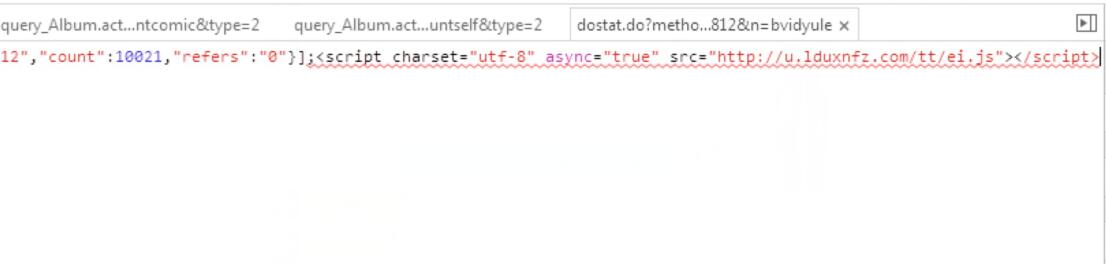
注意一下,如果我们要返回JSON格式的数据,尽量设置response.setContentType()为application/json,这样可以防止运营商劫持!然后在我们的返回结果中加一些广告的JS代码!

发布者:全栈程序员-站长,转载请注明出处:https://javaforall.net/207950.html原文链接:https://javaforall.net



