
世界坐标系,相机坐标系和图像坐标系的转换(Python)
相机内参外参说明:相机内参外参_pan_jinquan的博客-CSDN博客_相机内参
计算机视觉:相机成像原理:世界坐标系、相机坐标系、图像坐标系、像素坐标系之间的转换:计算机视觉:相机成像原理:世界坐标系、相机坐标系、图像坐标系、像素坐标系之间的转换_生活没有if-else-CSDN博客_相机坐标系转世界坐标系
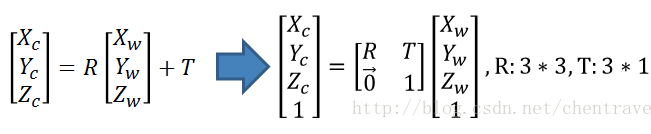
1.世界坐标->相机坐标

2.相机坐标系->图像坐标系
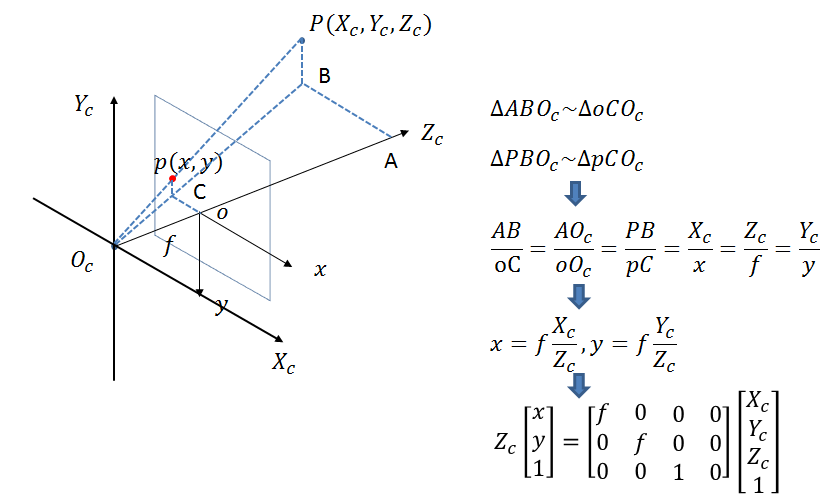
此时投影点p的单位还是mm,并不是pixel,需要进一步转换到像素坐标系。
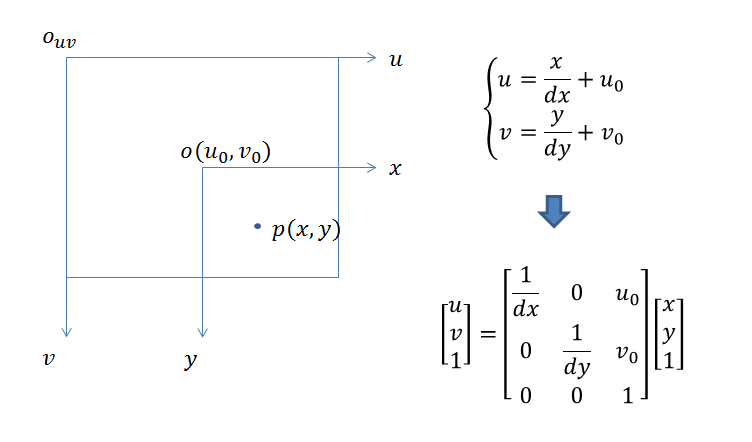
3.图像坐标系与像素坐标系
像素坐标系和图像坐标系都在成像平面上,只是各自的原点和度量单位不一样。图像坐标系的原点为相机光轴与成像平面的交点,通常情况下是成像平面的中点或者叫principal point。图像坐标系的单位是mm,属于物理单位,而像素坐标系的单位是pixel,我们平常描述一个像素点都是几行几列。所以这二者之间的转换如下:其中dx和dy表示每一列和每一行分别代表多少mm,即1pixel=dx mm
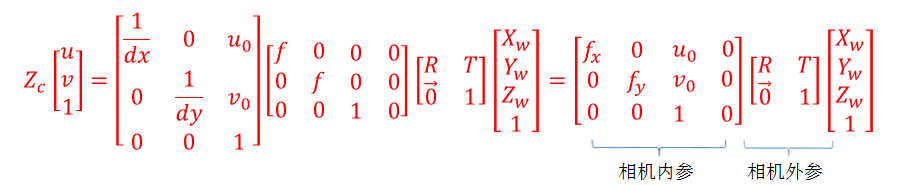
那么通过上面四个坐标系的转换就可以得到一个点从世界坐标系如何转换到像素坐标系的。
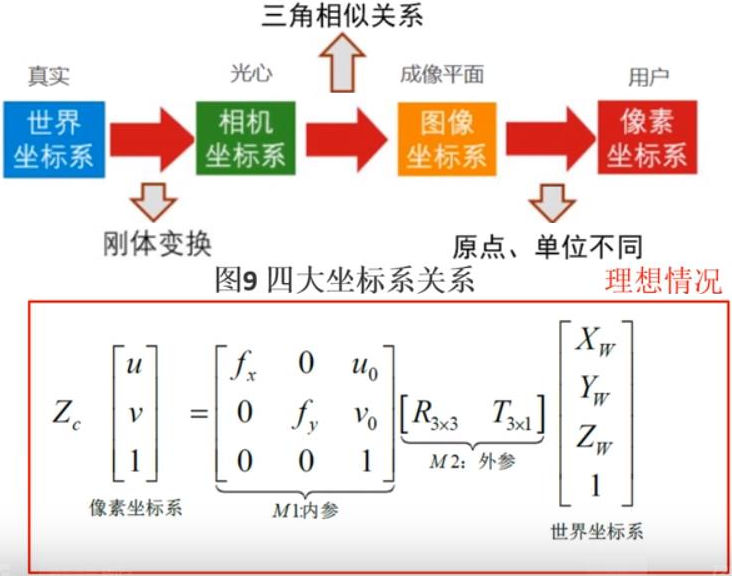
python代码实现:
以下是实现变换的关键代码
相关可视化部分已经push到github: https://github.com/PanJinquan/python-learning-notes
https://github.com/PanJinquan/python-learning-notes/blob/master/modules/utils_3d/camera_tools.py
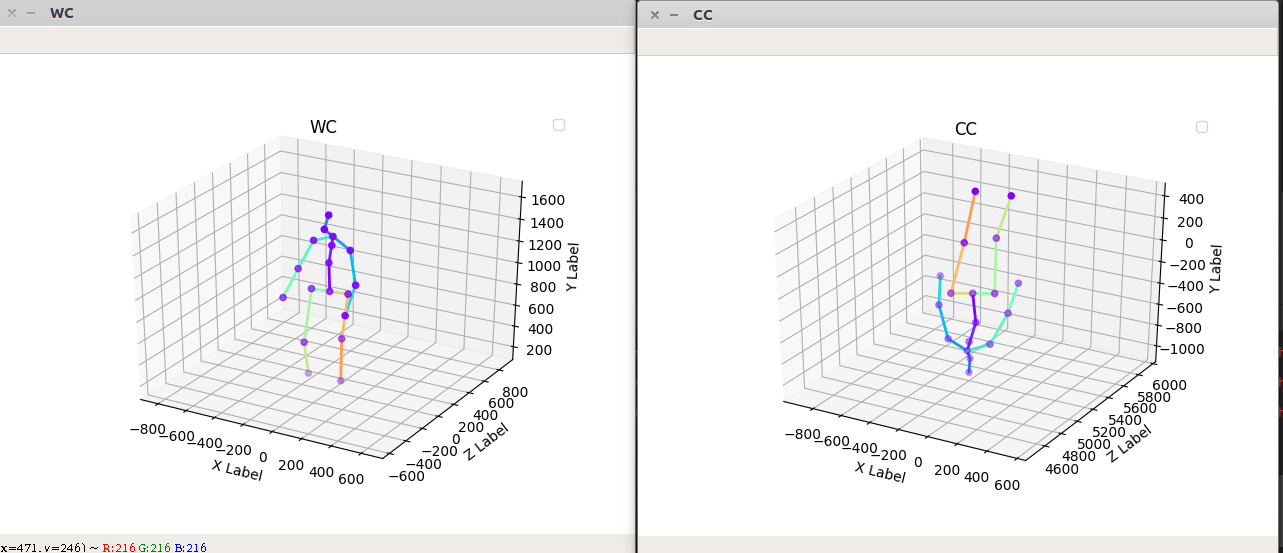
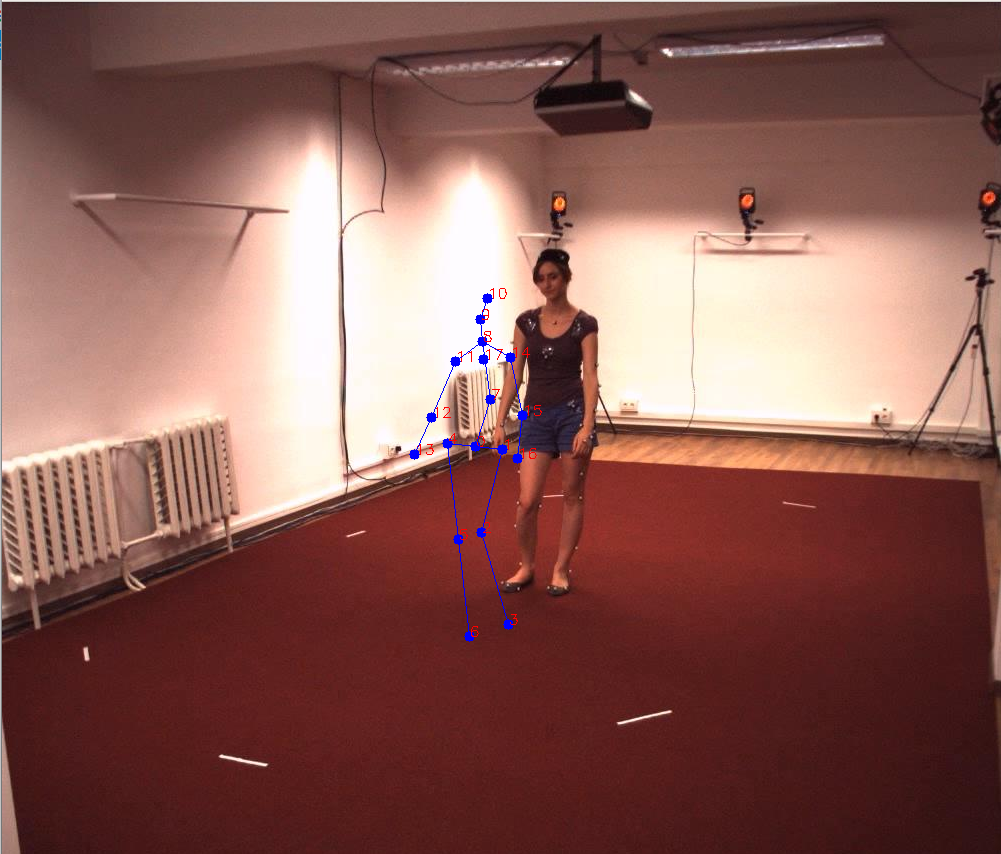
# -*- coding: utf-8 -*- """ # -------------------------------------------------------- # @Project: Integral-Human-Pose-Regression-for-3D-Human-Pose-Estimation # @Author : panjq # @E-mail : # @Date : 2020-02-04 16:03:01 # @url : https://www.jianshu.com/p/c5627ad019df # -------------------------------------------------------- """ import sys import os sys.path.append(os.getcwd()) import cv2 import numpy as np from modules.utils_3d import vis_3d as vis from utils import image_processing human36m_camera_intrinsic = { # R,旋转矩阵 "R": [[-0., 0., 0.0], [0.0, 0., -0.], [-0., -0., -0.]], # t,平移向量 "T": [1841., 4955., 1563.], # 焦距,f/dx, f/dy "f": [1145.0, 1143.], # principal point,主点,主轴与像平面的交点 "c": [512., 515.] } kinect2_camera_intrinsic = { # R,旋转矩阵 "R": [[0., -0.00, 0.0], [0.00, 0., 0.0], [-0.0, -0.0, 0.]], # t,平移向量 "T": [15.2562, 70.2212, -10.9926], # 焦距,f/dx, f/dy "f": [367.535, 367.535], # principal point,主点,主轴与像平面的交点 "c": [260.166, 205.197] } camera_intrinsic = human36m_camera_intrinsic # camera_intrinsic = kinect2_camera_intrinsic class CameraTools(object): @staticmethod def convert_wc_to_cc(joint_world): """ 世界坐标系 -> 相机坐标系: R * (pt - T): joint_cam = np.dot(R, (joint_world - T).T).T :return: """ joint_world = np.asarray(joint_world) R = np.asarray(camera_intrinsic["R"]) T = np.asarray(camera_intrinsic["T"]) joint_num = len(joint_world) # 世界坐标系 -> 相机坐标系 # [R|t] world coords -> camera coords # joint_cam = np.zeros((joint_num, 3)) # joint camera # for i in range(joint_num): # joint i # joint_cam[i] = np.dot(R, joint_world[i] - T) # R * (pt - T) # .T is 转置, T is translation mat joint_cam = np.dot(R, (joint_world - T).T).T # R * (pt - T) return joint_cam @staticmethod def convert_cc_to_wc(joint_world): """ 相机坐标系 -> 世界坐标系: inv(R) * pt +T joint_cam = np.dot(inv(R), joint_world.T)+T :return: """ joint_world = np.asarray(joint_world) R = np.asarray(camera_intrinsic["R"]) T = np.asarray(camera_intrinsic["T"]) # 相机坐标系 -> 世界坐标系 joint_cam = np.dot(np.linalg.inv(R), joint_world.T).T + T return joint_cam @staticmethod def __cam2pixel(cam_coord, f, c): """ 相机坐标系 -> 像素坐标系: (f / dx) * (X / Z) = f * (X / Z) / dx cx,ppx=260.166; cy,ppy=205.197; fx=367.535; fy=367.535 将从3D(X,Y,Z)映射到2D像素坐标P(u,v)计算公式为: u = X * fx / Z + cx v = Y * fy / Z + cy D(v,u) = Z / Alpha ===================================================== camera_matrix = [[428.30114, 0., 316.41648], [ 0., 427.00564, 218.34591], [ 0., 0., 1.]]) fx = camera_intrinsic[0, 0] fy = camera_intrinsic[1, 1] cx = camera_intrinsic[0, 2] cy = camera_intrinsic[1, 2] ===================================================== :param cam_coord: :param f: [fx,fy] :param c: [cx,cy] :return: """ # 等价于:(f / dx) * (X / Z) = f * (X / Z) / dx # 三角变换, / dx, + center_x u = cam_coord[..., 0] / cam_coord[..., 2] * f[0] + c[0] v = cam_coord[..., 1] / cam_coord[..., 2] * f[1] + c[1] d = cam_coord[..., 2] return u, v, d @staticmethod def convert_cc_to_ic(joint_cam): """ 相机坐标系 -> 像素坐标系 :param joint_cam: :return: """ # 相机坐标系 -> 像素坐标系,并 get relative depth # Subtract center depth # 选择 Pelvis骨盆 所在位置作为相机中心,后面用之求relative depth root_idx = 0 center_cam = joint_cam[root_idx] # (x,y,z) mm joint_num = len(joint_cam) f = camera_intrinsic["f"] c = camera_intrinsic["c"] # joint image_dict,像素坐标系,Depth 为相对深度 mm joint_img = np.zeros((joint_num, 3)) joint_img[:, 0], joint_img[:, 1], joint_img[:, 2] = CameraTools.__cam2pixel(joint_cam, f, c) # x,y joint_img[:, 2] = joint_img[:, 2] - center_cam[2] # z return joint_img def demo_for_human36m(): joint_world = [[-91.679, 154.404, 907.261], [-223.23566, 163.80551, 890.5342], [-188.4703, 14.077106, 475.1688], [-261.84055, 186.55286, 61.], [39., 145.00247, 923.98785], [-11., 160.89919, 484.39148], [-51., 220.14624, 35.], [-132.34781, 215.73018, 1128.8396], [-97.1674, 202.34435, 1383.1466], [-112.97073, 127.96946, 1477.4457], [-120.03289, 190.96477, 1573.4], [25., 192.35947, 1296.1571], [107.10581, 116.050285, 1040.5062], [129.8381, -48.024918, 850.94806], [-230.36955, 203.17923, 1311.9639], [-315.40536, 164.55284, 1049.1747], [-350.77136, 43., 831.3473], [-102., 197.76935, 1304.0605]] joint_world = np.asarray(joint_world) # 关节点连接线 kps_lines = ((0, 7), (7, 8), (8, 9), (9, 10), (8, 11), (11, 12), (12, 13), (8, 14), (14, 15), (15, 16), (0, 1), (1, 2), (2, 3), (0, 4), (4, 5), (5, 6)) # show in 世界坐标系 vis.vis_3d(joint_world, kps_lines, coordinate="WC", title="WC", set_lim=True, isshow=True) kp_vis = CameraTools() # show in 相机坐标系 joint_cam = kp_vis.convert_wc_to_cc(joint_world) vis.vis_3d(joint_cam, kps_lines, coordinate="CC", title="CC", set_lim=True, isshow=True) joint_img = kp_vis.convert_cc_to_ic(joint_cam) joint_world1 = kp_vis.convert_cc_to_wc(joint_cam) vis.vis_3d(joint_world1, kps_lines, coordinate="WC", title="WC", set_lim=True, isshow=True) # show in 像素坐标系 kpt_2d = joint_img[:, 0:2] image_path = "./data/s_01_act_02_subact_01_ca_02_000001.jpg" image = image_processing.read_image(image_path) image = image_processing.draw_key_point_in_image(image, key_points=[kpt_2d], pointline=kps_lines) image_processing.cv_show_image("image_dict", image) if __name__ == "__main__": demo_for_human36m() 效果:
版权声明:本文内容由互联网用户自发贡献,该文观点仅代表作者本人。本站仅提供信息存储空间服务,不拥有所有权,不承担相关法律责任。如发现本站有涉嫌侵权/违法违规的内容, 请联系我们举报,一经查实,本站将立刻删除。
发布者:全栈程序员-站长,转载请注明出处:https://javaforall.net/209484.html原文链接:https://javaforall.net


![ps磨皮滤镜portraiture安装教程mac[通俗易懂]](https://javaforall.net/wp-content/uploads/2020/11/2020110817443450-480x300.jpg)
