
大家好,又见面了,我是你们的朋友全栈君。如果您正在找激活码,请点击查看最新教程,关注关注公众号 “全栈程序员社区” 获取激活教程,可能之前旧版本教程已经失效.最新Idea2022.1教程亲测有效,一键激活。
Jetbrains全家桶1年46,售后保障稳定
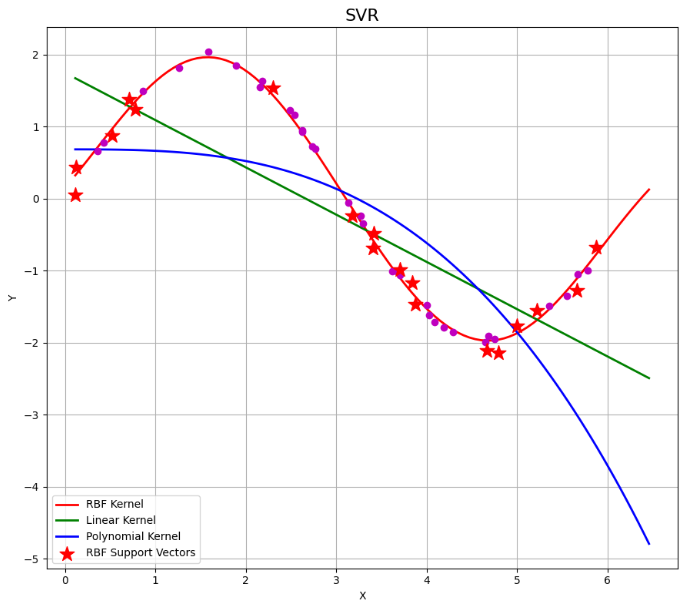
1.SVR时间序列预测
SVR可用于时间序列分析,但不是较好的选择。现在一般采用LSTM神经网络来处理时间序列数据
# SVR预测
# 也可用于时间序列分析(ARIMA也可用于时间序列分析)
import numpy as np
from sklearn import svm
import matplotlib.pyplot as plt


if __name__ == "__main__":
    # 构造数据
    N = 50
    np.random.seed(0)
    # 排序
    x = np.sort(np.random.uniform(0, 6, N), axis=0)
    y = 2*np.sin(x) + 0.1*np.random.randn(N)
    x = x.reshape(-1, 1)
    print('x =\n', x)
    print('y =\n', y)

    # 高斯核函数
    print('SVR - RBF')
    svr_rbf = svm.SVR(kernel='rbf', gamma=0.2, C=100)
    svr_rbf.fit(x, y)
    # 线性核函数
    print('SVR - Linear')
    svr_linear = svm.SVR(kernel='linear', C=100)
    svr_linear.fit(x, y)
    # 多项式核函数
    print('SVR - Polynomial')
    svr_poly = svm.SVR(kernel='poly', degree=3, C=100)
    svr_poly.fit(x, y)
    print('Fit OK.')

    # 思考:系数1.1改成1.5
    x_test = np.linspace(x.min(), 1.1*x.max(), 100).reshape(-1, 1)
    y_rbf = svr_rbf.predict(x_test)
    y_linear = svr_linear.predict(x_test)
    y_poly = svr_poly.predict(x_test)

    plt.figure(figsize=(9, 8), facecolor='w')
    plt.plot(x_test, y_rbf, 'r-', linewidth=2, label='RBF Kernel')
    plt.plot(x_test, y_linear, 'g-', linewidth=2, label='Linear Kernel')
    plt.plot(x_test, y_poly, 'b-', linewidth=2, label='Polynomial Kernel')
    plt.plot(x, y, 'mo', markersize=6)
    plt.scatter(x[svr_rbf.support_], y[svr_rbf.support_], s=200, c='r', marker='*', label='RBF Support Vectors', zorder=10)
    plt.legend(loc='lower left')
    plt.title('SVR', fontsize=16)
    plt.xlabel('X')
    plt.ylabel('Y')
    plt.grid(True)
    plt.tight_layout(2)
    plt.show()

2.SVR调参
# SVR调参
import numpy as np
from sklearn import svm
from sklearn.model_selection import GridSearchCV    # 0.17 grid_search
import matplotlib.pyplot as plt


if __name__ == "__main__":
    N = 50
    np.random.seed(0)
    x = np.sort(np.random.uniform(0, 6, N), axis=0)
    y = 2*np.sin(x) + 0.1*np.random.randn(N)
    x = x.reshape(-1, 1)
    print('x =\n', x)
    print('y =\n', y)

    model = svm.SVR(kernel='rbf')
    # 0.01~100取100个数字
    c_can = np.logspace(-2, 2, 10)
    gamma_can = np.logspace(-2, 2, 10)
    svr = GridSearchCV(model, param_grid={
   'C': c_can, 'gamma': gamma_can}, cv=5)
    svr.fit(x, y)
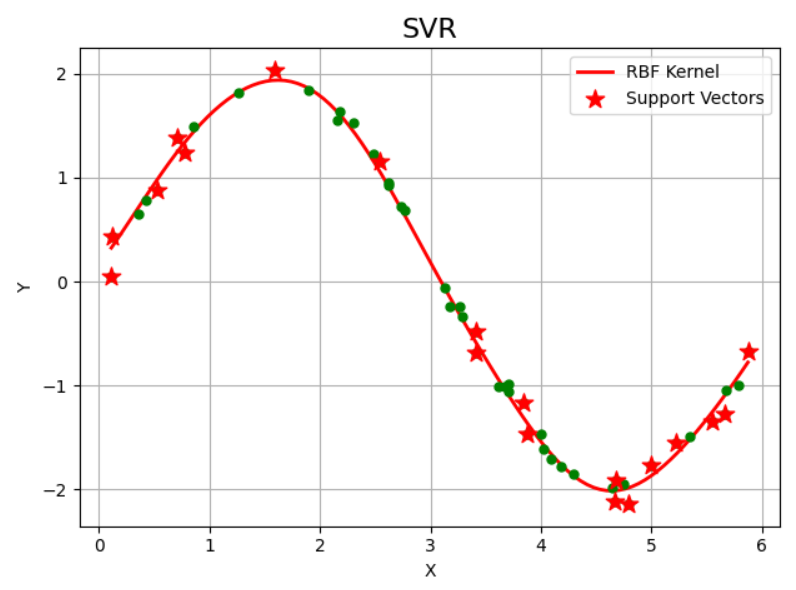
    print('验证参数:\n', svr.best_params_)

    x_test = np.linspace(x.min(), x.max(), 100).reshape(-1, 1)
    y_hat = svr.predict(x_test)

    sp = svr.best_estimator_.support_
    plt.figure(facecolor='w')
    plt.scatter(x[sp], y[sp], s=120, c='r', marker='*', label='Support Vectors', zorder=3)
    plt.plot(x_test, y_hat, 'r-', linewidth=2, label='RBF Kernel')
    plt.plot(x, y, 'go', markersize=5)
    plt.legend(loc='upper right')
    plt.title('SVR', fontsize=16)
    plt.xlabel('X')
    plt.ylabel('Y')
    plt.grid(True)
    plt.show()
3.SVR高斯核与过拟合
import numpy as np
from sklearn import svm
import matplotlib as mpl
import matplotlib.colors
import matplotlib.pyplot as plt


def extend(a, b):
    big, small = 1.01, 0.01
    return big*a-small*b, big*b-small*a


if __name__ == "__main__":

    t = np.linspace(-5, 5, 6)
    t1, t2 = np.meshgrid(t, t)
    print(t1.ravel().shape)
    # np.stack按给定输出轴连接数组
    x1 = np.stack((t1.ravel(), t2.ravel()), axis=1)
    print(x1.shape)
    N = len(x1)
    x2 = x1 + (1, 1)
    # np.concatenate沿现有轴连接一系列数组
    x = np.concatenate((x1, x2))
    y = np.array([1]*N + [-1]*N)

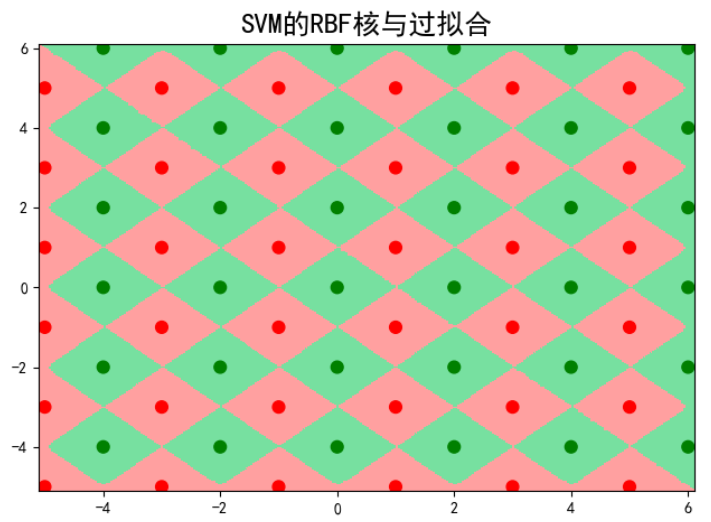
    clf = svm.SVC(C=0.1, kernel='rbf', gamma=5)
    clf.fit(x, y)
    y_hat = clf.predict(x)
    print('准确率:%.1f%%' % (np.mean(y_hat == y) * 100))

    mpl.rcParams['font.sans-serif'] = [u'SimHei']
    mpl.rcParams['axes.unicode_minus'] = False
    cm_light = mpl.colors.ListedColormap(['#77E0A0', '#FFA0A0'])
    cm_dark = mpl.colors.ListedColormap(['g', 'r'])
    x1_min, x1_max = extend(x[:, 0].min(), x[:, 0].max())  # 第0列的范围
    x2_min, x2_max = extend(x[:, 1].min(), x[:, 1].max())  # 第1列的范围
    x1, x2 = np.mgrid[x1_min:x1_max:300j, x2_min:x2_max:300j]  # 生成网格采样点
    grid_test = np.stack((x1.flat, x2.flat), axis=1)  # 测试点
    grid_hat = clf.predict(grid_test)
    grid_hat.shape = x1.shape  # 使之与输入的形状相同
    plt.figure(facecolor='w')
    plt.pcolormesh(x1, x2, grid_hat, cmap=cm_light)
    plt.scatter(x[:, 0], x[:, 1], s=60, c=y, marker='o', cmap=cm_dark)
    plt.xlim((x1_min, x1_max))
    plt.ylim((x2_min, x2_max))
    plt.title(u'SVM的RBF核与过拟合', fontsize=18)
    plt.tight_layout(0.2)
    plt.show()
如果对您有帮助,麻烦点赞关注,这真的对我很重要!!!如果需要互关,请评论留言!

版权声明:本文内容由互联网用户自发贡献,该文观点仅代表作者本人。本站仅提供信息存储空间服务,不拥有所有权,不承担相关法律责任。如发现本站有涉嫌侵权/违法违规的内容, 请联系我们举报,一经查实,本站将立刻删除。
发布者:全栈程序员-站长,转载请注明出处:https://javaforall.net/210013.html原文链接:https://javaforall.net



