
游戏介绍
在《FlappyBird》这款游戏中,玩家鼠标点击屏幕,小鸟就会往上飞,不断的点击就会不断的往高处飞。不点击的话则会快速下降。所以玩家要控制小鸟一直向前飞行,然后注意躲避途中高低不平的管子。
1、在游戏开始后,鼠标点击屏幕,要记住是有间歇的点击屏幕,不要让小鸟掉下来。
2、尽量保持平和的心情,点的时候不要下手太重,尽量注视着小鸟。
3、游戏的得分是,小鸟安全穿过一个柱子且不撞上就是1分。撞上柱子就直接挂掉,只有一条命。
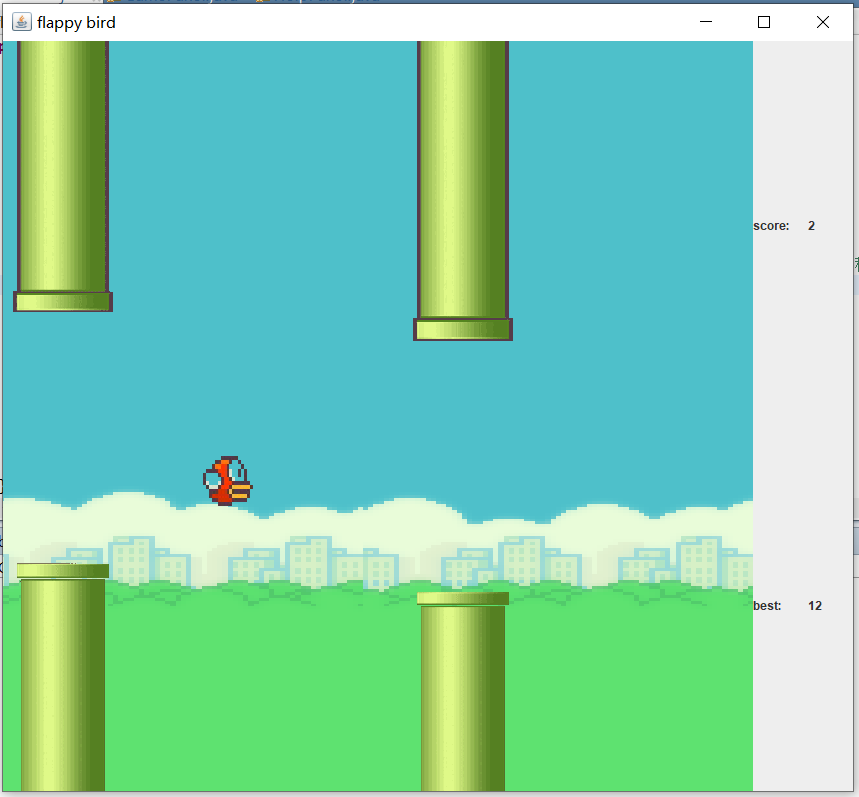
本篇博文开发了一个《flappy bird》游戏,运行效果如下:

使用素材文件夹:
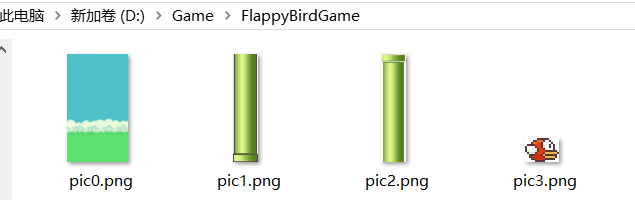
素材及完整工程链接:https://pan.baidu.com/s/1D1eCMNzVrVl8XeOz6vDSkg 提取码: xbc1
游戏设计思路
使用场景相对小鸟移动的过程间接实现小鸟在水平方向的位移,小鸟实际上只在垂直方向上进行了位置的改变,调用线程,每次循环使小鸟的y值自动增加以达到重力效果,玩家点击鼠标按键时,减少小鸟y轴坐标以达到跳跃效果,当小鸟位于某根水管中间时,判断小鸟是否与该水管的上侧或者下侧发生了碰撞,如果没有,当小鸟的x坐标>水管左上角x坐标+水管宽度时,分数+1;如果发生了碰撞,游戏结束。
游戏具体实现
Ⅰ信息的存储
游戏使用两张背景图片平铺的形式达到背景循环效果,需要使用backgroundX0和backgroundX1两个变量记录背景1和背景2两张图片左上角的x坐标,使用birdX和birdY记录小鸟左上角的x坐标和y坐标,使用barXArrays数组记录各个水管左上角的x坐标,使用barUpArrays数组记录各个水管上半部分底部的y坐标,使用barDownArrays数组记录各个水管下半部分顶部的y坐标,使用score变量记录分数,使用width和height变量记录屏幕长宽,使用nowStep表示当前跳跃状态y值改变的大小,flag表示小鸟是否在跳跃中:
Image[] pics = new Image[5];//存储图片 int birdX;//小鸟左上角x,y坐标 int birdY; int width;//屏幕长宽 int height; int backgroundX0 = 0;//背景1的x轴起点 int backgroundX1 = 750;//背景2的x轴起点 int nowStep = 40;//当前跳跃状态改变的y值大小 int flag = 0;//是否跳跃中 int score = 0;//记录分数 int[] barXArrays = new int[5];//记录各个水管左上角的x坐标 int[] barUpArrays = new int[5];//记录各个水管上半部分底部的y坐标 int[] barDownArrays = new int[5];//记录各个水管下半部分顶部的y坐标 Ⅱ信息初始化
初始时backgroundX0的值为0,backgroundX1的值为width,小鸟垂直位于屏幕中间,水平方向靠左1/3处。初始化水管x值位于屏幕右侧,每隔400像素出现一根水管,水管宽度为100像素,每根水管上半部分底部的y值位于150~350之间,每根水管下半部分顶部的y值是上半部分底部的y值+250,小鸟初始状态未跳跃,分数为0:
public GamePanel(){ width = 750; height = 750; birdX = width/3-50;//小鸟始终位于屏幕左边1/3处 birdY = height/2;//只通过重力去改变小鸟纵坐标 this.setPreferredSize(new Dimension(width,height)); this.setVisible(true); getPics(); initData(); this.addMouseListener(new MouseAdapter() { @Override public void mousePressed(MouseEvent e) { flag = 1; repaint(); } }); new Thread(this).start(); } private void initData(){ for(int i=0;i<5;i++){ int barUp = (int) (Math.random()*200+150);//barUp取值范围是150~350 int barDown = barUp+250;//barDown取值范围是450~600 barXArrays[i] = width+400*i; barUpArrays[i] = barUp; barDownArrays[i] = barDown; // System.out.println(barXArrays[i]+","+barUpArrays[i]+","+barDownArrays[i]); } }Ⅲ场景相对位移
线程每次循环,背景1和背景2两图片左上角x坐标减去10,当背景1或者背景2的左上角x值为-width时(该背景完全位于屏幕左侧),将x值赋值为width,达到背景循环轮播的效果;线程每次循环还要对每根水管左上角的x值进行减去10的操作,如果某根水管完全位于屏幕左侧时,获取当前场景最后一根水管的数组下标值,根据最后一根水管的x值,在新的位置生成新的一根水管:
@Override public void run() { while(true){ try { backgroundX0-=10; backgroundX1-=10; 省略... for(int i=0;i<5;i++){ barXArrays[i]-=10; 省略... if(barXArrays[i]<-100){ int index = i-1<0?4:i-1;//获取当前位于最后的一根水管的下标 int barUp = (int) (Math.random()*200+150);//barUp取值范围是150~350 int barDown = barUp+250;//barDown取值范围是450~600 barXArrays[i] = barXArrays[index]+400; barUpArrays[i] = barUp; barDownArrays[i] = barDown; } } repaint(); 省略... if(backgroundX0==-width){ backgroundX0=width; } if(backgroundX1==-width){ backgroundX1=width; } Thread.sleep(50); } catch (InterruptedException e) { // TODO Auto-generated catch block e.printStackTrace(); } } } Ⅳ小鸟的跳跃
为了增加小鸟跳跃的流畅性,可以将小鸟的跳跃过程分为多帧数处理,即每帧向上跳一定距离nowStep,nowStep逐渐减小,然后跟重力效果抵消,当nowStep为0时,跳跃状态结束;在这里可以为小鸟添加一个标记flag,表示小鸟是否在跳跃过程中;当玩家点击鼠标按键时,flag=1;当跳跃状态结束时,flag=0并将nowStep的值初始化;线程每次循环将增加小鸟的y值;
//鼠标监听时间,有鼠标按键时跳跃 this.addMouseListener(new MouseAdapter() { @Override public void mousePressed(MouseEvent e) { flag = 1; repaint(); } }); @Override public void run() { while(true){ try { 省略... if(flag==1){//如果是跳跃过程中 if(birdY>=0){//没有触碰到游戏屏幕顶部 birdY-=nowStep; } nowStep-=4; if(nowStep==0){ nowStep=40; flag = 0; } } 省略... Thread.sleep(50); } catch (InterruptedException e) { // TODO Auto-generated catch block e.printStackTrace(); } } } Ⅴ碰撞检测
循环遍历水管左上角x坐标数组,如果小鸟左上角x值+小鸟宽度>某根水管左上角x值 并且 小鸟左上角x值+小鸟宽度
<该根水管左上角x值+水管宽度,说明小鸟位于该根水管的中间,可能发生碰撞;如果前面两个条件满足,再判断小鸟左上角y值是否小于该水管上半部分底部y值 或者="" 小鸟左上角y值+小鸟高度是否大于该水管下半部分顶部的y值,如果是,说明发生了碰撞;简单说,碰撞检测需要满足下列条件:<="" p="">
①小鸟左上角x值+小鸟宽度>某根水管左上角x值
②小鸟左上角x值+小鸟宽度
<该根水管左上角x值+水管宽度< strong="">
③小鸟左上角y值
<该水管上半部分底部y值 或者="" 小鸟左上角y值+小鸟高度="">
该水管下半部分顶部的y值
 for(int i=0;i<5;i++){ if(birdX>barXArrays[i]-50&&birdX

    =barDownArrays[i])){//碰撞检测 int best = GameClient.helpPanel.getRecord(); int choice; if(score>best){ GameClient.helpPanel.writeRecord(score); choice = JOptionPane.showConfirmDialog(null, "你的分数是"+score+",更新了历史记录"+best+"\n是否重新开始?","游戏结束",JOptionPane.YES_NO_OPTION);//获取用户选择 }else{ choice = JOptionPane.showConfirmDialog(null, "你的分数是"+score+"是否重新开始?","游戏结束",JOptionPane.YES_NO_OPTION);//获取用户选择 } if(choice==1){//否 System.exit(0);//退出 }else if(choice == 0){//是,重置游戏数据 initData(); birdY = height/2; flag = 0; score = 0; nowStep = 40; backgroundX0 = 0; backgroundX1 = width; GameClient.helpPanel.getRecord(); GameClient.helpPanel.setScore(score); } break; } }
Ⅵ图片的获取及显示
图形化编程基础不多解释。。。
private void getPics() { for(int i=0;i<4;i++){ pics[i] = Toolkit.getDefaultToolkit().getImage("D://Game//FlappyBirdGame//pic"+i+".png"); } } public void paint(Graphics g){ g.clearRect(0, 0, width, height);//清屏 g.drawImage(pics[0],backgroundX0,0,width,height,this);//背景1 g.drawImage(pics[0],backgroundX1,0,width,height,this);//背景2 g.drawImage(pics[3],birdX,birdY,50,50,this); for(int i=0;i<5;i++){//画水管 g.drawImage(pics[1], barXArrays[i], 0, 100, barUpArrays[i], this); g.drawImage(pics[2], barXArrays[i],barDownArrays[i], 100,height-barDownArrays[i],this); } }Ⅶ历史记录读取及更新
常用IO操作,如果不存在则新建历史记录文本;
//获取历史记录 public int getRecord(){ File file = new File("D://GameRecordAboutSwing"); if(!file.exists()){ file.mkdirs(); } File record = new File("D://GameRecordAboutSwing//flappyBirdGame.txt"); try{ if(!record.exists()){//如果不存在,新建文本 record.createNewFile(); fos = new FileOutputStream(record); dos = new DataOutputStream(fos); String s = "0"; dos.writeBytes(s); System.out.println(record.isFile());; } //读取记录 fis = new FileInputStream(record); dis = new DataInputStream(fis); String str = dis.readLine(); best = Integer.parseInt(str); bestLabel.setText(""+best); }catch(Exception e){ e.printStackTrace(); }finally{ try { if(fis!=null) fis.close(); if(dis!=null) dis.close(); if(fos!=null) fos.close(); if(dos!=null) dos.close(); } catch (IOException e) { // TODO Auto-generated catch block e.printStackTrace(); } } return best; } //更新关卡历史记录 public void writeRecord(int score){ File record = new File("D://GameRecordAboutSwing//flappyBirdGame.txt"); try { //清空原有记录 FileWriter fileWriter =new FileWriter(record); fileWriter.write(""); fileWriter.flush(); fileWriter.close(); //重新写入文本 fos = new FileOutputStream(record); dos = new DataOutputStream(fos); String s = score+""; dos.writeBytes(s); } catch (IOException e) { // TODO Auto-generated catch block e.printStackTrace(); }finally{ try { if(fos!=null) fos.close(); if(dos!=null) dos.close(); } catch (IOException e) { // TODO Auto-generated catch block e.printStackTrace(); } } } 到这游戏的主要实现步骤已经介绍完了,完整源码篇幅不多,这次贴下,自己实现的话素材需自备:
GamePanel类:
import java.awt.Dimension; import java.awt.Graphics; import java.awt.Image; import java.awt.Toolkit; import java.awt.event.MouseAdapter; import java.awt.event.MouseEvent; import javax.swing.JOptionPane; import javax.swing.JPanel; public class GamePanel extends JPanel implements Runnable{ Image[] pics = new Image[5];//存储图片 int birdX;//小鸟左上角x,y坐标 int birdY; int width;//屏幕长宽 int height; int backgroundX0 = 0;//背景1的x轴起点 int backgroundX1 = 750;//背景2的x轴起点 int nowStep = 40;//当前跳跃状态改变的y值大小 int flag = 0;//是否跳跃中 int score = 0;//记录分数 int[] barXArrays = new int[5];//记录各个水管左上角的x坐标 int[] barUpArrays = new int[5];//记录各个水管上半部分底部的y坐标 int[] barDownArrays = new int[5];//记录各个水管下半部分顶部的y坐标 public GamePanel(){ width = 750; height = 750; birdX = width/3-50;//小鸟始终位于屏幕左边1/3处 birdY = height/2;//只通过重力去改变小鸟纵坐标 this.setPreferredSize(new Dimension(width,height)); this.setVisible(true); getPics(); initData(); this.addMouseListener(new MouseAdapter() { @Override public void mousePressed(MouseEvent e) { flag = 1; repaint(); } }); new Thread(this).start(); } private void initData(){ for(int i=0;i<5;i++){ int barUp = (int) (Math.random()*200+150);//barUp取值范围是150~350 int barDown = barUp+250;//barDown取值范围是450~600 barXArrays[i] = width+400*i; barUpArrays[i] = barUp; barDownArrays[i] = barDown; // System.out.println(barXArrays[i]+","+barUpArrays[i]+","+barDownArrays[i]); } } private void getPics() { for(int i=0;i<4;i++){ pics[i] = Toolkit.getDefaultToolkit().getImage("D://Game//FlappyBirdGame//pic"+i+".png"); } } public void paint(Graphics g){ g.clearRect(0, 0, width, height);//清屏 g.drawImage(pics[0],backgroundX0,0,width,height,this);//背景1 g.drawImage(pics[0],backgroundX1,0,width,height,this);//背景2 g.drawImage(pics[3],birdX,birdY,50,50,this); for(int i=0;i<5;i++){//画水管 g.drawImage(pics[1], barXArrays[i], 0, 100, barUpArrays[i], this); g.drawImage(pics[2], barXArrays[i],barDownArrays[i], 100,height-barDownArrays[i],this); } } @Override public void run() { while(true){ try { backgroundX0-=10; backgroundX1-=10; birdY+=10; for(int i=0;i<5;i++){ barXArrays[i]-=10; if(barXArrays[i]+100>birdX-5&&barXArrays[i]+100<=birdX+5){ score++; GameClient.helpPanel.setScore(score); } if(barXArrays[i]<-100){ int index = i-1<0?4:i-1;//获取当前位于最后的一根水管的下标 int barUp = (int) (Math.random()*200+150);//barUp取值范围是150~350 int barDown = barUp+250;//barDown取值范围是450~600 barXArrays[i] = barXArrays[index]+400; barUpArrays[i] = barUp; barDownArrays[i] = barDown; } } repaint(); for(int i=0;i<5;i++){ if(birdX>barXArrays[i]-50&&birdX

    =barDownArrays[i])){//碰撞检测 int best = GameClient.helpPanel.getRecord(); int choice; if(score>best){ GameClient.helpPanel.writeRecord(score); choice = JOptionPane.showConfirmDialog(null, "你的分数是"+score+",更新了历史记录"+best+"\n是否重新开始?","游戏结束",JOptionPane.YES_NO_OPTION);//获取用户选择 }else{ choice = JOptionPane.showConfirmDialog(null, "你的分数是"+score+"是否重新开始?","游戏结束",JOptionPane.YES_NO_OPTION);//获取用户选择 } if(choice==1){//否 System.exit(0);//退出 }else if(choice == 0){//是,重置游戏数据 initData(); birdY = height/2; flag = 0; score = 0; nowStep = 40; backgroundX0 = 0; backgroundX1 = width; GameClient.helpPanel.getRecord(); GameClient.helpPanel.setScore(score); } break; } } if(flag==1){ if(birdY>=0){ birdY-=nowStep; } nowStep-=4; if(nowStep==0){ nowStep=40; flag = 0; } } if(backgroundX0==-width){ backgroundX0=width; } if(backgroundX1==-width){ backgroundX1=width; } Thread.sleep(50); } catch (InterruptedException e) { // TODO Auto-generated catch block e.printStackTrace(); } } } }
HelpPanel类:
import java.awt.Color; import java.awt.Dimension; import java.awt.GridLayout; import java.io.DataInputStream; import java.io.DataOutputStream; import java.io.File; import java.io.FileInputStream; import java.io.FileOutputStream; import java.io.FileWriter; import java.io.IOException; import javax.swing.*; //辅助面板 public class HelpPanel extends JPanel{ int score = 0; int best = 0; JLabel scoreLabel = new JLabel("0"); JLabel bestLabel = new JLabel("0"); FileInputStream fis = null; FileOutputStream fos = null; DataInputStream dis = null; DataOutputStream dos = null; public HelpPanel(){ this.setPreferredSize(new Dimension(100,750)); this.setVisible(true); this.setLayout(new GridLayout(2,2,10,10)); this.add(new JLabel("score:")); this.add(scoreLabel); this.add(new JLabel("best:")); this.add(bestLabel); getRecord(); } public void setScore(int score){ this.score = score; scoreLabel.setText(score+""); } //获取历史记录 public int getRecord(){ File file = new File("D://GameRecordAboutSwing"); if(!file.exists()){ file.mkdirs(); } File record = new File("D://GameRecordAboutSwing//flappyBirdGame.txt"); try{ if(!record.exists()){//如果不存在,新建文本 record.createNewFile(); fos = new FileOutputStream(record); dos = new DataOutputStream(fos); String s = "0"; dos.writeBytes(s); System.out.println(record.isFile());; } //读取记录 fis = new FileInputStream(record); dis = new DataInputStream(fis); String str = dis.readLine(); best = Integer.parseInt(str); bestLabel.setText(""+best); }catch(Exception e){ e.printStackTrace(); }finally{ try { if(fis!=null) fis.close(); if(dis!=null) dis.close(); if(fos!=null) fos.close(); if(dos!=null) dos.close(); } catch (IOException e) { // TODO Auto-generated catch block e.printStackTrace(); } } return best; } //更新关卡历史记录 public void writeRecord(int score){ File record = new File("D://GameRecordAboutSwing//flappyBirdGame.txt"); try { //清空原有记录 FileWriter fileWriter =new FileWriter(record); fileWriter.write(""); fileWriter.flush(); fileWriter.close(); //重新写入文本 fos = new FileOutputStream(record); dos = new DataOutputStream(fos); String s = score+""; dos.writeBytes(s); } catch (IOException e) { // TODO Auto-generated catch block e.printStackTrace(); }finally{ try { if(fos!=null) fos.close(); if(dos!=null) dos.close(); } catch (IOException e) { // TODO Auto-generated catch block e.printStackTrace(); } } } } GameClient类:
import java.awt.BorderLayout; import java.awt.Container; import javax.swing.JFrame; import javax.swing.JPanel; public class GameClient extends JFrame{ static HelpPanel helpPanel; public GameClient(){ GamePanel gamePanel = new GamePanel();//实例化主面板对象 helpPanel = new HelpPanel();//实例化辅助面板对象 Container container = this.getContentPane();//获取窗体内置容器 container.setLayout(new BorderLayout());//设置布局 container.add(gamePanel,BorderLayout.CENTER);//添加游戏主面板到内置容器 container.add(helpPanel,BorderLayout.EAST);//添加游戏辅助面板到内置容器 this.setSize(850,750);//设置窗体大小 pack(); this.setDefaultCloseOperation(JFrame.EXIT_ON_CLOSE);//当用户点击窗体右上角的x时,自动退出程序 this.setTitle("flappy bird");//设置窗体标题 this.setLocationRelativeTo(null);//让窗体显示在屏幕正中间 this.setVisible(true);//展示窗体 gamePanel.requestFocus(); } public static void main(String[] args) { new GameClient(); } }
发布者:全栈程序员-站长,转载请注明出处:https://javaforall.net/210268.html原文链接:https://javaforall.net



