
xxx管理系统的基本实现
一、项目名称
使用MVC模式和三层开发架构,开发一个完整的“注册登录退出”模块。
二、项目环境
1、软件环境:
2、项目思路 :
3、项目所用知识点:
4、项目架构:
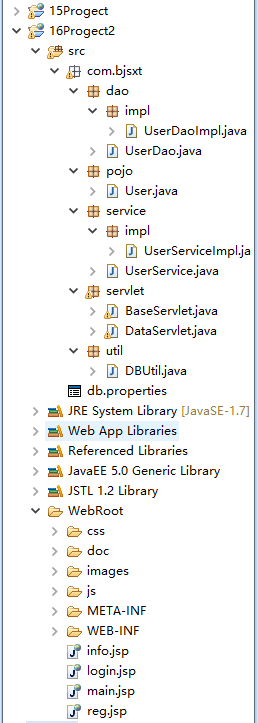

三、项目源码
数据库设计
创建用户表 create table t_user( uid int(10) not null auto_increment, uname varchar(100) not null, pwd varchar(100) not null, sex char(4) not null, age int(3) not null, birthday date not null, primary key(uid) ); insert into t_user values(default,'张三',123,'男',18,'1988-09-09' ); insert into t_user values(default,'小七',456,'男',20,'1996-09-09' ); 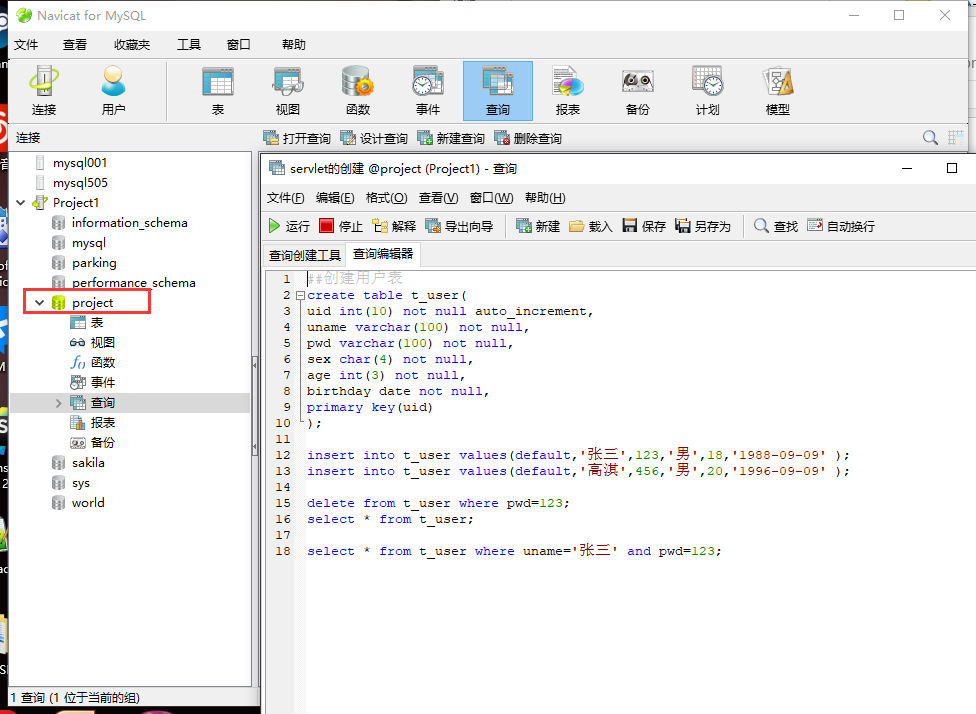
UserDaoImpl.java
 package com.bjsxt.dao.impl; import java.sql.Connection; import java.sql.PreparedStatement; import java.sql.ResultSet; import com.bjsxt.dao.UserDao; import com.bjsxt.pojo.User; import com.bjsxt.util.DBUtil; / * 导的不是jdbc包,全是sql包 * @author chy * */ public class UserDaoImpl implements UserDao {
    //查询用户信息 @Override public User getUserInfoDao(String uname, String pwd) {
    //声明jdbc变量 Connection conn=null; PreparedStatement ps=null; ResultSet rs=null; //声明变量 User u=null; try {
    //创建连接 conn=DBUtil.getConnection(); //创建sql命令 String sql="select * from t_user where uname=? and pwd=?"; //创建SQL命令对象 ps=conn.prepareStatement(sql); //给占位符赋值 ps.setString(1, uname); ps.setString(2, pwd); //执行sql命令 rs=ps.executeQuery(); //遍历 while (rs.next()) {
    //给变量赋值 u=new User(); u.setUid(rs.getInt("uid")); u.setUname(rs.getString("uname")); u.setPwd(rs.getString("pwd")); u.setSex(rs.getString("sex")); u.setAge(rs.getInt("age")); u.setBirthday(rs.getString("birthday")); } //关闭资源 //返回结果 } catch (Exception e) {
    e.printStackTrace(); }finally{
    DBUtil.closeAll(rs, ps, conn); } return u; } //用户注册 @Override public int regUserInfoDao(String uname, String pwd, String sex, int age, String birthday) {
    //创建sql语句 String sql="insert into t_user values(default,?,?,?,?,?)"; return DBUtil.executeDML(sql, uname,pwd,sex,age,birthday); } }
UserDao.java
 package com.bjsxt.dao; import com.bjsxt.pojo.User; public interface UserDao {
    / * 根据用户名和密码,查询用户信息 * @author chy * */ User getUserInfoDao(String uname, String pwd); int regUserInfoDao(String uname, String pwd, String sex, int age, String birthday); }
User.java
 package com.bjsxt.pojo; public class User {
    private int uid; private String uname; private String pwd; private String sex; private int age; private String birthday; public int getUid() {
    return uid; } public void setUid(int uid) {
    this.uid = uid; } public String getUname() {
    return uname; } public void setUname(String uname) {
    this.uname = uname; } public String getPwd() {
    return pwd; } public void setPwd(String pwd) {
    this.pwd = pwd; } public String getSex() {
    return sex; } public void setSex(String sex) {
    this.sex = sex; } public int getAge() {
    return age; } public void setAge(int age) {
    this.age = age; } public String getBirthday() {
    return birthday; } public void setBirthday(String birthday) {
    this.birthday = birthday; } public User(int uid, String uname, String pwd, String sex, int age, String birthday) {
    super(); this.uid = uid; this.uname = uname; this.pwd = pwd; this.sex = sex; this.age = age; this.birthday = birthday; } public User() {
    super(); } @Override public int hashCode() {
    final int prime = 31; int result = 1; result = prime * result + age; result = prime * result + ((birthday == null) ? 0 : birthday.hashCode()); result = prime * result + ((pwd == null) ? 0 : pwd.hashCode()); result = prime * result + ((sex == null) ? 0 : sex.hashCode()); result = prime * result + uid; result = prime * result + ((uname == null) ? 0 : uname.hashCode()); return result; } @Override public boolean equals(Object obj) {
    if (this == obj) return true; if (obj == null) return false; if (getClass() != obj.getClass()) return false; User other = (User) obj; if (age != other.age) return false; if (birthday == null) {
    if (other.birthday != null) return false; } else if (!birthday.equals(other.birthday)) return false; if (pwd == null) {
    if (other.pwd != null) return false; } else if (!pwd.equals(other.pwd)) return false; if (sex == null) {
    if (other.sex != null) return false; } else if (!sex.equals(other.sex)) return false; if (uid != other.uid) return false; if (uname == null) {
    if (other.uname != null) return false; } else if (!uname.equals(other.uname)) return false; return true; } @Override public String toString() {
    return "User [uid=" + uid + ", uname=" + uname + ", pwd=" + pwd + ", sex=" + sex + ", age=" + age + ", birthday=" + birthday + "]"; } }
UserService.java
 package com.bjsxt.service; import com.bjsxt.pojo.User; public interface UserService {
    /用户登陆 * * @param uname * @param pwd * @return */ User getUserInfoService(String uname, String pwd); /用户注册 * * @param uname * @param pwd * @param sex * @param age * @param birthday * @return */ int getUserInfoService(String uname, String pwd, String sex, int age, String birthday); } UserServiceImpl.java package com.bjsxt.service.impl; import com.bjsxt.dao.UserDao; import com.bjsxt.dao.impl.UserDaoImpl; import com.bjsxt.pojo.User; import com.bjsxt.service.UserService; public class UserServiceImpl implements UserService {
    //创建Dao对象 UserDao ud = new UserDaoImpl(); @Override public User getUserInfoService(String uname, String pwd) {
    //处理登录业务 return ud.getUserInfoDao(uname,pwd); } //用户注册 @Override public int getUserInfoService(String uname, String pwd, String sex, int age, String birthday) {
    //处理注册业务 return ud.regUserInfoDao(uname,pwd,sex,age,birthday); } }
BaseServlet.java
package com.bjsxt.servlet; import java.io.IOException; import java.lang.reflect.Method; import javax.servlet.ServletException; import javax.servlet.http.HttpServlet; import javax.servlet.http.HttpServletRequest; import javax.servlet.http.HttpServletResponse; public abstract class BaseServlet extends HttpServlet {
    @Override protected void service(HttpServletRequest req, HttpServletResponse resp) throws ServletException, IOException {
    //设置请求、响应编码格式 req.setCharacterEncoding("utf-8"); resp.setContentType("text/html; charset=utf-8"); //获取请求信息 String methodName = req.getParameter("method"); //处理请求信息(动态调用方法处理请求--》反射) try {
    //反射方法获取所在类的类对象 Class cla = this.getClass(); //反射方法获取要被调用的方法对象 Method m= cla.getMethod(methodName, HttpServletRequest.class,HttpServletResponse.class); //反射执行的方法 m.invoke(this, req,resp); } catch (Exception e) {
    e.printStackTrace(); } } }
DataServlet.java
 package com.bjsxt.servlet; import java.io.IOException; import java.lang.reflect.Method; import java.util.Calendar; import javax.servlet.ServletException; import javax.servlet.http.HttpServlet; import javax.servlet.http.HttpServletRequest; import javax.servlet.http.HttpServletResponse; import javax.servlet.http.HttpSession; import com.bjsxt.pojo.User; import com.bjsxt.service.UserService; import com.bjsxt.service.impl.UserServiceImpl; public class DataServlet extends BaseServlet {
    /*@Override protected void service(HttpServletRequest req, HttpServletResponse resp) throws ServletException, IOException { //设置请求、响应编码格式 req.setCharacterEncoding("utf-8"); resp.setContentType("text/html; charset=utf-8"); //获取请求信息 String methodName = req.getParameter("method"); //处理请求信息(动态调用方法处理请求--》反射) try { //反射方法获取所在类的类对象 Class cla = this.getClass(); //反射方法获取要被调用的方法对象 Method m= cla.getMethod(methodName, HttpServletRequest.class,HttpServletResponse.class); //反射执行的方法 m.invoke(this, req,resp); } catch (Exception e) { e.printStackTrace(); } }*/ //登陆处理方法 public void Userlogin(HttpServletRequest req, HttpServletResponse resp) throws IOException {
    //获取请求信息 String uname = req.getParameter("uname"); String pwd = req.getParameter("pwd"); //处理请求信息 System.out.println("DataServlet.Userlogin()"+uname+":"+pwd); //创建业务层对象 UserService us = new UserServiceImpl(); User u= us.getUserInfoService(uname,pwd); System.out.println("用户查询登陆结果为:"+u); //响应处理结果 //直接响应  //请求转发 //获取session对象 HttpSession hs = req.getSession(); if (u!=null) {
   //登陆成功 //将用户信息存储到session hs.setAttribute("user", u); //重定向到mian.jsp resp.sendRedirect("/16/main.jsp"); }else {
   //登录失败 //将登陆标记添加 hs.setAttribute("flag", "loginfalse"); //重定向到login.jsp resp.sendRedirect("/16/login.jsp"); } } //退出处理方法 public void UserOut(HttpServletRequest req, HttpServletResponse resp) throws IOException {
    //获取请求信息 //处理请求信息 //获取session、销毁session HttpSession hs = req.getSession(); hs.invalidate(); //相应处理结果 //直接响应 //请求转发 //重定向 resp.sendRedirect("/16/login.jsp"); } //注册处理方法 public void UserReg(HttpServletRequest req, HttpServletResponse resp) throws IOException {
    //获取请求信息 String uname = req.getParameter("uname"); String pwd = req.getParameter("pwd"); String sex = req.getParameter("sex"); int age =Integer.parseInt(req.getParameter("age")) ; String birthday = req.getParameter("birthday"); //处理请求信息 //获取业务层对象 UserService us = new UserServiceImpl(); //处理注册 int i=us.getUserInfoService(uname, pwd,sex,age,birthday); //相应处理结果 //获取session对象 HttpSession hs = req.getSession(); //重定向到登陆界面 if(i>0){
    //注册成功,添加标记到session hs.setAttribute("flag", "regsuccess"); resp.sendRedirect("/16/login.jsp"); }else{
    //重定向到注册页面 resp.sendRedirect("/16/login.jsp"); } } }
DBUtil.java
 package com.bjsxt.util; import java.io.IOException; import java.io.InputStream; import java.sql.Connection; import java.sql.DriverManager; import java.sql.PreparedStatement; import java.sql.ResultSet; import java.sql.SQLException; import java.sql.Statement; import java.util.Properties; public class DBUtil {
    //声明全局变量记录jdbc参数 private static String driver; private static String url; private static String username; private static String password; //使用静态代码块,在类加载时即完成对属性文件的读取 static{
    //动态获取属性配置文件的流对象 InputStream in=DBUtil.class.getResourceAsStream("/db.properties"); //创建Properties对象 Properties p=new Properties(); //加载 try {
    p.load(in);//会将属性配置文件的所有数据存储到Properties对象中 //将读取的jdbc参数赋值给全局变量 driver=p.getProperty("driver"); url=p.getProperty("url"); username=p.getProperty("username"); password=p.getProperty("password"); //加载驱动 Class.forName(driver); } catch (IOException e) {
    // TODO Auto-generated catch block e.printStackTrace(); } catch (ClassNotFoundException e) {
    // TODO Auto-generated catch block e.printStackTrace(); } } //创建连接对象并返回 public static Connection getConnection(){
    Connection conn=null; try {
    conn = DriverManager.getConnection(url, username, password); } catch (SQLException e) {
    // TODO Auto-generated catch block e.printStackTrace(); } return conn; } //关闭资源 public static void closeAll(ResultSet rs,Statement stmt,Connection conn){
    try {
    if(rs!=null){
    rs.close(); } } catch (SQLException e1) {
    // TODO Auto-generated catch block e1.printStackTrace(); } try {
    stmt.close(); } catch (SQLException e) {
    // TODO Auto-generated catch block e.printStackTrace(); } try {
    conn.close(); } catch (SQLException e) {
    // TODO Auto-generated catch block e.printStackTrace(); } } //封装增加删除修改的通用工具方法 / * @param sql SQL语句 * @param objs SQL语句占位符实参,如果没有参数则传入null * @return 返回增删改的结果,类型为int */ public static int executeDML(String sql,Object...objs){
    // 声明jdbc变量 Connection conn = null; PreparedStatement ps = null; int i = -1; try {
    // 获取连接对象 conn = DBUtil.getConnection(); // 开启事务管理 conn.setAutoCommit(false); // 创建SQL命令对象 ps = conn.prepareStatement(sql); // 给占位符赋值 if(objs!=null){
    for(int j=0;j<objs.length;j++){
    ps.setObject(j+1,objs[j]); } } // 执行SQL i = ps.executeUpdate(); conn.commit(); } catch (Exception e) {
    try {
    conn.rollback(); } catch (SQLException e1) {
    // TODO Auto-generated catch block e1.printStackTrace(); } e.printStackTrace(); } finally {
    DBUtil.closeAll(null, ps, conn); } return i; } }
db.properties
driver=com.mysql.jdbc.Driver url=jdbc:mysql://localhost:3306/project username=root password=root web.xml
    <web-app xmlns:xsi="http://www.w3.org/2001/XMLSchema-instance" xmlns="http://java.sun.com/xml/ns/javaee" xsi:schemaLocation="http://java.sun.com/xml/ns/javaee http://java.sun.com/xml/ns/javaee/web-app_2_5.xsd" id="WebApp_ID" version="2.5"> <display-name>15Progect
     display-name> <servlet> <description>This is the description of my J2EE component
      description> <display-name>This is the display name of my J2EE component
       display-name> <servlet-name>UserServlet
        servlet-name> <servlet-class>com.bjsxt.servlet.UserServlet
         servlet-class>
          servlet> <servlet> <description>This is the description of my J2EE component
           description> <display-name>This is the display name of my J2EE component
            display-name> <servlet-name>OutServlet
             servlet-name> <servlet-class>com.bjsxt.servlet.OutServlet
              servlet-class>
               servlet> <servlet> <description>This is the description of my J2EE component
                description> <display-name>This is the display name of my J2EE component
                 display-name> <servlet-name>RegServlet
                  servlet-name> <servlet-class>com.bjsxt.servlet.RegServlet
                   servlet-class>
                    servlet> <servlet> <description>This is the description of my J2EE component
                     description> <display-name>This is the display name of my J2EE component
                      display-name> <servlet-name>DataServlet
                       servlet-name> <servlet-class>com.bjsxt.servlet.DataServlet
                        servlet-class>
                         servlet> <servlet-mapping> <servlet-name>UserServlet
                          servlet-name> <url-pattern>/user
                           url-pattern>
                            servlet-mapping> <servlet-mapping> <servlet-name>OutServlet
                             servlet-name> <url-pattern>/out
                              url-pattern>
                               servlet-mapping> <servlet-mapping> <servlet-name>RegServlet
                                servlet-name> <url-pattern>/reg
                                 url-pattern>
                                  servlet-mapping> <servlet-mapping> <servlet-name>DataServlet
                                   servlet-name> <url-pattern>/data
                                    url-pattern>
                                     servlet-mapping> <welcome-file-list> <welcome-file>index.html
                                      welcome-file> <welcome-file>index.htm
                                       welcome-file> <welcome-file>index.jsp
                                        welcome-file> <welcome-file>default.html
                                         welcome-file> <welcome-file>default.htm
                                          welcome-file> <welcome-file>default.jsp
                                           welcome-file>
                                            welcome-file-list>
                                             web-app>
info.jsp
<%@ page language="java" import="java.util.*" pageEncoding="UTF-8"%> <% String path = request.getContextPath(); String basePath = request.getScheme()+"://"+request.getServerName()+":"+request.getServerPort()+path+"/"; %>
DOCTYPE html> <html> <head> <base href="<%=basePath%>"> <meta http-equiv="Content-Type" content="text/html; charset=utf-8" /> <meta http-equiv="X-UA-Compatible" content="IE=edge"> <meta name="viewport" content="width=device-width, initial-scale=1.0, maximum-scale=1.0, user-scalable=no" /> <meta name="renderer" content="webkit"> <title>网站信息
title> <link rel="stylesheet" href="css/pintuer.css"> <link rel="stylesheet" href="css/admin.css"> <script src="js/jquery.js">
script> <script src="js/pintuer.js">
script>
head> <body> <div class="panel admin-panel"> <div><strong><span>
span> 网站信息
strong>
div> <div> <form method="post" action=""> <div> <div> <label>网站标题:
label>
div> <div> <input type="text" name="stitle" value="" /> <div>
div>
div>
div> <div> <div> <label>网站LOGO:
label>
div> <div> <input type="text" id="url1" name="slogo" class="input tips" style="width:25%; float:left;" value="" data-toggle="hover" data-place="right" data-image="" /> <input type="button" class="button bg-blue margin-left" id="image1" value="+ 浏览上传" >
div>
div> <div> <div> <label>网站域名:
label>
div> <div> <input type="text" name="surl" value="" />
div>
div> <div style="display:none"> <div> <label>副加标题:
label>
div> <div> <input type="text" name="sentitle" value="" /> <div>
div>
div>
div> <div> <div> <label>网站关键字:
label>
div> <div> <textarea name="skeywords" style="height:80px">
textarea> <div>
div>
div>
div> <div> <div> <label>网站描述:
label>
div> <div> <textarea name="sdescription">
textarea> <div>
div>
div>
div> <div> <div> <label>联系人:
label>
div> <div> <input type="text" name="s_name" value="" /> <div>
div>
div>
div> <div> <div> <label>手机:
label>
div> <div> <input type="text" name="s_phone" value="" /> <div>
div>
div>
div> <div> <div> <label>电话:
label>
div> <div> <input type="text" name="s_tel" value="" /> <div>
div>
div>
div> <div style="display:none;"> <div> <label>400电话:
label>
div> <div> <input type="text" name="s_400" value="" /> <div>
div>
div>
div> <div> <div> <label>传真:
label>
div> <div> <input type="text" name="s_fax" value="" /> <div>
div>
div>
div> <div> <div> <label>:
label>
div> <div> <input type="text" name="s_" value="" /> <div>
div>
div>
div> <div style="display:none"> <div> <label>:
label>
div> <div> <input type="text" name="s_u" value="" /> <div>
div>
div>
div> <div> <div> <label>Email:
label>
div> <div> <input type="text" name="s_email" value="" /> <div>
div>
div>
div> <div> <div> <label>地址:
label>
div> <div> <input type="text" name="s_address" value="" /> <div>
div>
div>
div> <div> <div> <label>底部信息:
label>
div> <div> <textarea name="scopyright" style="height:120px;">
textarea> <div>
div>
div>
div> <div> <div> <label>
label>
div> <div> <button class="button bg-main icon-check-square-o" type="submit"> 提交
button>
div>
div>
form>
div>
div>
body>
html> login.jsp
 <%@ page language="java" import="java.util.*" pageEncoding="UTF-8"%> <% String path = request.getContextPath(); String basePath = request.getScheme()+"://"+request.getServerName()+":"+request.getServerPort()+path+"/"; %>
    DOCTYPE html> <html> <head> <base href="<%=basePath%>"> <meta http-equiv="Content-Type" content="text/html; charset=utf-8" /> <meta http-equiv="X-UA-Compatible" content="IE=edge"> <meta name="viewport" content="width=device-width, initial-scale=1.0, maximum-scale=1.0, user-scalable=no" /> <meta name="renderer" content="webkit"> <title>登录
      title> <link rel="stylesheet" href="css/pintuer.css"> <link rel="stylesheet" href="css/admin.css"> <script src="js/jquery.js">
       script> <script src="js/pintuer.js">
        script>
         head> <body> <div>
          div> <div> <div class="line bouncein"> <div class="xs6 xm4 xs3-move xm4-move"> <div style="height:150px;">
           div> <div class="media media-y margin-big-bottom">
            div> <form action="data" method="get">
            <input type="hidden" name="method" value="Userlogin" /> <div class="panel loginbox"> <div class="text-center margin-big padding-big-top"><h1>chy超级管理系统
             h1>
              div>
              <% //获取session中的标记 Object obj =session.getAttribute("flag"); if(obj!=null){ if("loginfalse".equals((String)obj)){ %> <div style="text-align:center;color:red"; ><h1>用户名或密码错误
               h1>
                div> <% }else if("regsuccess".equals((String)obj)){ %> <div style="text-align:center;color:red"; ><h1>新用户注册成功
                 h1>
                  div> <% } } session.invalidate();/* 销毁session */ %> <div style="padding:30px; padding-bottom:10px; padding-top:10px;"> <div> <div class="field field-icon-right"> <input type="text" class="input input-big" name="uname" placeholder="登录账号" data-validate="required:请填写账号" /> <span class="icon icon-user margin-small">
                   span>
                    div>
                     div> <div> <div class="field field-icon-right"> <input type="password" class="input input-big" name="pwd" placeholder="登录密码" data-validate="required:请填写密码" /> <span class="icon icon-key margin-small">
                      span>
                       div>
                        div> <div> <div> <input type="text" class="input input-big" name="code" placeholder="填写右侧的验证码" data-validate="required:请填写右侧的验证码" /> <img src="images/passcode.jpg" alt="" width="100" height="32" style="height:43px;cursor:pointer;" onclick="this.src=this.src+'?'">
                         div>
                          div>
                           div> <div style="padding:30px;"><input type="submit" class="button button-block bg-main text-big input-big" value="登录">
                            div> <div style="font-size:20px; position:relative;left:300px;top:-20px"><a href="reg.jsp">注册
                             a>
                              div>
                               div>
                                form>
                                 div>
                                  div>
                                   div>
                                    body>
                                     html>
main.jsp
 <%@page import="com.bjsxt.pojo.User"%> <%@ page language="java" import="java.util.*" pageEncoding="UTF-8"%> <% String path = request.getContextPath(); String basePath = request.getScheme()+"://"+request.getServerName()+":"+request.getServerPort()+path+"/"; %>
    DOCTYPE html> <html> <head> <base href="<%=basePath%>"> <meta http-equiv="Content-Type" content="text/html; charset=utf-8" /> <meta http-equiv="X-UA-Compatible" content="IE=edge"> <meta name="viewport" content="width=device-width, initial-scale=1.0, maximum-scale=1.0, user-scalable=no" /> <meta name="renderer" content="webkit"> <title>chy参与管理系统修改
      title> <link rel="stylesheet" href="css/pintuer.css"> <link rel="stylesheet" href="css/admin.css"> <script src="js/jquery.js">
       script> <script type="text/javascript"> //给退出登陆添加单击事件,通过id选择器 $(function(){
         $("#out").click(function(){
         return window.confirm("你需要退出登陆吗?") }) })
        script>
         head> <body style="background-color:#f2f9fd;"> <div class="header bg-main" style="border:solid 1px"> <div class="logo margin-big-left fadein-top"> <h1><img src="images/y.jpg" class="radius-circle rotate-hover" height="50" alt="" />chy超级管理系统
          h1>
           div>

           <div style="position:relative;left:900px"><span style="font-size:20px;color:white;"> 欢迎:<%=( (User)session.getAttribute("user")).getUname() %>进入系统
            span>    <a id="out" class="button button-little bg-red" href="data?method=UserOut"><span>
             span> 退出登录
              a>
               div>
                div> <div> <div><strong><span>
                 span>菜单列表
                  strong>
                   div> <h2><span>
                    span>基本设置
                     h2> <ul style="display:block"> <li><a href="info.html" target="right"><span>
                      span>网站设置
                       a>
                        li> <li><a href="pass.html" target="right"><span>
                         span>修改密码
                          a>
                           li> <li><a href="page.html" target="right"><span>
                            span>单页管理
                             a>
                              li> <li><a href="adv.html" target="right"><span>
                               span>首页轮播
                                a>
                                 li> <li><a href="book.html" target="right"><span>
                                  span>留言管理
                                   a>
                                    li> <li><a href="column.html" target="right"><span>
                                     span>栏目管理
                                      a>
                                       li>
                                        ul> <h2><span>
                                         span>栏目管理
                                          h2> <ul> <li><a href="list.html" target="right"><span>
                                           span>内容管理
                                            a>
                                             li> <li><a href="add.html" target="right"><span>
                                              span>添加内容
                                               a>
                                                li> <li><a href="cate.html" target="right"><span>
                                                 span>分类管理
                                                  a>
                                                   li>
                                                    ul>
                                                     div> <script type="text/javascript"> $(function(){
                                                       $(".leftnav h2").click(function(){
                                                       $(this).next().slideToggle(200); $(this).toggleClass("on"); }) $(".leftnav ul li a").click(function(){
                                                       $("#a_leader_txt").text($(this).text()); $(".leftnav ul li a").removeClass("on"); $(this).addClass("on"); }) });
                                                      script> <ul> <li><a href="{:U('Index/info')}" target="right"> 首页
                                                       a>
                                                        li> <li><a href="" id="a_leader_txt">网站信息
                                                         a>
                                                          li> <li><b>当前语言:
                                                           b><span style="color:red;">中文
                                                            php>
                                                             span>      切换语言:<a href="">中文
                                                              a>   <a href="">英文
                                                               a>
                                                                li>
                                                                 ul> <div> <iframe scrolling="auto" rameborder="0" src="info.jsp" name="right" width="100%" height="100%">
                                                                  iframe>
                                                                   div> <div style="text-align:center;">
                                                                    div>
                                                                     body>
                                                                      html>
reg.jsp
 <%@ page language="java" import="java.util.*" pageEncoding="UTF-8"%> <% String path = request.getContextPath(); String basePath = request.getScheme()+"://"+request.getServerName()+":"+request.getServerPort()+path+"/"; %>
    DOCTYPE html> <html> <head> <base href="<%=basePath%>"> <meta http-equiv="Content-Type" content="text/html; charset=utf-8" /> <meta http-equiv="X-UA-Compatible" content="IE=edge"> <meta name="viewport" content="width=device-width, initial-scale=1.0, maximum-scale=1.0, user-scalable=no" /> <meta name="renderer" content="webkit"> <title>
      title> <link rel="stylesheet" href="css/pintuer.css"> <link rel="stylesheet" href="css/admin.css"> <script src="js/jquery.js">
       script> <script src="js/pintuer.js">
        script>
         head> <body> <div class="panel admin-panel"> <div><strong><span>
          span>新用户注册
           strong>
            div> <div> <form method="post" action="data"> <input type="hidden" name="method" value="UserReg" /> <div> <div> <label for="sitename">用户名:
             label>
              div> <div> <input type="text" class="input w50" id="mpass" name="uname" size="50" placeholder="请输入新用户名" data-validate="required:请输入原始密码" />
               div>
                div> <div> <div> <label for="sitename">新密码:
                 label>
                  div> <div> <input type="password" class="input w50" name="pwd" size="50" placeholder="请输入新密码" data-validate="required:请输入新密码,length#>=5:新密码不能小于5位" />
                   div>
                    div> <div> <div> <label for="sitename">确认新密码:
                     label>
                      div> <div> <input type="password" class="input w50" name="" size="50" placeholder="请再次输入新密码" data-validate="required:请再次输入新密码,repeat#pwd:两次输入的密码不一致" />
                       div>
                        div> <div style="position:relative;left:100px; top:-10px"> 性别:男<input type="radio" name="sex" value="男" checked="checked">女<input type="radio" name="sex" value="女" >
                         div>
                         <div> <div> <label for="sitename">年龄:
                          label>
                           div> <div> <input type="text" class="input w50" id="mpass" name="age" size="50" placeholder="请输入年龄" />
                            div>
                             div>
                             <div> <div> <label for="sitename">出生日期:
                              label>
                               div> <div> <input type="date" class="input w50" id="mpass" name="birthday" size="50" />
                                div>
                                 div> <div> <div> <label>
                                  label>
                                   div> <div> <button class="button bg-main icon-check-square-o" type="submit"> 提交
                                    button>
                                     div>
                                      div>
                                       form>
                                        div>
                                         div>
                                          body>
                                           html>
运行结果

四、bug以及心得体会
1、bug:由于粗心引起的bug,均已改正。
2、心得与体会
很多时候出现的bug,都是因为自己粗心所导致的。例如页面无法跳转多半是因为重定向的路径没有写对、或者form表单的action没写对、亦或是href后的路径没有写对,要特别注意。
在一开始时,每个请求或独立的业务逻辑(登陆、退出、注册)都要单独使用一个Servlet进行处理。但随着网站功能的增多,Servlet增多导致资源浪费,需要我们进一步的优化。使用反射动态调用其功能处理方法,并将相关的Servlet集成在一个Servlet上。
虽然使用了反射集成了一个独立的业务逻辑,但是反射不会只使用一次,需要我们在一些Servlet中的service方法中的反射代码声明一遍,然后使用时直接继承声明该反射代码的类。而且,该类最好不能被访问到(删除相应的url-pattern),最好不能被实例化(声明为抽象类)。
刚接触JavaEE项目,需要掌握的知识点很多而且很杂,学起来比较吃力。但是这些零碎的知识点恰恰是今后做项目的基础。我还在不断花费时间去吸收、去归纳这些知识,相信通过本次的学习,我能够更加轻松的掌握这些知识!
五、项目源码及压缩包
关注后私信回复 [ servlet ], 即可获取源码哦~~~

https://pan.baidu.com/s/1ylOi3PXFy6nwoOyVGVrBeg?pwd=yvsn
版权声明:本文内容由互联网用户自发贡献,该文观点仅代表作者本人。本站仅提供信息存储空间服务,不拥有所有权,不承担相关法律责任。如发现本站有涉嫌侵权/违法违规的内容, 请联系我们举报,一经查实,本站将立刻删除。
发布者:全栈程序员-站长,转载请注明出处:https://javaforall.net/210398.html原文链接:https://javaforall.net




