
我们在进行Android java 开发的时候,经常会遇到各种IO流操作。IO流操作一般分为两类:字符流和字节流。以“Reader”结尾都是字符流,操作的都是字符型的数据;以“Stream”结尾的都是字节流,操作的都是byte数据。现将各种常见IO流总结如下:
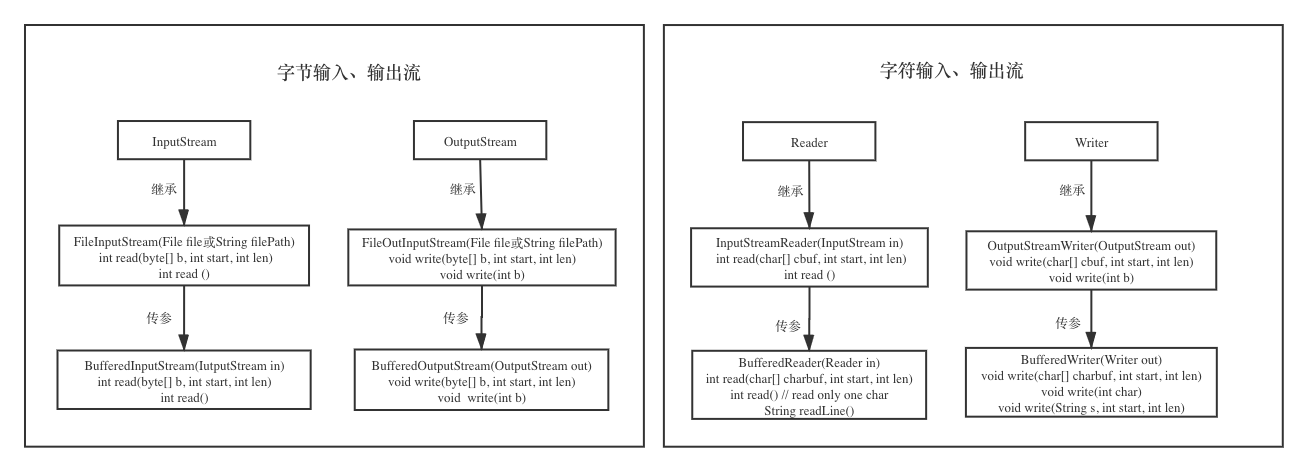

一、字节流
1. InputStream 和 OutputStream
InputStream 和 OutputStream为各种输入输出字节流的基类,所有字节流都继承这两个基类。
2. FileInputStream 和 FileOutputStream
这两个从字面意思很容易理解,是对文件的字节流操作,也会最常见的IO操作流。
/* * 以字节为单位读取文件,常用于读二进制文件,如图片、声音、影像等文件。 */ public static void readFileByBytes(String inFile, String outFile) { File file = new File(fileName); InputStream in = null; OutputStream out = null; try { byte[] tempbytes = new byte[100]; int byteread = 0; in = new FileInputStream(inFile); out = new FileOutputStream(outFile); while ((byteread = in.read(tempbytes)) != -1) { out.write(tempbytes, 0, byteread); } } catch (Exception e1) { e1.printStackTrace(); } finally { if (in != null) { try { in.close(); } catch (IOException e1) { } try { out.close(); } catch (IOException e1) { } } } }
3.DataInputStream和DataOutputStream
/ * DataOutputStream的API测试函数 */ private static void testDataOutputStream() { DataOutputStream out = null; try { File file = new File("file.txt"); out = new DataOutputStream(new FileOutputStream(file)); out.writeBoolean(true); out.writeByte((byte)0x41); out.writeChar((char)0x4243); out.writeShort((short)0x4445); out.writeInt(0x); out.writeLong(0x0FEDCBAL); out.writeUTF("abcdefg"); } catch (FileNotFoundException e) { e.printStackTrace(); } catch (SecurityException e) { e.printStackTrace(); } catch (IOException e) { e.printStackTrace(); } finally { try { out.close(); } catch(IOException e) { } } } / * DataInputStream的API测试函数 */ private static void testDataInputStream() { DataInputStream in = null; try { File file = new File("file.txt"); in = new DataInputStream(new FileInputStream(file)); System.out.printf("byteToHexString(0x8F):0x%s\n", byteToHexString((byte)0x8F)); System.out.printf("charToHexString(0x8FCF):0x%s\n", charToHexString((char)0x8FCF)); System.out.printf("readBoolean():%s\n", in.readBoolean()); System.out.printf("readByte():0x%s\n", byteToHexString(in.readByte())); System.out.printf("readChar():0x%s\n", charToHexString(in.readChar())); System.out.printf("readShort():0x%s\n", shortToHexString(in.readShort())); System.out.printf("readInt():0x%s\n", Integer.toHexString(in.readInt())); System.out.printf("readLong():0x%s\n", Long.toHexString(in.readLong())); System.out.printf("readUTF():%s\n", in.readUTF()); } catch (FileNotFoundException e) { e.printStackTrace(); } catch (SecurityException e) { e.printStackTrace(); } catch (IOException e) { e.printStackTrace(); } finally { try { in.close(); } catch(IOException e) { } } }4.BufferedInputStream 和 BufferedOutputStream
BufferedInputStream是带缓冲区的输入流,它继承于FilterInputStream。默认缓冲区大小是8M,能够减少访问磁盘的次数,提高文件读取性能。
BufferedOutputStream是带缓冲区的输出流,它继承于FilterOutputStream,能够提高文件的写入效率。
它们提供的“缓冲功能”本质上是通过一个内部缓冲区数组实现的。例如,在新建某输入流对应的BufferedInputStream后,当我们通过read()读取输入流的数据时,BufferedInputStream会将该输入流的数据分批的填入到缓冲区中。每当缓冲区中的数据被读完之后,输入流会再次填充数据缓冲区;如此反复,直到我们读完输入流数据。
public static void readAndWrite(String[] args) { try { BufferedInputStream bis = new BufferedInputStream(new FileInputStream("f:/a.mp3")); BufferedOutputStream bos = new BufferedOutputStream(new FileOutputStream("f:/b.mp3")); byte[] b=new byte[1024]; int len=0; while(-1!= (len = bis.read(b, 0, b.length))) { bos.write(b, 0, len); } } catch (FileNotFoundException e) { System.out.println("文件找不到"); e.printStackTrace(); } catch (IOException e) { e.printStackTrace(); }finally{ if (null! = bos){ bos.close(); } if (null! = bis){ bis.close(); } } }
5. ByteArrayInputStream 和 ByteArrayOutputStream
该类从内存中的字节数组中读取数据,它的数据源是一个字节数组,它们分别继承自InputStream 和 OutputStream。
private static byte[] readWithByteArray(byte[] dataSource) { ByteArrayInputStream in = null; ByteArrayOutputStream out = null; try { in = new ByteArrayInputStream(dataSource); out = new ByteArrayOutputStream(); int len = 0; byte[] buffer = new byte[1024]; while ((len = in.read(buffer, 0, buffer.length)) != -1){ out.write(buffer, 0, len); } return out.toByteArray(); } catch (IOException e) { e.printStackTrace(); } finally { try { in.close(); } catch (IOException e1) { } try { out.close(); } catch (IOException e1) { } } }
二、字符流
1. InputStreamReader 和 OutputStreamWriter
InputStreamReader 和 OutputStreamWriter为各种输入输出字符流的基类,所有字符流都继承这两个基类。实际上,这两个类内部各自持有一个inputStream 和 outputStream对象,相当于是对inputStream 和 outputStream进行了包装,将输入字节流转换成字符流,便于读写操作。
/ * 以字符为单位读取文件,常用于读文本,数字等类型的文件 */ public static void readFileByChars(String fileName) { File file = new File(fileName); Reader reader = null; try { System.out.println("以字符为单位读取文件内容,一次读一个字节:"); //1. 一次读一个字符 reader = new InputStreamReader(new FileInputStream(file));//可以是任意的InputStream类,不一定必须是FileInputStream int tempchar; while ((tempchar = reader.read()) != -1) { if (((char) tempchar) != '\r') { System.out.print((char) tempchar); } } reader.close(); } catch (Exception e) { e.printStackTrace(); } try { System.out.println("以字符为单位读取文件内容,一次读多个字节:"); //2. 一次读多个字符 char[] tempchars = new char[30]; int charread = 0; reader = new InputStreamReader(new FileInputStream(fileName)); while ((charread = reader.read(tempchars)) != -1) { for (int i = 0; i < charread; i++) { if (tempchars[i] != '\r') { System.out.print(tempchars[i]); } } } } catch (Exception e1) { e1.printStackTrace(); } finally { if (reader != null) { try { reader.close(); } catch (IOException e1) { } } } } 2. FileReader 和 FileWriter
FileReader 和 FileWriter分别继承自 inputStreamReader 和 outputStreamWriter。它是对读取文件操作系统的封装,所有的读写都是直接操作文件系统。因此如果是频繁读写操作,不建议使用FileReader 和 FileWriter,性能将会非常低,这时你需要使用BufferedReader。
public static void readAndWrite() { FileReader fr = null; FileWriter fw = null; try { fr = new FileReader("C:\\my.txt"); fw = new FileWriter("D:\\you.txt"); //1.读一个字符,写一个字符方法 int ch = 0; while ((ch = fr.read()) != -1) { fw.write(ch); } //2.读一个数组大小,写一个数组大小方法。 char []buf = new char[1024]; int len = 0; while((len = fr.read(buf)) != -1){ fw.write(buf, 0, len); } //3.直接写一个字符串 fw.write("hello world!"); } catch (Exception e) { System.out.println(e.toString()); } finally { if (fr != null) try { fr.close(); } catch (Exception e2) { throw new RuntimeException("关闭失败!"); } if (fw != null){ try { fw.close(); } catch (IOException e) { throw new RuntimeException("关闭失败!"); } } } }3. BufferedReader 和 BufferedWriter
/ * 以行为单位读取文件,常用于读面向行的格式化文件 */ public static void readWithBufferedReader(String fileName) { File file = new File(fileName); BufferedReader reader = null; try { reader = new BufferedReader(new FileReader(file)); String tempString = null; int line = 1; // 一次读入一行,直到读入null为文件结束 while ((tempString = reader.readLine()) != null) { System.out.println("line " + line + ": " + tempString); line++; } reader.close(); } catch (IOException e) { e.printStackTrace(); } finally { if (reader != null) { try { reader.close(); } catch (IOException e1) { } } } }System.in是一个位流,为了转换为字符流,可使用InputStreamReader为其进行字符转换,然后再使用BufferedReader为其增加缓冲功能。例如:
public static void readAndWrite() { try { //缓冲System.in输入流 //System.in是位流,可以通过InputStreamReader将其转换为字符流 BufferedReader bufReader = new BufferedReader(new InputStreamReader(System.in)); //缓冲FileWriter BufferedWriter bufWriter = new BufferedWriter(new FileWriter("/sdcard/log/test.txt")); String input = null; //每读一行进行一次写入动作 while(!(input = bufReader.readLine())) { bufWriter.write(input); //newLine()方法写入与操作系统相依的换行字符,依执行环境当时的OS来决定该输出那种换行字符 bufWriter.newLine(); } bufReader.close(); bufWriter.close(); } catch(ArrayIndexOutOfBoundsException e) { System.out.println("没有指定文件"); } catch(IOException e) { e.printStackTrace(); } }
三、 RandomAccessFile
/ * 随机读取文件内容 */ public static void readFileByRandomAccess(String fileName) { RandomAccessFile randomFile = null; try { // 打开一个随机访问文件流,按只读方式 randomFile = new RandomAccessFile(fileName, "rw"); long fileLength = randomFile.length(); // 设置读写文件的起始位置 randomFile.seek(0); // 一次读取多个数据 byte[] bytes = new byte[10]; int byteread = 0; while ((byteread = randomFile.read(bytes)) != -1) { System.out.write(bytes, 0, byteread); } //一次写入多个数据 randomFile.write(bytes); // 一次读取单个数据 randomFile() // 一次写入单个数据 randomFile.writeDouble(47.0001); } catch (IOException e) { e.printStackTrace(); } finally { if (randomFile != null) { try { randomFile.close(); } catch (IOException e1) { } } } }
发布者:全栈程序员-站长,转载请注明出处:https://javaforall.net/211054.html原文链接:https://javaforall.net



