
大家好,我是小小明,今天要带大家做一款简易的网页版进程管理器,最终效果如下:
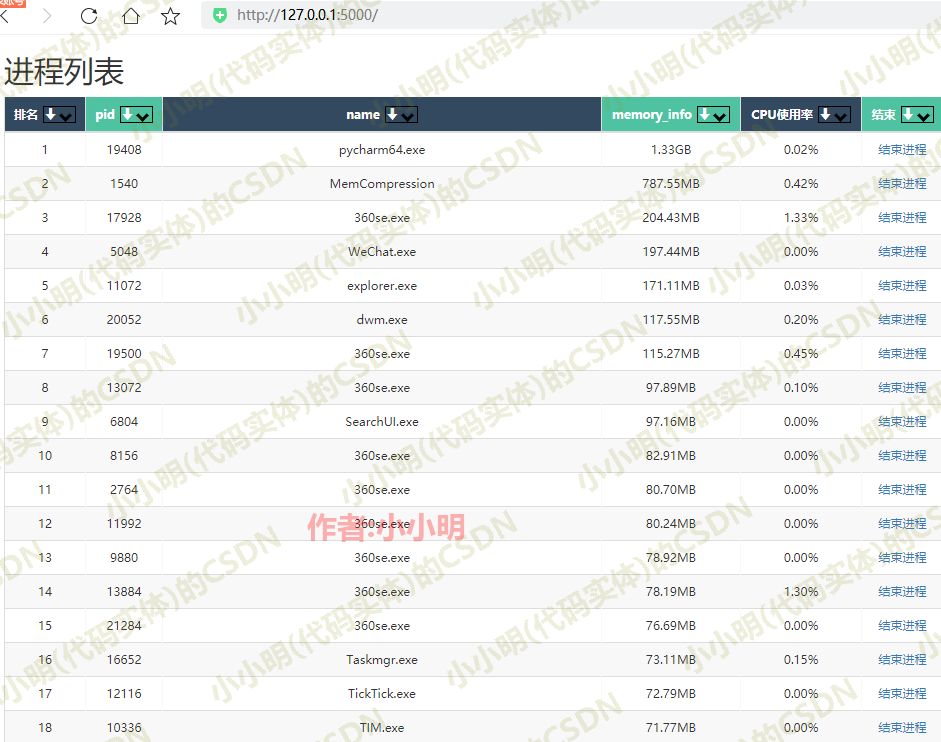

目标只要求能查看内存使用何cpu使用率即可。
基础模块技术测试
读取进程信息
首先,我们可以使用psutil读取服务端的进程使用情况(包括内存和CPU):
import psutil n = psutil.cpu_count() infos = [] for proc in psutil.process_iter(attrs=['memory_info', 'name', 'pid']): info = proc.info memory_info = info['memory_info'].rss / 1024 info['memory_info'] = memory_info cpu_percent = proc.cpu_percent(0) / n info['cpu_percent'] = f"{
     cpu_percent:.2f}%" infos.append(info)
然后我们可以按照内存使用量对数据进行降序排序:
infos.sort(key=lambda info: info['memory_info'], reverse=True) 然后可以对内存数据进行格式化(当然这步也可以交给游览器js来处理):
for info in infos: memory_info = info['memory_info'] if memory_info < 1024: memory_info = f"{
     memory_info :.2f}KB" elif memory_info < 1024 * 1024: memory_info = f"{
     memory_info / 1024:.2f}MB" else: memory_info = f"{
     memory_info / 1024 / 1024:.2f}GB" info['memory_info'] = memory_info return infos
杀掉某个进程
为了干掉某个进程,我们使用如下方法:
# 杀掉进程树 def kill_proc_tree(pid, sig=signal.SIGTERM, include_parent=True, timeout=None, on_terminate=None): if pid == os.getpid(): raise RuntimeError("I refuse to kill myself") parent = psutil.Process(pid) children = parent.children(recursive=True) if include_parent: children.append(parent) for p in children: p.send_signal(sig) gone, alive = psutil.wait_procs(children, timeout=timeout, callback=on_terminate) return (gone, alive) 也可以调用系统命令:
def execute_cmd_command(PID): os.system("ntsd -c q -p PID".format(PID)) 网页开发
基础前端模板
这次我们计划使用flask来开发一个小网站,所以使用jinja2模板的语法。
先做一个简单的前端页面(文件名show.html):
    DOCTYPE html> <html lang="en"> <head> <meta charset="utf-8"> <meta name="viewport" content="width=device-width, initial-scale=1"> <title>进程列表
      title> <link rel="stylesheet" href="https://cdn.jsdelivr.net/npm/bootstrap@4.5.3/dist/css/bootstrap.min.css">
       head> <body> <div class="container"> <h1>进程列表
        h1> <table class="table"> <thead> <tr> <th scope="col">排名
         th> <th scope="col">pid
          th> <th scope="col">name
           th> <th scope="col">memory_info
            th> <th scope="col">CPU使用率
             th> <th scope="col">结束
              th>
               tr>
                thead> <tbody> {% for row in data %} <tr> <td>{
              { loop.index }}
                 td> <td>{
               { row['pid'] }}
                  td> <td>{
                { row['name'] }}
                   td> <td>{
                 { row['memory_info'] }}
                    td> <td>{
                  { row['cpu_percent'] }}
                     td> <td><a href='/kill_proL/{
                     { row['pid'] }}'>结束进程
                      a>
                       td>
                        tr> {% endfor %}
                         tbody>
                          table>
                           div>
                            body>
                             html>
jinja2模板语法的规则可以百度。
完善后端代码:
""" 小小明的代码 CSDN主页:https://blog.csdn.net/as """ __author__ = '小小明' __time__ = '2021/7/9 22:21' import psutil from flask import Flask, redirect, render_template import os import signal app = Flask(__name__) # 获取系统进程列表 def get_procs(): infos = [] n = psutil.cpu_count() for proc in psutil.process_iter(attrs=['memory_info', 'name', 'pid']): info = proc.info memory_info = info['memory_info'].rss / 1024 info['memory_info'] = memory_info cpu_percent = proc.cpu_percent(0) / n info['cpu_percent'] = f"{
     cpu_percent:.2f}%" infos.append(info) infos.sort(key=lambda info: info['memory_info'], reverse=True) for info in infos: memory_info = info['memory_info'] if memory_info < 1024: memory_info = f"{
     memory_info :.2f}KB" elif memory_info < 1024 * 1024: memory_info = f"{
     memory_info / 1024:.2f}MB" else: memory_info = f"{
     memory_info / 1024 / 1024:.2f}GB" info['memory_info'] = memory_info return infos # 杀掉进程树 def kill_proc_tree(pid, sig=signal.SIGTERM, include_parent=True, timeout=None, on_terminate=None): if pid == os.getpid(): raise RuntimeError("I refuse to kill myself") parent = psutil.Process(pid) children = parent.children(recursive=True) if include_parent: children.append(parent) for p in children: p.send_signal(sig) gone, alive = psutil.wait_procs(children, timeout=timeout, callback=on_terminate) return (gone, alive) def execute_cmd_command(PID): os.system("ntsd -c q -p PID".format(PID)) @app.route('/kill_proL/

     '
   , methods=['GET']) def kill_proL(pid): try: kill_proc_tree(int(pid)) # execute_cmd_command(pid) finally: return redirect("/") # 重新加载页面 @app.route('/') def Show_html(): data = get_procs() return render_template('show.html', data=data) if __name__ == "__main__": app.run(host="0.0.0.0", port=8888)
注意:show.html需要方法上述py脚本的同级templates目录下。
咱们运行看看效果:

比较粗糙但是可以用。
升级版前端开发
这次我们计划给表头增加排序和筛选的功能。
经过一番开发,编译出了仿Excel的筛选功能的JavaScript脚本和css样式表:
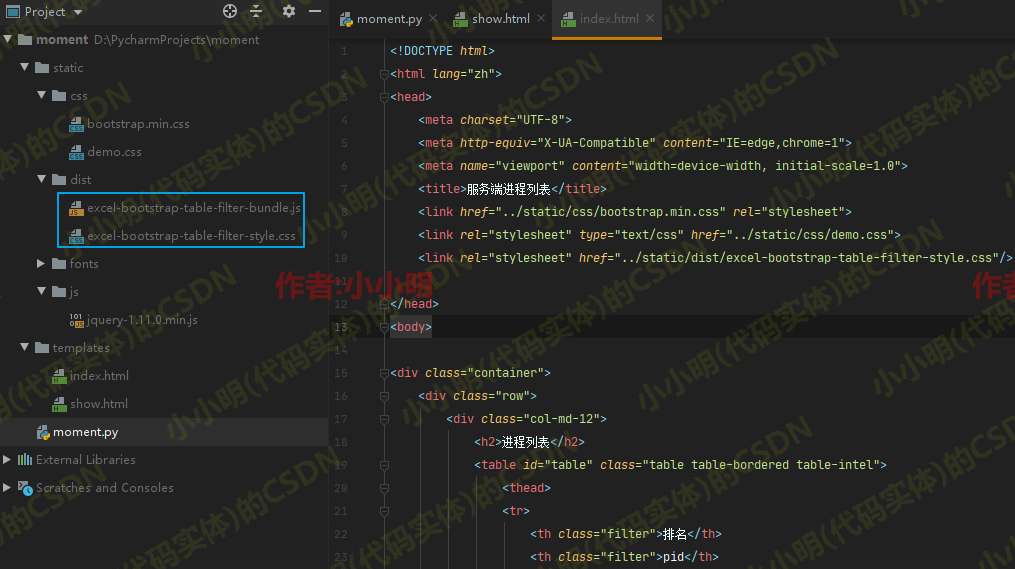
对于index.html模板的代码为:
<!DOCTYPE html> <html lang="zh"> <head> <meta charset="UTF-8"> <meta http-equiv="X-UA-Compatible" content="IE=edge,chrome=1"> <meta name="viewport" content="width=device-width, initial-scale=1.0"> <title>服务端进程列表</title> <link href="../static/css/bootstrap.min.css" rel="stylesheet"> <link rel="stylesheet" type="text/css" href="../static/css/demo.css"> <link rel="stylesheet" href="../static/dist/excel-bootstrap-table-filter-style.css"/> </head> <body> <div class="container"> <div class="row"> <div class="col-md-12"> <h2>进程列表</h2> <table id="table" class="table table-bordered table-intel"> <thead> <tr> <th class="filter">排名</th> <th class="filter">pid</th> <th class="filter">name</th> <th class="filter">memory_info</th> <th class="no-filter">CPU使用率</th> <th class="no-sort no-filter">结束</th> </tr> </thead> <tbody> {
   % for row in data %} <tr> <td>{
   {
    loop.index }}</td> <td>{
   {
    row['pid'] }}</td> <td>{
   {
    row['name'] }}</td> <td>{
   {
    row['memory_info'] }}</td> <td>{
   {
    row['cpu_percent'] }}</td> <td><a href='/kill_proL/{
   { row['pid'] }}'>结束进程</a></td> </tr> {
   % endfor %} </tbody> </table> </div> </div> </div> <script type="text/javascript" src="../static/js/jquery-1.11.0.min.js"></script> <script type="text/javascript" src="../static/dist/excel-bootstrap-table-filter-bundle.js"></script> <script type="text/javascript"> $(function () {
    $('#table').excelTableFilter({
    'captions': {
   a_to_z: '升序排列', z_to_a: '降序排列', search: '搜索', select_all: '全部选择'} }); $('#table2').excelTableFilter({
    'captions': {
   a_to_z: '升序排列', z_to_a: '降序排列', search: '搜索', select_all: '全部选择'} }); $('#table3').excelTableFilter({
    'captions': {
   a_to_z: '升序排列', z_to_a: '降序排列', search: '搜索', select_all: '全部选择'} }); }); </script> </body> </html>
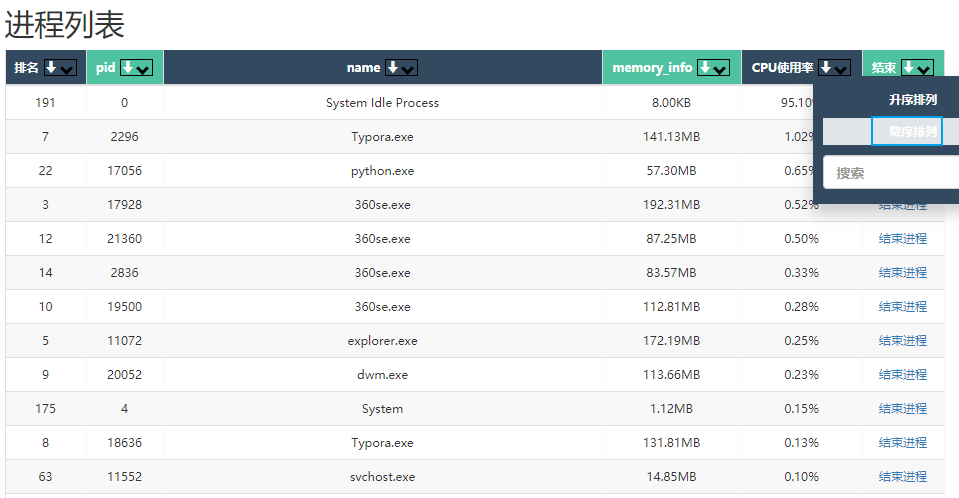
于是就可以在前端按CPU使用率来排序了:
还可以筛选筛选包含指定名称的进程:
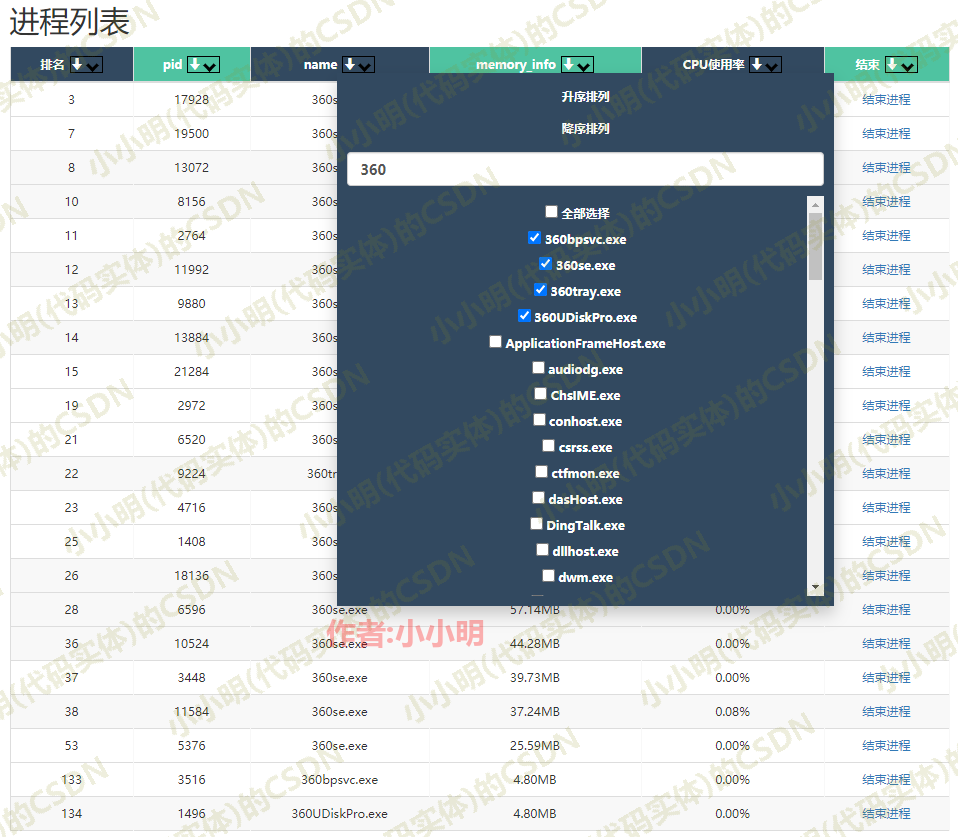
测试结束进程可以顺利的关闭服务器上面的金山词霸、钉钉等非系统进程。
至此我们就成功的完成了网页版进程管理器的开发。
前端代码获取方式
本文评论数过20并且阅读量达到1000以上,或者将本文转发到自己的朋友圈,可向作者索要本文全套代码的下载地址。
版权声明:本文内容由互联网用户自发贡献,该文观点仅代表作者本人。本站仅提供信息存储空间服务,不拥有所有权,不承担相关法律责任。如发现本站有涉嫌侵权/违法违规的内容, 请联系我们举报,一经查实,本站将立刻删除。
发布者:全栈程序员-站长,转载请注明出处:https://javaforall.net/211429.html原文链接:https://javaforall.net



