
公众号推送早安问候以及天气预报(JAVA)
① 概述
功能点
- 每天早上可以给指定的微信用户推送消息,经过公众号
- 可以使用第三方接口丰富推送的消息内容
- 百度天气api:添加天气信息推送
- 天行数据api:添加美句、彩虹屁等语句推送
- 通过后台计算纪念日推送
- …
- 效果图
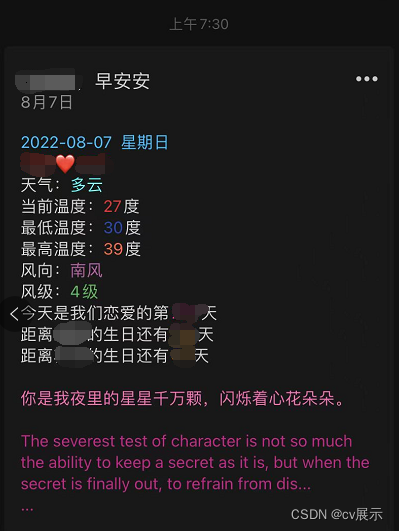

技术栈点
- spring boot实现后台
- 微信测试账号的申请
- 微信模版推送的配置
- 对接百度天气api
- 对接彩虹屁api
- 对接优美句子api
源码开放
Gitee
GitHub
② 注册微信测试账号,编辑推送模板
- 使用微信扫码登录此网站https://mp.weixin..com/debug/cgi-bin/sandbox?t=sandbox/login就能得到一个微信公众号测试号
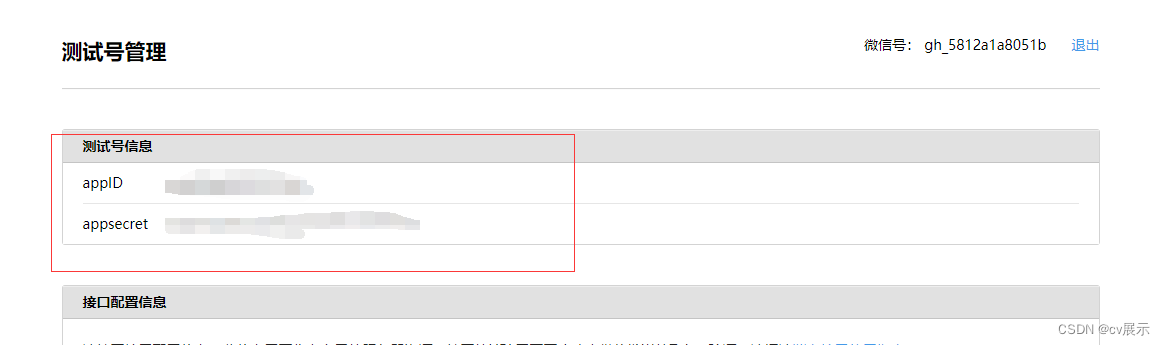
- 推送消息需要用到的信息
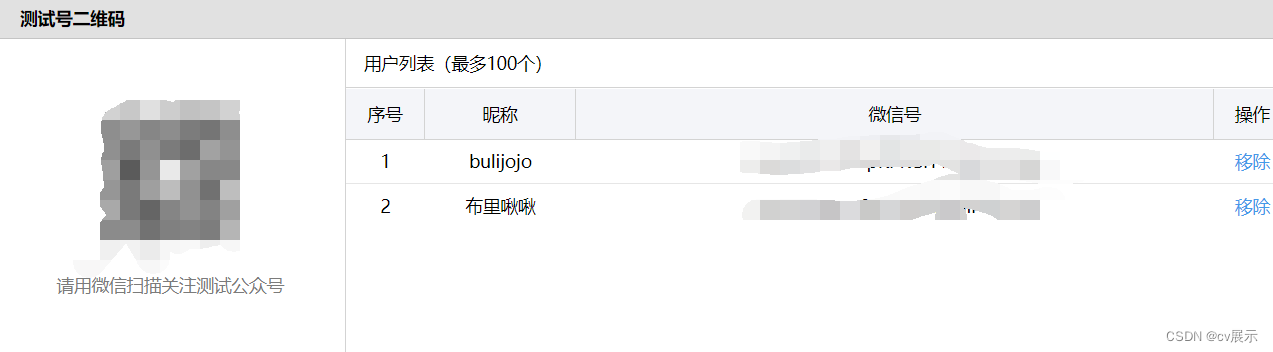
- 用户扫码关注得到用户的id
- 编辑消息模板
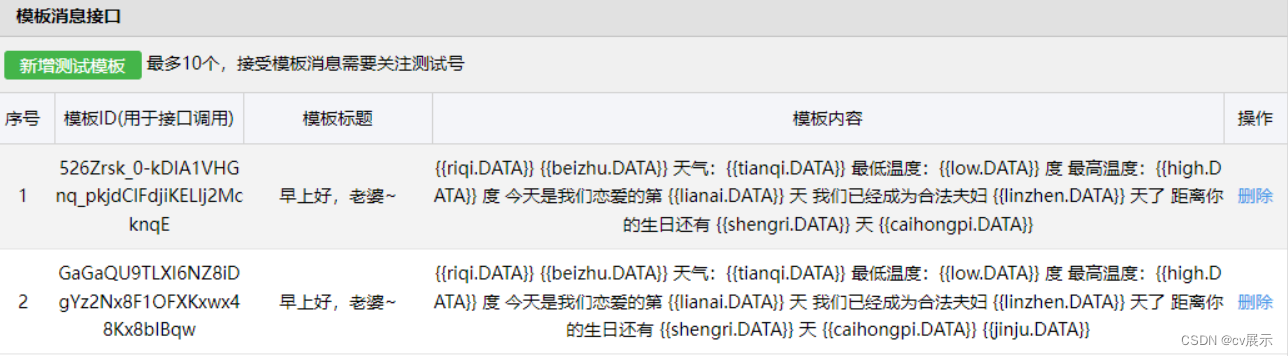
- 此步骤的模板id、用户微信号id、以及自己的appID、appsecret是后续推送所需要用到的
③ 使用spring boot 做后台开发,并且与第三方对接
使用第三方接口——控制台 | 百度地图开放平台 (baidu.com)
- 在百度地图开放平台注册账号,并且到控制台中的应用创建一个应用(其中应用AK是推送需要使用到的)
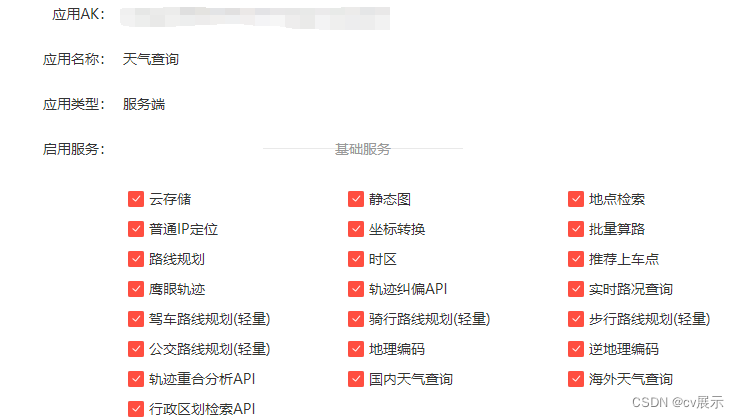
- 设置ip白名单为0.0.0.0/0
使用第三方接口——天行数据TianAPI – 开发者API数据平台
- 进去注册账号选择需要的句子接口使用就行
- 每个接口都有实例代码,直接使用就行
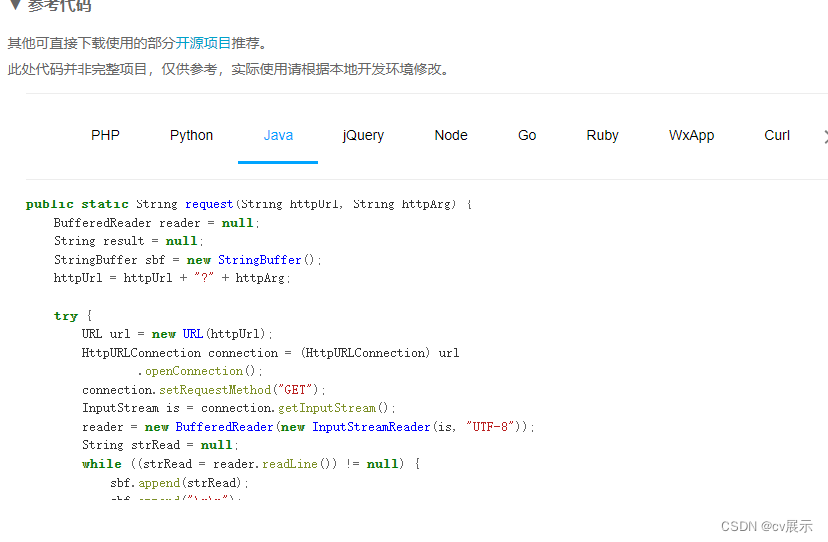
- 此案例使用了彩虹屁以及英语一句话两种
spring boot后台开发
- 创建spring boot项目,创建教程
- 导入需要的依赖
<properties> <java.version>1.8 java.version> <project.build.sourceEncoding>UTF-8 project.build.sourceEncoding> <project.reporting.outputEncoding>UTF-8 project.reporting.outputEncoding> <spring-boot.version>2.3.7.RELEASE spring-boot.version> properties> <dependencies> <dependency> <groupId>org.projectlombok groupId> <artifactId>lombok artifactId> <version>1.18.20 version> <scope>provided scope> dependency> <dependency> <groupId>com.alibaba groupId> <artifactId>fastjson artifactId> <version>2.0.7 version> dependency> <dependency> <groupId>org.springframework.boot groupId> <artifactId>spring-boot-starter-web artifactId> dependency> <dependency> <groupId>org.springframework.boot groupId> <artifactId>spring-boot-starter-test artifactId> <scope>test scope> <exclusions> <exclusion> <groupId>org.junit.vintage groupId> <artifactId>junit-vintage-engine artifactId> exclusion> exclusions> dependency> <dependency> <groupId>com.github.binarywang groupId> <artifactId>weixin-java-mp artifactId> <version>3.3.0 version> dependency> dependencies> - 编写对接百度天气api 的工具类
天气的实体类
/ * @author cVzhanshi * @create 2022-08-04 2215 */ @Data @AllArgsConstructor @NoArgsConstructor public class Weather {
      String wd_night; String date; String high; String week; String text_night; String wd_day; String low; String wc_night; String text_day; String wc_day; // 当前天气 String text_now; // 当前温度 String temp; // 风级大小 String wind_class; // 风向 String wind_dir; }
/ * @author cVzhanshi * @create 2022-08-04 22:02 */ public class WeatherUtils { public static void main(String[] args) { System.out.println(getWeather()); } public static Weather getWeather(){ RestTemplate restTemplate = new RestTemplate(); Map<String,String> map = new HashMap<String,String>(); map.put("district_id",""); // 地方行政代码 map.put("data_type","all");//这个是数据类型 map.put("ak","自己的应用AK"); String res = restTemplate.getForObject( "https://api.map.baidu.com/weather/v1/?district_id={district_id}&data_type={data_type}&ak={ak}", String.class, map); JSONObject json = JSONObject.parseObject(res); JSONArray forecasts = json.getJSONObject("result").getJSONArray("forecasts"); List<Weather> weathers = forecasts.toJavaList(Weather.class); JSONObject now = json.getJSONObject("result").getJSONObject("now"); Weather weather = weathers.get(0); weather.setText_now(now.getString("text")); weather.setTemp(now.getString("temp")); weather.setWind_class(now.getString("wind_class")); weather.setWind_dir(now.getString("wind_dir")); return weather; } } - 编写对接天行数据(彩虹屁)api的工具类
/ * @author cVzhanshi * @create 2022-08-04 22:58 */ public class CaiHongPiUtils { public static String getCaiHongPi() { String httpUrl = "http://api.tianapi.com/caihongpi/index?key=接口的key"; BufferedReader reader = null; String result = null; StringBuffer sbf = new StringBuffer(); try { URL url = new URL(httpUrl); HttpURLConnection connection = (HttpURLConnection) url .openConnection(); connection.setRequestMethod("GET"); InputStream is = connection.getInputStream(); reader = new BufferedReader(new InputStreamReader(is, "UTF-8")); String strRead = null; while ((strRead = reader.readLine()) != null) { sbf.append(strRead); sbf.append("\r\n"); } reader.close(); result = sbf.toString(); } catch (Exception e) { e.printStackTrace(); } JSONObject jsonObject = JSONObject.parseObject(result); JSONArray newslist = jsonObject.getJSONArray("newslist"); String content = newslist.getJSONObject(0).getString("content"); return content; } public static Map<String,String> getEnsentence() { String httpUrl = "http://api.tianapi.com/ensentence/index?key=接口的key"; BufferedReader reader = null; String result = null; StringBuffer sbf = new StringBuffer(); try { URL url = new URL(httpUrl); HttpURLConnection connection = (HttpURLConnection) url .openConnection(); connection.setRequestMethod("GET"); InputStream is = connection.getInputStream(); reader = new BufferedReader(new InputStreamReader(is, "UTF-8")); String strRead = null; while ((strRead = reader.readLine()) != null) { sbf.append(strRead); sbf.append("\r\n"); } reader.close(); result = sbf.toString(); } catch (Exception e) { e.printStackTrace(); } JSONObject jsonObject = JSONObject.parseObject(result); JSONArray newslist = jsonObject.getJSONArray("newslist"); String en = newslist.getJSONObject(0).getString("en"); String zh = newslist.getJSONObject(0).getString("zh"); Map<String, String> map = new HashMap<>(); map.put("zh",zh); map.put("en",en); return map; } } - 编写计算纪念日的工具类
public class JiNianRiUtils { public static int getLianAi(){ return calculationLianAi("2022-12-11"); } public static int getBirthday_Jo(){ try { return calculationBirthday("2009-03-09"); } catch (ParseException e) { e.printStackTrace(); } return 0; } public static int getBirthday_Hui(){ try { return calculationBirthday("2020-01-11"); } catch (ParseException e) { e.printStackTrace(); } return 0; } // 计算生日天数 public static int calculationBirthday(String clidate) throws ParseException { SimpleDateFormat myFormatter = new SimpleDateFormat("yyyy-MM-dd"); Calendar cToday = Calendar.getInstance(); // 存今天 Calendar cBirth = Calendar.getInstance(); // 存生日 cBirth.setTime(myFormatter.parse(clidate)); // 设置生日 cBirth.set(Calendar.YEAR, cToday.get(Calendar.YEAR)); // 修改为本年 int days; if (cBirth.get(Calendar.DAY_OF_YEAR) < cToday.get(Calendar.DAY_OF_YEAR)) { // 生日已经过了,要算明年的了 days = cToday.getActualMaximum(Calendar.DAY_OF_YEAR) - cToday.get(Calendar.DAY_OF_YEAR); days += cBirth.get(Calendar.DAY_OF_YEAR); } else { // 生日还没过 days = cBirth.get(Calendar.DAY_OF_YEAR) - cToday.get(Calendar.DAY_OF_YEAR); } // 输出结果 if (days == 0) { return 0; } else { return days; } } // 计算天数 public static int calculationLianAi(String date) { DateFormat simpleDateFormat = new SimpleDateFormat("yyyy-MM-dd"); int day = 0; try { long time = System.currentTimeMillis() - simpleDateFormat.parse(date).getTime(); day = (int) (time / L); } catch (ParseException e) { e.printStackTrace(); } return day; } } - 编写推送类
/ * @author cVzhanshi * @create 2022-08-04 21:09 */ public class Pusher { public static void main(String[] args) { push(); } private static String appId = "xx"; private static String secret = "xx"; public static void push(){ //1,配置 WxMpInMemoryConfigStorage wxStorage = new WxMpInMemoryConfigStorage(); wxStorage.setAppId(appId); wxStorage.setSecret(secret); WxMpService wxMpService = new WxMpServiceImpl(); wxMpService.setWxMpConfigStorage(wxStorage); //2,推送消息 WxMpTemplateMessage templateMessage = WxMpTemplateMessage.builder() .toUser("用户微信id") .templateId("消息模板id") .build(); //3,如果是正式版发送模版消息,这里需要配置你的信息 Weather weather = WeatherUtils.getWeather(); Map<String, String> map = CaiHongPiUtils.getEnsentence(); templateMessage.addData(new WxMpTemplateData("riqi",weather.getDate() + " "+ weather.getWeek(),"#00BFFF")); templateMessage.addData(new WxMpTemplateData("tianqi",weather.getText_now(),"#00FFFF")); templateMessage.addData(new WxMpTemplateData("low",weather.getLow() + "","#")); templateMessage.addData(new WxMpTemplateData("temp",weather.getTemp() + "","#EE212D")); templateMessage.addData(new WxMpTemplateData("high",weather.getHigh()+ "","#FF6347" )); templateMessage.addData(new WxMpTemplateData("windclass",weather.getWind_class()+ "","#42B857" )); templateMessage.addData(new WxMpTemplateData("winddir",weather.getWind_dir()+ "","#B95EA3" )); templateMessage.addData(new WxMpTemplateData("caihongpi",CaiHongPiUtils.getCaiHongPi(),"#FF69B4")); templateMessage.addData(new WxMpTemplateData("lianai",JiNianRiUtils.getLianAi()+"","#FF1493")); templateMessage.addData(new WxMpTemplateData("shengri1",JiNianRiUtils.getBirthday_Jo()+"","#FFA500")); templateMessage.addData(new WxMpTemplateData("shengri2",JiNianRiUtils.getBirthday_Hui()+"","#FFA500")); templateMessage.addData(new WxMpTemplateData("en",map.get("en") +"","#C71585")); templateMessage.addData(new WxMpTemplateData("zh",map.get("zh") +"","#C71585")); String beizhu = "❤"; if(JiNianRiUtils.getLianAi() % 365 == 0){ beizhu = "今天是恋爱" + (JiNianRiUtils.getLianAi() / 365) + "周年纪念日!"; } if(JiNianRiUtils.getBirthday_Jo() == 0){ beizhu = "今天是生日,生日快乐呀!"; } if(JiNianRiUtils.getBirthday_Hui() == 0){ beizhu = "今天是生日,生日快乐呀!"; } templateMessage.addData(new WxMpTemplateData("beizhu",beizhu,"#FF0000")); try { System.out.println(templateMessage.toJson()); System.out.println(wxMpService.getTemplateMsgService().sendTemplateMsg(templateMessage)); } catch (Exception e) { System.out.println("推送失败:" + e.getMessage()); e.printStackTrace(); } } } - 编写定时任务
@SpringBootApplication @EnableScheduling // 开启定时任务 public class WechatpushApplication {
      public static void main(String[] args) {
      SpringApplication.run(WechatpushApplication.class, args); } // 定时 @Scheduled(cron = "0 30 7 * * ?") public void goodMorning(){
      Pusher.push(); } }
④ 部署
- 把项目打包成jar包
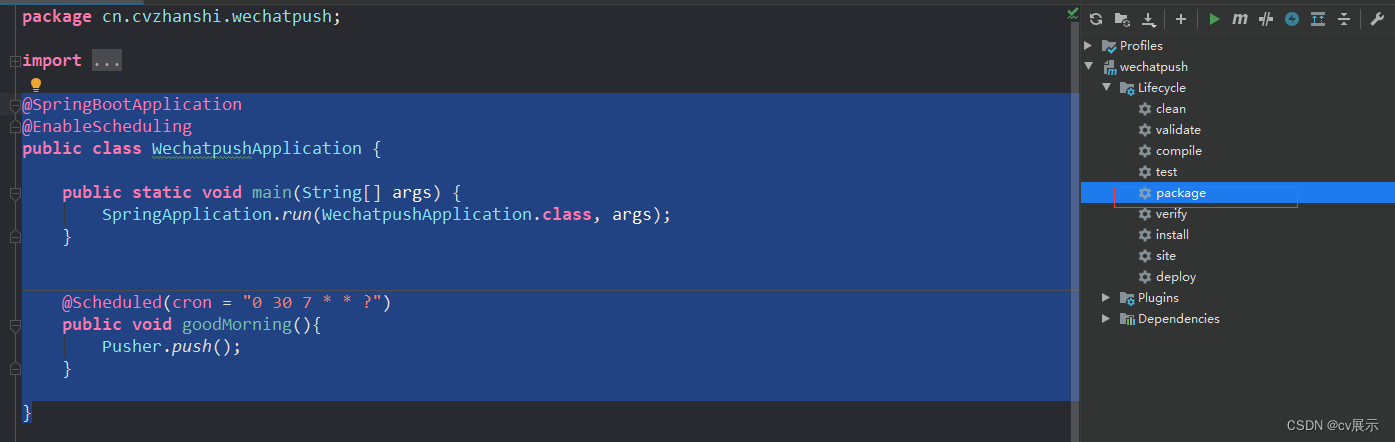
- 把jar包上传到服务器并且运行起来
# 运行命令 nohup java -jar test.jar >temp.txt &
完成~
版权声明:本文内容由互联网用户自发贡献,该文观点仅代表作者本人。本站仅提供信息存储空间服务,不拥有所有权,不承担相关法律责任。如发现本站有涉嫌侵权/违法违规的内容, 请联系我们举报,一经查实,本站将立刻删除。
发布者:全栈程序员-站长,转载请注明出处:https://javaforall.net/211455.html原文链接:https://javaforall.net



