
1.前提准备
环境介绍
- haystack是django的开源搜索框架,该框架支持Solr, Elasticsearch, Whoosh, *Xapian*搜索引擎,不用更改代码,直接切换引擎,减少代码量。
- 搜索引擎使用Whoosh,这是一个由纯Python实现的全文搜索引擎,没有二进制文件等,比较小巧,配置比较简单,当然性能自然略低。whoosh和xapian的性能差距还是比较明显。索引和搜索的速度有近4倍的差距,在full cache情况下的性能差距更是达到了60倍。
- 中文分词+,由于Whoosh自带的是英文分词,对中文的分词支持不是太好,故用jieba替换whoosh的分词组件。
- Elasticsearch:开源的搜索引擎,本文版本为7.6.0
- 其他:Python3.6.5, Django2.2
安装环境
pip3 install django==2.2 -i https://pypi.douban.com/simple pip3 install whoosh -i https://pypi.douban.com/simple pip3 install django-haystack -i https://pypi.douban.com/simple pip3 install jieba -i https://pypi.douban.com/simple pip3 install pymysql -i https://pypi.douban.com/simple pip3 install elasticsearch==7.6.0 -i https://pypi.douban.com/simple/项目结构
- Project - Project - settings.py - blog - models.py表结构
models.py
from django.db import models class UserInfo(models.Model): username = models.CharField(verbose_name='用户名', max_length=225) def __str__(self): return self.username class Tag(models.Model): name = models.CharField(verbose_name='标签名称', max_length=225) def __str__(self): return self.name class Article(models.Model): title = models.CharField(verbose_name='标题', max_length=225) content = models.CharField(verbose_name='内容', max_length=225) # 外键 username = models.ForeignKey(verbose_name='用户', to='UserInfo', on_delete=models.DO_NOTHING) tag = models.ForeignKey(verbose_name='标签', to='Tag', on_delete=models.DO_NOTHING) def __str__(self): return self.title 图解
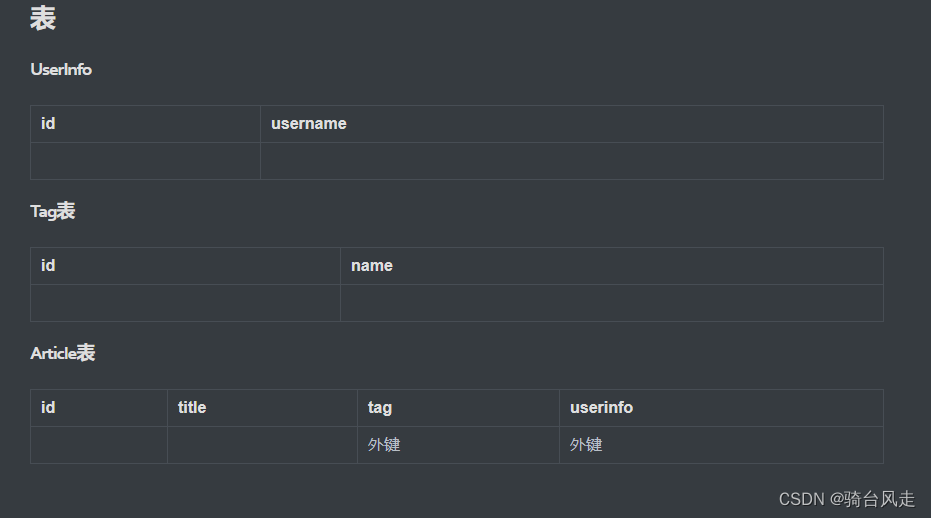

本文优势
集全网的django+django-haystack+Whoosh的总结,取其精华,去其糟粕,加入了新的注解。
如果你想你的es或者Whoosh集成到django上,那你来对地方了
django+django-haystack+Whoosh+Jieba+mysql
1. setting.py配置
# 数据库配置 DATABASES = { 'default': { 'ENGINE': 'django.db.backends.mysql', 'NAME': 'dj_ha', 'USER': 'root', 'PASSWORD': 'foobared', 'HOST': '106.14.42.253', 'PORT': '11111', } } # app INSTALLED_APPS = [ 'haystack', ] # 本教程使用的是Whoosh,故配置如下 HAYSTACK_CONNECTIONS = { 'default': { 'ENGINE': 'haystack.backends.whoosh_backend.WhooshEngine', 'PATH': os.path.join(os.path.dirname(__file__), 'whoosh_index'), }, } # 自动更新索引 HAYSTACK_SIGNAL_PROCESSOR = 'haystack.signals.RealtimeSignalProcessor' # 设置每页显示的数目,默认为20,可以自己修改 HAYSTACK_SEARCH_RESULTS_PER_PAGE = 8 2. 为表模型创建索引,search_indexes.py
1. 如果你想针对某个app,例如blog做全文检索,则必须在blog的目录下面,建立search_indexes.py文件,文件名不能修改,必须叫search_indexes.py
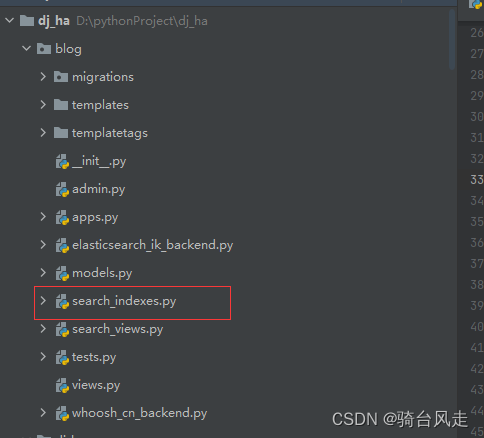
from haystack import indexes from .models import Article # ArticleIndex:固定写法 表名Index class ArticleIndex(indexes.SearchIndex, indexes.Indexable): # 固定写法 document=True:haystack和搜索引擎,将给text字段分词,建立索引,使用此字段的内容作为索引进行检索 # use_template=True,使用自己的模板,与document=True进行搭配,自定义检索字段模板(允许谁可以被全文检索,就是谁被建立索引) text = indexes.CharField(document=True, use_template=True) # 以下字段作为辅助数据,便于调用,最后也不知道怎么辅助,我注释了,也不影响搜索 # title:写入引擎的字段名,model_attr='title':相对应的表模型字段名, title = indexes.CharField(model_attr='title') content = indexes.CharField(model_attr='content') username = indexes.CharField(model_attr='username') tag = indexes.CharField(model_attr='tag') def get_model(self): # 需要建立索引的模型 return Article def index_queryset(self, using=None): """Used when the entire index for model is updated.""" # 写入引擎的数据,必须返回queryset类型 return self.get_model().objects.all() 3. 创建被检索的模板(允许谁可以全文检索)
这个数据模板的作用是对Article.title, Article.content,Article.username.username
这三个字段建立索引,当检索的时候会对这三个字段的内容,做全文检索匹配。
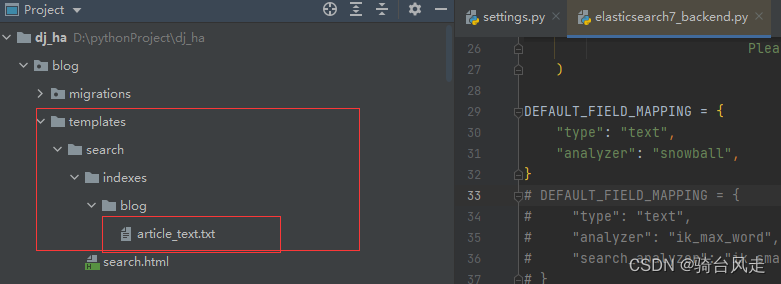
数据模板的路径为yourapp/templates/search/indexes/yourapp/note_text.txt,
例如本例子为blog/templates/search/indexes/blog/article_text.txt 文件名必须为要索引的小写模型类名_text.txt
{
  { object.title }} {
  { object.content }} {
  { object.username.username }}
4. 路由
urls.py配置(用内置的视图,后期可以自定义,本文也有介绍)
# urls.py from django.contrib import admin from django.urls import path, include, re_path urlpatterns = [ path('admin/', admin.site.urls), # 配置的搜索路由,路由可以自定义,include('haystack.urls')固定 re_path(r'^search/', include('haystack.urls')), ]haystack.urls的内容(内置的,只是我拉出来,让你看一下,不需要进行修改)
from django.urls import path from haystack.views import SearchView urlpatterns = [path("", SearchView(), name="haystack_search")]5. search.html
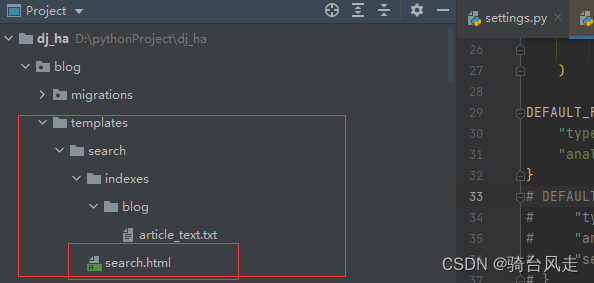
SearchView()视图函数默认使用的html模板为当前app目录下,
路径为app名称,/templates/search/search.html
所以需要在blog/templates/search/下添加search.html文件,内容为
search.html(原生)
Search
{% load highlight %}
后端返回数据介绍
# print(context) """ { 'query': '刘', 'form':

    , 'page':

     , 'paginator':

      , 'suggestion': None} """ # print(context.get('page').__dict__) """ { 'object_list': [

       ,

        ,

         ], 'number': 1, 'paginator':

          } """
前端返回数据介绍
{% load highlight %}:高亮加载 内置的会省略搜到的内容,之前的内容 {% load my_filters_and_tags %}:自定义高亮 form.as_table:生成表格,里边会自动成成input标签 query:查询的参数 page.object_list:返回的查询一页数据 result:数据对象集 result.object:当前查询的数据对象 page.has_previous or page.has_next:分页6. 高亮配置
# 7.高亮加载 # 1.使用默认值 {% highlight result.summary with query %} # 案例 {% highlight result.object.title with query %} # 2.这里我们为 {
{ result.summary }}里所有的 {
{ query }} 指定了一个
标签,并且将class设置为highlight_me_please,这样就可以自己通过CSS为{
{ query }}添加高亮效果了,怎么样,是不是很科学呢
{% highlight result.summary with query html_tag "div" css_class "highlight_me_please" %}
# 3.这里可以限制最终{
{ result.summary }}被高亮处理后的长度 {% highlight result.summary with query max_length 40 %} # 5.自定义使用(后面会介绍) # 5.4格式 {% myhighlight
with
[css_class "class_name"] [html_tag "span"] [max_length 200] [start_head True] %} # 5.2使用一 {% myhighlight result.object.content with query css_class "highlighted" html_tag "span" max_length 200 start_head True %} # 5.3自定义二 {% myhighlight result.object.content with query css_class "highlighted" start_head True %}
7.自定义
自定义返回内容
在app下新建一个文件名称search_views
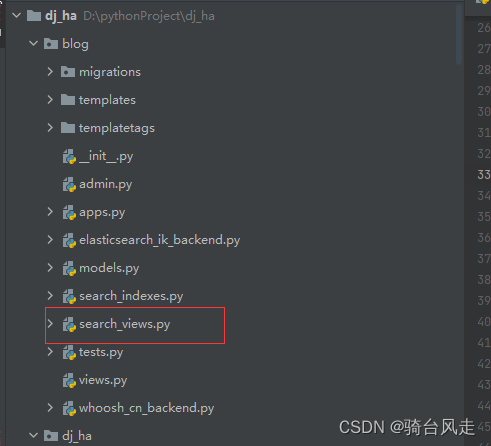
# 重写SearchView,实现自定义内容 # blog/search_views.py from haystack.views import SearchView # 导入模块 from .models import * class MySeachView(SearchView): def extra_context(self): # 重载extra_context来添加额外的context内容 context = super(MySeachView, self).extra_context() my_str = '111' context['my_str'] = my_str # print(context) return context 修改路由
from django.contrib import admin from django.urls import path, include, re_path from blog import search_views urlpatterns = [ path('admin/', admin.site.urls), # 原生的 # re_path(r'^search/', include('haystack.urls')), # 自己的 re_path(r'^search/', search_views.MySeachView(), name='haystack_search'), ]前端使用
    圆明园:{
   { my_str }}
自定义search.html模板
1. 保证有一个from,get请求,input标签的name=q,value=Search,
自定义高亮显示(原生的会省略)
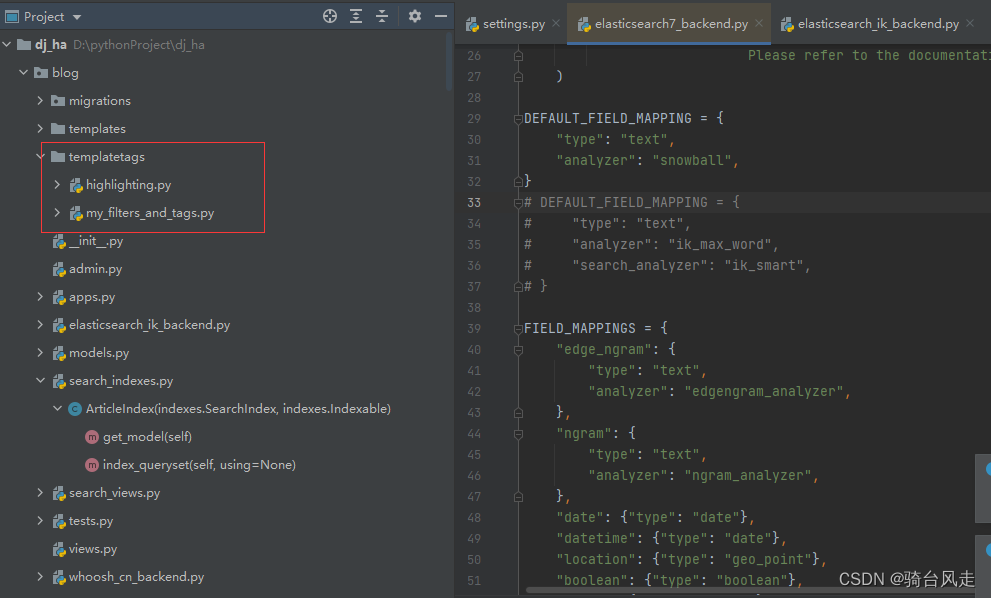
新建文件夹templatetags
添加blog/templatetags/my_filters_and_tags.py 文件和 blog/templatetags/highlighting.py 文件,
# encoding: utf-8
from __future__ import absolute_import, division, print_function, unicode_literals

from django import template
from django.conf import settings
from django.core.exceptions import ImproperlyConfigured
from django.utils import six

from haystack.utils import importlib

register = template.Library()

class HighlightNode(template.Node):
    def __init__(self, text_block, query, html_tag=None, css_class=None, max_length=None, start_head=None):
        self.text_block = template.Variable(text_block)
        self.query = template.Variable(query)
        self.html_tag = html_tag
        self.css_class = css_class
        self.max_length = max_length
        self.start_head = start_head

        if html_tag is not None:
            self.html_tag = template.Variable(html_tag)

        if css_class is not None:
            self.css_class = template.Variable(css_class)

        if max_length is not None:
            self.max_length = template.Variable(max_length)

        if start_head is not None:
            self.start_head = template.Variable(start_head)

    def render(self, context):
        text_block = self.text_block.resolve(context)
        query = self.query.resolve(context)
        kwargs = {}

        if self.html_tag is not None:
            kwargs['html_tag'] = self.html_tag.resolve(context)

        if self.css_class is not None:
            kwargs['css_class'] = self.css_class.resolve(context)

        if self.max_length is not None:
            kwargs['max_length'] = self.max_length.resolve(context)

        if self.start_head is not None:
            kwargs['start_head'] = self.start_head.resolve(context)

        # Handle a user-defined highlighting function.
        if hasattr(settings, 'HAYSTACK_CUSTOM_HIGHLIGHTER') and settings.HAYSTACK_CUSTOM_HIGHLIGHTER:
            # Do the import dance.
            try:
                path_bits = settings.HAYSTACK_CUSTOM_HIGHLIGHTER.split('.')
                highlighter_path, highlighter_classname = '.'.join(path_bits[:-1]), path_bits[-1]
                highlighter_module = importlib.import_module(highlighter_path)
                highlighter_class = getattr(highlighter_module, highlighter_classname)
            except (ImportError, AttributeError) as e:
                raise ImproperlyConfigured("The highlighter '%s' could not be imported: %s" % (settings.HAYSTACK_CUSTOM_HIGHLIGHTER, e))
        else:
            from .highlighting import Highlighter
            highlighter_class = Highlighter

        highlighter = highlighter_class(query, kwargs)
        highlighted_text = highlighter.highlight(text_block)
        return highlighted_text


@register.tag
def myhighlight(parser, token):
    """
    Takes a block of text and highlights words from a provided query within that
    block of text. Optionally accepts arguments to provide the HTML tag to wrap
    highlighted word in, a CSS class to use with the tag and a maximum length of
    the blurb in characters.
    Syntax::
        {% highlight


    with

     [css_class "class_name"] [html_tag "span"] [max_length 200] %} Example:: # Highlight summary with default behavior. {% highlight result.summary with request.query %} # Highlight summary but wrap highlighted words with a div and the # following CSS class. {% highlight result.summary with request.query html_tag "div" css_class "highlight_me_please" %} # Highlight summary but only show 40 characters. {% highlight result.summary with request.query max_length 40 %} """ bits = token.split_contents() tag_name = bits[0] if not len(bits) % 2 == 0: raise template.TemplateSyntaxError(u"'%s' tag requires valid pairings arguments." % tag_name) text_block = bits[1] if len(bits) < 4: raise template.TemplateSyntaxError(u"'%s' tag requires an object and a query provided by 'with'." % tag_name) if bits[2] != 'with': raise template.TemplateSyntaxError(u"'%s' tag's second argument should be 'with'." % tag_name) query = bits[3] arg_bits = iter(bits[4:]) kwargs = {} for bit in arg_bits: if bit == 'css_class': kwargs['css_class'] = six.next(arg_bits) if bit == 'html_tag': kwargs['html_tag'] = six.next(arg_bits) if bit == 'max_length': kwargs['max_length'] = six.next(arg_bits) if bit == 'start_head': kwargs['start_head'] = six.next(arg_bits) return HighlightNode(text_block, query, kwargs)
highlighting.py
# encoding: utf-8

from __future__ import absolute_import, division, print_function, unicode_literals

from django.utils.html import strip_tags


class Highlighter(object):
    #默认值
    css_class = 'highlighted'
    html_tag = 'span'
    max_length = 200
    start_head = False
    text_block = ''

    def __init__(self, query, kwargs):
        self.query = query

        if 'max_length' in kwargs:
            self.max_length = int(kwargs['max_length'])

        if 'html_tag' in kwargs:
            self.html_tag = kwargs['html_tag']

        if 'css_class' in kwargs:
            self.css_class = kwargs['css_class']

        if 'start_head' in kwargs:
            self.start_head = kwargs['start_head']

        self.query_words = set([word.lower() for word in self.query.split() if not word.startswith('-')])

    def highlight(self, text_block):
        self.text_block = strip_tags(text_block)
        highlight_locations = self.find_highlightable_words()
        start_offset, end_offset = self.find_window(highlight_locations)
        return self.render_html(highlight_locations, start_offset, end_offset)

    def find_highlightable_words(self):
        # Use a set so we only do this once per unique word.
        word_positions = {}

        # Pre-compute the length.
        end_offset = len(self.text_block)
        lower_text_block = self.text_block.lower()

        for word in self.query_words:
            if not word in word_positions:
                word_positions[word] = []

            start_offset = 0

            while start_offset < end_offset:
                next_offset = lower_text_block.find(word, start_offset, end_offset)

                # If we get a -1 out of find, it wasn't found. Bomb out and
                # start the next word.
                if next_offset == -1:
                    break

                word_positions[word].append(next_offset)
                start_offset = next_offset + len(word)

        return word_positions

    def find_window(self, highlight_locations):
        best_start = 0
        best_end = self.max_length

        # First, make sure we have words.
        if not len(highlight_locations):
            return (best_start, best_end)

        words_found = []

        # Next, make sure we found any words at all.
        for word, offset_list in highlight_locations.items():
            if len(offset_list):
                # Add all of the locations to the list.
                words_found.extend(offset_list)

        if not len(words_found):
            return (best_start, best_end)

        if len(words_found) == 1:
            return (words_found[0], words_found[0] + self.max_length)

        # Sort the list so it's in ascending order.
        words_found = sorted(words_found)

        # We now have a denormalized list of all positions were a word was
        # found. We'll iterate through and find the densest window we can by
        # counting the number of found offsets (-1 to fit in the window).
        highest_density = 0

        if words_found[:-1][0] > self.max_length:
            best_start = words_found[:-1][0]
            best_end = best_start + self.max_length

        for count, start in enumerate(words_found[:-1]):
            current_density = 1

            for end in words_found[count + 1:]:
                if end - start < self.max_length:
                    current_density += 1
                else:
                    current_density = 0

                # Only replace if we have a bigger (not equal density) so we
                # give deference to windows earlier in the document.
                if current_density > highest_density:
                    best_start = start
                    best_end = start + self.max_length
                    highest_density = current_density

        return (best_start, best_end)

    def render_html(self, highlight_locations=None, start_offset=None, end_offset=None):
        # Start by chopping the block down to the proper window.
        #text_block为内容,start_offset,end_offset分别为第一个匹配query开始和按长度截断位置
        text = self.text_block[start_offset:end_offset]

        # Invert highlight_locations to a location -> term list
        term_list = []

        for term, locations in highlight_locations.items():
            term_list += [(loc - start_offset, term) for loc in locations]

        loc_to_term = sorted(term_list)

        # Prepare the highlight template
        if self.css_class:
            hl_start = '<%s class="%s">' % (self.html_tag, self.css_class)
        else:
            hl_start = '<%s>' % (self.html_tag)

        hl_end = '


  ' % self.html_tag

        # Copy the part from the start of the string to the first match,
        # and there replace the match with a highlighted version.
        #matched_so_far最终求得为text中最后一个匹配query的结尾
        highlighted_chunk = ""
        matched_so_far = 0
        prev = 0
        prev_str = ""

        for cur, cur_str in loc_to_term:
            # This can be in a different case than cur_str
            actual_term = text[cur:cur + len(cur_str)]

            # Handle incorrect highlight_locations by first checking for the term
            if actual_term.lower() == cur_str:
                if cur < prev + len(prev_str):
                    continue

                #分别添上每个query+其后面的一部分(下一个query的前一个位置)
                highlighted_chunk += text[prev + len(prev_str):cur] + hl_start + actual_term + hl_end
                prev = cur
                prev_str = cur_str

                # Keep track of how far we've copied so far, for the last step
                matched_so_far = cur + len(actual_term)

        # Don't forget the chunk after the last term
        #加上最后一个匹配的query后面的部分
        highlighted_chunk += text[matched_so_far:]

        #如果不要开头not start_head才加点
        if start_offset > 0 and not self.start_head:
            highlighted_chunk = '...%s' % highlighted_chunk

        if end_offset < len(self.text_block):
            highlighted_chunk = '%s...' % highlighted_chunk

        #可见到目前为止还不包含start_offset前面的,即第一个匹配的前面的部分(text_block[:start_offset]),如需展示(当start_head为True时)便加上
        if self.start_head:
            highlighted_chunk = self.text_block[:start_offset] + highlighted_chunk
        return highlighted_chunk
前端使用
{% load my_filters_and_tags %}
{% myhighlight result.object.content with query css_class "highlighted" html_tag "span" max_length 200 start_head True %}
8. 目前位置搜索已经完成,可以重建索引,同步数据,测试一下
python manage.py rebuild_index 9.jieba分词器配置
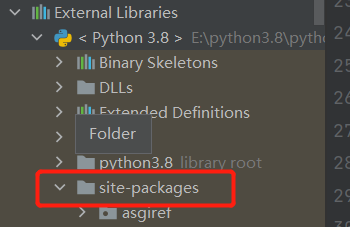
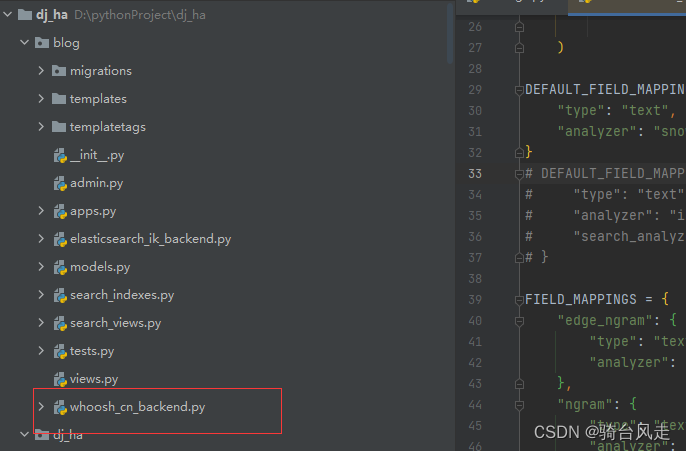
9.1 先从python包中复制whoosh_backend.py到app中,并改名为whoosh_cn_backend.py
文件路径:\site-packages\haystack\backends\whoosh_backend.py
复制到的路径:
9.2 对whoosh_cn_backend.py做以下修改:
1、导入 ChineseAnalyze from jieba.analyse import ChineseAnalyzer 2、替换schema_fields[field_class.index_fieldname] = TEXT(下的analyzer analyzer=ChineseAnalyzer(), 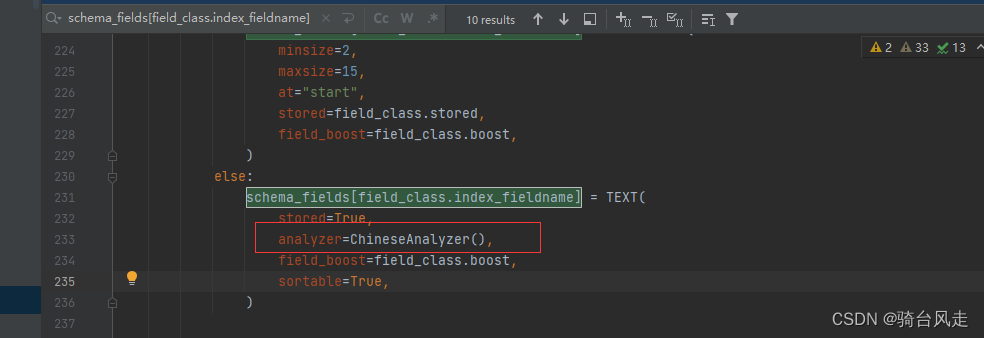
9.3 在django的配置文件中,修改搜索引擎
HAYSTACK_CONNECTIONS = { 'default': { # 设置haystack的搜索引擎 'ENGINE': 'blog.whoosh_cn_backend.WhooshEngine', # 'ENGINE': 'haystack.backends.whoosh_backend.WhooshEngine', # 设置索引文件的位置 'PATH': os.path.join(BASE_DIR, 'whoosh_index'), } }10 django+django-haystack+Elasticsearch7.5+ik+mysql
10.0 切换成es引擎,除了settings.py和把jieba换成ik,其他步骤跟上面的都一样
如果一开始,就是奔着es+ik来的,那步骤9 jieba分词器配置 不用看,直接从步骤8跳到这里来
10.1 安装es,ik
10.2 使用ik重写es7.5引擎
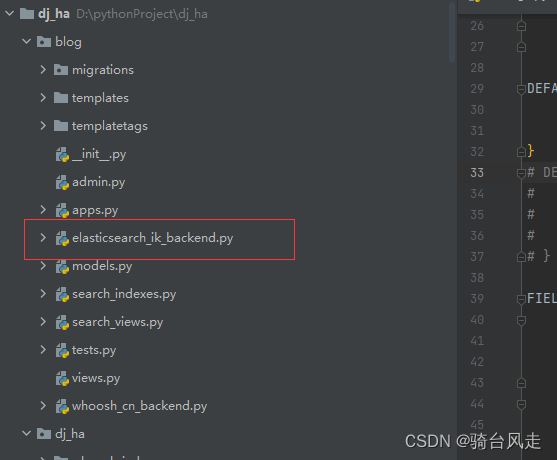
10.2.1 新建elasticsearch_ik_backend.py(在自己的app下)
在 blog应用下新建名为 elasticsearch7_ik_backend.py 的文件,继承 Elasticsearch7SearchBackend(后端) 和 Elasticsearch7SearchEngine(搜索引擎) 并重写建立索引时的分词器设置
from haystack.backends.elasticsearch7_backend import Elasticsearch7SearchBackend, Elasticsearch7SearchEngine """ 分析器主要有两种情况会被使用: 第一种是插入文档时,将text类型的字段做分词然后插入倒排索引, 第二种就是在查询时,先对要查询的text类型的输入做分词,再去倒排索引搜索 如果想要让 索引 和 查询 时使用不同的分词器,ElasticSearch也是能支持的,只需要在字段上加上search_analyzer参数 在索引时,只会去看字段有没有定义analyzer,有定义的话就用定义的,没定义就用ES预设的 在查询时,会先去看字段有没有定义search_analyzer,如果没有定义,就去看有没有analyzer,再没有定义,才会去使用ES预设的 """ DEFAULT_FIELD_MAPPING = { "type": "text", "analyzer": "ik_max_word", # "analyzer": "ik_smart", "search_analyzer": "ik_smart" } class Elasticsearc7IkSearchBackend(Elasticsearch7SearchBackend): def __init__(self, *args, kwargs): self.DEFAULT_SETTINGS['settings']['analysis']['analyzer']['ik_analyzer'] = { "type": "custom", "tokenizer": "ik_max_word", # "tokenizer": "ik_smart", } super(Elasticsearc7IkSearchBackend, self).__init__(*args, kwargs) class Elasticsearch7IkSearchEngine(Elasticsearch7SearchEngine): backend = Elasticsearc7IkSearchBackend 10.3 修改settings.py(切换成功)
# es 7.x配置 HAYSTACK_CONNECTIONS = { 'default': { # 'ENGINE': 'haystack.backends.elasticsearch7_backend.Elasticsearch7SearchEngine', 'ENGINE': 'blog.elasticsearch_ik_backend.Elasticsearch7IkSearchEngine', # 'URL': 'http://106.14.42.253:9200/', 'URL': 'http://106.14.42.253:9200/', # elasticsearch建立的索引库的名称,一般使用项目名作为索引库 'INDEX_NAME': 'elastic_new', }, }10.4 重建索引,同步数据
python manage.py rebuild_index 10.5 补充
10.5.1 未成功切换成ik
haystack 原先加载的是 ...\venv\Lib\site-packages\haystack\backends 文件夹下的 elasticsearch7_backend.py 文件,打开即可看到 elasticsearch7 引擎的默认配置
若用上述方法建立出来的索引字段仍使用 snowball 分词器,则将原先elasticsearch7_backend.py 文件中的 DEFAULT_FIELD_MAPPING 也修改为 ik 分词器(或许是因为版本问题)
位置:D:\py_virtualenv\dj_ha\Lib\site-packages\haystack\backends\elasticsearch7_backend.py
修改内容:
DEFAULT_FIELD_MAPPING = { "type": "text", "analyzer": "ik_max_word", "search_analyzer": "ik_smart", }10.5.2 es6版本加入ik,重写引擎
from haystack.backends.elasticsearch_backend import ElasticsearchSearchBackend from haystack.backends.elasticsearch_backend import ElasticsearchSearchEngine class IKSearchBackend(ElasticsearchSearchBackend): DEFAULT_ANALYZER = "ik_max_word" # 这里将 es 的 默认 analyzer 设置为 ik_max_word def __init__(self, connection_alias, connection_options): super().__init__(connection_alias, connection_options) def build_schema(self, fields): content_field_name, mapping = super(IKSearchBackend, self).build_schema(fields) for field_name, field_class in fields.items(): field_mapping = mapping[field_class.index_fieldname] if field_mapping["type"] == "string" and field_class.indexed: if not hasattr( field_class, "facet_for" ) and not field_class.field_type in ("ngram", "edge_ngram"): field_mapping["analyzer"] = getattr( field_class, "analyzer", self.DEFAULT_ANALYZER ) mapping.update({field_class.index_fieldname: field_mapping}) return content_field_name, mapping class IKSearchEngine(ElasticsearchSearchEngine): backend = IKSearchBackend11.实时更新索原理:采用信号
配置
# 在django配置文件中,添加索引值,文章更新的时候,就会自动更新索引值 HAYSTACK_SIGNAL_PROCESSOR = 'haystack.signals.RealtimeSignalProcessor'RealtimeSignalProcessor源码如下:
class RealtimeSignalProcessor(BaseSignalProcessor): """ Allows for observing when saves/deletes fire & automatically updates the search engine appropriately. 当 检索对象出现保存或者删除的时候更新索引值。 """ def setup(self): # Naive (listen to all model saves). models.signals.post_save.connect(self.handle_save) models.signals.post_delete.connect(self.handle_delete) # Efficient would be going through all backends & collecting all models # being used, then hooking up signals only for those. def teardown(self): # Naive (listen to all model saves). models.signals.post_save.disconnect(self.handle_save) models.signals.post_delete.disconnect(self.handle_delete) # Efficient would be going through all backends & collecting all models # being used, then disconnecting signals only for those. 本文借鉴
(5条消息) Haystack 使用 Elasticsearch 建立索引时 修改为中文分词器_SevenBerry的博客-CSDN博客_elasticsearch 修改字段分词器
(5条消息) Elasticsearch中analyzer和search_analyzer的区别_chuixue24的博客-CSDN博客
发布者:全栈程序员-站长,转载请注明出处:https://javaforall.net/212241.html原文链接:https://javaforall.net



