
初学spring的时候使用注解总觉得使用注解很神奇,加一个注解就能实现想要的功能,很好奇,也想自己根据需要写一些自己实现的自定义注解。问题来了,自定义注解到底是什么?肯定会有人和我一样有这个疑惑,我根据自己的理解总结一下。看完下面的几个使用自定义注解的实战demo,小伙伴大概就懂怎么用了。
其实注解一点也不神奇,注解就是一种标志,单独使用注解,就相当于在类、方法、参数和包上加上一个装饰,什么功能也没有,仅仅是一个标志,然后这个标志可以加上一些自己定义的参数。就像下面这样,创建一个@interface的注解,然后就可以使用这个注解了,加在我们需要装饰的方法上,但是什么功能也没有
@Target(ElementType.METHOD) @Retention(RetentionPolicy.RUNTIME) @Inherited @Documented public @interface XinLinLog {
    String value() default""; }
一、 java自定义注解的定义、描述
注解是一种能被添加到java源代码中的元数据,方法、类、参数和包都可以用注解来修饰。注解可以看作是一种特殊的标记,可以用在方法、类、参数和包上,程序在编译或者运行时可以检测到这些标记而进行一些特殊的处理。
1. 创建一个注解的基本元素
修饰符
访问修饰符必须为public,不写默认为pubic;
关键字
关键字为@interface;
注解名称
注解名称为自定义注解的名称,例如上面的XinLinLog 就是注解名称
注解类型元素
注解类型元素是注解中内容,根据需要标志参数,例如上面的注解的value;
2. 元注解(@Target、@Retention、@Inherited、@Documented)
我们上面的创建的注解XinLinLog上面还有几个注解(@Target、@Retention、@Inherited、@Documented),这四个注解就是元注解,元注解的作用就是负责注解其他注解。Java5.0定义了4个标准的元注解类型,它们被用来提供对其它 注解类型作标志操作(可以理解为最小的注解,基础注解)
- @Target:用于描述注解的使用范围,该注解可以使用在什么地方
| Target类型 | 描述 |
|---|---|
| ElementType.TYPE | 应用于类、接口(包括注解类型)、枚举 |
| ElementType.FIELD | 应用于属性(包括枚举中的常量) |
| ElementType.METHOD | 应用于方法 |
| ElementType.PARAMETER | 应用于方法的形参 |
| ElementType.CONSTRUCTOR | 应用于构造函数 |
| ElementType.LOCAL_VARIABLE | 应用于局部变量 |
| ElementType.ANNOTATION_TYPE | 应用于注解类型 |
| ElementType.PACKAGE | 应用于包 |
备注:例如@Target(ElementType.METHOD),标志的注解使用在方法上,但是我们在这个注解标志在类上,就会报错
- @Retention:表明该注解的生命周期
| 生命周期类型 | 描述 |
|---|---|
| RetentionPolicy.SOURCE | 编译时被丢弃,不包含在类文件中 |
| RetentionPolicy.CLASS | JVM加载时被丢弃,包含在类文件中,默认值 |
| RetentionPolicy.RUNTIME | 由JVM 加载,包含在类文件中,在运行时可以被获取到 |
- @Inherited:是一个标记注解,@Inherited阐述了某个被标注的类型是被继承的。如果一个使用了@Inherited修饰的annotation类型被用于一个class,则这个annotation将被用于该class的子类。
- @Documented:表明该注解标记的元素可以被Javadoc 或类似的工具文档化
二、自定义注解的使用DEMO
上面总结的注解的定义,但是创建这样一个注解,仅仅是一个标志,装饰类、方法、属性的,并没有功能,要想实现功能,需要我们通过拦截器、AOP切面这些地方获取注解标志,然后实现我们的功能。
java自定义注解的使用范围
一般我们可以通过注解来实现一些重复的逻辑,就像封装了的一个方法,可以用在一些权限校验、字段校验、字段属性注入、保存日志、缓存
1.权限校验注解(校验token)
1) 首先我们创建一个注解,标志那些类需要校验token
@Target(ElementType.METHOD) @Retention(RetentionPolicy.RUNTIME) public @interface AppAuthenticationValidate {
    //必填参数 String[] requestParams() default {
   }; }
2) 然后再创建一个AOP切面类来拦截这个注解
拦截使用这个注解的方法,同时获取注解上面的requestParams参数,校验json里面必填的属性是否存在
@Aspect @Component @Slf4j public class AppAuthenticationValidateAspect {
    @Reference(check = false, timeout = 18000) private CommonUserService commonUserService; @Before("@annotation(cn.com.bluemoon.admin.web.common.aspect.AppAuthenticationValidate)") public void repeatSumbitIntercept( JoinPoint joinPoint) {
    //获取接口的参数 Object[] o = joinPoint.getArgs(); JSONObject jsonObject = null; String[] parameterNames = ((CodeSignature) joinPoint.getSignature()).getParameterNames(); String source = null; for(int i=0;i<parameterNames.length;i++){
    String paramName = parameterNames[i]; if(paramName.equals("source")){
    //获取token来源 source = (String)o[i]; } if(paramName.equals("jsonObject")){
    jsonObject = (JSONObject) o[i]; } } if(jsonObject == null){
    throw new WebException(ResponseConstant.ILLEGAL_PARAM_CODE, ResponseConstant.ILLEGAL_PARAM_MSG); } String token = jsonObject.getString("token"); if(StringUtils.isBlank(token)){
    throw new WebException(ResponseConstant.TOKEN_EXPIRED_CODE,"登录超时,请重新登录"); } MethodSignature signature = (MethodSignature) joinPoint.getSignature(); Method method = signature.getMethod(); AppAuthenticationValidate annotation = method.getAnnotation(AppAuthenticationValidate.class); String[] requestParams = annotation.requestParams(); //校验必填参数 ParamsValidateUtil.isNotBlank(jsonObject,requestParams); ResponseBean<String> response = null; if(StringUtils.isBlank(source)){
    response = this.commonUserService.checkAppToken(token); }else{
    response = this.commonUserService.checkAppTokenByAppType(token,source); } if (response.getIsSuccess() && ResponseConstant.REQUEST_SUCCESS_CODE == response.getResponseCode()) {
    String empCode = response.getData(); log.info("---token ={}, empCode={}--", token, empCode); jsonObject.put(ProcessParamConstant.APP_EMP_CODE,empCode); } else {
    log.info("---token验证不通过,token ={}---", token); throw new WebException(ResponseConstant.TOKEN_EXPIRED_CODE, "登录超时,请重新登录"); } } }
3)把注解加在需要校验的接口方法上
备注:有些项目会把token放到请求头header中,处理方式类似
2.角色校验注解(springsecurity中的角色校验)
我们在使用springsecurity有一个注解@PreAuthorize可以作用在类或方法上,用来校验是否有权限访问,我们可以模仿这个注解,写一个我们自定义注解来实现同样的功能
1)创建一个自定义注解
@Target({
   ElementType.METHOD, ElementType.TYPE}) @Retention(RetentionPolicy.RUNTIME) @Inherited @Documented public @interface RoleAuthorize {
    String[] value() default {
   }; }
2)创建一个拦截器
这个拦截器拦截所有访问路径的url,如果访问方法上带有我们创建的自定义注解RoleAuthorize ,则获取这个注解上限定的访问角色,方法没有注解再获取这个类是否有这个注解,如果这个类也没有注解,则这个类的访问没有角色限制,放行,如果有则校验当前用户的springsecurity是否有这个角色,有则放行,没有则抛出和springsecurity一样的异常AccessDeniedException,全局异常捕获这个异常,返回状态码403(表示没有权限访问)
@Component public class RoleInterceptor extends HandlerInterceptorAdapter{
    @Override public boolean preHandle(HttpServletRequest request, HttpServletResponse response, Object handler) throws Exception {
    HandlerMethod handlerMethod = (HandlerMethod)handler; //在方法上寻找注解 RoleAuthorize permission = handlerMethod.getMethodAnnotation(RoleAuthorize.class); if (permission == null) {
    //方法不存在则在类上寻找注解则在类上寻找注解 permission = handlerMethod.getBeanType().getAnnotation(RoleAuthorize.class); } //如果没有添加权限注解则直接跳过允许访问 if (permission == null) {
    return true; } //获取注解中的值 String[] validateRoles = permission.value(); //校验是否含有对应的角色 for(String role : validateRoles){
    //从springsecurity的上下文获取用户角色是否存在当前的角色名称 if(AuthUserUtils.hasRole("ROLE_"+role)){
    return true; } } throw new AccessDeniedException("没有权限访问当前接口"); } }
3)配置拦截器
@Configuration public class WebMvcConfig extends WebMvcConfigurerAdapter {
    @Autowired private RoleInterceptor roleInterceptor; / * 添加拦截器 * * @param registry */ @Override public void addInterceptors(InterceptorRegistry registry) {
    registry.addInterceptor(roleInterceptor).addPathPatterns("/"); super.addInterceptors(registry); } }
4)把注解加到接口的类或方法上验证
3.字段属性注入注解
还有一种场景,我们校验token通过后,还需要通过token去换取用户信息,如果通过接口方法里面去调token换用户信息,好像不太优雅,我们用自定义注解把用户信息直接注入我们接口上的属性参数里面
1)创建自定义注解
//作用在参数上 @Target({
   ElementType.PARAMETER}) @Retention(RetentionPolicy.RUNTIME) public @interface LoginUserInfo {
    }
2)需要写一个实现类实现HandlerMethodArgumentResolver接口
Spring也向我们提供了多种解析器Resolver,HandlerMethodArgumentResolver是用来处理方法参数的解析器,包含以下2个方法:
- supportsParameter(满足某种要求,返回true,方可进入resolveArgument做参数处理)
- resolveArgument(解析返回对象注入我们该注解上的属性)
public class UserInfoArgumentResolver implements HandlerMethodArgumentResolver {
    @Override public boolean supportsParameter(MethodParameter methodParameter) {
    return methodParameter.getParameterType().isAssignableFrom(LoginUser.class) && methodParameter.hasParameterAnnotation(LoginUserInfo.class); } @Override public Object resolveArgument(MethodParameter methodParameter, ModelAndViewContainer modelAndViewContainer, NativeWebRequest nativeWebRequest, WebDataBinderFactory webDataBinderFactory) throws Exception {
    //从我们的request域里获取用户信息对象,返回注入属性 return nativeWebRequest.getAttribute(Constants.USER_INFN, RequestAttributes.SCOPE_REQUEST); } }
3)创建拦截器
这个拦截器会通过请求头header拿到token,然后再通过token去从缓存或数据库中获取用户信息,最后把用户信息写进request里面
@Component public class AuthenticationInterceptor extends HandlerInterceptorAdapter {
    @Autowired UserService userService; @Override public boolean preHandle(HttpServletRequest request, HttpServletResponse response, Object o) throws Exception {
    StringBuffer requestURL = request.getRequestURL(); System.out.println("前置拦截器1 preHandle: 请求的uri为:"+requestURL.toString()); String token = request.getHeader("token"); //根据token从缓存或数据库中获取用户信息 LoginUser user = userService.findUserByToken(token); if(user == null){
    throw new WebException(ResultStatusCode.INVALID_TOKEN); } request.setAttribute(Constants.USER_INFN,user); return true; } } //配置拦截器 @Configuration public class WebMvcConfig implements WebMvcConfigurer {
    @Autowired AuthenticationInterceptor authenticationInterceptor; @Override public void addInterceptors(InterceptorRegistry registry) {
    // 拦截指定路径 registry.addInterceptor(authenticationInterceptor).addPathPatterns("/user/check/"); } }
4)把注解加到接口的参数上


执行测试我们就可以知道只要token正确,loginUser就已经注入用户信息了
4.对象的属性校验注解
完整描述查看 springboot中参数验证自定义注解,@Valid总结
validation-api包里面还有一个@Constraint注解,我们的自定义注解里面加上这个注解就能实现自定义验证
1)创建一个自定义验证注解
@Constraint(validatedBy = {CheckValidator.class})//指向实现验证的类
@Target({
     ElementType.FIELD,ElementType.PARAMETER}) @Retention(RetentionPolicy.RUNTIME) @Constraint(validatedBy = {
     CheckValidator.class})//指向实现验证的类 public @interface Check {
      CheckValidatorEnum type() default CheckValidatorEnum.Null; long min() default 1; long max() default 1; String message() default "参数异常"; Class<?>[] groups() default {
      }; Class<? extends Payload>[] payload() default {
      }; } //校验枚举类 @Getter public enum CheckValidatorEnum {
      Null(1,"为空校验"), AGE(2,"年龄校验"), Phone(3,"手机校验"); CheckValidatorEnum(int code,String desc){
      this.code = code; this.desc = desc; } private int code; private String desc; }
2)实现验证的类
我们这个实现自定义验证的类需要实现ConstrainValidator接口
public class CheckValidator implements ConstraintValidator<Check,Object> {
      private Check check; private CheckValidatorEnum checkValidatorEnum; @Override public void initialize(Check CheckAnnotation){
      this.check = CheckAnnotation; this.checkValidatorEnum = CheckAnnotation.type(); } @Override public boolean isValid(Object o, ConstraintValidatorContext constraintValidatorContext) {
      if(checkValidatorEnum.getCode()==CheckValidatorEnum.Null.getCode()){
      //非空校验 if(o != null && !o.toString().equals("")){
      return true; } }else if(checkValidatorEnum.getCode()==CheckValidatorEnum.AGE.getCode()){
      //年龄校验 if(o.toString() == null){
      return true; } long min = this.check.min(); long max = this.check.max(); Integer age = Integer.parseInt(o.toString()); if(age>=min && age<=max){
      return true; } }else if(checkValidatorEnum.getCode()==CheckValidatorEnum.Phone.getCode()){
      if(o == null){
      return true; } //手机号码校验 if(CommonUtil.isMobile(o.toString())){
      return true; } } return false; } }
3)使用@Valid注解加在类上校验
如下 @Valid User user,同时在User里面的属性加入自定义注解
public ResponseObject addUser(@Valid @RequestBody User user) throws IOException {
     } @Data public class User {
      private int id; @Check(type = CheckValidatorEnum.Null) private String name; @Check(type = CheckValidatorEnum.AGE, min = 18,max = 30,message = "年龄不在18-30范围内") private Integer age; @Check(type = CheckValidatorEnum.Phone,message = "手机号码不正确") private String tel; @Valid private UserCityInfo cityInfo; } //嵌套对象的校验 @Data public class UserCityInfo {
      @Check(type = CheckValidatorEnum.Null,message = "城市编码不能为空") private Integer cityCode; @NotEmpty private String cityName; }
4)在全局异常里捕获校验异常
@Slf4j @RestControllerAdvice public class GlobalExceptionHandle {
      //捕获@Valid校验不通过的异常 @ExceptionHandler(MethodArgumentNotValidException.class) public ResponseObject handleMethodArgumentNotValidException(MethodArgumentNotValidException e) {
      log.error(e.getMessage(), e); BindingResult ex = e.getBindingResult(); List<ObjectError> allErrors = ex.getAllErrors(); ObjectError error = allErrors.get(0); String defaultMessage = error.getDefaultMessage(); ResponseObject responseObject = new ResponseObject(ResultStatusCode.VALIDATE_FAIL.getStatuscode(),defaultMessage,null); return responseObject; } @ExceptionHandler(Exception.class) public ResponseObject handleException(Exception e) {
      log.error(e.getMessage(), e); ResponseObject responseObject = new ResponseObject(ResultStatusCode.SYSTEM_ERROR.getStatuscode(),ResultStatusCode.SYSTEM_ERROR.getStatusmsg(),null); return responseObject; } }
然后我们就实现了在注解里校验,不需要在接口代码里再判断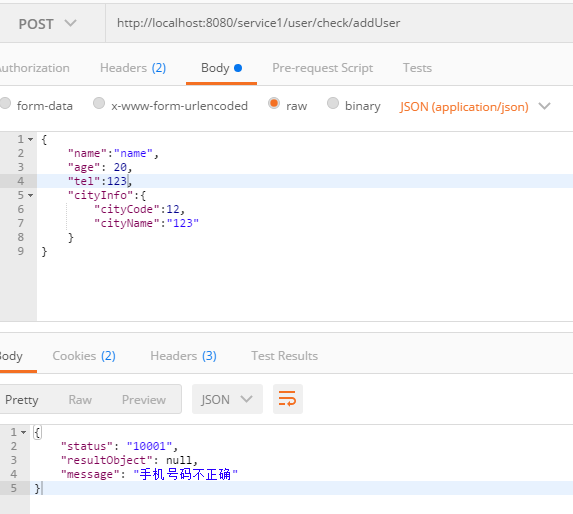
5.接口的操作日志注解
记录接口的操作日志注解
1)创建自定义注解
//记录接口的操作日志 @Target({
     METHOD}) @Retention(RetentionPolicy.RUNTIME) @Inherited @Documented public @interface OperationLog {
      String value() default""; OperationTypeEnum operationTypeEnum() default OperationTypeEnum.OTHER; }
2)通过AOP切面实现注解功能
@Aspect @Component public class LogAspect {
      @Autowired private ISysLogInfoService sysLogInfoService; //定义切点 @Pointcut //在注解的位置切入代码 @Pointcut("@annotation(OperationLog)") public void logPointCut() {
      } //切面 配置通知 @AfterReturning("logPointCut()") public void saveSysLog(JoinPoint joinPoint) {
      //保存日志 SysLogInfo sysLog = new SysLogInfo(); MethodSignature signature = (MethodSignature) joinPoint.getSignature(); //获取切入点所在的方法 Method method = signature.getMethod(); //获取操作 Operation operation = method.getAnnotation(Operation.class); if (operation != null) {
      String value = operation.value(); //获取请求的类名 String className = joinPoint.getTarget().getClass().getName(); //获取请求的方法名 String methodName = method.getName(); String methodStr = (className + "." + methodName); // 构造参数组集合 JSONObject allParams = new JSONObject(); for (Object arg : joinPoint.getArgs()) {
      if (arg instanceof JSONObject) {
      allParams.putAll((JSONObject) arg); } } //获取用户ip地址 HttpServletRequest request = ((ServletRequestAttributes) RequestContextHolder.getRequestAttributes()).getRequest(); String url = request.getRequestURI(); String ip = IpAddressUtils.getIpAdrress(request); String params = ""; //请求参数 if (!allParams.isEmpty()) {
      params = allParams.toJSONString(); } if(params.length()> 1000){
      params = params.substring(0,997).concat("..."); } sysLog.setLogDesc(value); sysLog.setBizId(bizId); sysLog.setOpIp(ip); sysLog.setBizParam(params); sysLog.setOpMethod(methodStr); //获取登录用户信息 AuthUser user = AuthUserUtils.getCurrentUser(); sysLog.setBizType(operation.operationTypeEnum().getCode()); sysLog.setOpUser(user.getName()); sysLog.setOpUserNo(user.getEmpNo()); sysLog.setOpTime(new Date()); //保存日志 sysLogInfoService.insertSelective(sysLog); } } }
3)把注解加在接口方法上
把注解加在接口的方法上就可以保存进入这个接口请求IP、类型、方法名、入参、用户信息
6.缓存注解
spring里面有一个@Cacheable注解,使用这个注解的方法,如果key在缓存中已有,则不再进入方法,直接从缓存获取数据,缓存没有值则进入并且把值放到缓存里面,我们写一个类似的,简单的注解
备注:使用了这个注解,如果数据有修改,记得清除缓存
1)创建自定义注解
@Target({
     ElementType.METHOD}) @Retention(RetentionPolicy.RUNTIME) public @interface CustomCache {
      //缓存前缀 String prefix() default ""; //缓存key String key() default ""; }
2)然后再创建一个AOP切面类来实现这个注解
@Aspect @Component public class CustomCacheAspect {
      private static HashMap<String,Object> cacheMap = new HashMap<>(); @Pointcut("@annotation(CustomCache)") public void cache() {
      } @Around("cache()") public Object printLog(ProceedingJoinPoint joinPoint){
      MethodSignature signature = (MethodSignature) joinPoint.getSignature(); //获取切入点所在的方法 Method method = signature.getMethod(); //获取操作 CustomCache customCache = method.getAnnotation(CustomCache.class); String prefix = customCache.prefix(); if(prefix == null || prefix.equals("")){
      //如果前缀为空,默认使用类型+方法名作为缓存的前缀 //获取请求的类名 String className = joinPoint.getTarget().getClass().getName(); //获取请求的方法名 String methodName = method.getName(); prefix = className+"-"+methodName; } String key = customCache.key(); if(key == null || key.equals("")){
      //获取接口的参数 Object[] o = joinPoint.getArgs(); //如果key为空,默认使用参数名称为id的值作为id String[] parameterNames = ((CodeSignature) joinPoint.getSignature()).getParameterNames(); for(int i=0;i<parameterNames.length;i++){
      String paramName = parameterNames[i]; if(paramName.equals("id")){
      key = o[i].toString(); } } } String cacheKey = prefix+key; Object result = cacheMap.get(cacheKey); if(result != null){
      //缓存不为空,直接返回缓存结果 return result; } try {
      result = joinPoint.proceed(); } catch (Throwable throwable) {
      throwable.printStackTrace(); } cacheMap.put(cacheKey,result); return result; } }
3)把注解加在查询用户信息的Service上
 @Override @CustomCache() public User findUser(Integer id) {
      return baseMapper.selectById(id); }
测试可以看到只有首次才会进入这个方法查询用户信息,查询出用户信息后再调用这个方法只是从缓存中获取
7.防刷新注解
有一些场景,例如申请提交之后几秒内需要防止用户重复提交,我们后端通过注解实现这一功能
1)创建自定义注解
@Target(ElementType.METHOD) @Retention(RetentionPolicy.RUNTIME) public @interface AvoidRepeatSubmit {
      / * 指定时间内不可重复提交,单位:s * * @return */ long timeout() default 3; }
2)再创建一个AOP切面类来实现这个注解
@Aspect @Component @Slf4j public class AvoidRepeatSubmitAspect {
      @Autowired private RedisRepository redisRepository; @Before("@annotation(cn.com.bluemoon.admin.web.common.aspect.AvoidRepeatSubmit)") public void repeatSumbitIntercept(JoinPoint joinPoint) {
      // ip + 类名 + 方法 + timeout HttpServletRequest request = ((ServletRequestAttributes) RequestContextHolder.getRequestAttributes()).getRequest(); String ip = IpAddressUtils.getIpAdrress(request); String className = joinPoint.getTarget().getClass().getName(); MethodSignature signature = (MethodSignature) joinPoint.getSignature(); Method method = signature.getMethod(); String methodName = method.getName(); // 获取配置的过期时间 AvoidRepeatSubmit annotation = method.getAnnotation(AvoidRepeatSubmit.class); long timeout = annotation.timeout(); StringBuilder builder = new StringBuilder(); builder.append(ip).append(",").append(className).append(",").append(methodName).append(",").append(timeout).append("s"); String key = builder.toString(); log.info(" --- >> 防重提交:key -- {}", key); // 判断是否已经超过重复提交的限制时间 String value = redisRepository.get(key); if (StringUtils.isNotBlank(value)) {
      String messge = MessageFormat.format("请勿在{0}s内重复提交", timeout); throw new WebException(messge); } this.redisRepository.setExpire(key, key, timeout); } }
8.动态切换数据源注解
原理:Spring提供了AbstractRoutingDataSource用于动态路由数据源,继承AbstractRoutingDataSource类并覆写其protected abstract Object determineCurrentLookupKey()即可
完整描述查看:springboot动态多数据源配置和使用(二)
1)创建自定义注解
/ * 自定义的多数据源注解 * */ @Target({
     ElementType.METHOD, ElementType.TYPE}) @Retention(RetentionPolicy.RUNTIME) @Documented @Inherited public @interface DataSource {
      String value() default ""; }
2)再创建一个AOP切面类来实现这个注解
下面的代码很简单,可以看出,这个切面类先判断注解是在方法上还是类上,如果方法上有注解优先使用方法上的,获取注解的value属性的值,把这个值作为数据源的key。通过 DynamicContextHolder.push(value)来设置数据源的key(这里改变后, determineCurrentLookupKey()重写的方法返回的key也就改变了,从而切换了数据源)
/ * 多数据源,切面处理类 * */ @Aspect @Component @Order(Ordered.HIGHEST_PRECEDENCE) public class DataSourceAspect {
      protected Logger logger = LoggerFactory.getLogger(getClass()); @Pointcut("@annotation(io.renren.datasource.annotation.DataSource) " + "|| @within(io.renren.datasource.annotation.DataSource)") public void dataSourcePointCut() {
      } @Around("dataSourcePointCut()") public Object around(ProceedingJoinPoint point) throws Throwable {
      MethodSignature signature = (MethodSignature) point.getSignature(); Class targetClass = point.getTarget().getClass(); Method method = signature.getMethod(); DataSource targetDataSource = (DataSource)targetClass.getAnnotation(DataSource.class); DataSource methodDataSource = method.getAnnotation(DataSource.class); if(targetDataSource != null || methodDataSource != null){
      String value; if(methodDataSource != null){
      value = methodDataSource.value(); }else {
      value = targetDataSource.value(); } DynamicContextHolder.push(value); logger.debug("set datasource is {}", value); } try {
      return point.proceed(); } finally {
      DynamicContextHolder.poll(); logger.debug("clean datasource"); } } }
3)把这个注解加在需要使用多数据源的service方法或类上
从下面的三个方法逐个调用测试,可以看到操作了三个不同的数据源的数据
@Service //@DataSource("slave1") public class DynamicDataSourceTestService {
      @Autowired private SysUserDao sysUserDao; @Transactional public void updateUser(Long id){
      SysUserEntity user = new SysUserEntity(); user.setUserId(id); user.setMobile(""); sysUserDao.updateById(user); } @Transactional @DataSource("slave1") public void updateUserBySlave1(Long id){
      SysUserEntity user = new SysUserEntity(); user.setUserId(id); user.setMobile(""); sysUserDao.updateById(user); } @DataSource("slave2") @Transactional public void updateUserBySlave2(Long id){
      SysUserEntity user = new SysUserEntity(); user.setUserId(id); user.setMobile(""); sysUserDao.updateById(user); } }
参考文章
大白快跑8的《Java实现自定义注解》https://blog.csdn.net/zt/article/details/
发布者:全栈程序员-站长,转载请注明出处:https://javaforall.net/212514.html原文链接:https://javaforall.net



