
极光推送官方提供的Cordova插件目前无法适配Capacitor电容器平台进行开发,之前问了官方什么时候会考虑适配,官方的回答是暂不做开发安排,需要调研,这对于想使用Capacitor进行开发的同学来说不太友好,Google了一番,发现有一个GitHub已经对此做了适配,于是Fork了一份整理了下,附上使用文档。原GitHub传送门:https://github.com/netsesame2/cordova-plugin-jpush
Capacitor 使用 npm 安装:
npm i cordova-plugin-jpush-capacitor capacitor同步插件至Android/iOS项目(前提是已经通过命令添加了IOS/Android平台):
ionic cap sync IOS 设置APPKEY:
ionic cap add ios ionic cap sync Android设置APPKEY:
ionic cap add android ionic cap sync import {
isPlatform } from '@ionic/vue'; class Jpush {
jpush: any; constructor() {
if (window.JPush) {
this.jpush = window.JPush; this.jpush.setDebugMode(true); if (isPlatform('ios')) {
this.jpush.startJPushSDK(); } this.jpush.init(); } } getRegistrationID() {
return new Promise(resolve => {
this.jpush.getRegistrationID(function (rId: string) {
resolve(rId); console.log("JPushPlugin:registrationID is " + rId); }) }) } // 设置别名 setAlias(alias: string) {
return new Promise(((resolve, reject) => {
this.jpush.setAlias({
alias, sequence: new Date().valueOf(), }, (res: {
alias: string, sequence: number }) => {
console.log('别名设置成功: ', res); resolve(res); }, (err: {
code: number, sequence: number }) => {
console.log('别名设置失败: ', err); setTimeout(() => this.setAlias(alias), 3000); reject(err); }) })) } // 设置角标 只限IOS setBadge(badge: number) {
if (isPlatform('ios')) {
this.jpush.setBadge(badge); } } } export default Jpush App.vue中使用:
<template> <ion-app> <ion-router-outlet />
     ion-app>
      template> <script lang="ts"> import {
       Plugins } from "@capacitor/core"; import {
       defineComponent, onMounted } from 'vue'; import {
       IonApp, IonRouterOutlet } from '@ionic/vue'; import jpush from "@/utils/jpush"; const {
       SplashScreen } = Plugins; export default defineComponent({
       name: 'App', components: {
       IonApp, IonRouterOutlet }, setup() {
       onMounted(() => {
       // 由于是cordova插件,需要在deviceready回调后才能使用,用过Cordova的都懂 document.addEventListener('deviceready', () => {
       new jpush().setAlias('app'); }) setTimeout(() => SplashScreen.hide(), 2000); }) } });
       script>
由于Capacitor生成的IOS平台自动加入了推送,会导致极光插件获取的DeviceToken无法回传至极光服务器,所以,还需对IOS进行修改:
- 添加IOS平台
ionic cap add ios ionic cap sync - 用Xcode打开项目
ionic cap open ios func application(application: UIApplication, didRegisterForRemoteNotificationsWithDeviceToken deviceToken: NSData) {
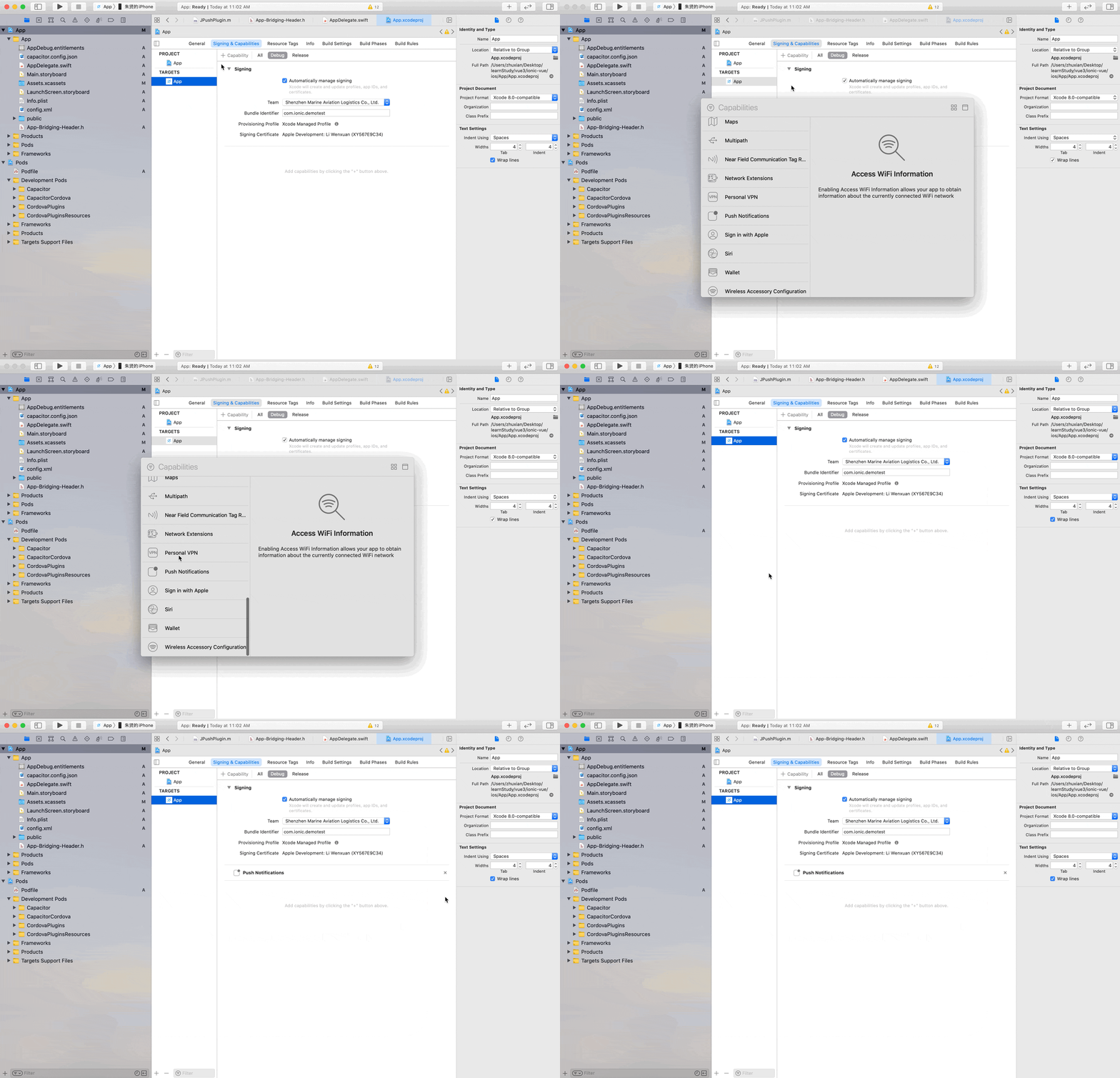
NSNotificationCenter.defaultCenter().postNotificationName("DidRegisterRemoteNotification", object: deviceToken) JPUSHService.registerDeviceToken(deviceToken) } 另外,在Target中需要加入推送通知权限:

官方Cordova插件ISSUE:https://github.com/jpush/jpush-phonegap-plugin/issues/434
版权声明:本文内容由互联网用户自发贡献,该文观点仅代表作者本人。本站仅提供信息存储空间服务,不拥有所有权,不承担相关法律责任。如发现本站有涉嫌侵权/违法违规的内容, 请联系我们举报,一经查实,本站将立刻删除。
发布者:全栈程序员-站长,转载请注明出处:https://javaforall.net/212582.html原文链接:https://javaforall.net


![网络端口的作用及分类[通俗易懂]](https://javaforall.net/wp-content/uploads/2020/11/2020110817443450-480x300.jpg)
