
CentOS7使用nmtui和nmcli配置网络
CentOS7配置网络推荐使用NetworkManager服务(不推荐network服务)。
图形化方式:nmtui或Applications->System Tools->Settings->Network
命令方式:nmcli
nmtui要求安装了NetworkManager-tui包
nmcli要求安装了NetworkManager包
注:nmtui与nmcli均是通过NetworkManager实现对网络进行配置
1. nmtui图形化方式
nmtui->
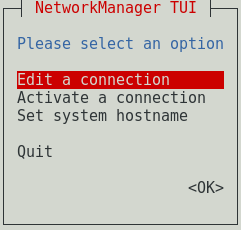

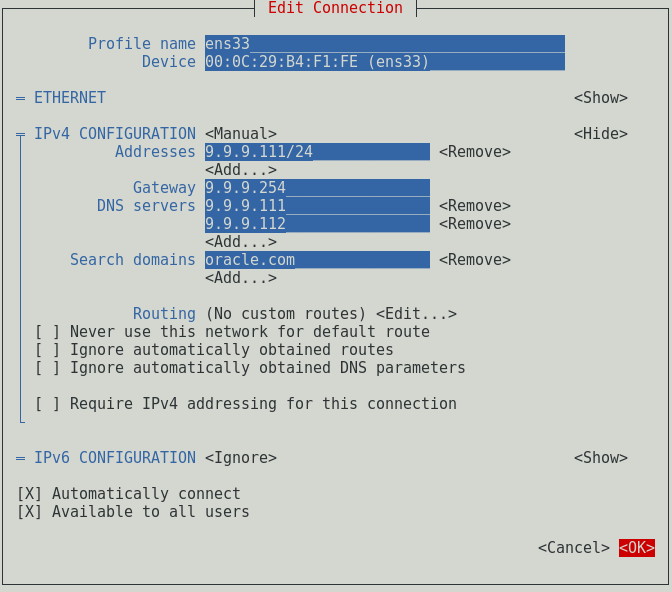
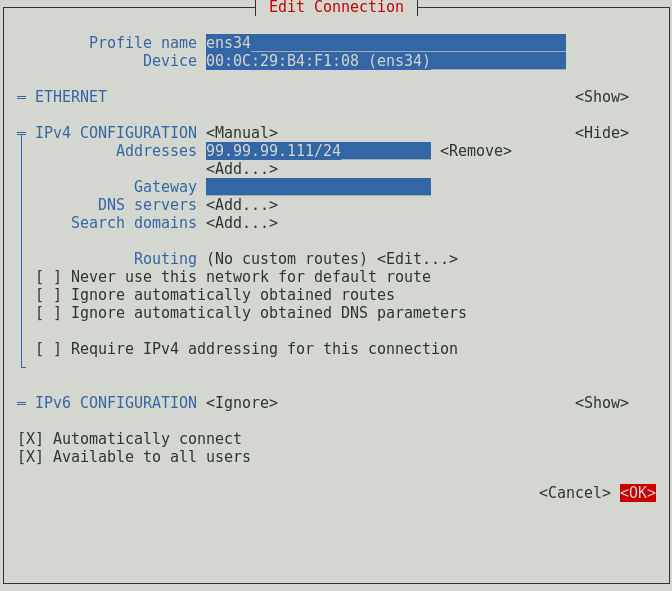


[ ] Require IPv4 addressing for this connect->默认不勾选->IPv4寻址方式
[X] Automatically connect->默认->自动连接->ONBOOT=yes
[X] Available to all users->默认->所有用户均可使用
IPv4 CONFIGURATION Manual->静态配置->BOOTPROTO=none
Profile name ens33->NAME=ens33
cat /etc/sysconfig/network-scripts/ifcfg-ens33
HWADDR=00:0C:29:B4:F1:FE
TYPE=Ethernet
PROXY_METHOD=none
BROWSER_ONLY=no
BOOTPROTO=none
IPADDR=9.9.9.111
PREFIX=24
GATEWAY=9.9.9.254
DNS1=9.9.9.111
DNS2=9.9.9.112
DOMAIN=oracle.com
DEFROUTE=yes
IPV4_FAILURE_FATAL=no
IPV6INIT=no
NAME=ens33
UUID=e-b421-4299-9ace-b1509e
ONBOOT=yes
cat /etc/sysconfig/network-scripts/ifcfg-ens34
HWADDR=00:0C:29:B4:F1:08
TYPE=Ethernet
PROXY_METHOD=none
BROWSER_ONLY=no
BOOTPROTO=none
IPADDR=99.99.99.111
PREFIX=24
DEFROUTE=yes
IPV4_FAILURE_FATAL=no
IPV6INIT=no
NAME=ens34
UUID=53f2aa6a-cb9c-4ff9-812b-be2ef549bced
ONBOOT=yes
cat /etc/resolv.conf
# Generated by NetworkManager
search oracle.com
nameserver 9.9.9.111
nameserver 9.9.9.112
cat /etc/hostname
rac111
2. Applications->System Tools->Settings->Network图形化
Applications->System Tools->Settings->Network

3. nmcli命令方式
nmcli命令方式非常适合用于批处理脚本
主机名配置
hostnamectl set-hostname rac111 ->/etc/hostname
网卡配置
nmcli connection add type ethernet ifname ens33 con-name ens33 ipv4.method manual ipv4.addresses 9.9.9.111/24 ipv4.gateway 9.9.9.254 ipv4.dns 9.9.9.111,9.9.9.112 ipv4.dns-search oracle.com ipv6.method ignore
nmcli connection add type ethernet ifname ens34 con-name ens34 ipv4.method manual ipv4.addresses 99.99.99.111/24 ipv6.method ignore
#nmcli connection add type ethernet ifname ens33 con-name ens33 autoconnect yes save yes ipv4.method manual ipv4.addresses 9.9.9.111/24 ipv4.gateway 9.9.9.254 ipv4.dns 9.9.9.111,9.9.9.112 ipv4.dns-search oracle.com ipv6.method ignore
#nmcli connection add type ethernet ifname ens34 con-name ens34 autoconnect yes save yes ipv4.method manual ipv4.addresses 99.99.99.111/24 ipv6.method ignore
autoconnect yes->默认->[X] Automatically connect
save yes->默认->/etc/sysconfig/network-scripts/ifcfg-ens33->ifcfg-ens33可以改名(NAME=ens33)
[X] Available to all users->默认->没找到相关设置值
确认有哪些设置值
nmcli con edit
->
Enter connection type: ethernet
->
help
->
nmcli connection up ens33
nmcli connection down ens33
nmcli connection delete ens33
nmcli connection show
nmcli device show
nmcli device status
ifconfig
ip address->ip a
CentOS6不勾选“Available to all users”,无/etc/sysconfig/network-scripts/ifcfg-Wired_connection_1配置文件(CentOS7仍会生成对应配置文件,只与save yes有关,默认就是yes)

希望与广大网友互动??
点此进行留言吧!
发布者:全栈程序员-站长,转载请注明出处:https://javaforall.net/215421.html原文链接:https://javaforall.net



