
本文的主要参考为官方文档OpenCV249-fitLine和博客-OpenCV 学习(直线拟合)
以及《Learning OpenCV 3》page425-426
OpenCV中提供的直线拟合API如下:
void fitLine(InputArray points, OutputArray line, int distType, double param, double reps, double aeps)输入:二维点集。存储在std::vector<> or Mat
算法:OpenCV中共提供了6种直线拟合的算法,如下图所示,其中第一种就是最常用的最小二乘法。但是最小二乘法受噪声的影响很大,别的方法具有一定的抗干扰性,但是具体的数学原理不是很理解。
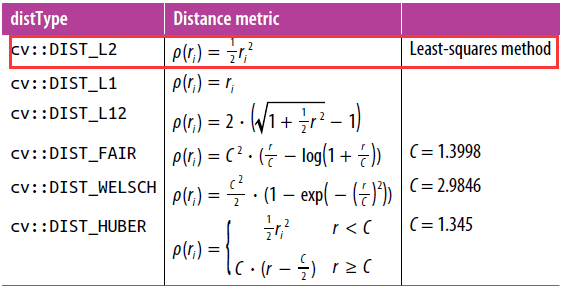

输出:拟合结果为一个四元素的容器,比如Vec4f – (vx, vy, x0, y0)。其中(vx, vy) 是直线的方向向量,(x0, y0) 是直线上的一个点。
示例代码如下:
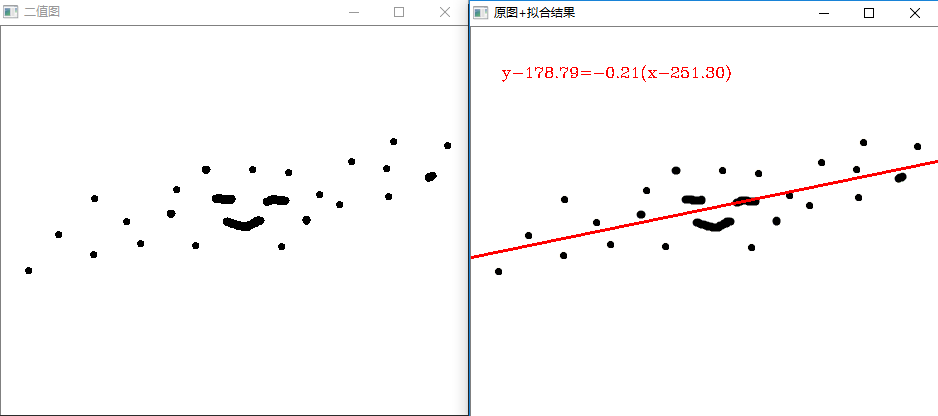
#include "opencv2/imgproc/imgproc.hpp" #include "opencv2/highgui/highgui.hpp" #include

    using namespace cv; using namespace std; int main( ) { const char* filename = "1.bmp"; Mat src_image = imread(filename,1); if( src_image.empty() ) { cout << "Couldn't open image!" << filename; return 0; } int img_width = src_image.cols; int img_height = src_image.rows; Mat gray_image,bool_image; cvtColor(src_image,gray_image,CV_RGB2GRAY); threshold(gray_image,bool_image,0,255,CV_THRESH_OTSU); imshow("二值图", bool_image); //获取二维点集 vector

     point_set; Point point_temp; for( int i = 0; i < img_height; ++i) { for( int j = 0; j < img_width; ++j ) { if (bool_image.at

      (i,j) < 255) { point_temp.x = j; point_temp.y = i; point_set.push_back(point_temp); } } } //直线拟合 //拟合结果为一个四元素的容器,比如Vec4f - (vx, vy, x0, y0) //其中(vx, vy) 是直线的方向向量 //(x0, y0) 是直线上的一个点 Vec4f fitline; //拟合方法采用最小二乘法 fitLine(point_set,fitline,CV_DIST_L2,0,0.01,0.01); //求出直线上的两个点 double k_line = fitline[1]/fitline[0]; Point p1(0,k_line*(0 - fitline[2]) + fitline[3]); Point p2(img_width - 1,k_line*(img_width - 1 - fitline[2]) + fitline[3]); //显示拟合出的直线方程 char text_equation[1024]; sprintf(text_equation,"y-%.2f=%.2f(x-%.2f)",fitline[3],k_line,fitline[2]); putText(src_image,text_equation,Point(30,50),CV_FONT_HERSHEY_COMPLEX,0.5,Scalar(0,0,255),1,8); //显示拟合出的直线 line(src_image,p1,p2,Scalar(0,0,255),2); imshow("原图+拟合结果", src_image); waitKey(); return 0; }
版权声明:本文内容由互联网用户自发贡献,该文观点仅代表作者本人。本站仅提供信息存储空间服务,不拥有所有权,不承担相关法律责任。如发现本站有涉嫌侵权/违法违规的内容, 请联系我们举报,一经查实,本站将立刻删除。
发布者:全栈程序员-站长,转载请注明出处:https://javaforall.net/220180.html原文链接:https://javaforall.net




