
最近在学习webpack打包原理及过程,在配置出口output时遇到了个难题,就是publicPath配置项,一直没搞明白他有什么作用,官网上就解释它是用来按需加载或者加载外部资源时要用到,当我们打包的时候webpack会在静态文件路径前面添加publicPath的值,当我们把资源放到CDN上的时候,把publicPath的值设为CDN的值就可以了,对于我这种小白来说肯迪是一脸懵逼,所以还是决定自己去一探究竟。
首先我想要说一下publicPath的作用是分环境的,在开发环境中,也就是启动webpack-dev-server时,webpack会将打包好的静态文件放在publicPath中,如果需要访问其中的资源直接加上pubilcPath路径就行,而在生产环境中,当时用webpack进行打包时,webpack会在静态文件前面加上publicPath的值,在这里你可能有个疑问,webpack-dev-server不是启动服务器吗,怎么会进行打包呢?????,实际上是会的,只是我们看不到,他会实时监听你的代码,只要你的代码一变动,他就会打包,同时在默认情况下会将打包后的文件放入更目录下,如果你加上publicPath他就会帮你打包到指定的路径下。下面我们分两种情况来验证一下一个是手动创建的index.html,一个是webpack打包生成的index.html,通过这两种情况我们来分析下publicPath的作用。
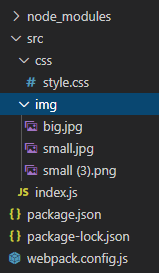
首先我们自己搭建一个项目。
 "scripts": {
    "build": "webpack", "dev": "webpack-dev-server" },
我的webpack.config.js文件
const path = require('path'); // const webpack = require('webpack'); // const htmlWebpackPlugin = require('html-webpack-plugin'); module.exports = {
    entry: path.join(__dirname, 'src/index.js'), output: {
    path: path.join(__dirname, 'dist'), filename:'bundle.js' // publicPath:'/dist/images/' }, mode:'development', devtool:'cheap-module-eval-source-map', module: {
    rules:[ {
    test: /\.css$/, use: ['style-loader', 'css-loader'] }, {
    test: /\.(png|jpg)$/, loader: 'url-loader', options: {
    limit: 5000, name: '[name].[hash:8].[ext]', outputPath:'images/' } } ] }, plugins: [ // new htmlWebpackPlugin()  ] }
style.css如下
.small {
    width: 200px; height: 200px; background: url(../img/small.jpg) no-repeat; } .big {
    width: 500px; height: 350px; background: url(../img/big.jpg) no-repeat; }
index.js 如下
import './css/style.css'; import img from './img/big.jpg'; var img1 = document.createElement('img'); img1.src = img; document.body.appendChild(img1); 自己创建的index.html
<!DOCTYPE html> <html> <head> <meta charset="UTF-8"> </head> <body> <div class="small"></div> <div class="big"></div> <script src="./bundle.js"></script> </body> </html> 我们看到可以正确显示,现在我们执行npm run build进行打包,打包完成之后我们直接用浏览器打开我们手动创建的index.html文件,同时我们将index.html中img的src改成./dist/bundle.js因为我们打包后的文件会在根目录下的dist目录中,浏览器打开我们的indedx.html后我们发现没有图片显示,我们来看下控制台

我们可以看到图片的地址是images/…可是我们更目录下更本没有images文件夹,所以我们当然找不到,这时我们的publicPath登场了,我们在webpack.config.js中将output改为
 output: {
    path: path.join(__dirname, 'dist'), filename:'bundle.js', publicPath:'./dist/' },
下面我们看看自动生成的index.html有什么区别,删掉index.html,通过npm安装html-webpack-plugin,webpack.config.js 修改如下
const path = require('path'); const webpack = require('webpack'); const htmlWebpackPlugin = require('html-webpack-plugin'); module.exports = {
    entry: path.join(__dirname, 'src/index.js'), output: {
    path: path.join(__dirname, 'dist'), filename:'bundle.js', publicPath:'/dist/' }, mode:'development', devtool:'cheap-module-eval-source-map', module: {
    rules:[ {
    test: /\.css$/, use: ['style-loader', 'css-loader'] }, {
    test: /\.(png|jpg)$/, loader: 'url-loader', options: {
    limit: 5000, name: '[name].[hash:8].[ext]', outputPath:'images/' } } ] }, plugins: [ new htmlWebpackPlugin() ] }
版权声明:本文内容由互联网用户自发贡献,该文观点仅代表作者本人。本站仅提供信息存储空间服务,不拥有所有权,不承担相关法律责任。如发现本站有涉嫌侵权/违法违规的内容, 请联系我们举报,一经查实,本站将立刻删除。
发布者:全栈程序员-站长,转载请注明出处:https://javaforall.net/220788.html原文链接:https://javaforall.net



