
一些关于定位和叠加的理解
一、position属性
position有5个值,分别为static,relative,absolute,fixed,sticky。
1.1 static
static是position的默认属性,元素会按正常的文档流进行排序,不会受到top,bottom,left,right的影响。
1.2 relative
relative相对定位的元素会较正常文档流中的位置进行偏移,受top,bottom,left,right的影响。就是元素还在文档流中像static一样占着位置,但视觉上会有偏移,多用于absolute绝对定位的父元素。
1.3 absolute
absolute绝对定位会脱离正常的文档流,相对于最近的进行过定位的(非static)父级元素定位,若没有父级元素进行过定位,则相对于即浏览器窗口定位。
1.4 fixed
1.5 sticky
 <html lang="en"> <head> <meta charset="UTF-8"> <title>Title
     title>
      head> <body> <div class="box"> <div>title
       div> <div class="stickyBar">stickyBar
        div> <p>this is a paragraph!this is a paragraph!this is a paragraph!this is a paragraph!this is a paragraph!this is a paragraph!this is a paragraph!this is a paragraph!this is a paragraph!this is a paragraph!this is a paragraph!this is a paragraph!this is a paragraph!this is a paragraph!
         p>
          div>
           body>
            html> <style> div.box{
             height: 2000px; } div.stickyBar {
             position: -webkit-sticky; position: sticky; top: 0; padding: 5px; background-color: #cae8ca; border: 2px solid #4CAF50; width: 200px; } div p {
             width: 200px; }
             style>
二、元素叠加时的几种状态
2.1
 <html lang="en"> <head> <meta charset="UTF-8"> <title>Title
     title>
      head> <body> <div class="one"> <p>divOne
       p> <p>position: absolute;
        p>
         div> <div class="two"> <p>divTwo
          p> <p>position: absolute;
           p>
            div>
             body>
              html> <style> p {
               margin: 0; } div {
               width: 200px; height: 200px; border: 1px solid black; } .one {
               position: absolute; background-color: red; top: 10px; left: 10px; } .two {
               position: absolute; background-color: blue; top: 100px; left: 100px; }
style> 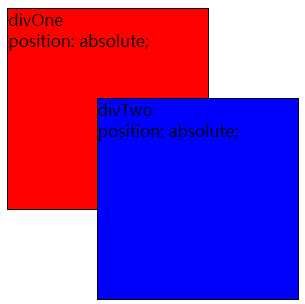

2.2
同一级别的元素使用了relative,absolute,fixed,sticky,那么z-index值大的元素在上面。
 <html lang="en"> <head> <meta charset="UTF-8"> <title>Title
     title>
      head> <body> <div class="one"> <p>divOne
       p> <p>position: relative;
        p>
         div> <div class="two"> <p>divTwo
          p> <p>position: absolute;
           p>
            div>
             body>
              html> <style> p {
               margin: 0; } div {
               width: 200px; height: 200px; border: 1px solid black; } .one {
               position: relative; background-color: red; top: 10px; left: 10px; z-index: 99; } .two {
               position: absolute; background-color: blue; top: 50px; left: 100px; z-index: 1; }
style> 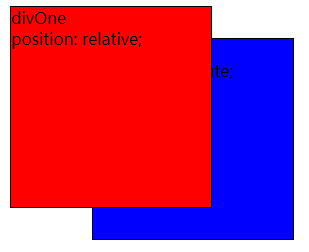
2.3
同级别的元素,relative,absolute,fixed,sticky定位会在static上面。
 <html lang="en"> <head> <meta charset="UTF-8"> <title>Title
     title>
      head> <body> <div class="one"> <p>absolute
       p>
        div> <div class="two"> <p>static
         p>
          div>
           body>
            html> <style> p {
             margin: 0; } div {
             width: 200px; height: 200px; border: 1px solid black; box-sizing: border-box; } .one {
             position: absolute; background-color: red; top: 0; left: 0; } .two {
             position: static; background-color: blue; margin: 100px 0 0 100px; padding-top: 100px; }
style> 
2.4
example1
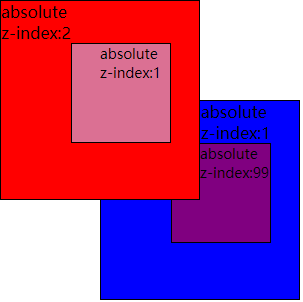
 <html lang="en"> <head> <meta charset="UTF-8"> <title>Title
     title>
      head> <body> <div class="one"> <p>absolute
       p> <p>z-index:2
        p> <div class="child"> <p style="padding-left: 28px">absolute
         p> <p style="padding-left: 28px">z-index:1
          p>
           div>
            div> <div class="two"> <p style="padding-left: 100px">absolute
             p> <p style="padding-left: 100px">z-index:1
              p> <div class="child"> <p style="padding-left: 28px">absolute
               p> <p style="padding-left: 28px">z-index:99
                p>
                 div>
                  div>
                   body>
                    html> <style> p {
                     margin: 0; } div {
                     width: 200px; height: 200px; border: 1px solid black; box-sizing: border-box; } div .child {
                     width: 100px; height: 100px; margin: 0 0 0 70px; position: relative; font-size: 14px; } .one {
                     position: absolute; background-color: red; top: 0; left: 0; z-index: 2; } .one .child {
                     background-color: palevioletred; z-index: 1; } .two {
                     position: absolute; background-color: blue; top: 100px; left: 100px; z-index: 1; } .two .child {
                     background-color: purple; z-index: 99; }
                     style>
example2
 <html lang="en"> <head> <meta charset="UTF-8"> <title>Title
     title>
      head> <body> <div class="one"> <p>static
       p> <div class="child"> <p style="padding-left: 28px">relative
        p> <p style="padding-left: 28px">z-index:1
         p>
          div>
           div> <div class="two"> <p style="padding-left: 100px">static
            p> <div class="child"> <p style="padding-left: 28px">static
             p>
              div>
               div>
                body>
                 html> <style> p {
                  margin: 0; } div {
                  width: 200px; height: 200px; border: 1px solid black; box-sizing: border-box; } div .child {
                  width: 100px; height: 100px; margin: 0 0 0 70px; font-size: 14px; } .one {
                  position: static; background-color: red; } .one .child {
                  position: relative; background-color: palevioletred; z-index: 1; } .two {
                  position: static; background-color: blue; margin: -150px 0 0 75px; } .two .child {
                  position: static; background-color: purple; }
                  style>
example3
2.5
最后再来看一种被transform影响到的情况。
父级红色未加transform

父级红色加了transform

 <html lang="en"> <head> <meta charset="UTF-8"> <title>Title
     title>
      head> <body> <div class="one"> <div class="oneChild">
       div>
        div> <div class="two">
         div>
          body>
           html> <style> p {
            margin: 0; } div {
            width: 200px; height: 200px; border: 1px solid black; } .one {
            position: static; background-color: red; /*transform: translate(1px,1px);*/ } .oneChild {
            width: 100px; height: 100px; background-color: pink; margin: 50px 0 0 50px; position: relative; z-index: 2; } .two {
            position: absolute; background-color: blue; top: 100px; left: 100px; z-index: 1; }
            style>
版权声明:本文内容由互联网用户自发贡献,该文观点仅代表作者本人。本站仅提供信息存储空间服务,不拥有所有权,不承担相关法律责任。如发现本站有涉嫌侵权/违法违规的内容, 请联系我们举报,一经查实,本站将立刻删除。
发布者:全栈程序员-站长,转载请注明出处:https://javaforall.net/221246.html原文链接:https://javaforall.net



