
准备工作
安装系统编译mptcp源码
#deb cdrom:[Ubuntu 12.10 _Quantal Quetzal_ - Release amd64 (.5)]/ quantal main restricted # See http://help.ubuntu.com/community/UpgradeNotes for how to upgrade to # newer versions of the distribution. deb http://old-releases.ubuntu.com/ubuntu/ quantal main restricted deb-src http://old-releases.ubuntu.com/ubuntu/ quantal main restricted Major bug fix updates produced after the final release of the distribution. deb http://old-releases.ubuntu.com/ubuntu/ quantal-updates main restricted deb-src http://old-releases.ubuntu.com/ubuntu/ quantal-updates main restricted N.B. software from this repository is ENTIRELY UNSUPPORTED by the Ubuntu team. Also, please note that software in universe WILL NOT receive any review or updates from the Ubuntu security team. deb http://old-releases.ubuntu.com/ubuntu/ quantal universe deb-src http://old-releases.ubuntu.com/ubuntu/ quantal universe deb http://old-releases.ubuntu.com/ubuntu/ quantal-updates universe deb-src http://old-releases.ubuntu.com/ubuntu/ quantal-updates universe N.B. software from this repository is ENTIRELY UNSUPPORTED by the Ubuntu team, and may not be under a free licence. Please satisfy yourself as to your rights to use the software. Also, please note that software in multiverse WILL NOT receive any review or updates from the Ubuntu security team. deb http://old-releases.ubuntu.com/ubuntu/ quantal multiverse deb-src http://old-releases.ubuntu.com/ubuntu/ quantal multiverse deb http://old-releases.ubuntu.com/ubuntu/ quantal-updates multiverse deb-src http://old-releases.ubuntu.com/ubuntu/ quantal-updates multiverse N.B. software from this repository may not have been tested as extensively as that contained in the main release, although it includes newer versions of some applications which may provide useful features. Also, please note that software in backports WILL NOT receive any review or updates from the Ubuntu security team. deb http://old-releases.ubuntu.com/ubuntu/ quantal-backports main restricted universe multiverse deb-src http://old-releases.ubuntu.com/ubuntu/ quantal-backports main restricted universe multiverse deb http://old-releases.ubuntu.com/ubuntu quantal-security main restricted deb-src http://old-releases.ubuntu.com/ubuntu quantal-security main restricted deb http://old-releases.ubuntu.com/ubuntu quantal-security universe deb-src http://old-releases.ubuntu.com/ubuntu quantal-security universe deb http://old-releases.ubuntu.com/ubuntu quantal-security multiverse deb-src http://old-releases.ubuntu.com/ubuntu quantal-security multiverse 
需要选择编译时,*表示直接编译到内核中,M表示以模块的方式编译,之后使用需要加载该模块才可以。这里注意几个配置的地方:
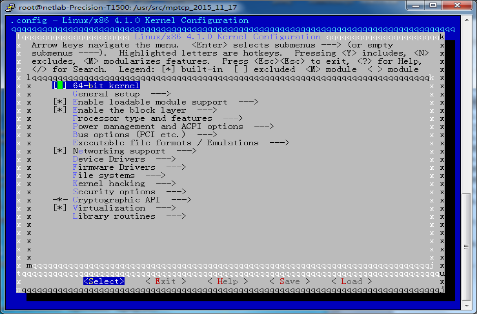
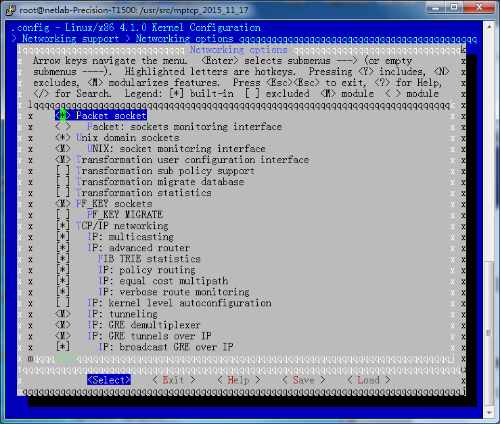
③ 这里的Networking support->Networking options->IP: advanced router->IP: policy routing 这个要开启。
④ 先选中MPTCP protocol 这样一些拥塞控制算法才会出现在TCP :advanced congestion control 里。
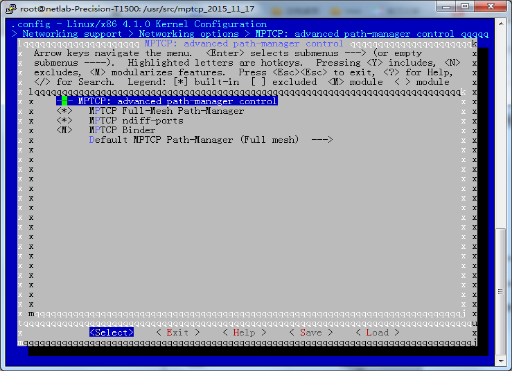
⑤ 选中MPTCP protocol后下面的MPTCP:advanced path-manager control 也要选中,进到里面,选中MPTCP Full-Mesh Path-Manager和MPTCP ndiff-ports。这里选择*。下面的Default MPTCP Path-Manager 选择Full mesh。
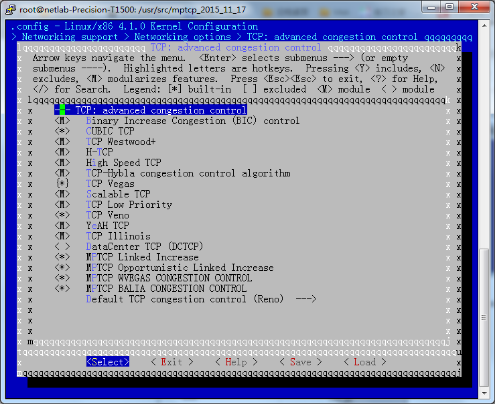
⑥ 之后退出到Networking support->Networking options,找到TCP :advanced congestion control ,进入到里面。这里是拥塞控制算法,需要哪些就选择哪些,是直接编译到内核,M是编译成模块,使用的时候要先加载模块。这里必要的用选择了CUBIC ,Vegas,Veno,LIA(MPTCP Link Increase),Olia (MPTCP Opportunistic Linked Increase),wVegas,Balia.这里也可以选择默认的算法。
⑦ 配置好拥塞控制算法后退出到Networking support->Networking options。这里需要注意IPv6部分,要么选择*直接编译到内核,要么不选择,不可以选择成M作为模块。
⑧ 保存配置,退出。
配置路由
路由的配置有两种方法,一种是使用自动配置脚本,一种是自己手动配置。这里需要注意的是Ubuntu 系统关于网卡的配置有两套方法,一个是通过配置文件/etc/network/interface来配置IP 和网关,一个是通过系统设置里有网络管理。这两个方法不能同时生效,当修改/etc/network/interface后,网络管理自动失效。在本次实验环境中经过测试,使用系统设置里的网络管理成功率较高,所以选择使用系统设置->网络管理,通过界面来设置网卡IP 和网关。还需要注意,这里的IP地址必须手动固定IP 信息,不可以DHCP自动分配。
因为本实验环境要求服务器端只有一个网卡,所以可以忽略下面的配置,下面的配置针对于有两个网卡情况的网络配置。
Eht0 : 192.168.1.45 网关:192.168.1.15
Eth1 :192.168.2.45 网关:192.168.2.15
将上面的信息配置通过系统设置->网络管理手动配置完成。接下来的路由表配置有两种方法。
# This creates two different routing tables, that we use based on the source-address. ip rule add from 192.168.1.45 table 1 ip rule add from 192.168.2.45 table 2 # Configure the two different routing tables ip route add 192.168.1.0/24 dev eth0 scope link table 1 ip route add default via 192.168.1.15 dev eth0 table 1 ip route add 192.168.2.0/24 dev eth1 scope link table 2 ip route add default via 1192.168.2.15 dev eth1 table 2 # default route for the selection process of normal internet-traffic ip route add default scope global nexthop via 192.168.1.15 dev eth0可以把这些规则写在/etc/rc.local 文件中,每次开机自动执行。
mptcp配置
编译自己的拥塞控制算法
配置apache服务器
发布者:全栈程序员-站长,转载请注明出处:https://javaforall.net/221624.html原文链接:https://javaforall.net



