
组件的挂载:
组件在首次创建后,进行第一次的渲染为挂载期。挂载期有的一些方法会被依次触发,列举如下:
- constructor(构造函数,初始化状态值)
- getInitialState(设置状态机)
- getDefaultProps(获取默认的props)
- UNSAFE_componentWillMount(首次渲染前执行)
- render(渲染组件)
- componentDidMount(render渲染之后执行的操作)
//组件挂载 import React from 'react'; import ReactDOM from 'react-dom'; class HelloWorld extends React.Component{
    constructor(props) {
    super(props); console.log("1,构造函数"); this.state={
   }; console.log("2,设置状态机"); } static defaultProps={
    name:"React", } UNSAFE_componentWillMount(nextProps, nextState, nextContext) {
    console.log("3,完成首次渲染前调用"); } render() {
    console.log("4,组件进行渲染"); return ( <div> <div>{
   this.props.name}</div> </div> ) } componentDidMount() {
console.log("5,componentDidMount render渲染后的操作") } } ReactDOM.render(<HelloWorld />, document.getElementById('root')); 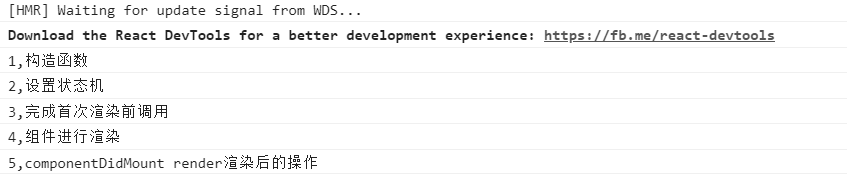

组件的更新:
组件更新,指的是在组件初次渲染后,进行了组件状态的改变。React在生命周期中的更新过程包括以下几个方法:
- UNSAFE_componentWillReceiveProps :当父组件更新子组件state时,该方法会被调用。
- shouldComponentUpdate : 该方法决定组件state或props的改变是否需要重新渲染组件。
- UNSAFE_componentWillUpdate : 在组件接受新的state或者props时,即将进行重新渲染前调用该方法,和UNSAFE_componentWillMount方法类似。
- componentDidUpdate : 在组件重新渲染后调用该方法,和componentDidMount方法类似。
//组件更新 class HelloWorldFather extends React.Component{
    constructor(props) {
    super(props); this.updateChildProps=this.updateChildProps.bind(this); this.state={
    //初始化父组件 name:"React" } } updateChildProps(){
    //更新父组件state this.setState({
    name:"Vue" }) } render() {
    return ( <div> <HelloWorld name={
   this.state.name} /> {
   /*父组件的state传递给子组件*/} <button onClick={
   this.updateChildProps}>更新子组件props</button> </div> ) } } class HelloWorld extends React.Component{
    constructor(props) {
    super(props); console.log("1,构造函数"); console.log("2,设置状态机") } UNSAFE_componentWillMount() {
    console.log("3,完成首次渲染前调用"); } UNSAFE_componentWillReceiveProps(nextProps, nextContext) {
    console.log("6,父组件更新子组件时调用该方法"); } shouldComponentUpdate(nextProps, nextState, nextContext) {
    console.log("7,决定组件props或者state的改变是否需要重新进行渲染"); return true; } UNSAFE_componentWillUpdate(nextProps, nextState, nextContext) {
    console.log("8,当接收到新的props或state时,调用该方法"); } render() {
    console.log("4,组件进行渲染"); return ( <div> <div>{
   this.props.name}</div> </div> ) } componentDidMount() {
    console.log("5,componentDidMount render后的操作"); } componentDidUpdate(prevProps, prevState, snapshot) {
console.log("9,组件被重新选然后调用该方法"); } } ReactDOM.render(<HelloWorldFather />,document.getElementById("root")); 
点击“更新子组件props”后:

组件的卸载:
生命周期的最后一个过程为组件卸载期,也称为组件销毁期。该过程主要涉及一个 方法,即componentWillUnmount,当组件从DOM树删除的时候调用该方法。
//组件卸载 class HelloWorldFather extends React.Component{
    constructor(props) {
    super(props); this.updateChildProps=this.updateChildProps.bind(this); this.state={
    //初始化父组件 name:"React" } } updateChildProps(){
    //更新父组件state this.setState({
    name:"Vue" }) } render() {
    return ( <div> <HelloWorld name={
   this.state.name} /> {
   /*父组件的state传递给子组件*/} <button onClick={
   this.updateChildProps}>更新子组件props</button> </div> ) } } class HelloWorld extends React.Component{
    constructor(props) {
    super(props); console.log("1,构造函数"); console.log("2,设置状态机") } UNSAFE_componentWillMount() {
    console.log("3,完成首次渲染前调用"); } UNSAFE_componentWillReceiveProps(nextProps, nextContext) {
    console.log("6,父组件更新子组件时调用该方法"); } shouldComponentUpdate(nextProps, nextState, nextContext) {
    console.log("7,决定组件props或者state的改变是否需要重新进行渲染"); return true; } UNSAFE_componentWillUpdate(nextProps, nextState, nextContext) {
    console.log("8,当接收到新的props或state时,调用该方法"); } delComponent(){
    //添加卸载方法 ReactDOM.unmountComponentAtNode(document.getElementById("root")); } render() {
    console.log("4,组件进行渲染"); return ( <div> <div>{
   this.props.name}</div> <button onClick={
   this.delComponent}>卸载组件</button> {
   /*声明卸载按钮*/} </div> ) } componentDidMount() {
    console.log("5,componentDidMount render后的操作"); } componentDidUpdate(prevProps, prevState, snapshot) {
    console.log("9,组件被重新选然后调用该方法"); } componentWillUnmount() {
//组件卸载后执行 console.log("10,组件已被卸载"); } } ReactDOM.render(<HelloWorldFather />,document.getElementById("root")); 
点击卸载按钮后:

总览组件生命周期:

版权声明:本文内容由互联网用户自发贡献,该文观点仅代表作者本人。本站仅提供信息存储空间服务,不拥有所有权,不承担相关法律责任。如发现本站有涉嫌侵权/违法违规的内容, 请联系我们举报,一经查实,本站将立刻删除。
发布者:全栈程序员-站长,转载请注明出处:https://javaforall.net/224115.html原文链接:https://javaforall.net




